WordPress powers over 42% of all websites on the internet, but did you know its true potential is unlocked when paired with custom PHP development?
While WordPress offers thousands of themes and plugins, businesses often need tailored solutions, whether it’s a unique feature, advanced integrations, or performance optimization. That’s where PHP development comes in, giving developers the flexibility to extend WordPress far beyond its out-of-the-box capabilities.
Imagine transforming your WordPress site into a fully customized digital experience, scalable, secure, and designed exactly for your business needs. With PHP, you can build custom plugins, optimize database queries, and create dynamic features that make your site stand out.
In this blog, we’ll explore how PHP development with WordPress enhances your website, the benefits it brings, core concepts and practical ways to leverage it for building powerful, future-ready websites.
TL;DR
- PHP development with WordPress is the process of using PHP to build, customize, and extend WordPress websites, enabling dynamic features, custom functionality, and seamless database interactions.
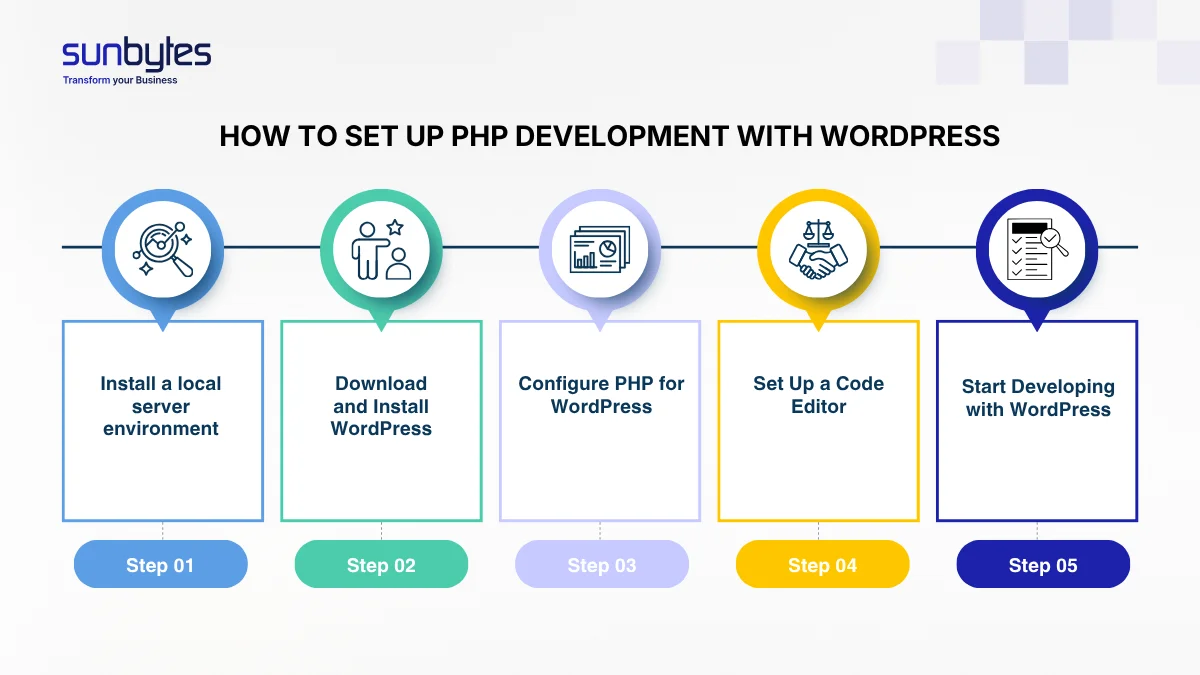
- The process of setting up PHP development with WordPress typically includes installing a local server environment, downloading & installing WordPress, configuring a code editor, enabling debugging, and developing themes and plugins.
What is PHP?
PHP is a programming language, more specifically, a server-side scripting language. This means it processes data on the server and generates dynamic content before sending it to the client’s browser.
Despite the rise of newer technologies, PHP has remained one of the most popular programming languages for many years. According to W3Techs, it powers 71.7% of all the websites whose server-side programming language we know, including WordPress, Facebook, and Wikipedia. This popularity is driven by several key advantages:
- High performance: PHP delivers strong performance for server-side web processing, making it suitable for dynamic websites and applications.
- Wide hosting support: It is supported by most shared hosting providers, making it an accessible and cost-effective option for small to mid-sized projects without requiring a fully custom infrastructure.
- Strong database integration: PHP offers robust support for interacting with databases like MySQL,PostgreSQL, Oracle, MongoDB, etc., enabling efficient data handling and storage.
- Large and mature ecosystem: Its ecosystem is extensive and well-established, offering a wide range of frameworks, libraries, and thorough documentation, all supported by a large global community.
- Ease of use: PHP has a relatively gentle learning curve, making it beginner-friendly while still powerful enough for advanced development.
- Flexibility: It supports multiple programming paradigms, including procedural, object-oriented, and functional programming, giving developers the freedom to choose the approach that best fits their project.
How PHP is used in WordPress
As one of the main techstack for WordPress websites, PHP powers almost every aspect of the platform, from the dashboard to the front-end display. Here’s an easy-to-understand breakdown:
- Core Functionality: PHP runs WordPress’s core code, controlling how content is displayed, how users interact with the site, and how different components (themes, plugins, widgets) work together.
- Themes and Templates: WordPress themes rely heavily on PHP to generate dynamic HTML. Template files like index.php, single.php, and page.php use PHP functions to pull content from the database and display it on the front end.
- Plugins and Custom Functionality: One of the biggest strengths of PHP development with WordPress is the ability to build custom plugins. Developers can extend functionality, modify content, integrate third-party services, and tailor site behavior
- Database Interaction: WordPress uses PHP to interact with its MySQL or MariaDB database. PHP functions retrieve, insert, update, and delete data, powering features like posts, comments, user accounts, and settings.
- Hooks and Filters: Through PHP development with WordPress, developers can leverage hooks (actions and filters) to safely customize functionality without modifying core files, making updates easier and more secure.
- Form Handling and Security: Security is a key benefit of PHP development with WordPress. PHP processes form submissions, validates user input, and sanitizes data to protect against vulnerabilities like XSS, CSRF, and SQL injection.
Core WordPress PHP Concepts
Understanding the fundamental concepts is essential for effective PHP development with WordPress, especially when building themes, plugins, or custom functionality. These concepts form the foundation of how WordPress retrieves, processes, and displays content, while also providing the tools needed to safely extend and customize its behavior.
Template Hierarchy & Template Tags
The template hierarchy determines which PHP file WordPress loads when a visitor accesses a page. The logic is straightforward: WordPress checks templates from the most specific to the more general. If a template for a particular post type or page isn’t available, it moves up one level and continues until it reaches the top-level fallback template. This system is efficient because it provides a universal structure with built-in fallback options.
Think of it like a decision tree:
If a very specific file exists → use it
If not → fall back to a more general file
The two main categories of templates are singular (for individual posts or pages) and archive (for lists of posts). These templates rely on the WordPress Loop and WP_Query, which form the foundation for displaying content dynamically.
Template tags like the_title(), the_content(), and the_permalink() are PHP functions used inside these templates to pull specific data from the database and display it in the theme.
The Loop
The Loop is a PHP code structure used to retrieve and display a collection of posts or other content from the WordPress database. It iterates over content retrieved from the database and outputs it according to the theme’s template. In PHP development with WordPress, developers can customize the Loop using conditional tags, template tags, or custom queries to control which posts appear and how they are displayed.
WP_Query
WP_Query is a PHP class used to retrieve posts from the database using custom parameters. With PHP development with WordPress, it allows developers to create custom loops, filter posts by categories, tags, metadata, or date, and display content in unique ways beyond the default Loop.
Hooks
Hooks allow developers to modify or extend WordPress functionality without changing core files. They come in two types:
- Actions: Execute custom code at specific points in WordPress execution (e.g., wp_footer to add scripts before the closing </body> tag).
- Filters: Modify data before it is rendered or saved (e.g., the_content filter to change post content before display).
How to set up PHP development with WordPress
Setting up a PHP development with WordPress involves preparing your system with the right tools, installing WordPress locally, and configuring PHP properly for development. Here’s a step-by-step guide:
Step 1: Install a local server environment
WordPress requires a web server, PHP, and a database. The easiest way to get all three is to use a local development environment:
- XAMPP (Windows, macOS, Linux): includes Apache, MySQL, PHP, and phpMyAdmin.
- MAMP (macOS, Windows): similar to XAMPP, optimized for macOS.
- Local by Flywheel: user-friendly, optimized for WordPress development.
- Laragon (Windows): lightweight and fast, supports multiple PHP versions.
Make sure your PHP version matches WordPress’s recommended requirements (currently PHP 8.1 or higher). This environment lets you safely test and refine your PHP development with WordPress projects before deploying them to a live site.
Step 2: Download and Install WordPress
Once your local server is running, get the latest WordPress package from wordpress.org. Place the extracted files into the appropriate directory of your server (such as htdocs in XAMPP).
Next, create a new database via phpMyAdmin or the command line. With the files and database ready, open your browser and navigate to https://locallhost.com/.This will launch the WordPress installer, where you’ll connect your database and set your admin account.
Step 3: Configure PHP for WordPress
To ensure smooth development, it’s important to adjust your PHP configuration:
- memory_limit: at least 256M
- upload_max_filesize: 64M or higher
- max_execution_time: 300 seconds
These changes prevent issues when uploading large files or running scripts that take longer to execute. Additionally, ensure essential PHP extensions such as mysqli, curl, mbstring, and gd are enabled, as WordPress relies on them for database connections, image processing, and other core functions.
Step 4: Set Up a Code Editor
A powerful code editor will make your development process much easier. Popular choices include Visual Studio Code, PhpStorm, and Sublime Text. These editors support PHP syntax highlighting, autocompletion, and debugging tools.
To maintain clean and consistent code, install PHP linting extensions and configure PHP CodeSniffer (PHPCS) with the WordPress coding standards ruleset. Adding Xdebug integration will also allow you to step through your code and troubleshoot issues more effectively.
Step 5: Start Developing with WordPress
With everything in place, you can now begin PHP development within WordPress
- Themes: work inside the wp-content/themes directory, using PHP template files (index.php, single.php, etc.).
- Plugins: create a folder in wp-content/plugins and start with a main PHP file that registers hooks and functions.
Always use WordPress APIs (Options API, Settings API, REST API) instead of reinventing functionality for maintainable PHP development with WordPress.
5 Best practices for PHP development with WordPress
PHP development with WordPress requires attention to performance, security, and maintainability. By following key best practices, you can write cleaner code, avoid common issues, and build more reliable solutions.
Follow WordPress coding standards
Adhering WordPress’s official PHP coding standards ensures that your code remains consistent, readable, and easy to maintain. These guidelines promote better structure and clarity, making collaboration smoother, especially when working in teams or contributing to larger projects.
Sanitize and escape all input/output
Security is a critical aspect of PHP development with WordPress. Since WordPress sites are common targets for attacks, developers should sanitize and validate all user inputs using built-in functions like sanitize_text_field(), esc_html(), and nonces to prevent CSRF attacks. Avoid writing raw SQL queries and instead use $wpdb with prepared statements to protect against SQL injection. A secure coding approach helps safeguard both site owners and users from potential exploits.
Keep WordPress and PHP updated
Running outdated versions of WordPress or PHP can expose your site to security risks and compatibility issues. Regularly update WordPress core, themes, plugins, and your PHP version to ensure optimal performance, improved features, and security patches.
Avoid editing core files directly
Directly modifying WordPress core files is a recipe for trouble, as any updates will overwrite your changes and potentially break your site. Instead, extend or customize functionality using child themes, custom plugins, or WordPress’s robust system of hooks (actions and filters). This approach keeps your site maintainable, update-safe, and aligned with best practices, allowing you to tailor functionality without sacrificing stability.
Debugging & testing
Thorough debugging and testing are essential in PHP development with WordPress. Use tools like WP_DEBUG to catch errors during development, and employ plugins such as Query Monitor to analyze performance and database queries. Writing unit tests with frameworks like PHPUnit ensures your code behaves as expected and remains stable through future changes.
Achieve Reliable PHP Development with WordPress Every Time
PHP Development with WordPress is the cornerstone of building fast, secure, and scalable websites. From custom features to seamless integrations, expert PHP coding ensures your WordPress site performs reliably and adapts to your business needs.
Partnering with experienced engineers can make all the difference. At Sunbytes, our senior PHP developers, with an average experience of 7 years, are professionals with deep knowledge about PHP frameworks such as Laravel, CodeIgniter, Symfony. Whether you need to optimize an existing site, build complex features, or scale your team efficiently, our PHP developers at Sunbytes can ensure your projects are executed with precision and reliability.
Why Sunbytes?
Sunbytes is a Dutch technology company with a delivery hub in Vietnam specializing in Digital Transformation Solutions. With 15 years of experience, our teams take pride in helping customers build robust WordPress-based digital products with senior engineering teams that are goal-oriented, reliable, and committed to sustainable growth.
What makes our approach to PHP development with WordPress stronger is how it’s reinforced by our core pillars:
- Cybersecurity Solutions: Our Secure by Design approach ensures that your WordPress systems are modernized without becoming fragile. Security is embedded early in the architecture and aligned with delivery constraints, resulting in practical improvements your team can sustain.
- Accelerate Workforce Solutions: Scaling transformation requires the right capabilities at the right time. We help you add WordPress and PHP expertise efficiently, so your roadmap stays on track and your delivery model remains stable as demands grow.
Let’s start with Sunbytes!
Let us know your requirements for the team and we will contact you right away.