

AI agent security starts with controlling what your agent can access and execute. Before connecting live systems, decide which actions the agent may take alone. This guide covers eight launch controls, a human approval matrix, and the EU AI Act and GDPR checks relevant to a first agent.
TL;DR
An AI agent uses a language model to choose actions through tools. Securing an agent means limiting its access, checking actions before execution, and retaining a record of what happened.
- Before launch, assign an owner, a separate identity with minimal permissions, and an explicit list of allowed tools.
- Require human approval for high-impact or irreversible actions. Enforce limits in the software that runs each tool.
- Add protected logs and a tested kill switch. Check applicable EU AI Act transparency requirements and GDPR duties when the agent handles personal data.
What AI agent security means: securing what the agent can do
AI agent security protects an agent’s tools, data and actions from misuse or manipulation. An agent combines a language model with tools: APIs or functions that retrieve information or perform tasks, such as reading an order or issuing a refund.
Decide which proposed actions your software should execute. Check whether the agent can access another customer’s order or send money to an unauthorised recipient.
For checks on software built with AI coding tools, see AI-generated code in production. This guide concerns agents using AI during operation.
Why your first agent changes your risk: the blast radius
An agent’s blast radius is the extent of harm possible through its access and actions. Use this qualitative model when reviewing the design:
Blast radius = available tools × credential permissions × freedom to act without human approval.
The formula is a discussion aid, not a numerical risk score. Tool access, permissions and autonomy each affect what an agent can do.
For example, a support agent can read authorised orders and propose capped refunds. The server checks eligibility, prevents duplicate refunds and requires human approval before payment. An administrator credential could instead expose payment operations outside that process.
List every tool, credential and permitted action. Investigate unaccounted access before launch.
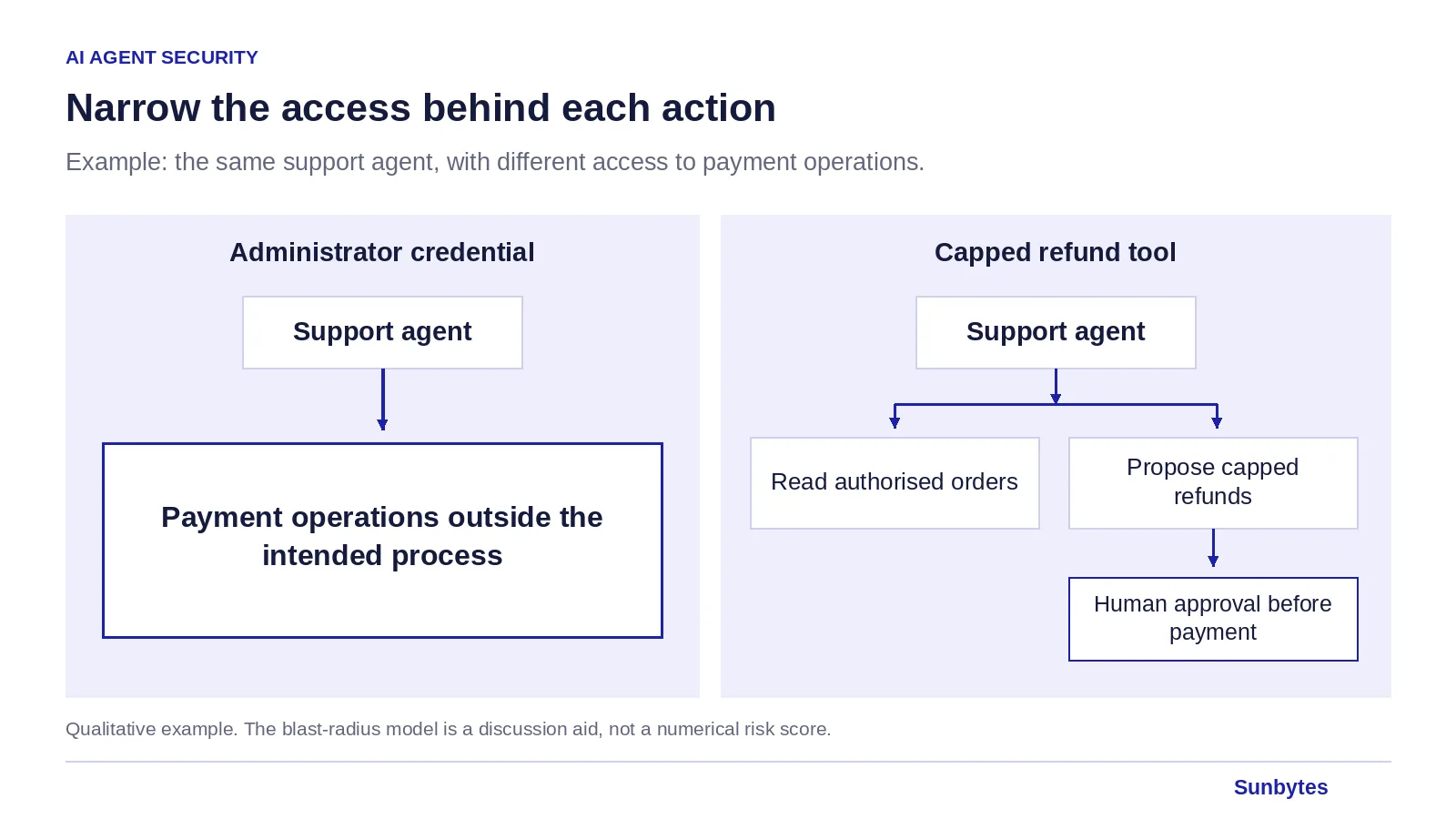
An example of a capped tool and human approval restricts the payment actions available to a support agent.
Do you need an agent, or a workflow?
An AI agent decides which tool to call next; a rule-based workflow follows steps you defined in advance. If every path through a process can be written down, a workflow is easier to secure, test and audit, and its blast radius is fixed by design.
Use an agent only for the steps that need judgement, such as reading a free-text request or summarising a case. Keep payments, deletions and permission changes in fixed workflow steps, behind server-side execution checks. Many first agents work best as one judgement step inside a larger workflow.
The biggest security risks of AI agents
The biggest security risks of AI agents concern permissions, tools, stored context and data handling. Identify which failure paths apply to your process.
| Risk | What it looks like | Business consequence | First control |
|---|---|---|---|
| Excessive permissions | An order lookup uses an administrator account. | Unnecessary access to records or settings. | Restrict operations and accessible records. |
| Shared or long-lived credentials | The agent reuses a staff member’s token. | Access persists and is harder to revoke separately. | Use a dedicated identity and managed credentials. |
| Tool misuse | An unvetted integration exposes unwanted actions. | Unauthorised changes or data transfers. | Review tools and validate each request. |
| Untrusted content steering actions | Text in a retrieved email changes a proposed action. | The agent proposes an unauthorised operation. | Separate content from authority; check execution. |
| Memory poisoning | Corrupted stored context is reused later. | Future work follows false instructions or facts. | Validate and isolate stored context. |
| Data leakage | A tool returns more customer data than needed. | Private information reaches an unintended recipient. | Restrict returned fields and destinations. |
| Unowned agents | An agent remains connected after its creator leaves. | Nobody reviews access or responds to incidents. | Maintain an inventory with a named owner. |
Prioritise permissions and human approval to control which actions execute. Check what data can leave through read-only tools too.
Prompt injection and the OWASP LLM Top 10: what an agent team needs to know
Prompt injection occurs when a model follows untrusted content as instructions, including text supplied by a user or retrieved from an email, web page or document. Retrieved content creates an indirect route into the agent’s decisions.
For an agent, the concern is what happens after the model reads that content. An email may influence a refund request, but the software executing the refund should still check the customer, order, amount and required human approval. Instructions inside the email must not change those checks.
The 2025 list identifies LLM01:2025 Prompt Injection and LLM06:2025 Excessive Agency, which concerns excessive functionality, permissions or autonomy. The wider OWASP Top 10 for LLM Applications explains the other categories. If the agent’s own code was written with AI coding tools, also check security risks in AI-generated code.
Treat model-level defences as one layer. Containment also needs restricted access, independent checks before execution and validation of data leaving a tool. A stronger system prompt cannot replace those controls, and content filtering cannot establish whether a refund is authorised.
Before go-live: eight controls for your first agent
Implement a baseline for all eight controls before launch, then refine them during the first month. These priorities are this guide’s recommendations, informed by the OWASP AI Agent Security Cheat Sheet.
| Control | Before launch | First month | Owner |
|---|---|---|---|
| 1. Ownership and inventory | Record purpose, systems, tools and owner. | Review changes and unused access. | Product or operations lead |
| 2. Separate identity | Apply minimal permissions and customer boundaries. | Remove permissions the agent does not use. | Engineering lead |
| 3. Managed credentials | Store secrets server-side; support revocation and rotation. | Review token lifetimes and rotation. | Engineering or platform owner |
| 4. Allowed tools and limits | Validate arguments; cap actions, spend and retries. | Tune limits using actual usage. | Engineering lead |
| 5. Human approval | Gate high-impact and irreversible actions. | Review rejected and corrected proposals. | Business process owner |
| 6. Input and output checks | Validate requests, returned data and destinations. | Extend checks from observed failures. | Engineering and security owner |
| 7. Data and memory rules | Set permitted data, isolation and retention. | Check stored context and deletion. | Data owner |
| 8. Logs and stopping | Trace tool calls; test stopping and recovery. | Tune alerts and rehearse response. | Operations owner |
Identity and permissions
Give each agent a non-human identity: a software account separate from a person’s account. Start read-only; add write access for defined tasks. When acting for a user, check that user’s authorisation on every request.
Use short-lived credentials where supported, keep secrets server-side outside model context, and define rotation and revocation for long-lived credentials. Request evidence of effective permissions and accessible customer records.
Tools and actions
Allow only listed tools, with arguments checked server-side. Execution code must validate refund ownership and eligibility, enforce per-action and aggregate caps, and prevent retries from paying twice. Validate recipients and rate limits; bound steps and total spend to stop indefinite loops.
MCP, the Model Context Protocol, standardises connections between AI applications and tools. Check each MCP server’s security, operator, permissions and data destinations. Isolate any code execution. For agents inside n8n or Make, review securing AI-built automations for the surrounding workflow controls.
Data and memory
Restrict prompts, tool results and outgoing messages to necessary data. For example, an order-status answer may need a delivery state without payment details or the customer’s full history.
Isolate customers’ memory, check access on retrieval, and set retention rules. Validate stored context. An instruction in a customer document must not become an agent permission.
Oversight, logging and a kill switch
Trace each tool call from request through validated arguments, human approval and result. Keep a redacted prompt or protected reference where necessary. Exclude credentials and unnecessary personal data; restrict log access and retention.
Test a kill switch that blocks tool execution, including queued work, without redeploying. Plan recovery where possible; completed payments and sent emails may be irreversible. Alert on unusual activity. Run misuse scenarios before launch alongside broader testing of AI applications.
In the first month, track three signals: the share of proposed actions the execution code rejects, how long human approvals take, and the result of each kill-switch test. A rising rejection rate points to a permission or prompt problem; slow approvals push reviewers to approve without reading.
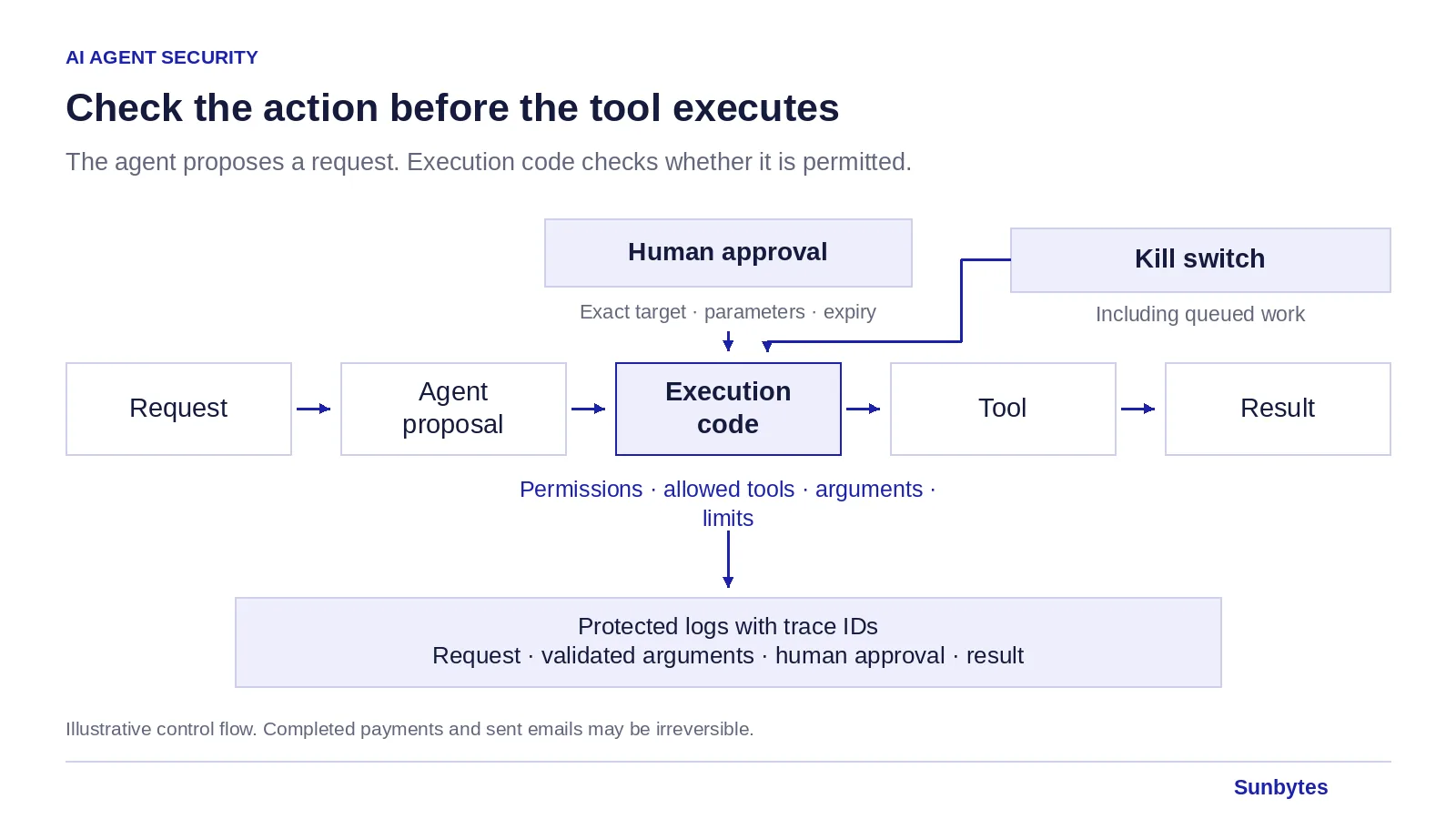
The execution code checks permissions and human approval before running a tool; the kill switch also covers queued work.
Which agent actions need human approval
Require human approval before an agent takes high-impact or irreversible actions. Use reversibility and customer impact to classify each tool operation, rather than granting autonomy to the agent as a whole.
| Action | Internal | Customer-facing or financial |
|---|---|---|
| Reversible and low impact | Allow within defined permissions; log execution. Example: tag an internal ticket. | Allow only narrowly bounded changes with no material consequence; review a sample weekly. Example: update a reversible display preference. |
| Irreversible or high impact | Require human approval. Examples: delete records or change permissions. | Require human approval. Examples: payments, refunds, bulk email or contract changes. |
Show the reviewer the exact target and proposed change. Bind approval to that operation, its parameters and an expiry; changed details need new approval. The agent must not approve its own request.
Relax discretionary approval only for bounded, low-impact actions after reviewing logged decisions and an error rate the business owner accepts. A low error rate does not override legal requirements. AI Act Article 14 addresses oversight for high-risk systems; its application timetable and scope need separate assessment.
Define what your agent may do alone and where a person must decide. Discuss your process, connected systems and proposed actions with Sunbytes for advice on the appropriate automation approach.
EU AI Act and GDPR duties for AI agents
EU obligations depend on an agent’s intended use, the personal data it processes and your company’s role. A customer support label alone does not determine its classification. Check these points before launch.
For the EU AI Act, Regulation (EU) 2024/1689:
- Transparency: Article 50(1) requires providers to inform people they are interacting directly with AI, unless this is obvious in context. Article 50 applies from 2 August 2026. Use a clear notice at the start of the interaction.
- Roles and literacy: using an agent under your authority makes you a deployer; developing or commissioning one under your own name can also make you a provider. Article 4, applicable since 2 February 2025 and subsequently amended, requires measures supporting staff AI literacy. Train operators on limitations, human approval and stopping the agent.
- High-risk uses: recruitment and creditworthiness assessment can fall within Annex III, subject to Article 6’s classification rules. Article 14 concerns human oversight. Under the current Article 113 timetable, the relevant high-risk requirements apply from 2 December 2027 for Annex III systems and 2 August 2028 for Annex I product systems. Obtain advice on the actual use and any transitional rules.
For the GDPR, Regulation (EU) 2016/679:
- Significant decisions: Article 22 generally restricts solely automated decisions with legal or similarly significant effects. Exceptions include contract necessity, authorisation by law and explicit consent, with applicable safeguards. A token human click does not establish meaningful involvement.
- Data processing: Article 35 requires a data protection impact assessment (DPIA) before processing likely to create high risks to people’s rights and freedoms. Where a model or tool provider acts as your processor, Article 28 requires a binding processing arrangement. Confirm roles, retention and any international transfers.
- Incidents: under Article 33, a controller must notify the competent supervisory authority without undue delay and, where feasible, within 72 hours of awareness, unless a breach is unlikely to risk people’s rights and freedoms. In the Netherlands, assess whether the Autoriteit Persoonsgegevens is the competent authority.
Have a privacy specialist assess the agent’s actual data flows and decision-making before launch.
When to bring in outside help
Seek an independent review before an agent writes to production systems, moves money, handles customer or employee personal data or enters a potentially high-risk use case. Bring in help when nobody on the team can own its security decisions.
For a bounded read-only or draft-only agent, an experienced internal team may be able to implement and verify the eight controls. Read-only access still needs data restrictions. Once an agent acts on customers or finances, have someone outside the build review its permissions and approval design before launch.
These decisions belong in process automation design: who starts the work, which system changes, and who remains accountable.
How Sunbytes helps teams ship agents safely
Sunbytes’ AI-Built Product Review helps teams assess the software behind an agent before launch or wider use. For products built or accelerated with AI, the review covers agreed areas of security, code, architecture, reliability and deployment.
The engagement starts by confirming how the agent is used and which parts of the product need review. Software engineers and security specialists examine the relevant behaviour and technical setup, including permissions, sensitive data flows and critical workflows within the agreed scope. You receive findings with supporting evidence, a prioritised action plan and a technical handoff. Your team can address the findings, or scope fixes and re-checks with Sunbytes. The review is run by software engineers and security specialists with 15+ years and 300+ delivered software projects behind them.
If the work also requires changes to the surrounding process, Business Process Automation can support system integrations, workflow rules and human approval points. Discuss your agent and the review scope with our team.
Frequently asked questions
An AI agent’s security depends on its tools, permissions, data handling and execution controls. Models can propose incorrect or unauthorised actions. Restrict what tools can do, require human approval for high-impact actions, and keep protected records so the team can investigate and stop execution.
Start with a separate identity, minimal permissions, an explicit list of allowed tools and human approval for high-impact or irreversible actions. Complete the eight-control checklist with managed credentials, data boundaries, protected logs and a tested kill switch. Verify that disallowed requests are rejected by the execution code.
Model safety filters are one layer, but your application must enforce business permissions. A filter cannot establish whether a particular customer qualifies for a refund or whether its amount is authorised. Check each proposed tool call in server-side code, including the target, limits and required human approval.
Assess the agent’s purpose and your role under the Act. Article 50(1) addresses disclosure when people interact directly with AI, unless obvious in context. A support function alone does not establish high-risk status. If the agent also influences recruitment, creditworthiness or another listed use, assess Article 6 and Annex III.
Give the agent a separate identity and credentials with the minimum permissions for its task. Reusing a person’s token ties automated access to that account and complicates independent revocation. Prefer short-lived credentials where available, keep secrets outside model context, and verify the initiating user’s permissions when acting on their behalf.
Use a tested kill switch that blocks new tool execution without a redeploy and addresses queued work. Revoke credentials if necessary, inspect logs using trace IDs, and identify affected records. Recovery depends on the action: a reversible update may be restored, while a completed payment or sent email may require remediation.