Choosing the right technology for your WordPress website can feel overwhelming. With so many hosting options, plugins, themes, and development tools, making the wrong decision can lead to slow performance, security issues, and endless troubleshooting.
Imagine launching your website, every minute your site underperforms is a missed opportunity, lost traffic, frustrated users, and wasted resources.
The solution is to choose a website tech stack for a Web Development Project that aligns with your goals, performance requirements, and scalability needs. In this guide, we’ll show you how to select the right combination of hosting, plugins, frameworks, and tools to build a fast, secure, and future-proof WordPress site.
TL;DR
- A WordPress tech stack refers to the set of technologies—frontend, backend, databases, plugins, and hosting — that function together to build and support your website.
- When choose website tech stack for WordPress website, it’s important to evaluate factors such as website type, performance, scalability, security, maintenance, budget, and compatibility.
- To choose website tech stack for WordPress website effectively, focus on real project needs, design for strong performance at every layer, match the stack to your team’s skills and keep it lean by minimizing unnecessary plugins and tools.
What is a tech stack for a WordPress website and why is it important?
A tech stack for a WordPress website is the combination of technologies, servers, programming languages, databases, frameworks, and tools that work together to power and support the site. To build a fast, secure, and scalable website, it’s crucial to choose website tech stack for WordPress website that aligns with your goals and requirements.
The right tech stack offers multiple benefits:
- Better performance: With optimized hosting, lightweight themes, and minimal plugins, your site loads quickly and runs efficiently.
- Stronger security: A well-planned stack built on trusted plugins and tools helps reduce vulnerabilities and protect your data.
- Greater scalability: The appropriate stack lets your site grow smoothly as traffic and functionality increase.
- Simpler maintenance: Fewer conflicts and consistent technologies make updates simpler and troubleshooting faster.
- Improved user experience: Responsive design, caching, and fast loading create a seamless experience for visitors.
Core components of a WordPress tech stack
To effectively choose website tech stack for WordPress website, it’s important to understand the key components that make up the stack:
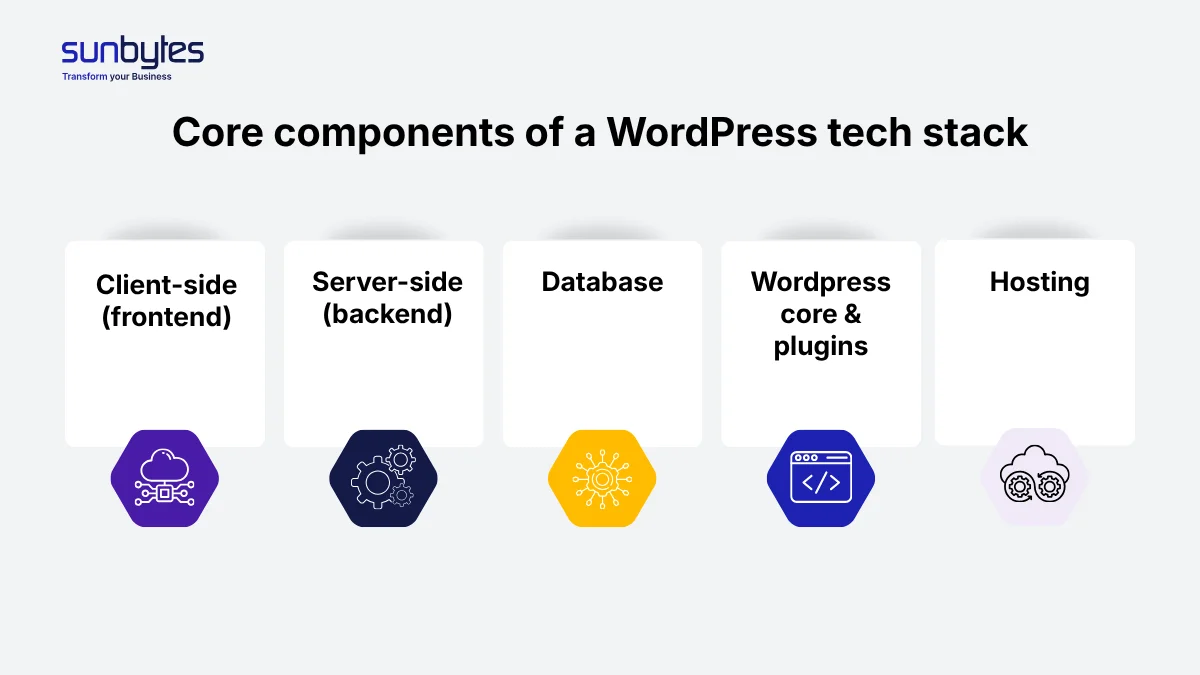
Client-side (frontend)
When you choose website tech stack for WordPress website projects, the client-side is a critical component. It handles everything users see and interact with in their browsers. This includes HTML for structure, CSS for styling, and JavaScript for dynamic behavior. Themes and page builders play a critical role here, allowing developers to customize layouts, animations, and interactive elements for a smooth user experience.
Server-side (backend)
The server-side is where the website executes its core logic. In WordPress, most backend processes rely on PHP development, which manages requests, generates pages, and connects seamlessly with the database.
Database
WordPress relies on a database, usually MySQL or MariaDB, to store content, settings, user data, and more. Every post, page, plugin configuration, and theme setting is stored here. Efficient database design and optimization are crucial for maintaining fast load times and scalability.
WordPress core & plugins
The WordPress core provides the foundational framework, including content management features, REST API, and security updates. Plugins extend this functionality, enabling everything from SEO optimization and e-commerce capabilities to advanced analytics. When choosing a website tech stack for your WordPress website, selecting reliable and regularly updated plugins is essential for stability and performance.
Hosting
Finally, hosting is a cornerstone when you choose website tech stack for WordPress website performance. A reliable hosting environment ensures your WordPress site runs smoothly and can handle traffic spikes. Hosting options range from shared hosting to managed WordPress hosting, VPS, and cloud solutions.
7 Factors to consider when choose website tech stack for WordPress website
Selecting the right setup means carefully weighing multiple priorities. The factors below highlight the most critical areas that will shape your final choice when you choose website tech stack for WordPress website.
Website type
The type of website you’re building (blog, eCommerce store, portfolio, or enterprise platform) directly influences how you choose website tech stack for WordPress website. For instance, high-traffic blogs prioritize caching and CDN integration while eCommerce sites require secure payment handling and inventory management.
Performance
Site speed and responsiveness are critical for user experience and SEO. When you choose website tech stack for WordPress website, consider lightweight themes, caching mechanisms, optimized images, proper server configuration, and efficient database management.
Scalability
Your tech stack should support growth. If you anticipate increasing traffic or expanding features, choose hosting, database, and caching solutions that can scale without major overhauls. Cloud hosting and managed WordPress solutions often provide the flexibility needed for scaling.
Security requirements
Security is essential, especially for sites handling sensitive user data. Implement strong server-side security, SSL, regular updates, and secure plugins. For sites handling EU user data, compliance with GDPR regulations is also a crucial factor.
Ease of maintenance and updates
Ease of maintenance and updates is another factor to evaluate. A tech stack that allows for automated backups, smooth plugin and theme updates, and minimal custom code will save time and reduce the risk of errors in the long run.
Budget
Budget considerations also influence your decisions. When you choose website tech stack for WordPress website, account for hosting, premium plugins, themes, and developer resources. It is important to plan for both initial costs and long-term expenses related to scaling and maintaining the site.
Compatibility
Finally, compatibility must be ensured across the entire tech stack. This includes verifying that chosen themes, plugins, page builders, APIs, and other integrations work seamlessly with your WordPress environment, and that your server supports the necessary PHP version, database, and caching solutions.
Best Tech Stack for WordPress (Recommendation by use case)
Choose website tech stack for WordPress website isn’t a one-size-fits-all decision. Depending on your goals, scale, and audience, different websites will have different technical requirements. Below are common scenarios with recommended options
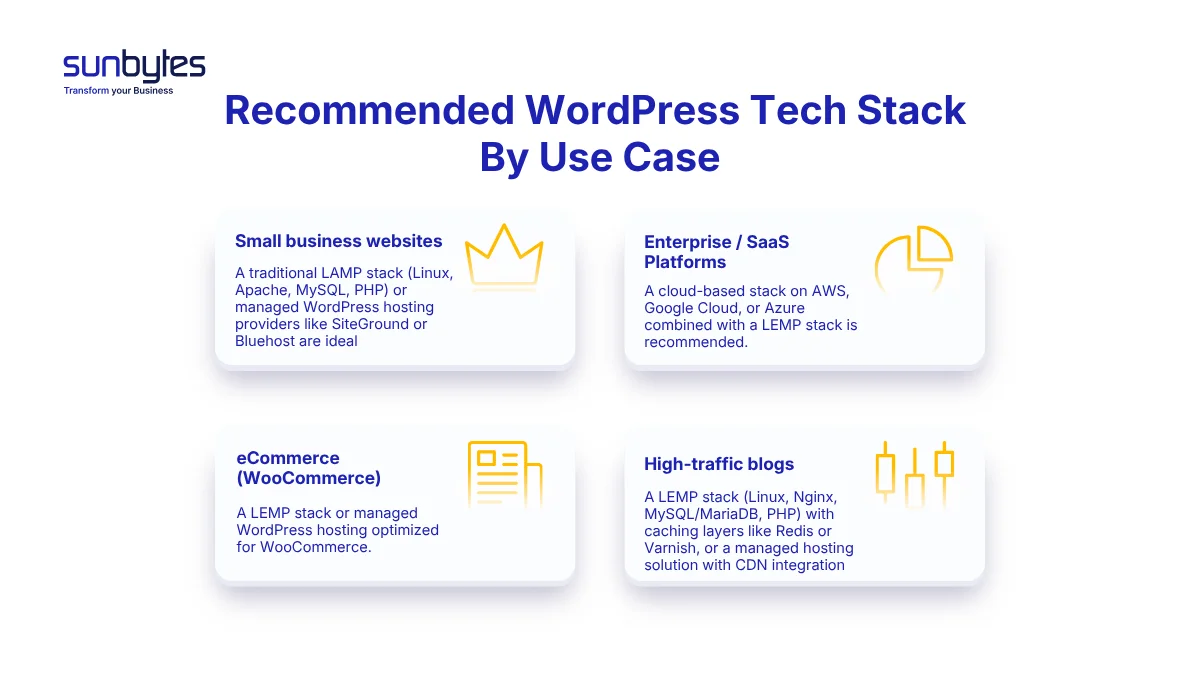
Small business websites
When planning a small business site, the most practical approach is to choose website tech stack for WordPress website that is simple, affordable, and reliable. A traditional LAMP stack (Linux, Apache, MySQL, PHP) or managed WordPress hosting providers like SiteGround or Bluehost are ideal. These solutions are easy to set up, widely supported, and allow for quick deployment without deep technical expertise.
Enterprise / SaaS Platforms
When scalability and reliability are critical, it’s important to choose website tech stack for WordPress website projects that can handle complex demands. A cloud-based stack on AWS, Google Cloud, or Azure combined with a LEMP stack (Linux, Nginx, MariaDB/MySQL, PHP) is recommended. This setup ensures high availability, advanced monitoring, and the flexibility to handle complex integrations and large user bases.
eCommerce (WooCommerce)
For online stores, performance and security are top priorities. The best approach when you choose website tech stack for WordPress website focused on eCommerce is a LEMP stack or managed WordPress hosting optimized for WooCommerce (such as Kinsta or WP Engine). These solutions provide faster checkout processes, secure transactions, and reliable uptime, making them ideal for the unique demands of eCommerce.
High-traffic blogs
As efficiency and global reach are key for this type of website, the best fit is a LEMP stack (Linux, Nginx, MySQL/MariaDB, PHP) with caching layers like Redis or Varnish, or a managed hosting solution with CDN integration. This combination reduces server load, improves page speed, and ensures smooth performance even under heavy visitor traffic—ultimately supporting stronger SEO rankings and higher user engagement.
Best practices to choose wesbite tech stack for WordPress website
To effectively choose website tech stack for WordPress website, it is not just about selecting popular tools, it’s about making strategic decisions that align with your project’s goals, performance needs, and long-term sustainability. The following best practices will help guide your decision-making process, ensuring that every layer of your stack is purposeful and efficient.
1. Define your website requirements first
The most important principle is to base your tech stack on actual project requirements instead of popular tools or trends. Factors like traffic scale, feature complexity, performance expectations or maintenance capacity should be taken into consideration. A stack that works well for a small content site may completely fail for a high-traffic or transaction-heavy platform
2. Prioritize performance at the architectural level
Performance should not rely only on plugins or later optimizations. When choosing a stack, consider how each layer (server, database, caching, CDN) contributes to speed and responsiveness. A well-structured architecture reduces the need for excessive fixes and ensures consistent performance under load.
3. Consider team skills and development workflow
Your stack should align with the skills of the team managing it. Choosing advanced technologies without the expertise to support them can slow development and introduce risks. If your in-house capabilities are limited, working with a dedicated development team can help ensure the stack is implemented and maintained effectively.
4. Minimize dependencies and avoid unnecessary complexity
Every additional tool, plugin, or service introduces potential points of failure and security risks. A good rule is to include only what is necessary and avoid overlapping functionalities. A lean stack is easier to maintain, debug, and scale over time.
Maximize your WordPress website performance with expert tech stack setup
Knowing how to choose website tech stack for WordPress website ensures that every decision, from hosting and caching to plugins and security tools, directly impacts speed, scalability, and long‑term reliability. For businesses aiming to go beyond standard setups, our Custom Software Development Services provide tailored tech stack solutions that design to deliver consistent performance and are built for growth.
About Sunbytes
As a Dutch technology company with a delivery hub in Vietnam, Sunbytes takes pride in delivering Digital Transformation Solutions designed for lasting impact, with every project built on the optimal tech stack drawn from 15 years of experience.
What makes our software development truly effective is the way we reinforce it with two essential pillars:
- Cybersecurity Solutions: Our Secure by Design approach integrates security from the start, reducing risk without slowing delivery. By aligning security with real architectures and practical workflows, we ensure modernized systems remain resilient rather than fragile.
- Accelerate Workforce Solutions: Scaling projects requires the right capabilities at the right time. We provide flexible capacity and critical skills to keep your roadmap on track and maintain a stable delivery model as demands grow.
FAQs
Headless WordPress is ideal when your project requires advanced flexibility and multi‑channel delivery or performance beyond what traditional WordPress can offer. Unlike traditional WordPress, a headless setup separates the backend from the front‑end, making it suitable for high‑traffic sites, complex integrations, or delivering content across web, mobile, and other platforms like IoT devices or digital kiosks.
For simple blogs or small business sites, traditional WordPress is usually sufficient, but for modern, dynamic projects, headless architecture provides the flexibility and performance you need.
Yes, you can change your WordPress tech stack but the ease of doing so depends on the type of migration. Moving from shared hosting to managed WordPress hosting is relatively simple, while shifting from a traditional LAMP setup to a cloud-based stack like AWS or Google Cloud requires more planning, database migration, and performance tuning. While not impossible, changing your tech stack mid-project can be time-consuming, so it’s best to choose website tech stack for WordPress website carefully from the start.
The cost of a WordPress tech stack varies widely depending on hosting, themes, plugins, and additional services. A basic small business website might run on shared or managed WordPress hosting, costing anywhere from $10 to $50 per month, plus optional premium plugins or themes. For enterprise, eCommerce or high-traffic sites, cloud-based or managed hosting solutions, advanced caching, security tools, and developer resources can bring costs into the hundreds or even thousands per month.
While tech stack costs can range from modest monthly fees to enterprise‑level budgets, it’s important to consider the bigger picture of software development expenses. Our detailed breakdown in The True Cost of Developing a Custom Software Product explores additional factors that influence overall website development costs.
Choose website tech stack for WordPress website is no easy task. Here are some common pitfalls to help you avoid making mistakes that impact speed, security, scalability, and long-term costs.
- Ignoring theme performance: Choosing a theme based only on looks without checking code quality, SEO, or support can slow your site and limit customization. Pick themes with good documentation and active support.
- Neglecting scalability: Choosing a tech stack that only works for low traffic can lead to expensive migrations or redesigns when your site grows. Planning for scalability from the beginning ensures that your site can handle increased visitors, eCommerce growth, or advanced features.
- Overloading with plugins: Too many plugins can slow your site, cause conflicts, and increase security risks. A careful selection of essential, well-maintained plugins ensures your site remains fast, secure, and easy to manage.
Let’s start with Sunbytes
Let us know your requirements for the team and we will contact you right away.