
Building a unique website with WordPress can seem straightforward until you realize how limiting pre-made themes can be. You try to customize layouts, tweak functionality, or match a specific brand identity, but suddenly you’re stuck fighting against someone else’s code instead of creating your own vision.
That frustration only grows when your site starts looking like hundreds of others using the same off-the-shelf theme. Bloated features, poor performance, and lack of flexibility can make even a simple website development project feel complicated, especially if you’re trying to deliver a polished, professional website for a client or your own brand.
One way to overcome these challenges is through custom WordPress theme development. Building a custom theme with PHP allows you to create websites that are fast, flexible, and fully tailored to your needs. In this post, we’ll walk through the key steps of custom theme development so you can take full control of your projects and elevate your WordPress skills.
TL;DR
- Custom WordPress theme development is a process of creating a tailored design and functionality using original code rather than relying on pre-made templates. This approach gives businesses a brand-aligned design while optimizing performance, scalability and security.
- The typical process starts with gathering requirements and planning, followed by UI/UX design, theme development, thorough testing and finally deployment with ongoing maintenance and updates.
- Best practices for WordPress theme development focus on clean structure, performance optimization (minified CSS/JS, caching, lazy loading, efficient queries), full responsiveness across devices, and clear code documentation.
What does custom WordPress theme development mean?
Custom WordPress theme development refers to creating a WordPress theme from scratch or heavily customizing an existing theme by writing your own code, rather than just using a pre-made theme.
Different from pre-made, which offer limited design options like color, font and basic layout choices, custom development involves designing and building the structure, layout, styles, and functionality of a website according to specific requirements.
Why choose custom WordPress theme development over pre-made solutions
Choosing custom WordPress theme development offers businesses far more than just a visually appealing website. It provides strategic advantages that impact branding, performance, and long-term growth. Here’s a detailed breakdown:
- Brand differentiation: A custom theme is designed around a business’s unique identity, ensuring the website reflects its brand personality and stands apart from competitors. Unlike generic templates, it delivers a distinctive look and feel that reinforces brand performance.
- Enhanced user experience: With custom WordPress theme development, themes include only the features a business truly needs, avoiding the unnecessary bloat of pre-made themes. This results in faster load times, cleaner code, and optimized functionality for a smoother user experience.
- Improved security: Because the theme is coded specifically for the business, it reduces vulnerabilities often found in mass‑market themes. Tailored development ensures stronger safeguards against potential threats.
- Full control: Businesses have complete control over every element, from layout to features, without relying on third-party theme updates or restrictions.
- Greater flexibility: As the business grows, its website can evolve seamlessly. Custom WordPress theme development allows developers to add new features, integrate specialized plugins, or build advanced e‑commerce solutions without being constrained by template limitations.
| Comparison: Custom themes vs Pre-Made | ||
| Feature | Custom theme | Pre-made theme |
| Design | Unique, brand-specific | Generic, shared by many sites |
| Performance | Optimized for speed | Often slower due to extra code |
| Security | Clean, controlled code reduces vulnerabilities | May have vulnerabilities if not updated; relies on theme developer |
| Cost & Time | Higher upfront cost and longer development | Lower cost, faster setup |
| Scalability | Easy to scale and add custom features | Limited by theme structure |
WordPress theme development structure
To make custom WordPress theme development works, developers rely on a core set of web technologies, including:
- HTML: Forms the backbone of your themes, providing the essential structure for pages, posts, headers, footers, sidebars, and other key sections. It ensures that all content is organized logically and semantically, which is vital for both users and search engines.
- CSS: Shapes the visual presentation, including typography, colors, spacing, layouts, responsive design, and animations.
- PHP: The server-side engine that powers WordPress itself. Through PHP development, WordPress dynamically retrieves content (such as blog posts, pages, or e-commerce products) from the database and inserts it into the HTML structure, making every page personalized and interactive.
- JavaScript: This client-side language adds interactivity and dynamic behavior. It enables modern web features like sliders, modal windows, interactive forms, and real-time content updates without requiring a full page reload.
Step-by-Step Process for Custom WordPress Theme Development with PHP
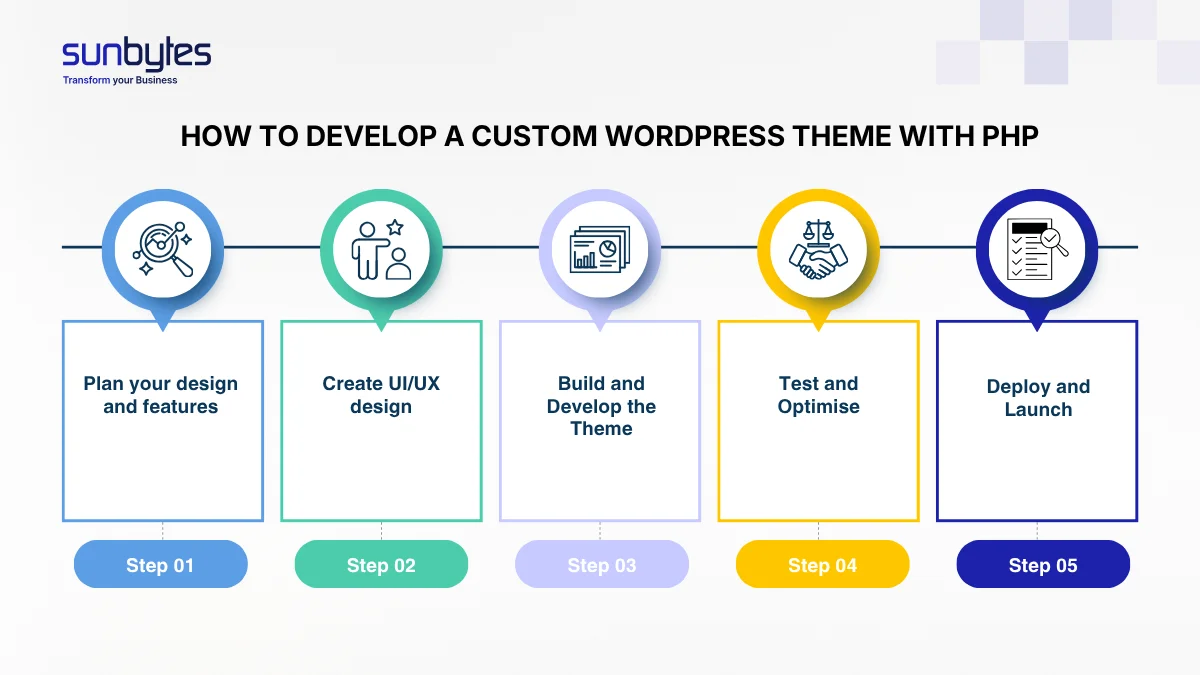
Step 1: Plan your design and features
Every successful WordPress theme development starts with careful planning. This is where your development team and stakeholders move beyond a vague idea, like “we need a new website” and clearly define the project’s goals and structure to ensure the theme meets both business and user needs.
Key activities:
- Theme objectives: Define the purpose of the custom theme. Are you building it to improve site performance, support e-commerce, enhance UX, or create a completely unique design that reflects your brand?
- Audience and user analysis: Identify your target users, their needs, and browsing behaviors. This helps shape layouts, navigation, and interactive features that provide a seamless user experience.
- Competitive and theme audit: Review competitor websites and existing WordPress themes to identify gaps, opportunities, and features your custom theme should include or avoid.
Primary deliverables:
- A detailed project brief for the custom theme
- A strategic development roadmap for theme creation
- A theme blueprint with templates, features, and plugin integrations
- Estimated timeline and milestones for the development process
Step 2: UI/UX design
With a clear strategy in place, the focus shifts to shaping the visual and interactive experience. This phase of WordPress theme development turns ideas into design concepts that reflect your brand while ensuring smooth and intuitive navigation.
Key activities:
- Wireframes: The team starts with simple, low-detail sketches of main page templates. The focus is on layout, hierarchy, and placement of important elements like calls-to-action, without worrying about colors or images.
- Mockups and prototypes: After the wireframes are finalized, the team creates detailed, full-color mockups that reflect your brand’s typography, colors, and imagery. These designs are often turned into clickable prototypes, allowing you to navigate the user journey before any coding begins.
- User flow planning: Designers map out how visitors will move through the site, strategically guiding them toward desired actions such as purchases, form submissions, or newsletter sign-ups.
- Content framework: The design also defines how content should be structured, including messaging hierarchy and placement. This ensures that text and visuals work together seamlessly.
- Stakeholder feedback: Regular review cycles allow your team to provide input and approve designs, keeping everyone aligned before development starts.
Read more: Wireframe vs Prototype: Key Differences and When to Use Each.
Step 3: Development
In this stage, all the planning and design work comes together as the developers bring your custom WordPress theme to life. Approved blueprints are transformed into fully coded, functional templates.
Key activities:
- Local development environment setup: Developers configure secure, isolated systems where they can build and test the theme without affecting the live website.
- Building the theme structure: The essential files and directories are created, providing WordPress with the framework it needs to recognize and load the project as a valid theme.
- Coding templates and custom content types: Design concepts are translated into coded templates that define the structure and presentation of each page.
- Front-end and back-end development: HTML, CSS, and JavaScript implement the responsive design on the front end. Meanwhile, PHP handles server-side logic, database queries, and dynamic content.
- Integrating third-party tools: Any external systems like CRMs, email platforms, or APIs are connected and tested to ensure smooth functionality.
- Client reviews at milestones: Developers share working versions along the way, allowing your team to give feedback and confirm the project is progressing as expected.
Step 4: Data migration
If you’re moving from an existing website, make sure all your content, media, plugins, integrations and settings get safely transferred to the new custom WordPress theme.
Key activities:
- Backup current site: Create a full backup of the existing website (database + files) to prevent accidental data loss
- Export content: Use WordPress plugins such as All-in-One WP Migration or WP Migrate DB for a complete export.
- Import content to the new theme: Import content into the WordPress site with the custom theme applied and verify that post types, categories, tags, and media are correctly mapped
- Test and verify: Check that all content appears correctly with the new theme layout, ensure media, links, and menus function as expected
- Finalize migration: Remove temporary or redundant data while confirming SEO settings, custom fields, and widgets are preserved.
Step 5: Testing
Prior to going live, every website undergoes a thorough WordPress site testing process to ensure every aspect of the project meets professional standards
Key activities:
- User Acceptance testing (UAT): Validates that the website meets the client’s requirements and expectations. This includes checking functionality, workflows, forms, and features to ensure everything works as intended before going live.
- Bug identification and resolution: Developers systematically test all templates, custom features, and integrations to uncover errors or inconsistencies. Any issues discovered are documented, fixed, and retested to guarantee stability.
- Performance optimization: Page load times, responsiveness across devices, and compatibility with different browsers are carefully measured. Techniques such as caching, image compression, and script optimization are applied to deliver a fast, seamless experience.
- Security validation: The site is checked for vulnerabilities, including outdated plugins, insecure code, or weak configurations. Best practices like input sanitization, SSL enforcement, and secure authentication are implemented to protect both the business and its users.
- Reliability and scalability: Stress tests simulate heavy traffic to confirm the site can handle real-world usage without crashing or slowing down. This ensures the platform remains dependable as the audience grows.
- User experience review: Navigation, accessibility, and content presentation are evaluated to confirm that visitors can easily find information and interact with the site.
Step 6: Deployment
At this final stage, your custom-built WordPress site goes live and becomes accessible to your audience.
Key activities:
- Theme packaging & migration: All theme files and the database are carefully moved from the staging environment to your live hosting, ensuring a smooth transition without data loss.
- Performance optimization: Speed enhancements like caching configuration, script minification, and CDN setup are applied to deliver fast load times globally.
- Technical SEO check: Final verification of meta titles, descriptions, structured data, and 301 redirects to protect search rankings and improve visibility
- Post-launch review: A thorough inspection of pages, links, forms, and interactive features confirms everything works correctly in the live environment.
- Monitoring setup: Uptime alerts and analytics tools are installed to track site reliability and visitor behavior from day one.
- Handoff & training: Your team receives documentation and training on the WordPress admin dashboard, empowering you to manage content confidently.
Best practices for creating a custom WordPress theme development with PHP
Developing a custom WordPress theme with PHP requires a balance of clean code, scalability, and maintainability. Following best practices ensures your theme performs efficiently, is secure, and can be easily updated or expanded. Here are key guidelines:
Structure your theme properly

A well-organized theme structure is the foundation of maintainable WordPress theme development. Templates should be arranged logically, beginning with core files such as index.php, single.php, page.php, and archive.php. When working with custom post types, it is best to create dedicated templates like single-services.php to ensure consistent presentation. Breaking layouts into smaller, reusable components with get_template_part() keeps your code modular, reduces duplication, and makes future updates easier to manage.
Optimize performance
WordPress performance optimization is essential for both user experience and search engine rankings. CSS and JavaScript files should be minified and combined where possible to reduce load times. Implementing caching plugins and enabling lazy loading for images further enhances speed.
On the PHP side, database queries must be handled efficiently using WP_Query, avoiding unnecessary loops or heavy operations that can slow down the site. A theme that runs smoothly will delight users and improve engagement.
Make your theme responsive
Responsiveness is a must in modern WordPress theme development. By using fluid grids, flexible images, and CSS media queries, your theme can adapt seamlessly to different screen sizes. Testing across multiple devices and browsers ensures that visitors enjoy a consistent experience whether they are on a desktop, tablet, or smartphone.
Document your code

Clear documentation is vital for long-term maintainability in WordPress theme development. Adding comments to explain functions, hooks, and template logic makes it easier for other developers, or even your future self, to understand the codebase. Following WordPress PHP coding standards ensures consistency and readability. Beyond inline comments, providing a README file or developer documentation helps teams onboard quickly and makes updates more efficient.
Delivers WordPress Themes Built for Impact with Sunbytes
A custom WordPress theme development is a true strategic advantage that delivers lasting value. With a custom build, you gain complete brand control to craft a unique experience, superior performance that satisfies both users and search engines and long-term scalability designed to support growth.
Creating this level of quality requires expertise. Partnering with Sunbytes allows you to avoid the risks and uncertainty of hiring blindly and move directly into confident execution. With over 200 projects delivered, our dedicated team of experienced WordPress specialists has a proven record of building well‑architected themes that stand the test of time.
Ready to build the custom theme your business deserves? Contact Sunbytes today and start transforming your digital presence with confidence.
About Sunbytes
Sunbytes is a Dutch technology company with a delivery hub in Vietnam. For over 15 years, we have specialized in building and modernizing Digital Transformation Solutions, powered by senior engineering teams with deep technical expertise, proven delivery experience and the ability to manage complete, end-to-end development projects.
What set our approach apart is that every transformation is anchored by two essential pillars
- CyberSecurity Solutions: With our Secure by Design methodology, we embed security from the very beginning. Risks are reduced without slowing delivery, ensuring systems remain resilient and aligned with real architectures and workflows. The result is practical, sustainable safeguards that protect your business long‑term.
- Accelerate Workforce Solutions: Scaling transformation requires agility. We provide the right expertise at the right time, helping you expand capacity efficiently. This ensures your roadmap stays on track and your delivery model remains stable, even as demands grow.
FAQs
The timeline for a custom WordPress theme development depends on the project’s complexity, features, and design requirements. A simple theme with basic layouts might take a few weeks, while a fully-featured, dynamic theme with custom templates, integrations, and advanced functionality can take several months.
The cost of custom WordPress theme development varies based on design complexity, the number of pages, required features, and whether you hire a freelancer, agency, or handle it in-house. Small projects may cost a few hundred dollars. On the other hand, enterprise-level themes can run into the thousands.
You don’t need to know PHP to use a theme once it’s developed. Users can manage content, update menus, and tweak design settings through the WordPress dashboard. However, PHP knowledge is essential for custom WordPress theme development itself, as it powers the dynamic functionality of WordPress and allows developers to build or modify themes beyond the default options.
Let’s start with Sunbytes
Let us know your requirements for the team and we will contact you right away.