

Low-code is usually sold as the faster path. For enterprise applications in Europe, that is only half the decision. The real question is not whether low-code can build working software. Mendix, OutSystems, Microsoft Power Apps, Bubble, and Webflow can all produce useful applications in the right context. The question is whether the platform still fits once GDPR obligations, enterprise integrations, long-term ownership, and performance requirements are added to the project.
For low-code vs custom development enterprise decisions, the safest split is this: low-code works best for internal tools with known users, standard workflows, and manageable data residency. Custom development is usually preferred for customer-facing, strategic, compliance-sensitive, or integration-heavy products.
This decision often sits within a broader mobile app development planning process, where scope, platform choice, delivery model, and risk all need to be evaluated together.
TL;DR
Low-code vs custom development enterprise decisions should be based on 5 factors: app type, GDPR & data residency, integration depth, vendor lock-in, and scale. Low-code is strongest for internal tools, approval workflows, admin panels, and short-lived operational apps. Custom development is safer when the application is customer-facing, differentiating, compliance-sensitive, or expected to run for 5+ years.
| Decision area | Low-code is usually stronger when… | Custom development is usually stronger when… |
|---|---|---|
| Decision area | Low-code is usually stronger when… | Custom development is usually stronger when… |
| App type | The app is internal and workflow-driven | The app is customer-facing or brand-critical |
| Data and GDPR | EU hosting and DPA terms are clear | Sensitive data or strict auditability is required |
| Integrations | Standard connectors cover the core systems | Legacy, custom, or real-time integrations matter |
| Ownership | Lock-in is acceptable for 2-3 years | Code ownership and exit strategy matter |
| Scale | Usage is predictable and internal | High traffic, real-time, or complex processing is expected |
Both approaches can coexist. A common enterprise pattern is a custom customer-facing product with a low-code internal workflow or admin layer connected through APIs.
What low-code and custom development mean in enterprise projects
Low-code development uses visual modelling, pre-built components, workflow builders, and platform-managed infrastructure to speed up application delivery. Developers may still write custom logic, integrations, or extensions, but much of the application is configured inside the platform.
Custom development means the application is designed and built with a chosen technology stack, owned codebase, and infrastructure setup. The team controls architecture, data model, user experience, deployment, integrations, and long-term maintenance.
For European enterprises, the distinction matters because the platform is not only a delivery tool. It becomes part of your compliance model, operating model, cost model, and exit strategy.
A low-code platform can shorten the first release. A custom build gives more control over what happens after release: architecture decisions, hosting model, security controls, integration design, and roadmap changes.
That is why the comparison should start with the application’s role in the business, not with build speed.
Why the “low-code is cheaper” argument is incomplete
Low-code can be cheaper at the start. That is true for many internal tools. A department needs an approval workflow. A finance team needs a dashboard. Operations need a simple case management tool. In those cases, low-code can reduce build time because the team starts with forms, workflow logic, access rules, and connectors already available. The comparison changes when the application becomes strategic.
European enterprises usually have constraints that are missing from generic low-code articles: GDPR requirements, data residency decisions, audit trails, internal governance, legacy systems, and multi-year product roadmaps. If those constraints are ignored, the faster option can become the more expensive one later.
The three costs that often appear after the first release are:
| Hidden cost | Why it appears | What to check before choosing low-code |
|---|---|---|
| Platform licensing | Costs continue after launch and may grow with users, environments, or advanced features | Pricing model, user tiers, production environments, API usage |
| Platform-specific talent | Certified low-code developers may be harder to find than general software engineers | Availability of Mendix, OutSystems, or Power Platform talent in your region |
| Exit cost | Logic is often tied to the platform’s proprietary model | Whether the app can be exported, rebuilt, or replaced without business disruption |
Custom development has a higher upfront build cost, but it avoids platform dependency. The codebase belongs to the business, the infrastructure can be changed, and another engineering team can take over if the delivery partner changes.
The 5-factor decision framework for low-code vs custom development enterprise projects
The fastest way to decide is to stop comparing platforms in the abstract. Compare the project against five factors.
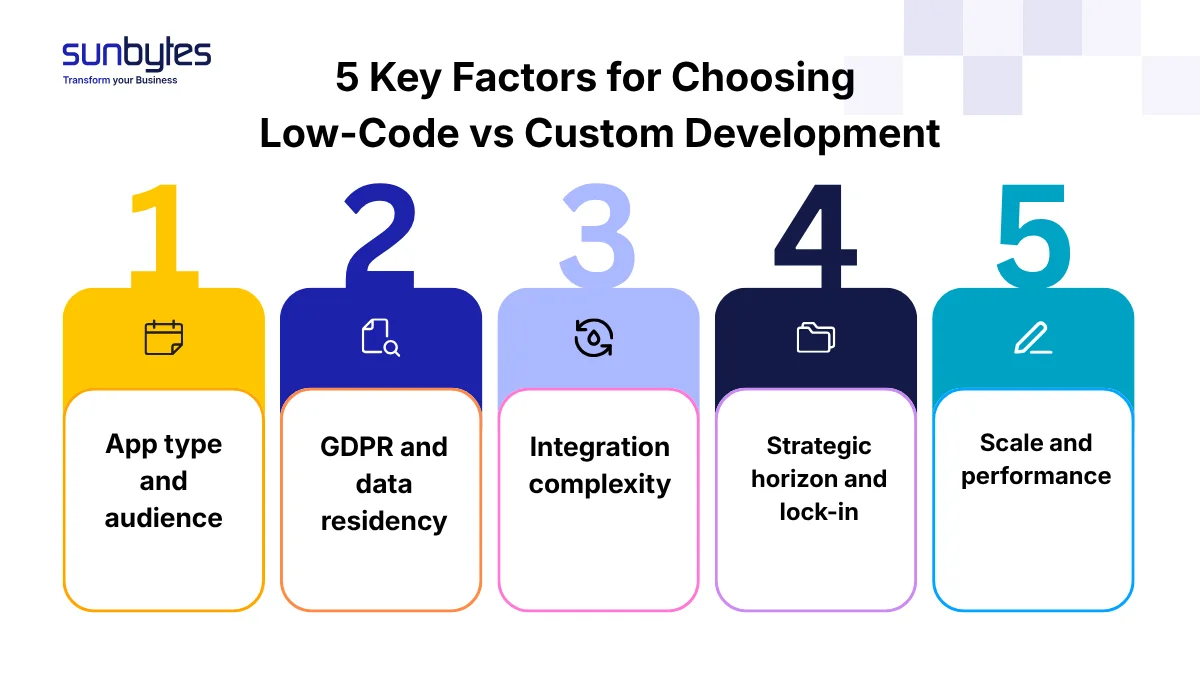
| Factor | Low-code signal | Custom development signal |
|---|---|---|
| App type and audience | Internal tool, known user base, standard workflow, limited UX differentiation | Internal tool, known user base, standard workflow, limited UX differentiation |
| GDPR and data residency | EU hosting is available, DPA terms are clear, data is low sensitivity | Sensitive personal data, strict audit needs, data residency must be contractually controlled |
| Integration complexity | 1-2 standard integrations with common systems | 3+ integrations, legacy APIs, real-time sync, non-standard authentication |
| Strategic horizon and lock-in | 2-3 year internal tool, no expected migration | 5+ year product roadmap, code ownership required |
| Scale and performance | Predictable internal usage, batch workflows, limited computation | 10,000+ daily users, real-time features, payment flows, complex processing |
This matrix should be completed before vendor selection. Once a vendor has already recommended a platform, the discussion often shifts toward implementation details before the core decision is tested.
Factor 1: App type and audience
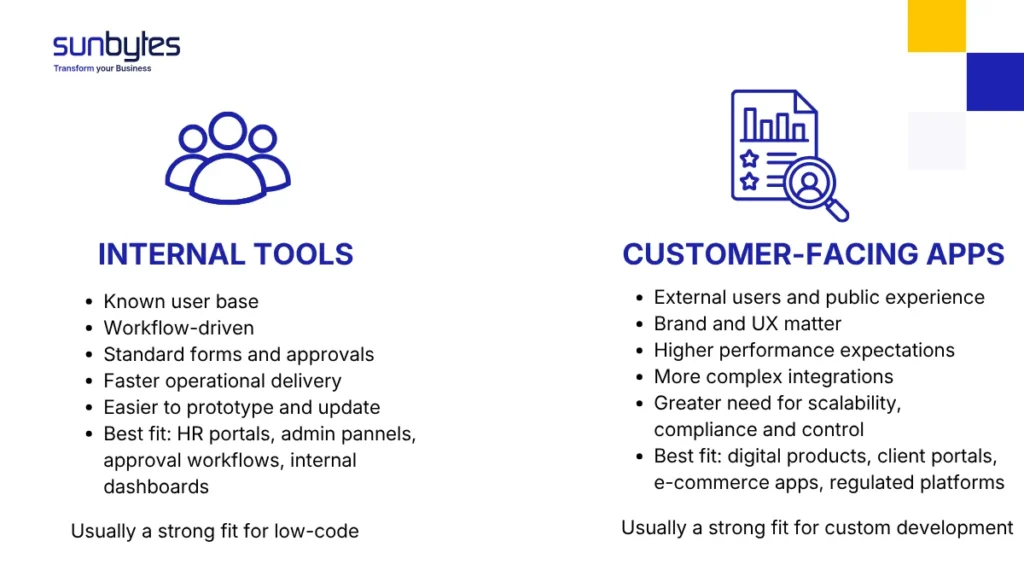
Internal tools are the natural home for low-code. Approval workflows, HR portals, internal dashboards, simple inventory tools, and finance request systems usually have a known user base. The users are employees. The workflow is more important than the interface. The app needs to work, but it does not need to create market differentiation. That is where low-code earns its place. A team can ship a usable internal tool faster because the platform already has workflow logic, forms, user management, and connectors.
Customer-facing applications are different. When users compare your app against alternatives in the market, the interface becomes part of the product. Performance, onboarding flow, brand experience, accessibility, offline behaviour, and mobile behaviour all affect conversion and retention. Low-code can build some of this, but the platform starts to shape the product instead of supporting it.
Use this rule: If the application is something your customers judge you by, custom development is usually safer. If the application is something internal users need to complete a workflow, low-code is often worth testing first.
Factor 2: GDPR and data residency
For European enterprises, GDPR and data residency are not legal details to check after platform selection. They are part of the platform decision.
Low-code platforms often run on vendor-managed cloud infrastructure. That means the enterprise must understand where customer data, application data, logs, backups, and support data are processed.
This does not mean every non-EU platform is unusable. It means the procurement team, DPO, and technical team need to verify the hosting setup and the data processing terms before the build starts.
For low-code platforms, ask:
| GDPR question | Why it matters |
|---|---|
| Where is production data stored? | Determines whether EU data residency expectations are met |
| Where are logs and backups stored? | Operational data can still contain personal data |
| Which subprocessors are used? | GDPR responsibility extends through the vendor chain |
| Can processing records be documented clearly? | Needed for auditability and governance |
| Can support staff access production data? | Access control and support-region rules matter |
Factor 3: Integration depth and enterprise system connectivity
Most enterprise applications do not live alone. They connect to ERP systems, CRM platforms, identity providers, data warehouses, payment services, reporting tools, and legacy databases. Low-code platforms usually handle common integrations well when standard connectors exist.
The risk appears when the integration is non-standard. A connector library can cover Microsoft 365, Salesforce, SAP, Azure AD, or common databases. It may not cover a legacy ERP with custom business logic, a real-time bidirectional sync requirement, or an old authentication model that needs special handling. At that point, low-code teams start writing custom extensions. Once enough custom code is added around the platform, the original speed advantage begins to shrink.
From Sunbytes’ delivery perspective, a practical threshold appears when an application has more than two core integrations and at least one of them is legacy, real-time, or business-critical. At that point, custom development should usually be evaluated first because integration logic, error handling, data ownership, and long-term maintainability become harder to control inside a low-code platform.
Factor 4: Vendor lock-in and exit cost
Low-code lock-in has two layers.
- The first is technical. Application logic is often expressed inside the platform’s visual model, workflow engine, database model, and deployment environment. Even when custom code is possible, the complete application usually cannot be moved to another stack without a rebuild.
- The second is commercial. Pricing, licensing, feature access, hosting options, and platform roadmap remain tied to the vendor. If the platform changes pricing or product direction, the enterprise has limited control.
This is not automatically a blocker. Lock-in can be acceptable for internal tools with a defined lifespan. If an internal workflow is expected to run for two or three years, and the platform saves months of delivery time, the trade-off can be justified. For strategic products, lock-in becomes a board-level risk. A customer-facing app with a 5-year roadmap should not depend on a platform that the company cannot exit without rebuilding the product. A simple procurement rule works well: If the app is strategic, ask for the exit plan before signing the platform contract. If the answer is “rebuild later,” include that rebuild risk in the decision.
Factor 5: Scale and performance ceiling
Low-code platforms abstract infrastructure. That is useful until the abstraction becomes the constraint.
For internal apps with 50 to 500 regular users, predictable workflows, and moderate data volumes, most enterprise low-code platforms can perform well enough. The user base is known. Load is predictable. Performance issues are usually easier to work around.
For customer-facing products, scale behaves differently. Traffic spikes, mobile conditions, payment flows, search, personalisation, real-time updates, and analytics can all stress the platform in ways that were not visible during the prototype.
Custom development gives the team control over the performance stack: database design, caching, API optimisation, background jobs, infrastructure scaling, monitoring, and release process. That control matters when performance affects revenue or trust.
Use this signal:
If the app is expected to support 10,000+ daily active users, payment processing, real-time features, or heavy data processing, custom development is usually the safer long-term choice.
Not sure whether your app should stay low-code or move custom? Talk to Sunbytes about the architecture, GDPR, integration, and scale trade-offs before choosing a platform
Low-code platform comparison for European enterprises
The platform choice matters as much as the low-code decision itself. A low-code recommendation without a hosting and governance check is incomplete.
| Platform | Type | Hosting and data notes | GDPR / EU risk for European enterprises |
|---|---|---|---|
| Mendix | Enterprise low-code | Mendix Cloud is AWS-powered and available in multiple regions; SAP BTP deployment is also supported | Lower when EU region and DPA terms are confirmed |
| OutSystems | Enterprise low-code | OutSystems Cloud hosts customer apps in its cloud infrastructure; supported AWS regions must be checked | Medium, depending on selected region and contract terms |
| Microsoft Power Apps | Low-code / no-code hybrid | Microsoft lets customers choose data regions for Power Platform; EU Data Boundary applies to Power Platform enterprise services | EU region available; risk depends on tenant region, connector data flow, DPA, and support access |
| Bubble | No-code / basic low-code | Dedicated instances can offer choice of hosting region for enterprise use | Medium to high unless dedicated hosting and DPA terms are verified |
| Webflow | No-code web platform | Webflow states customer and end-user data is stored in the United States | Higher for apps collecting personal data; lower for marketing sites with minimal data collection |
When low-code becomes more expensive than custom development
Low-code becomes expensive when the application outgrows the platform’s original purpose.
The first release may be faster, but total mobile app development cost changes when the enterprise adds advanced permissions, complex integrations, audit requirements, multi-region needs, performance optimisation, and platform-specific developers.
A qualitative TCO view is more useful than generic cost ranges because platform contracts vary by vendor, users, features, environments, and region.
| Scenario | Year 0 | Years 1-2 | Years 3-5 |
|---|---|---|---|
| Internal approval workflow for 100 employees | Low-code build is faster; standard workflow components reduce setup time | Licensing continues, but value is clear if the workflow saves operational time | Replace or retire if process changes |
| Customer-facing mobile app with product roadmap | Custom build costs more upfront | Custom codebase adapts better to roadmap and UX changes | Ownership and scale control reduce rebuild risk |
| Regulated B2B portal with sensitive data | Custom may need more discovery and architecture planning | Data controls, audit trails, and integration design become central | Lower lock-in risk if compliance expectations grow |
| Custom product plus internal admin tool | Customer product needs custom architecture | Internal teams can use low-code for workflow and admin tasks | API boundary keeps the low-code layer replaceable |
The mistake is treating low-code as a cheaper version of custom development. It is a different operating model.
Low-code reduces initial build friction when the platform’s assumptions match the app. Custom development reduces long-term friction when the app needs ownership, differentiation, and architectural control.
The hybrid approach: low-code and custom development in the same architecture
The strongest enterprise answer is often not binary. A hybrid architecture uses custom development where control matters and low-code where speed matters. The boundary between the two must be intentional.
A common pattern:
| Layer | Recommended approach | Reason |
|---|---|---|
| Customer-facing web or mobile app | Custom development | UX, performance, security, and roadmap control |
| Core API and business logic | Custom development | Clear ownership, testability, integration control |
| Internal admin panel | Low-code | Faster workflow delivery for internal users |
| Approval workflows | Low-code | Standard forms, rules, and user permissions |
| Reporting dashboard | Low-code or BI tool | Internal visibility without slowing product roadmap |
Example: a European fintech builds a custom customer-facing mobile app because onboarding, transaction flows, and trust are product differentiators. The same company uses Power Apps for internal loan approval workflows used by 30 employees. The two layers connect through controlled APIs.
That pattern keeps the strategic product under custom control while letting internal operations move faster. The API boundary is the important part. Without it, the low-code layer can start absorbing business logic that should live in the core product. Once that happens, the platform becomes harder to replace.
How to evaluate a vendor recommendation for low-code
When a vendor recommends low-code, the recommendation should be tested against your use case, not accepted as a delivery shortcut. Ask these questions before signing:
| Question | Why it matters |
|---|---|
| Which part of the app will be low-code, and which part will be custom? | Prevents platform sprawl |
| Where will personal data, logs, and backups be stored? | Checks GDPR and data residency fit |
| What happens if we leave the platform in three years? | Forces the exit strategy discussion early |
| Which integrations require custom code? | Reveals whether the low-code advantage still exists |
| What skills will we need after launch? | Avoids dependency on one vendor or one certified team |
| Who owns architecture decisions? | Prevents undocumented delivery decisions |
| How will performance be tested before launch? | Catches platform ceilings before production |
This is also where vendor selection criteria matter. A good development partner should not only know how to build on a platform; they should be able to explain when that platform creates unnecessary lock-in, compliance work, or integration risk.
How Sunbytes approaches the low-code vs custom decision
The hardest low-code decision is not the first release; it is deciding which logic must remain portable before the platform becomes hard to leave. Sunbytes uses the brief and architecture review to separate the custom core from workflow layers before delivery starts
Instead of treating one model as universally better, the focus is on identifying which parts of the system require scalability, compliance, and full technical control and which areas can benefit from faster operational delivery.
Incorporating DORA metrics like deployment frequency, lead time for changes, mean time to recovery, and change failure rate, Sunbytes ensures that platform decisions are guided by measurable outcomes. By weighing the trade‑offs of both approaches against DORA outcomes, Sunbytes builds a data‑driven framework for selecting the right mix of platforms.
Having 15+ years of experience and 300+ projects delivered across industries and regions, Sunbytes helps European companies move from platform uncertainty to a structured Digital Transformation Solutions. Dedicated senior teams can become operational in 2–4 weeks, supported by ISO-guided delivery and DORA-tracked outcomes from the first sprint.
This delivery model is strengthened by two supporting pillars. Accelerate Workforce Solutions helps form the right delivery team around the build, while Cybersecurity Solutions keeps access control, secure-by-design delivery, and GDPR-aware handling visible during the project.
Ready to explore how this applies to your own systems? Contact us today to get started.