
You built your app largely with AI coding tools, and now you are preparing a first App Store submission or reading a rejection notice in App Store Connect. The questions at this point are practical: what the guideline number means, what to change in the app, and whether to reply to Apple or appeal.
An App Store rejection is Apple’s decision not to approve a submission because it breaks one or more of its App Store Review Guidelines. It names the rule your build broke; it is not a verdict on how the app was made. AI coding tools generate what you describe in the prompt, so store requirements such as a reviewer demo account, in-app purchase or an SDK privacy manifest only appear in the build when someone asks for them.
This guide explains eight guidelines an AI-built app can run into, why AI-built apps trigger each one and how to avoid it. It then covers what to do after a rejection (fix, reply or appeal), what is different on Google Play and which EU requirements to settle before you submit, and ends with a ten-point pre-submission check. It is part of our guide to shipping AI-built products safely. Guidelines were checked on 2 November 2026.
TL;DR
Apple rejects App Store submissions that break its App Store Review Guidelines, not apps built with AI. In 2025, Apple rejected 2,093,244 of the 9,100,620 app submissions it reviewed, according to its 2025 App Store Transparency Report.
- Eight guidelines cause the rejections covered here: 2.1 (crashes and missing demo accounts), 4.2 and 4.3 (thin wrappers), 3.1.1 (web payments), 5.1.1 and 5.1.2 (privacy and AI data sharing), 4.8 (social login) and 2.5.2 (downloaded code).
- After a rejection, reply first and appeal last: fix metadata and resubmit the same build, upload a new build for code changes, reply when the reviewer missed something, and appeal to the App Review Board only with evidence of a misapplied guideline.
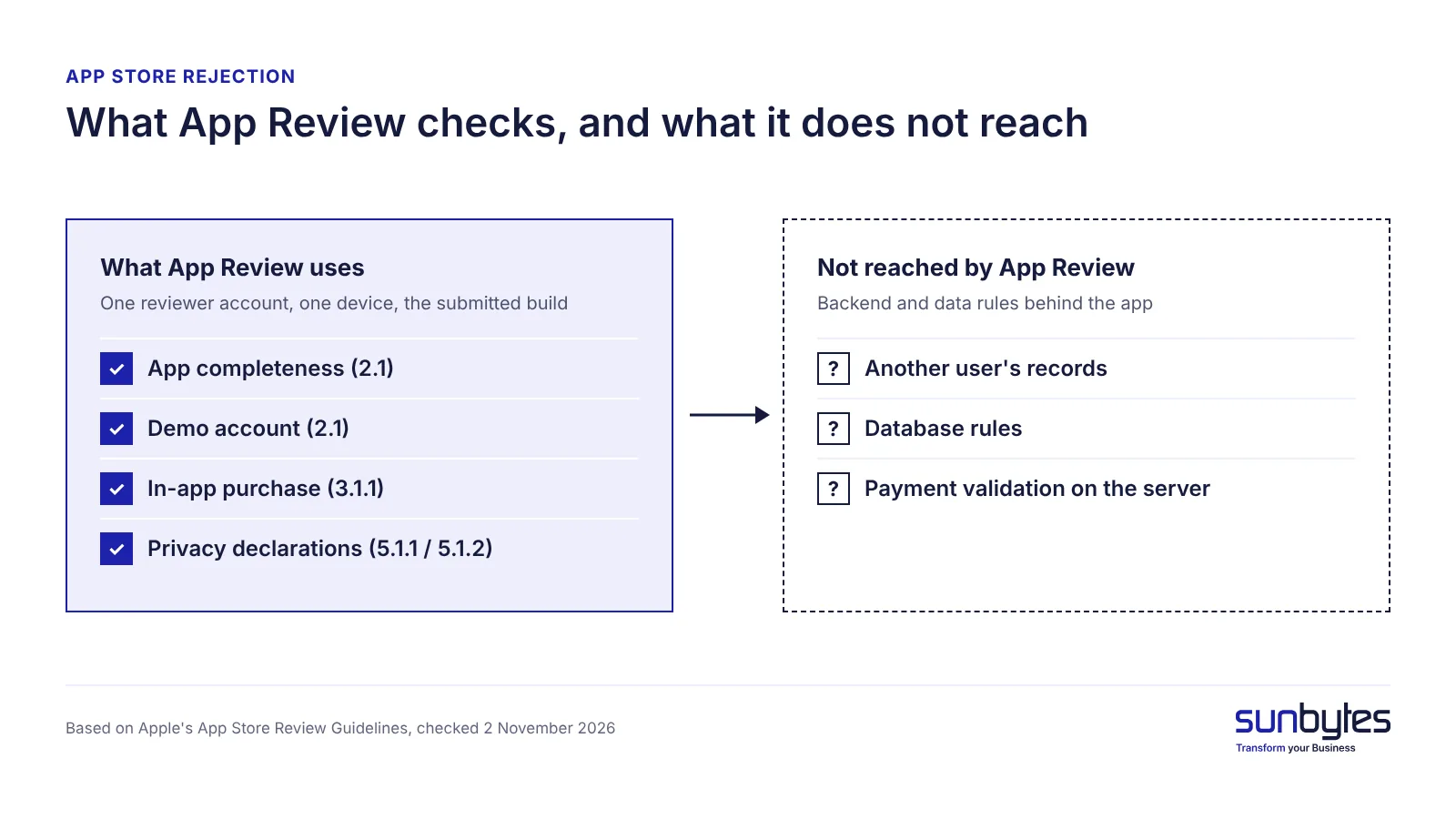
- Approval is a partial production check: App Review uses one reviewer account on one device, so a pass says little about whether one user can reach another user’s data or whether purchases are validated on your server.
8 App Store review guidelines to check in an AI-built app
Eight App Store review guidelines cover the rejection reasons in this article: four on whether the app works (2.1 twice, 4.2/4.3, 2.5.2), one on payments (3.1.1) and three on privacy and login (5.1.1, 5.1.2, 4.8). Whether the app works is Apple’s largest rejection category: in its 2025 Transparency Report, the Performance section, which includes 2.1, accounts for 1,354,418 rejections. A metadata fix changes App Store Connect information only; a binary fix changes code and needs a new build.
| Guideline | What the reviewer sees | Why AI apps trigger this | How to avoid it | Fix type |
|---|---|---|---|---|
| 2.1 App completeness | Crash, dead button, failed login | Tested only in a preview; backend off | Test on a physical device via TestFlight; keep backend live | Binary |
| 2.1 Demo account | Login screen, no credentials | Credentials missing from review information | Working demo account with sample data | Metadata |
| 4.2 / 4.3 Minimum functionality, spam | A website in an app shell, a bare AI chat or a copy of existing apps | Web build wrapped as an app; interface around one API call or a template | Product-specific, app-like features, explained in review notes | Binary |
| 3.1.1 In-app purchase | Card form or web checkout for digital content | Web payment flow reused in the app | StoreKit; entitlements validated on your server | Binary |
| 5.1.1 Privacy and manifest | No policy link, vague permission text, SDKs undeclared | SDKs added without updating declarations | Policy link, specific purpose strings, privacy manifest | Metadata or binary |
| 5.1.2 Data sharing | Personal data sent to a third-party AI | User input passed straight to a model API | Name the provider; ask explicit permission first | Binary |
| 4.8 Login services | Social login without an equivalent option | Social login from a template | Equivalent login option meeting three conditions | Binary |
| 2.5.2 Software requirements | Features change after approval | App downloads and runs code | All executable code in the binary | Binary |
The sections below follow Table 1 row by row: what the issue is, why AI apps trigger it and how to avoid it.
Crashes and broken flows on the reviewer’s device (2.1)
What the issue is: Apple will reject binaries that crash or show obvious technical problems. On the reviewer’s physical device, a crash, a dead button or a failed login ends the review. Apple also asks you to turn on your backend service before review, so a server that is down counts against the app too.
- Why AI apps trigger this: an AI-built app may only have been tested by the person prompting it, in a browser preview or simulator, on the paths that person clicked. A real device adds permission prompts, slower networks and screen sizes a preview does not show, and failure paths such as a wrong password may never have been tried.
- How to avoid it: install the exact build through TestFlight, Apple’s beta-testing app, and test every flow on at least one physical device, including failure paths. Keep the backend live and stable for the whole review period, and fix every crash before you submit rather than after the reviewer finds it.
No working demo account (2.1)
What the issue is: guideline 2.1(a) asks you to provide demo account details when your app has a login. A built-in demo mode is allowed instead only with Apple’s prior approval. Without credentials, the reviewer stops at the login screen and cannot assess the rest of the app.
- Why AI apps trigger this: the login flow is generated as part of the app, but the review credentials are a separate step in App Store Connect that no prompt covers. Test accounts from development may also have been deleted or left empty.
- How to avoid it: create a dedicated demo account, fill it with realistic sample data and enter the credentials in the App Review information in App Store Connect. Log in with it on a clean device just before you submit.
A thin wrapper or template app (4.2 and 4.3)
What the issue is: guideline 4.2 expects features, content and UI that lift an app beyond a repackaged website, and 4.3(b) rejects apps that are indistinguishable from what is already widely available. Guideline 4.2.6 also rejects apps created from a commercialised template or app generation service unless the provider of the app’s content submits them.
- Why AI apps trigger this: when a web app built with AI is wrapped for the store as it is, the app adds nothing the website does not already offer. A product whose core is a single call to a public AI model can also look like other apps already in the store.
- How to avoid it: give the app features that only make sense on a phone and that only your product offers, for example offline use, notifications or device features such as the camera. Describe these features in the review notes, so the reviewer can see what the app does beyond its website or the underlying AI model.
Web payments for digital goods (3.1.1)
What the issue is: guideline 3.1.1 requires in-app purchase to unlock features or digital content, and bars an app’s own mechanisms such as license keys.
- Why AI apps trigger this: when the app is generated from a web version, the existing web payment flow is carried over. If the generated code checks payment status only inside the app, a modified client can bypass it.
- How to avoid it: sell digital goods through StoreKit, Apple’s in-app purchase framework, and check each entitlement (the record that a user paid) on your own server, not only in the app. For the EU, check Apple’s current payment terms before using anything other than in-app purchase (see the EU section below).
Privacy declarations that do not match the app (5.1.1)
What the issue is: guideline 5.1.1 requires a privacy policy link in App Store Connect and inside the app, and permission texts (purpose strings) that clearly describe how the data is used. A privacy manifest is a file named PrivacyInfo.xcprivacy that records the data an app or SDK collects, and Apple’s third-party SDK requirements make it mandatory for listed SDKs in new submissions.
- Why AI apps trigger this: analytics, crash-reporting and login SDKs are added during generation, but the privacy policy, the App Privacy answers and the permission texts are not updated with them. Permission texts generated as placeholders, such as “This app needs access to your camera”, do not say why.
- How to avoid it: list every SDK in the build and the data each one collects, then write the privacy policy, App Privacy answers and purpose strings from that list. Include the privacy manifests the listed SDKs require and check that the policy link loads from inside the app.
Sending user data to an AI service without permission (5.1.2)
What the issue is: guideline 5.1.2(i) requires apps to clearly disclose where personal data will be shared with third parties, including with third-party AI, and to obtain explicit permission before doing so.
- Why AI apps trigger this: generated code calls the model API directly as soon as the user types or uploads something, with no consent screen in between. A mention in the privacy policy does not replace the explicit permission the guideline asks for.
- How to avoid it: name the AI provider inside the app, explain what data is sent and why, and ask for explicit permission before the first request that contains personal data. Store the user’s choice and offer a way to use the app, or part of it, if they decline.
Social login without an equivalent login option (4.8)
What the issue is: guideline 4.8 applies when an app uses a third-party or social login, such as Google Sign-In, for the primary account. The app must then also offer an equivalent login option that limits data collection to name and email, lets users keep their email address private and does not collect app interactions for advertising without consent. The guideline names these three conditions, not Sign in with Apple specifically.
- Why AI apps trigger this: social login may come from a template or starter kit that includes only Google or Facebook. The equivalent option is a store requirement, not part of the login feature itself.
- How to avoid it: add a login option that meets all three conditions; Sign in with Apple, which lets users hide their email address, is one way to do this. If an exception applies, for example an app that uses only your company’s own account system, state it in the review notes.
Downloading code after approval (2.5.2)
What the issue is: guideline 2.5.2 requires apps to be self-contained in their bundles and bars them from downloading, installing or executing code that introduces or changes features.
- Why AI apps trigger this: to ship changes faster, some generated apps load scripts or modules from a server instead of from the reviewed build. Remote configuration of content, such as text, prices or feature flags that switch between reviewed features, is a different case from new executable code.
- How to avoid it: ship all executable code in the binary and submit new features as a new version for review. Use remote configuration only for content and for switching between features that Apple has already reviewed.
What a rejection tells you about the rest of your app
A rejection is a free, partial production check: each guideline number points to a gap that real users would also hit.
- 2.1 points to a testing gap. A reviewer’s crash marks a flow no test caught. Our guide to testing AI applications covers what a green test suite misses.
- 3.1.1 points to a payment check that lives only in the app.
- 5.1.1 and 5.1.2 point to an unclear data inventory. If the declarations missed an SDK or an AI provider, establish which personal data the app collects and where it goes. For apps processing personal data, this inventory helps identify the purposes of processing, the applicable GDPR lawful bases and the information that must appear in the privacy notice.
App Review also leaves checks undone. A reviewer uses one demo account on one device, so the review does not show whether one user can open another user’s records, whether database rules are open to anyone with the app’s keys or whether secret keys ship inside the app. Those checks belong in an AI-built mobile app review.
Our recommendation: if the app has been rejected under two or more different guideline sections, for example Performance and Legal, review the whole app instead of patching the cited guideline.
Apple checks whether your app follows its rules. It does not check whether one user can open another user’s data. An AI-built product review looks at both sides, the gaps that cause rejections and the ones store review never sees, explained in plain English. Talk to us for advice on your app. Talk to us about a review
Google Play rejections: what is different
Google Play rejections differ because three Play Console requirements apply alongside review: the Data safety form, account deletion and, for new personal accounts, a closed test. Google requires the Data safety form to include data collected through third-party libraries and SDKs, and holds the developer responsible for its accuracy.
Under Google’s account deletion requirement, an app that lets users create an account must offer an in-app path to delete it and its data; Apple’s guideline 5.1.1(v) asks the same. Personal developer accounts created after 13 November 2023 must also run a closed test with at least 12 testers opted in for at least 14 consecutive days before production access.
Fill in the Play Data safety form and Apple’s App Privacy answers from the same SDK inventory, so both stores receive the same facts.
EU requirements to sort out before you submit
For apps distributed through the EU App Store, developers need to check their DSA trader declaration, privacy requirements and any EU-specific payment rules relevant to the app.
Trader status under the Digital Services Act. Apple requires developers to declare their trader status in App Store Connect, including whether they qualify as traders under EU law. Since 17 February 2025, Apple has required a completed trader-status declaration for apps distributed on the EU App Store. Apps without the required declaration are removed from EU storefronts until the status is provided and verified where necessary. Developers who qualify as traders must provide an address, phone number and email address for verification and display on their App Store product pages in the EU. Apple distinguishes these public trader contact details from the information used to manage a developer account.
Device access, consent and GDPR. Under Article 5(3) of the ePrivacy Directive, storing information on or accessing information from a user’s device generally requires prior consent, unless a statutory exception applies. Review each analytics, crash-reporting or AI SDK according to what it actually stores or accesses, rather than assuming every SDK requires consent. The EDPB’s Guidelines 2/2023 set out the technical scope. Where personal data is processed, the GDPR (known as the AVG in the Netherlands) also requires an appropriate lawful basis and transparent privacy information. The privacy notice must describe recipients or categories of recipients, including relevant AI service providers, and applicable international data transfers.
Since 1 October 2026, Apple’s updated EU terms have allowed eligible apps to offer alternative payment processing within the app and out-of-app purchase offers, subject to Apple’s entitlement, disclosure and business-term requirements. Check Apple’s current EU terms with your advisor before choosing anything other than in-app purchase. Before submitting your app for review, confirm the required trader-status information, privacy disclosures and payment configuration for the EU storefronts you plan to serve.
Rejected? Fix, reply or appeal
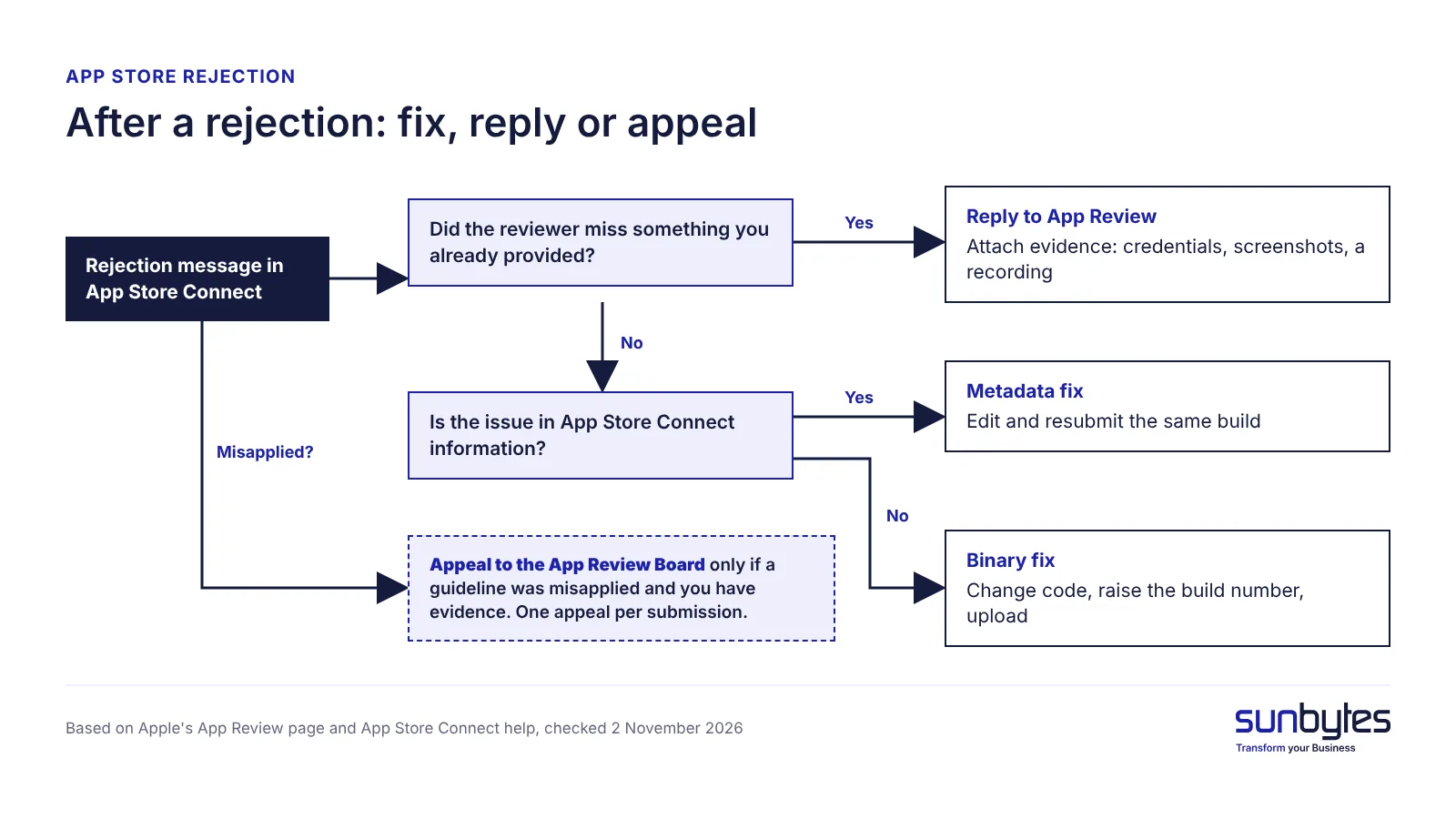
Start by reading Apple’s message, not by rebuilding. Apple’s App Review page states that a rejection names the guidelines the submission did not follow and that you can correspond with App Review before resubmitting.
- Read the App Review message in App Store Connect and note each guideline number. Apple’s help describes this as replying to App Review messages; older Apple material calls the area the Resolution Center.
- Decide between a metadata and a binary rejection. Metadata covers description, screenshots, links, privacy answers and review notes: fix it and resubmit the same build. A binary rejection needs a code change, a higher build number and a new upload.
- Reply to App Review when the reviewer missed something, such as demo credentials or how a feature works. Attach screenshots or a screen recording.
- Appeal to the App Review Board only when a guideline was misapplied. Apple allows one appeal per submission, so include step-by-step evidence.
A pre-submission check for AI-built apps
Ten checks cover the guidelines in this article. Run them on the build you plan to submit.
- Every flow, including failure paths, tested on a physical device through TestFlight
- Demo account with sample data in the App Review information, backend live
- Features beyond a website, template or single AI model call, described in the review notes
- StoreKit for digital goods, with entitlements validated on your server
- Privacy policy URL that loads, in App Store Connect and in the app
- App Privacy answers and purpose strings built from a full SDK inventory
- Privacy manifests for the listed third-party SDKs
- Disclosure and explicit permission before personal data goes to a third-party AI
- An equivalent login option meeting the 4.8 conditions, if you offer social login
- No prohibited downloaded executable code; EU trader status declared and contact details verified where required
Release itself, including rollback and monitoring after go-live, is covered in our go-live checklist.
How Sunbytes checks AI-built apps before submission
Several rejections in this article share one condition: the app was exercised on the paths its builder clicked, not on a reviewer’s device or against real data rules. Sunbytes’ AI-built product review starts from that condition. Software engineers and security specialists review the same product, covering its code, architecture, security, reliability and deployment, so one review addresses both the rejection causes and the backend checks Apple does not reach.
You receive findings with the evidence behind them, a prioritised action plan that separates what to fix now from what can wait, and a technical handoff your team or AI coding tool can act on, written in plain English. Your team can make the fixes, or ours can fix priority issues and check them again. Founded in 2011, Sunbytes brings 15 years of delivery experience across new products, platform work, integrations and modernisation, with more than 300 projects delivered. Access to your code and information during the review is handled under Sunbytes’ certified ISMS; project-specific security controls are scoped separately.
Scope depends on the app, its stack and its release plan, so we advise case by case. Talk to us about a review before your next submission.