

The speed score you saw in the builder measured the template. Your customers load the page after everything else was added: the hero video, the chat widget, the booking embed, the analytics and ad tags. Website performance optimization for an AI-built site starts with that gap. This guide shows where pages gain weight on Framer, Webflow and React or Next.js builds generated by an AI tool, which three metrics Google uses to judge the result, what to fix first, and how to keep the site fast once marketing starts adding to it.
TL;DR
Website performance optimization is the work of making pages appear, respond and stay stable faster for real visitors on real devices. On an AI-built site, start with what was added after generation and, on code builds, with how pages are rendered.
- Where AI-built sites gain weight: Framer and Webflow sites from full-resolution images, animations and third-party embeds; React or Next.js builds generated by an AI tool also from large JavaScript bundles and browser-side rendering.
- Which metrics count: the Core Web Vitals LCP (good: 2.5 s or less), INP (200 ms or less) and CLS (0.1 or less), for at least 75% of visits.
- What to fix first: the weakest Core Web Vital on your most important pages, traced to its measured cause; images and third-party scripts are practical starting points when measurements point to them, and rendering when critical content depends on client-side JavaScript.
- How to keep the site fast: one performance budget per page template, one owner who approves new scripts, and a monthly check of the 28-day field data in Search Console.
Why an AI-built site is slower than its speed score suggests
An AI-built site can score 90 or higher in the builder and still load slowly on a customer’s phone, because the two numbers measure different things. A builder score or a Lighthouse run is lab data: one test of one page, on a simulated device and connection. Field data is what real visitors experienced on their own devices and networks.
Google collects field data from Chrome users in the Chrome UX Report (CrUX). According to Chrome for Developers, PageSpeed Insights and Google Search Console both show CrUX data as a 28-day rolling average, updated daily. That window is why a site can look fine on launch day and fail a month later: the lab test ran on the empty template, while field data reflects the pages visitors load after content, embeds and tags were added.
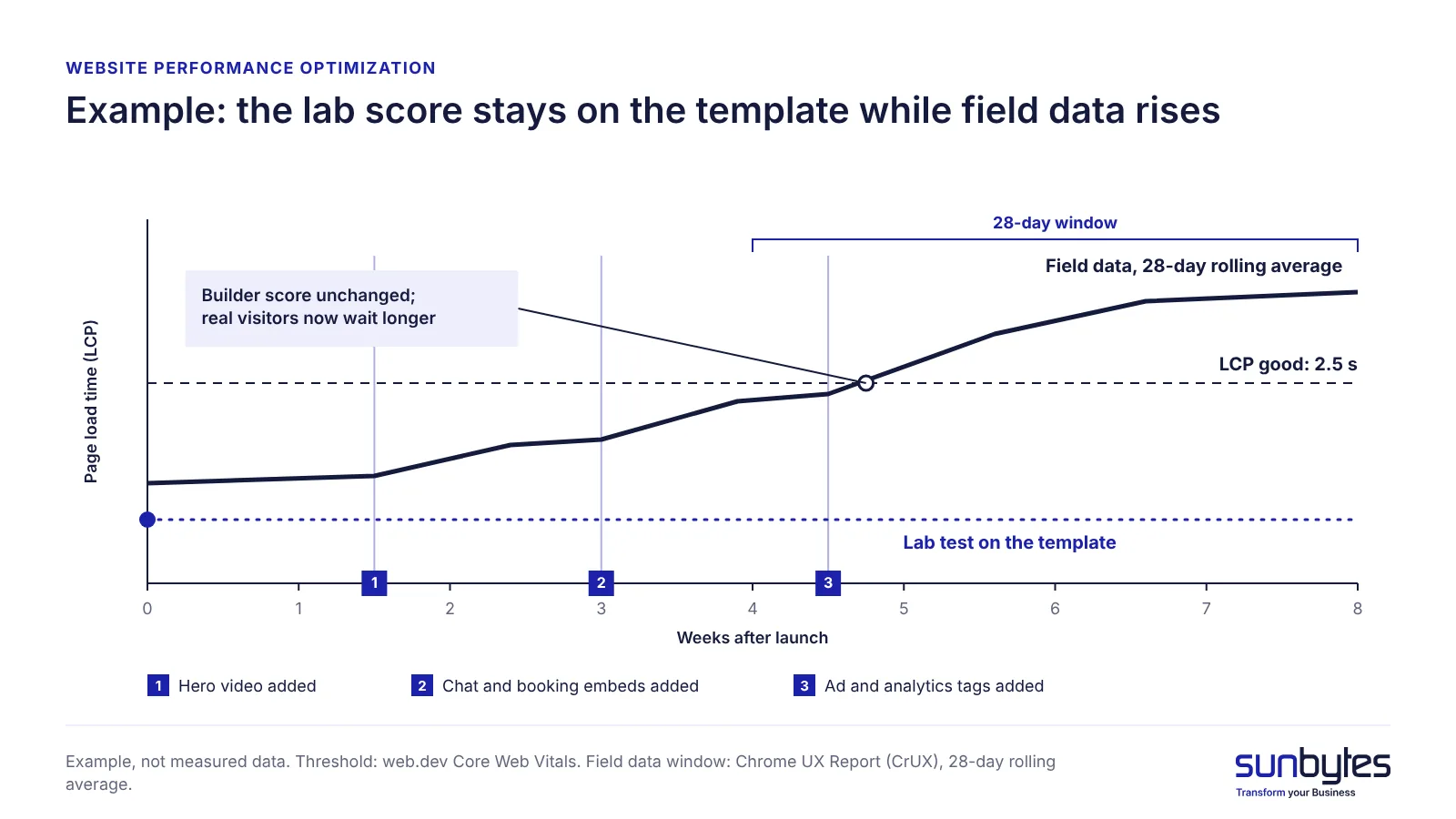
The gap costs money before it costs rankings. A paid click that lands on a page still loading its hero image is paid for whether or not the visitor stays to complete the form. Search visibility comes second: Google Search Central states that Core Web Vitals are used by its ranking systems, while relevant content still counts for more. Page speed is one of the checks in shipping AI-built products safely.
Next step: run your three most-visited pages, not only the home page, through PageSpeed Insights on the mobile tab, and read the field data before the lab score.
Core Web Vitals in plain language
Core Web Vitals are the three metrics Google uses to describe how a page feels to load and use. web.dev rates a page “good” when, for at least 75% of visits, each metric stays within its threshold:
- Largest Contentful Paint (LCP) measures how long the main content, such as the hero image or headline block, takes to appear. Good: 2.5 seconds or less.
- Interaction to Next Paint (INP) measures how quickly the page responds when a visitor taps a button, opens a menu or types in a form. Good: 200 milliseconds or less.
- Cumulative Layout Shift (CLS) measures how much the layout jumps while the page loads. Good: 0.1 or less.
Time to First Byte (TTFB), how long the server takes to start sending the page, is not a Core Web Vital, but a slow TTFB delays LCP on every page.
| Metric | What the visitor notices | Possible cause on an AI-built site | First fix |
|---|---|---|---|
| LCP | The main image or headline appears late | Full-resolution hero image or video background; content rendered by JavaScript in the browser | Resize and compress the hero image; render content pages on the server |
| INP | Taps and clicks respond late | Chat, booking and tracking scripts competing for the browser’s main thread; heavy animation code | Remove or delay third-party scripts; load embeds on interaction |
| CLS | Content jumps while loading | Images and embeds without reserved space; late font swaps; a consent banner pushing content down | Set image and embed dimensions; overlay the consent banner |
A low-traffic site may not have enough Chrome visits for CrUX to report field data; PageSpeed Insights then shows only the lab result, which becomes the best available guide. Fix whichever metric falls outside “good” on your top landing page first.
Where the weight comes from on AI-built sites
The weight on an AI-built site comes from two layers: what was added to the pages after generation, and how the platform or the generated code delivers them. On Framer and Webflow, the platform runs hosting and delivery, so the problems you can change sit in content and embeds. On a React or Next.js build generated by an AI tool, the code decides how much JavaScript loads and where each page is rendered, so the problems can sit deeper.
Framer and Webflow sites: images, interactions and embeds
On a Framer or Webflow site, speed is lost through decisions made in the editor. The sources to check are:
- generated or stock images uploaded at full resolution and displayed at a fraction of that size
- scroll and entrance animations on every section, which run script work while the visitor reads or taps
- video backgrounds in the hero, which compete with the main content for bandwidth
- third-party embeds such as chat, booking, review widgets and maps, each loading its own scripts
- tracking tags and custom code blocks pasted into the site head
- more than two web font families
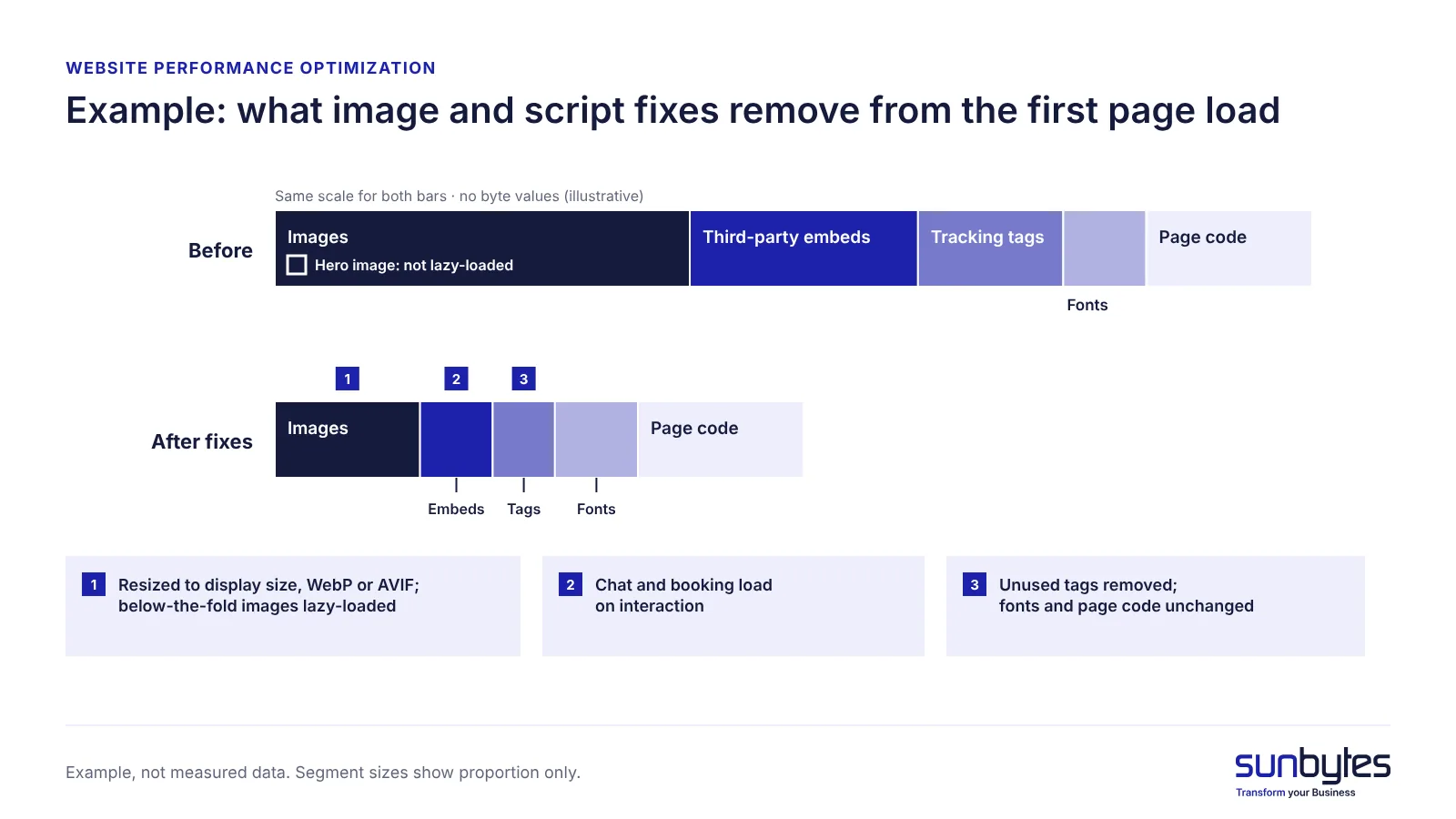
Images need two fixes: export them in WebP or AVIF at the size they are displayed, and lazy-load images and videos below the fold so they load only when the visitor scrolls towards them. Never lazy-load the hero image; web.dev advises against it because it delays LCP. Check what your platform already does with uploaded images first: the saving comes from files larger than their display size.
React and Next.js builds generated by an AI tool
A React or Next.js build generated by an AI tool can be slow for reasons no editor setting will fix. The main one is client-side rendering: the browser receives a nearly empty page and must download and run JavaScript before the content appears, which delays LCP on every visit. The other sources are code decisions:
- large bundles that include libraries the pages never use
- no code splitting, so every page loads the code for every other page
- images served at their original size and format, without an optimisation step
- hosting far from EU visitors, which raises TTFB on every request
If the site is mainly content pages (home, services, blog, pricing), server-side rendering or static generation is the default choice, as Rendering on the Web explains: the server sends ready HTML, so the main content can appear before the JavaScript has finished. Client-side rendering fits only app-like pages behind a login, where visitors load a dashboard once and then work in it.
If your site runs on WordPress
WordPress sites lose speed in other places: PHP execution, the database, caching plugins and theme weight. Those fixes are covered in our guide to WordPress performance optimisation. The consent and monitoring sections below apply to WordPress sites as well.
On a builder site, the speed problems you can change are mostly content and script decisions. On a generated code build, they can also sit in how pages are rendered, which a single score does not show. An independent AI-built product review looks at the code, the scripts and the data those scripts send, and gives you a prioritised list of what to fix first.
What to fix first: prioritise the measured bottleneck
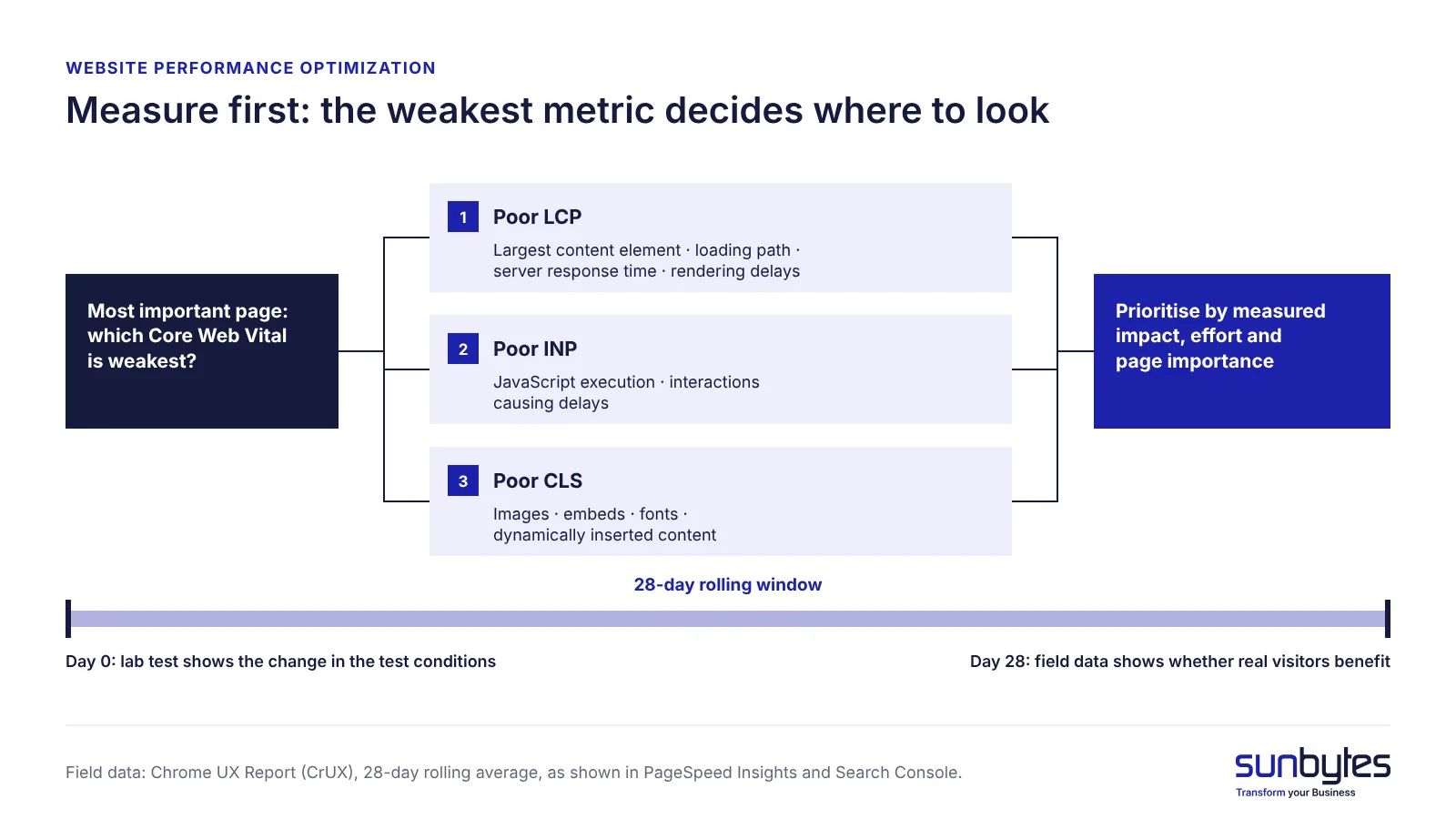
Start with the pages that matter most to your business, such as landing pages that receive paid traffic or generate leads. Check their Core Web Vitals and use a lab test to investigate the resources or rendering work behind the weakest metric.
If LCP is poor, inspect the largest content element, its loading path, server response time, and rendering delays. If INP is poor, investigate JavaScript execution and the interactions causing delays. If CLS is poor, look for images, embeds, fonts, or dynamically inserted content that change the layout.
Images and third-party scripts are practical starting points when measurements show they contribute to the problem. On a React or Next.js site, review the rendering strategy when critical content depends on client-side JavaScript. Prioritise changes by measured impact, implementation effort, and the importance of the affected page.
The fixes below are common on AI-built sites; treat them as examples to apply once measurements point to them. Measure with PageSpeed Insights for field and lab data per page, Lighthouse in Chrome DevTools for repeat lab tests, and the Search Console Core Web Vitals report for groups of pages over time.
- Images on the top landing pages. Resize to display size, convert to WebP or AVIF, lazy-load below the fold. Who: marketer on a builder, developer on a code build. How to verify: lab LCP drops and the hero image is no longer the largest request.
- Third-party scripts and embeds. Identify scripts that are no longer needed and remove them. For non-essential chat, booking, or video embeds, consider loading them when the visitor interacts with a lightweight placeholder (web.dev). Who: marketer, with the owner of each third-party tool and developer support where required. How to verify: compare Total Blocking Time (TBT), main-thread activity, and script execution in controlled lab tests. Where sufficient field data is available, monitor INP to assess real-user responsiveness. An improvement in lab TBT does not automatically establish an improvement in field INP.
- Fonts and animations above the fold. Limit the site to two font families and remove entrance animations from the first screen. Who: designer or marketer. How to verify: CLS stays at or below 0.1 and the headline appears without waiting for an animation.
- Caching and CDN. On a code build, serve static files with long cache headers from a content delivery network (CDN), a network of servers that delivers files from a location close to the visitor, and host in an EU region. On Framer or Webflow, confirm the platform defaults instead. Who: developer. How to verify: TTFB for EU visitors improves.
- Rendering strategy and bundle size (code builds only). Move content pages to server-side rendering or static generation, split code per page and remove unused libraries. Who: developer. How to verify: the main content is in the HTML before JavaScript runs.
- Re-measure field data after 28 days. Lab tests show the change the same day; field data needs a full 28-day window to show whether real visitors benefit. Who: site owner. How to verify: the URL group moves to “good” in the Search Console Core Web Vitals report.
Cookie consent, tracking tags and speed
For EU websites, loading tracking tags only after consent is both the legal set-up and the faster one. Under Article 11.7a of the Dutch Telecommunications Act (Telecommunicatiewet), which implements the EU ePrivacy rules, a website needs the visitor’s consent before it places or reads tracking cookies; the Autoriteit Persoonsgegevens explains when analytics cookies with little privacy impact are exempt. When non-essential tags wait for consent, the first page view loads fewer scripts, which helps LCP and INP for every visitor who has not yet answered the banner.
An AI-built site can be set up the other way round: a template ships with analytics and ad pixels hard-coded in the page head, and a consent banner is added on top. The tags then load before the visitor answers, so the page is slower and the banner does not control what it claims to control. Load each non-essential tag through the consent tool instead. Our GDPR website checklist covers the consent requirements in detail.
Check it in five minutes: open the page in a private window, decline consent, open the Network tab in Chrome DevTools and reload. No request should go to an analytics or advertising domain.
How to keep the site fast after launch
A site stays fast when every new script, widget and section has to fit inside a limit someone checks. A performance budget is that limit: a maximum page weight, request count or metric value that a page must stay within (web.dev). Set one budget per page template, such as the home page, a landing page and a blog post, because each template carries different content.
- One owner for new scripts. One named person approves every new tag, widget or embed before it goes live, and removes tools the business no longer uses.
- Re-test after every addition. Run PageSpeed Insights on the affected template after adding a widget, a tag or a section, and compare the result with its budget.
- Monthly field-data check. Open the Search Console Core Web Vitals report once a month. Because it reflects the previous 28 days, a regression that appears there started weeks earlier; trace it to the changes made in that period.
When a template goes over its budget, remove or delay something before adding the new item.
How Sunbytes reviews AI-built sites
A website that looks ready in a preview may still have technical issues affecting real users. Understanding these issues can require reviewing the generated code, product behaviour, dependencies, and deployment setup rather than relying on a performance score alone.
Sunbytes’ AI-Built Product Review brings software engineering and security expertise together to assess the agreed areas of an AI-built product. Depending on the product and review scope, this can include relevant code and architecture risks, third-party dependencies, critical workflows, configuration, and operational readiness.
The review provides findings with supporting evidence, a prioritised action plan, and a technical handoff your team can use to plan remediation. Specific website performance diagnostics, Core Web Vitals testing, or optimisation work should be discussed separately during scoping rather than assumed to be included in every review.
Sunbytes brings experience from 300+ delivered projects, supported by an ISO/IEC 27001-certified information security management system.
If you want an independent assessment of your AI-built website’s wider technical readiness, explore Sunbytes’ AI-Built Product Review and discuss the components and performance concerns you want included.