

A demo shows that a workflow can run in a limited scenario. Web app load testing provides evidence of how the same workflow behaves under a defined workload, which is what a founder needs before a launch, a campaign or a sales push. This guide covers four decisions: the traffic target, the flows to test, how to read the results, and whether to launch, fix first or rework.
TL;DR
An AI-built app is ready for launch traffic only when a representative load test meets thresholds agreed in advance: p95 response time, error rate and dependency capacity, at the forecast peak plus agreed headroom. No load test guarantees every real-world condition; it shows how the app behaves under the workload you defined.
- Set the target first: convert the launch or campaign forecast into peak concurrent sessions, then agree a p95 response-time threshold and a maximum error rate for each critical flow.
- Test the flows that earn revenue: sign-up or login, the product’s core action, checkout or payment, and any AI model call made inside a user request.
- Fix the first bottleneck the results show, then re-run the identical test script and compare against the recorded baseline before moving to the next one.
- Decide with pre-agreed conditions: go when every critical flow meets its thresholds at peak plus headroom, fix first when a bottleneck is isolated and diagnosable, rework when the architecture prevents meeting the thresholds.
How much traffic should your AI-built app handle?
Your AI-built app should handle the peak concurrent sessions derived from your own launch forecast, plus headroom agreed with your engineer. No universal number applies, and the calculation starts from a documented forecast, not from the number of registered users.
Five numbers need to stay separate in that calculation. Registered users are accounts. Visits are arrivals in a period. Active sessions are people interacting within a time window. Concurrent users are sessions active at the same moment. Requests per second is the number of calls the server receives. A thousand sign-ups is not a thousand people using the app at once.
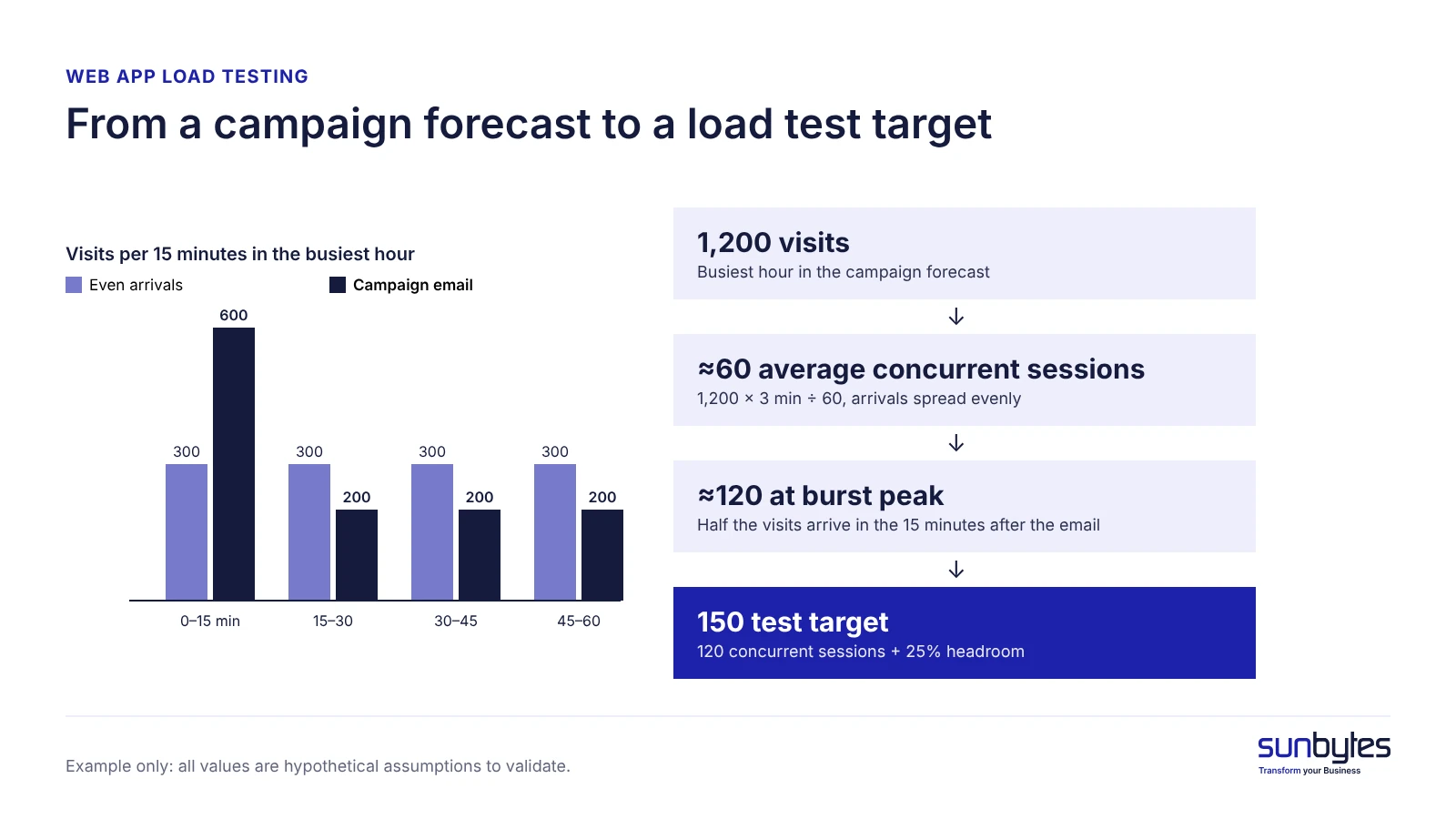
Example: a campaign plan forecasts 1,200 visits in the busiest hour, and beta analytics show an average active session of 3 minutes. With arrivals spread evenly, 1,200 × 3 ÷ 60 gives about 60 average concurrent sessions. A campaign email does not spread arrivals evenly. If the engineer assumes half of those visits arrive in the 15 minutes after the send, that quarter-hour runs at 2,400 visits per hour, which gives about 120 concurrent sessions at peak. With 25% headroom agreed for this example, the test target becomes 150 concurrent sessions. Every input is an assumption to validate, not an industry ratio.
Three metrics turn that target into a pass or fail line. p95 response time is the time within which 95 of every 100 requests complete. Error rate is the share of requests that fail. Throughput is the number of requests the app handles per second. Google’s Site Reliability Engineering book explains why the threshold uses a percentile: “We generally prefer to work with percentiles rather than the mean,” because an average can hide a long tail of slow requests. A p95 threshold tells you how the slowest 5% of checkouts perform under the tested workload, which an average cannot.
Pick three to five business-critical workflows: sign-up or login, the core action of the product, checkout or payment, and search or dashboard load. The founder sets the thresholds from user experience, service level objectives and commercial risk; the engineer turns them into a test script. A threshold agreed before the test is worth more than a long report after it, because it turns the result into a yes or no instead of a debate.
| Flow | Estimated target concurrency | p95 threshold | Max error rate | Dependency constraints |
|---|---|---|---|---|
| Sign-up / login | 45 sessions | ≤ 800 ms | < 1% | Email provider stubbed |
| Dashboard load | 60 sessions | ≤ 1,500 ms | < 1% | Database reads only |
| Core action with an AI model call | 30 sessions | ≤ 8,000 ms | < 2% | Model provider rate limits on your account |
| Checkout / payment | 15 sessions | ≤ 1,000 ms | < 1% | Payment provider sandbox |
What does load testing tell you?
Load testing tells you how an app behaves under a defined workload: whether it stays stable, how fast it responds and where capacity runs out. Load testing is a performance test that simulates concurrent real-user traffic against an app to check its stability, speed and capacity. Concurrent users are the sessions active at the same moment, and response time is the time from a request to a complete response.
A demo shows that a workflow can run once. A load test provides evidence of how the same workflow behaves when the forecast workload arrives together, which makes it one of the checks in shipping AI-built products safely. For an AI-built app, website load testing that only requests pages is not enough: the script has to exercise sign-up, the core action and checkout, because those flows touch the database, the payment provider and the model API.
Load testing sits within broader performance testing before launch, and its scope ends at capacity. It does not show whether user data is secure, whether features return correct results or whether the code is maintainable; those questions need security testing, functional testing and code review.
Load, stress, spike and soak testing
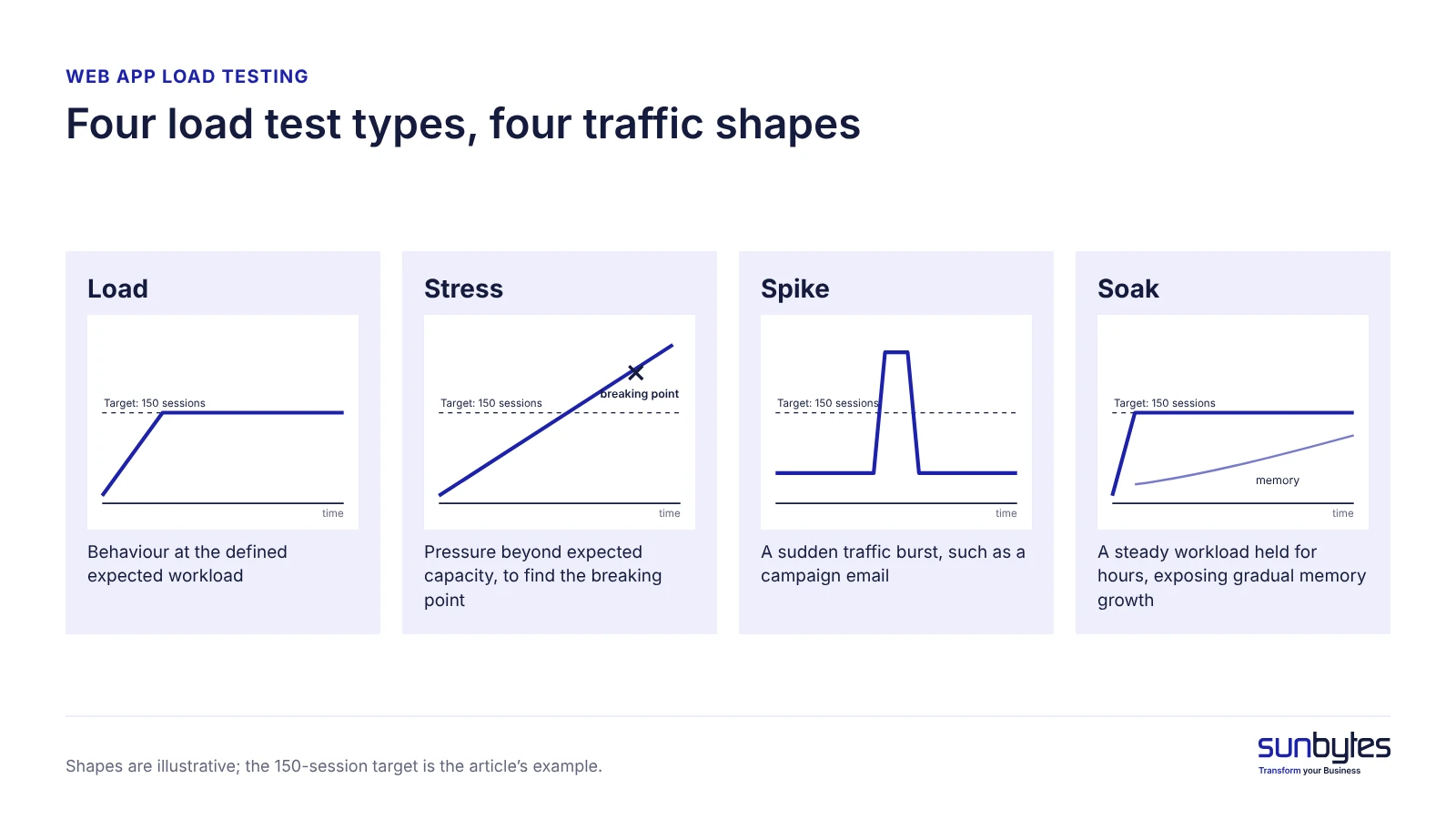
Load, stress, spike and soak testing answer four different capacity questions, and a founder does not need all four before every launch.
| Test | What it checks | When a founder needs it |
|---|---|---|
| Load | Behaviour at the defined expected workload | Before any launch, at forecast peak plus headroom |
| Stress | Pressure beyond expected capacity, to find the breaking point | When you need to know how far past the forecast the app can go |
| Spike | A sudden traffic burst, such as a campaign email or press mention | Before a campaign or launch announcement |
| Soak | A steady workload held for hours, exposing gradual memory or queue growth | When the app runs background jobs or long sessions |
Start with load and spike tests if you are launching or running a campaign. Add a soak test if the app runs background jobs, scheduled AI processing or sessions that stay open for long periods, because slow resource leaks can take hours to appear.
How to load test your AI-built app before launch
Load test your AI-built app in five steps: agree the workload, prepare a production-like staging environment, measure a baseline, ramp to peak plus headroom, then fix and re-test with the same workload. Release-day work such as UAT, rollout and the first 14 days of monitoring belongs to the go-live checklist; the load test comes before it and feeds its go decision.
A five-step load testing process
- Agree the workload. Write down the critical flows, how users arrive (evenly or in bursts), the forecast peak, the thresholds and a stop condition, for example halting the run when the error rate passes 5%.
- Prepare a production-like staging environment. Match the production database size, hosting plan and configuration as closely as budget allows. Stub or sandbox every dependency with side effects: payment, email, SMS and AI model APIs. Document what is simulated, because a stubbed dependency is not tested.
- Measure a low-concurrency baseline. Run the flows with a handful of sessions (5 in the example) to record normal p95 and error rate before any load.
- Ramp to peak and headroom. Increase sessions gradually to the forecast peak, then to peak plus headroom (150 sessions in the example), then run a spike test, and a soak test when it applies.
- Compare, fix and repeat. Compare actuals with the thresholds, investigate the first failure, fix it and re-run the identical workload.
Mocked AI replies isolate your app’s own performance, but they cannot verify live model latency or throttling. Model providers enforce rate limits: OpenAI’s rate limit documentation, for example, measures them in requests per minute (RPM) and tokens per minute (TPM), among other metrics, and returns a 429 error when a request exceeds a limit. Plan one bounded, authorised run against the real API, at low concurrency and with a spending cap, to measure actual latency and where your account’s limits sit.
Re-test after every fix with the identical script and workload, and compare against the recorded baseline, not against memory. Changing the script and the code at the same time makes it impossible to tell which change moved the numbers. Ask whoever runs the test for six items: the completed target-versus-actual table, the workload assumptions, the list of stubbed dependencies, the bottlenecks observed, retest evidence after each fix, and a go, fix-first or rework recommendation.
What load testing tools can and cannot tell you
Load testing tools measure what happened: p95 response time, throughput, error rate and whether each configured threshold passed. Some integrate with profiling or tracing to show where the time went. What a tool cannot supply by itself is the context for those measurements: whether the workload was representative, how the code and architecture are built, and which dependencies were stubbed.
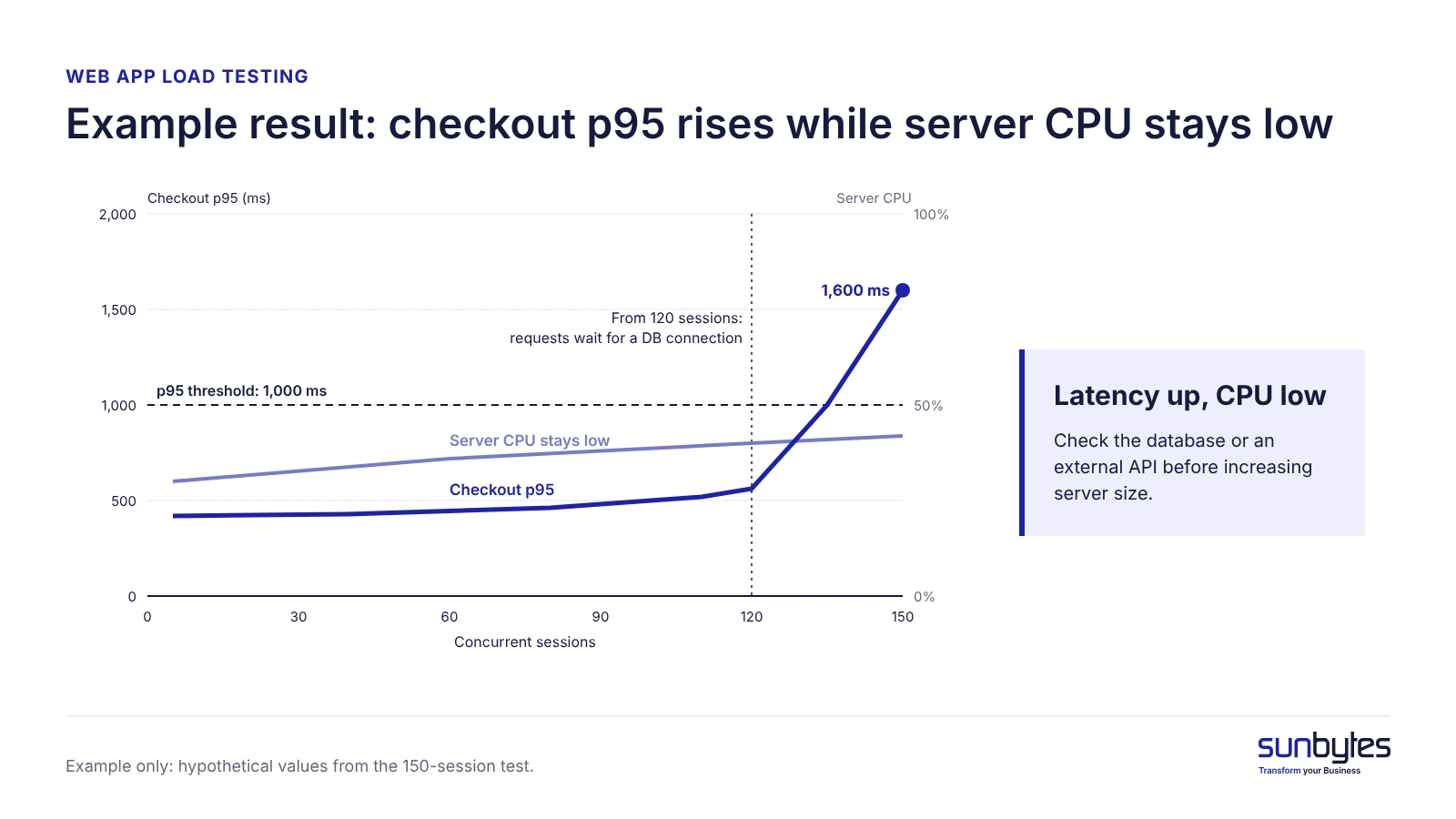
Example: p95 latency that climbs from 120 concurrent sessions could relate to slow database queries, a saturated connection pool or a throttled model API, and the metrics alone may not establish which. A human engineering review adds that judgment. It connects the measurement to the code, ranks the possible causes by business impact and decides what to fix first. The review does not replace the load test; it interprets it.
How to interpret load test results and decide what to fix
Interpret load test results in a fixed order: compare measured results with the agreed targets, form a hypothesis for each failure, assign a fix and an owner, then make the go, fix-first or rework call. A test can reach its target concurrency and still fail, because achieving the workload is not the same as passing the performance thresholds.
| Metric | Agreed target (example) | Observed result (example) | Pass / fail | Evidence / notes |
|---|---|---|---|---|
| Concurrent sessions reached | 150 | 150 | Pass (workload only) | Ramp completed; not a performance pass on its own |
| Checkout p95 response time | ≤ 1,000 ms | 1,600 ms | Fail | Latency climbs from 120 sessions |
| Checkout error rate | < 1% | 2.1% | Fail | Timeouts on the payment confirmation step |
| Throughput | Recorded as baseline | 38 requests per second at peak | Not scored | Flattens while sessions still rise |
| Database connection pressure | No requests waiting for a connection | Requests wait for a connection from 120 sessions | Fail | Connection pool exhausted during the spike |
| AI API throttling | No 429 responses in the bounded real-API run | 429 responses at 30 sessions | Fail | Account rate limit reached |
Record the conditions with the results (load-generator location, test data realism, stubbed dependencies, duration and stop condition), or the next run cannot be compared with this one.
When an app has been validated only with light traffic or small data volumes, rising concurrency can expose slow queries, API throttling or queue build-up, whether a person or an AI tool wrote the code. Five patterns are worth checking first, each listed with its business consequence:
- Pages slow down as data grows: queries that run once per item in a list (the N+1 query pattern) and missing indexes, the lookup structures that let a database find rows without scanning a whole table.
- Every visitor triggers the same expensive work: no caching, which stores a computed result for reuse.
- One heavy user or bot can exhaust capacity: no rate limiting, which caps how many requests one client can send in a period.
- Each extra user becomes an extra paid call: an AI model API called inside the user’s request, so the app inherits the provider’s latency and rate limits.
- Every page loads slowly on mobile: heavy front-end bundles that push large JavaScript files to each device.
Hosted databases such as Supabase have connection limits that a burst of traffic can reach. Connection pooling lets many requests share a small set of open database connections, and Supabase’s connection documentation recommends its transaction-mode pooler for serverless and edge functions, which open many short-lived connections. Query and index fixes are covered in depth under database performance. One signal narrows the search: if response time rises steeply while server CPU stays low, suspect the database or an external API before the server size.
| Symptom | Likely cause | Fix type | Who owns the fix |
|---|---|---|---|
| p95 climbs as data volume grows | N+1 queries or missing indexes | Rewrite queries, add indexes | Backend engineer |
| Requests wait for a database connection during bursts | Connection pool exhausted or too many direct connections | Connection pooling and pool sizing | Backend or DevOps engineer |
| 429 errors or long waits on AI features | Model provider rate limit reached | Queue or batch calls, cache repeated prompts, request a higher limit | Backend engineer with the account owner |
| Memory grows during a soak test until the app restarts | Memory leak or unbounded in-memory queue | Fix the leak, bound the queue | Backend engineer |
| CPU near 100% while response time rises | Expensive computation on every request | Cache results and optimise code, then size hosting | Backend or DevOps engineer |
AI cost exposure follows the same workload. Estimated AI API spend equals the number of model calls multiplied by the average cost per call, adjusted for input and output tokens, retries and caching. Example: if 20% of the 1,200 campaign visits run the core action and each run makes 4 model calls, the busiest hour generates 960 calls; with 5% retries after throttling, about 1,008. Multiply that by the per-call cost shown in your provider’s dashboard before the campaign starts.
A larger hosting plan can raise the monthly bill without resolving inefficient queries, AI provider throttling or missing caching, because none of those bottlenecks sits in server size; diagnose first.
| Decision | Conditions agreed before the test | Next step |
|---|---|---|
| Go | Every critical flow meets its p95 and error-rate thresholds at forecast peak plus headroom, with no unacceptable dependency failures | Continue with the go-live checklist |
| Fix first | Failures are isolated and diagnosable, such as one slow query or a pool setting | Fix, re-run the identical test, launch only after a pass |
| Rework | The architecture prevents meeting the thresholds, or reliable remediation is not feasible | Revisit the architecture before launch |
In the example, checkout fails on p95 and error rate, the connection pool saturates and the AI API throttles at 30 sessions. Connection pooling and a queue for model calls are isolated fixes, so the call is fix first, followed by a retest at 150 sessions. A passed test is evidence for the tested workload, not a certification of every production condition. Do not launch a campaign until the spike test passes at the target.
If the cause of a failure cannot be confirmed from the test results, an independent AI-built product review can help evaluate the code and architecture behind the bottleneck.
EU data responsibilities when load testing
Where your app’s processing falls within the GDPR’s scope, Article 32 of the GDPR requires security measures appropriate to the risks. Paragraph 1(b) covers the continued availability and resilience of processing systems and services, alongside confidentiality and integrity. Paragraph 1(d) calls for regular testing and evaluation of security measures. Neither provision specifically requires load testing. Where relevant to the risks, load-test results can support evidence about availability and resilience under the tested conditions; they do not establish GDPR compliance on their own.
Use synthetic or appropriately de-identified data in staging by default. This is a recommended testing policy informed by the data minimisation principle in Article 5(1)(c), which limits personal data to what is necessary for the purpose; copying live customer data into staging would need its own lawful basis, safeguards and risk assessment. A load test needs realistic data volume, not real identities.
If you supply software or services to organisations within the scope of the NIS2 Directive, those customers may request evidence of resilience as part of their supplier assessments. Article 21(2)(c) covers business continuity, disaster recovery and crisis management, while Article 21(2)(d) covers supply chain security involving direct suppliers and service providers. A relevant load-test report may support that assessment, but Article 21 does not prescribe a specific load test or report for every supplier.
Keep the target table, the test date, the test conditions and the results as a one-page record for customers and auditors.
How Sunbytes reviews performance testing before launch
A load test shows where an AI-built app slows down or fails under a defined workload; it does not explain why the code, architecture or dependencies behave that way. Sunbytes treats measurement and review as separate activities. The AI-built product review is an independent technical review of agreed scope across five areas: security and data, code and architecture, reliability and critical flows, deployment and operations, and maintainability and code ownership. Because security and code sit in the same review, a slow checkout is examined together with the error handling, dependencies and deployment set-up behind it.
The review produces clear findings with the evidence behind them, a prioritised action plan that separates what to fix now from what can wait, and a technical handoff your team can act on. Load test execution, capacity certification and guaranteed launch capacity are not included by default. If you need a load test run or the fixes implemented, Sunbytes’ product engineering team can scope that work separately.
The work runs under Sunbytes’ ISO 27001-certified information security management system, with Netherlands-led delivery backed by 15+ years in software delivery and 300+ projects delivered.
Planning a launch or campaign for an AI-built app? Talk to us about an AI-built product review; every product is different, so the scope is agreed case by case.