

Vibe coding best practices are the working habits that keep an app built with an AI coding tool easy to change, test and hand over once real users depend on it. They apply from the moment you plan to let people outside your team use the product.
This guide is for founders who build with AI and intend to launch. It gives you seven practices in the order to start them, a comparison with traditional development, a plan for which practices each stage needs, and clear signals for when to bring in an engineer. The practices are about process, not prompts: AI changes who writes the code, but someone still has to be able to undo, check and explain every change. They are one part of shipping AI-built products safely.
TL;DR
Vibe coding best practices are process habits, not prompting tricks: they make every change an AI coding tool makes reversible, testable and explainable. Put them in place before people outside your team use the app, and plan a second-person review before each step up in risk: outside users, personal data, payments and fundraising.
- Seven practices: Git from the first working version, a written specification, one change per prompt, tests for every flow that handles money or data, no real customer data in prompts or tests, a decision log, and a review point before each step up in risk.
- Vibe coding vs traditional coding: AI changes who writes the code; version control, tests, review and ownership still need an owner, and with vibe coding that owner is the founder.
- Practices by stage: Git and the specification on day one; tests, separate test data and a first review point before outside users; the decision log and another review point before personal data or payments.
- When to bring in an engineer: when you can no longer judge whether a change is correct, for example when the same bug returns after three attempts to fix it by prompt.
What vibe coding best practices are for
Vibe coding best practices exist so that every change the AI makes can be undone, checked and explained by someone other than the AI. If you need the background on the method itself, start with what vibe coding is; this guide assumes you already build this way.
Prompting skill gets a demo working. The practices below decide what happens after the demo: when a customer reports a bug, when a change breaks sign-up, or when a developer or investor asks how the product works. A founder who can answer “what changed yesterday, and how do we know the app flow still works?” is in a different position from one who can only prompt again and hope.
7 vibe coding best practices for founders who plan to ship
The seven practices below are ordered by when to start them, from the first working screen to the first paying customer. Each one prevents a different problem: lost work, scope drift, untraceable changes, silent breakage, exposed customer data, lost knowledge and unchecked releases.
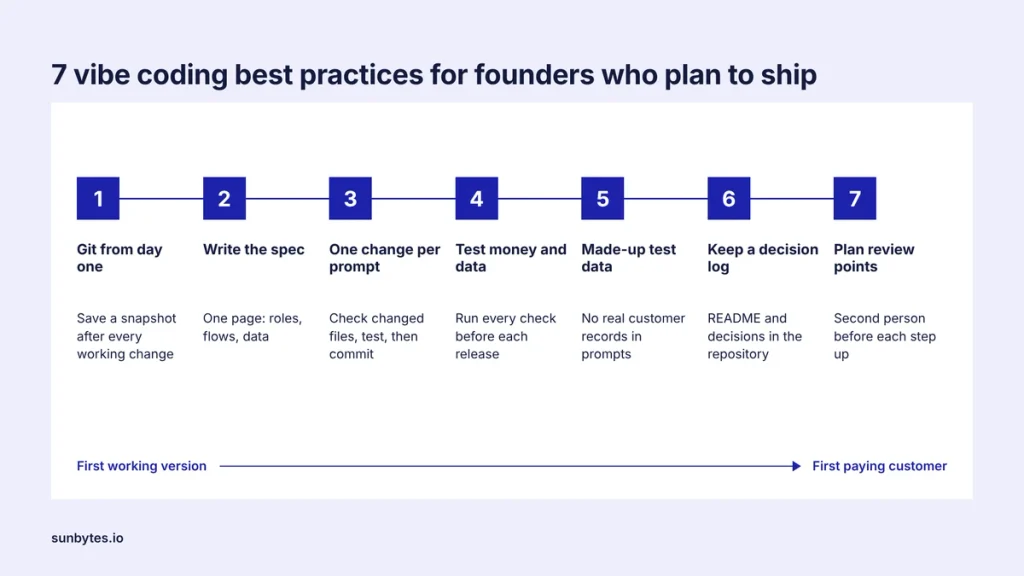
1. Put the project in Git from the first working version
Connect the project to a Git repository as soon as the first screen works, and save a snapshot after every change that works. Git is a version control system: it records each saved state of the code, so a prompt that breaks the app can be undone in one step instead of repaired with more prompts.
AI coding tools can rewrite several files in response to one prompt. Without version control, nobody can see which files changed or return to the version that worked. Each saved snapshot is called a commit; give it a one-line description of what changed, and commit before any large prompt so you know where to go back to. Signal that this practice is missing: nobody can tell you what the app looked like yesterday.
2. Write down what the product must do before you prompt
Keep a one-page specification that lists the user roles, the core flows and the data each flow stores, and point the AI coding tool to it at the start of every session. A written scope gives the AI fixed boundaries and gives you something to test the result against.
Without a specification, each prompt decides scope again, and behaviour shifts between sessions because the AI only knows what the current conversation tells it. The specification does not need to be technical: “A customer can see only their own invoices; an admin can see all invoices” is a usable line. Signal that this practice is missing: a user role sees screens it was never meant to see.
3. Change one thing per prompt and check the result
Ask the AI coding tool for one change at a time, check which files changed, test the flow that change affects and then commit it. Small steps make a bad change cheap to find and cheap to undo, because only one change could have caused the problem you see.
A prompt such as “build the whole dashboard” can touch dozens of files at once, and a bug that appears two days later is buried among them. Checking does not mean reading code line by line: ask whether each changed file belongs to the change you requested. A change to the payment screen should not also edit the login code. Signal that this practice is missing: a bug you fixed last week returns after an unrelated prompt.
4. Keep a test for every flow that handles money or data
List the flows that would cost you customers if they broke: sign-up, login, payment, and saving and showing customer data. Keep an automated test or a written click-through check for each of these flows, and run every one of them before each release to users.
An AI coding tool fixes the problem in front of it and can change shared code that another flow depends on. A regression test catches that: it checks that a feature which worked before still works after a change. Ask the AI coding tool to write the test from your specification, then confirm the test fails when the feature is switched off. Signal that this practice is missing: customers find the breakage before you do.
5. Keep real customer data out of prompts and test environments
Build and test with made-up data in a separate test environment, and do not paste real customer records into prompts. Real personal data belongs only in the live product, where access is controlled and every use of that data has a purpose you can explain.
A test environment, also called staging, is a copy of the app where changes are tried before they reach customers. Text pasted into a prompt is sent to the provider of the AI coding tool, whose terms decide how long it is kept. GDPR Article 5(1)(c) limits personal data to what is necessary for the purpose, and made-up records test the same flows without involving a real person. Signal that this practice is missing: the app has one database for building and for live customers.
6. Record prompts and decisions where the next developer can find them
Keep a short README and a decision log in the repository, recording which AI coding tool built which part, which outside services hold data and why the main design choices were made. The next developer, investor or reviewer reads the repository, not your chat history.
Knowledge that lives only in the chat threads of an AI coding tool can be lost when a session is cleared or a subscription ends. A decision log can be one line per decision: “12 May: invoices stored in the main database, not in the payment provider, so finance can export them.” With that record, a new developer sees why the code looks the way it does before changing it. Signal that this practice is missing: only one person can explain how the app works.
7. Set a review point before every step up in risk
Plan a check by a second person before each step up in risk: the first outside users, the first personal data, the first payment and any fundraising round. A review point is a date in the plan, agreed in advance, not a reaction to an incident that has already reached customers.
In Veracode’s 2025 GenAI Code Security Report, more than 100 language models completed 80 coding tasks, and 45% of the results contained a security weakness from the OWASP Top 10 list. That figure describes selected test tasks, not complete applications, but it shows that working code and safe code are separate questions. What a security check covers is set out in vibe coding security risks.
A working demo does not show whether a vibe-coded app is ready for real users.
An AI-built product review checks security, code structure, critical flows and deployment before your next step up in risk.
Vibe coding vs traditional coding: what changes in the process
Vibe coding vs traditional coding is mainly a difference in who writes the code and how fast it appears. Version control, testing, review and ownership still have to happen, and with vibe coding the founder has to put them in place deliberately.
| Part of the process | Traditional development team | Vibe coding | What the founder adds |
|---|---|---|---|
| Writing code | Developers write it | The AI coding tool generates it from prompts | A written specification the prompts refer to |
| Structure and architecture | Agreed by developers before building | Decided prompt by prompt unless constrained | Constraints in the specification; an engineer review before growth |
| Tracking changes | Commits in Git by each developer | Only if the project is connected to Git | Git from the first working version, one change per commit |
| Testing | Written and run by developers | Only when someone asks for tests | A test for every flow that handles money or data |
| Review | A second developer reviews changes | None unless someone plans it | A review point before each step up in risk |
| Documentation | Docs and tickets | Chat history in the AI coding tool | README and decision log in the repository |
| Ownership after launch | The team that wrote the code | Unclear unless assigned | A named owner for each part, recorded in the README |
A development team can build these habits into its process before features ship. An AI coding tool does not set them up unless someone asks for them, so each habit becomes a decision the founder makes. Treat the right-hand column as the minimum process around an AI coding tool. If you cannot name who does each item in your project, that item is not happening.
Which practices to start with at each stage
Start Git and the specification on day one, add tests, separate test data and a first review point before anyone outside the team uses the app, and add the decision log and another review point before you process personal data or take payments. Each stage adds practices; none replaces the ones before it.
| Stage | Practices in place | What you should be able to show |
|---|---|---|
| Prototype only you use | Git, specification, one change per prompt | The commit history and the one-page specification |
| First outside users | Add tests for money and data flows, a separate test environment with made-up data, and a first review point | A test run before each release, a live database used only by live users, and the first review findings |
| Personal data or payments | Add the decision log and a review point before go-live | Review findings and what was fixed |
| Fundraising or handover | All seven practices, up to date | A repository a new developer can run from the README |
A prototype that only you use can live with gaps. The same gaps carry more weight once a customer relies on the app, because a lost change or a broken login now affects someone else’s work. If you are deciding whether the prototype itself is ready to become the product, the checks for vibe coding an MVP cover that decision.
When to bring in an engineer
Bring in an engineer when you can no longer judge whether a change is correct, not when the app stops working. By the time the app stops working, customers may already have seen the problem.

| Signal | What it means | Next step |
|---|---|---|
| The same bug returns after three attempts to fix it by prompt | The AI coding tool is patching symptoms; the cause sits in code you cannot judge | Ask a developer to read the code around the bug |
| You cannot explain what the last change did | Changes reach users without anyone understanding them | Pause releases and have a developer review the recent commits |
| The app takes payments or stores personal data | A mistake now costs money or exposes people | An independent review before go-live |
| Someone else will maintain the app | Their first weeks depend on what is written down | A code walkthrough using the README and decision log |
| An investor or customer asks for evidence of quality or security | They need a view from outside the team | An independent review with written findings |
Before you book an engineer or a review, run the production readiness checklist. It turns the questions in this table into a list you can work through yourself, so the engineer’s time goes to the findings, not to discovering the basics. If two or more signals in Table 3 apply, plan an independent review before your next release to real users.
How Sunbytes reviews vibe-coded products before launch
The seven practices make a vibe-coded app reviewable: its history is in Git, its scope is written down and its critical flows have tests. A review then answers the question the practices cannot answer on their own: is this product ready for paying customers and personal data?
Sunbytes’ AI-built product review looks at five areas together: security and data, code and architecture, reliability of critical flows, deployment and operations, and maintainability and code ownership. Engineering and security are reviewed by the same team. Every finding comes with the evidence behind it and a plain-English explanation, and the review is separate from any rebuild work, so your team decides what to fix. Sunbytes brings 15+ years in software delivery and 300+ delivered projects, and works under an ISO 27001-certified ISMS with Netherlands-led governance.
What a review should cover depends on your product and stack, so scope is agreed case by case. Talk to us about a review before your next step up in risk.