

Many businesses invest heavily in building websites, yet still struggle with low engagement, high bounce rates, and missed conversions. The problem often isn’t the technology, it’s how users experience and interact with the product. When navigation feels confusing or interfaces fail to guide users clearly, even the most advanced platforms can underperform. This gap between functionality and usability is where UX UI design becomes critical.
This article will walk you through what UX UI design means, how UX and UI differ, the design process, key tools, and how to apply them to build high-performing, user-centered websites.
TL;DR
- UX design focuses on user experience, ensuring digital products are intuitive, efficient, and aligned with user needs and behaviors.
- UI design focuses on the interface, shaping how a product looks and feels through visual elements like layout, colors, and interactive components.
- UX and UI work together to create seamless, engaging digital experiences that improve usability and user satisfaction.
- An effective UX/UI design process includes research, structuring, prototyping, visual design, and continuous testing to optimize performance.
- Partnering with Sunbytes helps you apply UX/UI strategically, combining design and development expertise to build scalable, high-performing digital products.
Read our complete guide on website development to building modern websites.
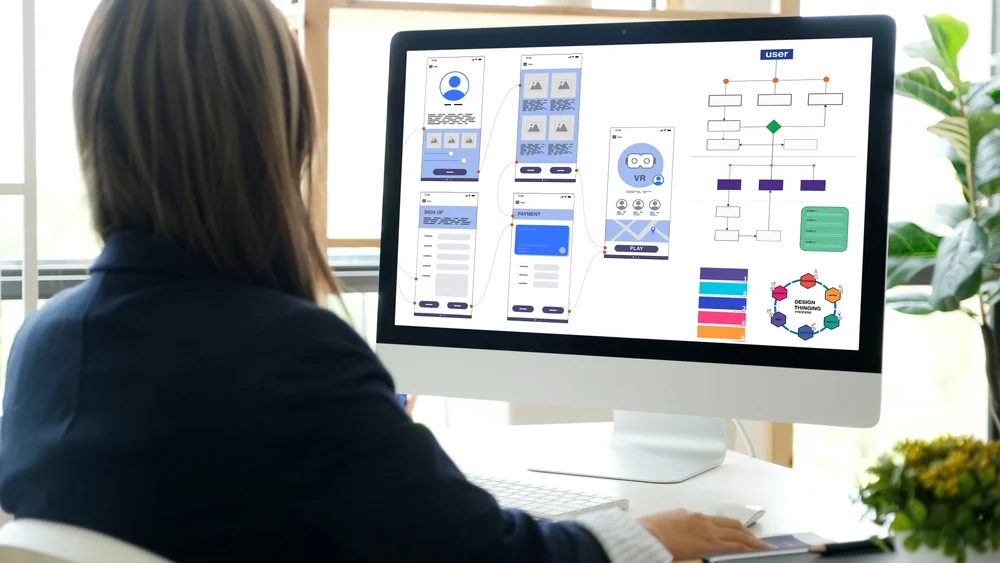
What Is UI Design?
UI (User Interface) design focuses on how a digital product looks, feels, and responds when users interact with it.
Common UI Components in Website Design include buttons, navigation menus, icons, forms, and interactive elements that users engage with throughout their journey.
Good UI design reduces friction by making actions obvious, guiding attention, and providing feedback, helping users move seamlessly from one step to the next.
What Is UX Design?
UX (User Experience) design focuses on how users interact with and experience a digital product from start to finish. It ensures that every step of the user journey is logical, efficient, and aligned with user needs.
Key components of UX Design include user research, information architecture, user flows, wireframing, and usability testing to validate decisions.
Rather than focusing on visuals, UX design is about solving problems, understanding what users want to achieve and removing friction that may prevent them from doing so. A well-designed UX makes a product feel intuitive, even on first use.
What is UX UI design?
UX UI design refers to the combined practice of designing digital products that are both easy to use (UX) and visually engaging (UI). It brings together how a product works and how it looks—ensuring users can navigate smoothly while interacting with a clear and intuitive interface.
In modern web development, UX UI design is an integrated process that influences everything from planning and development to testing and optimization. When done effectively, it reduces friction, improves engagement, and increases the likelihood that users will take meaningful actions.
What Is the Difference Between UX and UI Design?
UX and UI design are often used together, but they serve distinct roles in shaping a digital product. UX defines the journey, UI brings it to life visually. Both are essential—without UX, a product may feel confusing; without UI, it may lack clarity and engagement.
| UX Design | UI Design |
|---|---|
| Focuses on user journey and experience | Focuses on visual interface and interaction |
| Involves research, structure, and testing | Involves layout, colors, typography, and visuals |
| Ensures usability and functionality | Enhances aesthetics and user engagement |
Why Is UX UI Important for Web Development?
UX UI bridges the gap between functionality and usability, ensuring that what developers build aligns with how users think, behave, and navigate. This alignment is critical for turning traffic into engagement—and engagement into conversion.
UX/UI Improves Website Usability and Accessibility
Clear navigation, logical structure, and accessible design make it easier for users to find information and complete tasks without frustration.
UX/UI Enhances Website Engagement and Conversion Rates
According to Forrester research, a well-designed user interface can increase conversion rates by up to 200%, while a better user experience design can boost conversions by as much as 400%, highlighting the direct business impact of UX/UI. A seamless experience keeps users on the site longer, builds trust, and guides them toward key actions such as signing up or making a purchase.
UX/UI Helps Developers Build More User-Centered Products
By integrating UX/UI early in the development process, teams can reduce rework, improve efficiency, and deliver products that better meet both user needs and business goals.
Are you looking to convert UX/UI design into measurable business results? Sunbytes designs, builds, and optimizes user-centered digital products. We combine UX/UI expertise with scalable development to deliver measurable business outcomes. Connect with us to get started!
What Is the UX/UI Design Process?
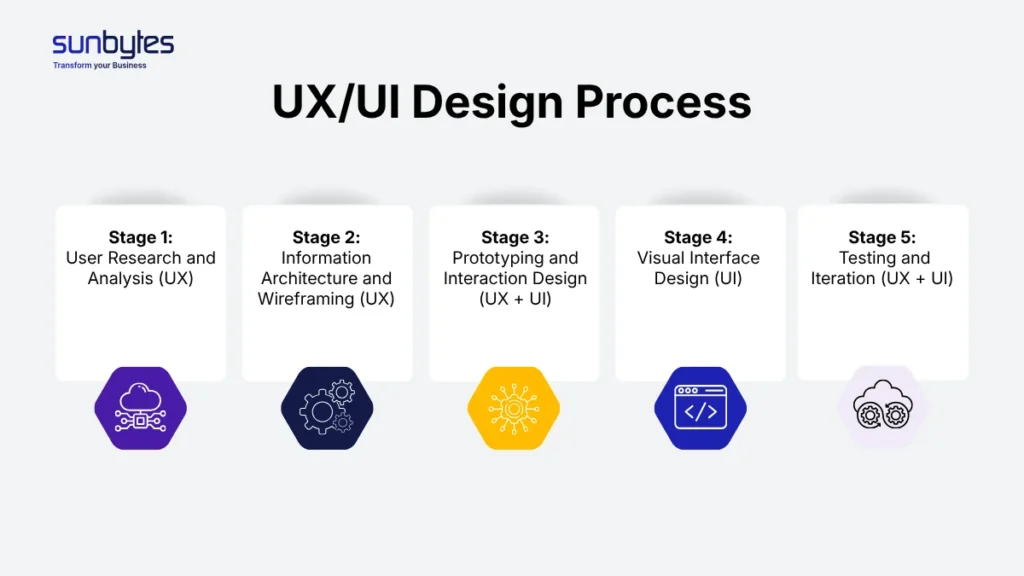
A comprehensive process follows 5 main stages:
Stage 1: User Research and Analysis (UX)
This stage defines what to build and why before any design begins. It plays a critical role early in the product development lifecycle, ensuring user needs and business goals are aligned.
How to implement effectively:
- Align stakeholders early: Clarify business goals, target users, and success metrics (e.g., conversion rate, retention).
- Conduct targeted user research: Use interviews, surveys, or analytics to identify user needs, behaviors, and pain points.
- Analyze existing data: Review website analytics, heatmaps, and user feedback to uncover friction points.
- Create user personas: Summarize key user types with clear goals and challenges to guide decision-making.
- Define user journeys: Map how users move from entry point to goal, identifying drop-offs and opportunities.
Outcome: A clear understanding of who your users are and what problems the product must solve.
Stage 2: Information Architecture and Wireframing (UX)
This stage defines how the product is structured and how users navigate it.
How to implement effectively:
- Structure content logically: Organize pages and features based on user priorities, not internal assumptions.
- Design user flows: Outline step-by-step paths users take to complete key actions (e.g., sign-up, checkout).
- Create low-fidelity wireframes: Focus on layout, hierarchy, and functionality—not visual design.
- Validate early with stakeholders: Ensure alignment before moving to more detailed design.
- Iterate quickly: Keep wireframes simple to allow fast changes based on feedback.
Outcome: A clear, user-centered structure that minimizes confusion and improves navigation.
Stage 3: Prototyping and Interaction Design (UX + UI)
This stage brings ideas to life and tests how users will actually interact with the product.
How to implement effectively:
- Build interactive prototypes: Simulate real user flows using tools like Figma or Adobe XD.
- Focus on key interactions: Prioritize critical user paths rather than designing everything at once.
- Test with real users early: Conduct usability testing to observe behavior and identify friction points.
- Refine based on feedback: Adjust flows, interactions, and structure before development begins.
- Collaborate with developers: Ensure proposed interactions are technically feasible.
Outcome: A validated interaction model that reduces costly changes during development.
Stage 4: Visual Interface Design (UI)
This stage defines how the product looks and feels, translating structure into a polished interface.
How to implement effectively:
- Apply a consistent design system: Use standardized colors, typography, and components to ensure scalability.
- Design for clarity and hierarchy: Guide user attention using spacing, contrast, and visual emphasis.
- Ensure responsiveness: Adapt designs across desktop, tablet, and mobile devices.
- Align with brand identity: Maintain consistency with brand guidelines while prioritizing usability.
- Collaborate closely with developers: Provide design specifications and assets for accurate implementation.
Outcome: A visually cohesive and user-friendly interface that supports seamless interaction.
Stage 5: Testing and Iteration (UX + UI)
According to Nielsen Norman Group, testing with just 5 users can uncover up to 85% of usability issues, making early testing one of the most cost-effective design practices. This stage ensures the product performs well in real-world scenarios and continues to improve over time.
How to implement effectively:
- Conduct usability testing: Observe users completing tasks to identify usability issues.
- Run A/B testing: Compare variations of design elements (e.g., CTAs, layouts) to optimize performance.
- Track performance metrics: Monitor KPIs such as bounce rate, task completion rate, and conversion rate.
- Perform regular UX audits: Identify friction points and areas for improvement across the user journey.
- Iterate continuously: Treat UX/UI as an ongoing process, not a one-time effort.
Outcome: A continuously optimized product that evolves based on real user behavior and data.
What Is the Role of a UX/UI Designer?

A UX/UI designer is responsible for ensuring that a digital product is not only functional, but also intuitive, engaging, and aligned with user needs. They act as the bridge between user expectations, business goals, and technical implementation—turning ideas into usable and effective experiences.
- Understanding Users Through Research and Personas/: UX/UI designers start by identifying who the users are and what they need. They conduct research, analyze behaviors, and create personas to ensure every design decision is grounded in real user insights.
- Designing User Journeys and Digital Experiences: They map out how users move through a product—from entry point to final action—ensuring each step is logical, seamless, and free of friction.
- Creating Visual Interfaces and Interaction Patterns: On the UI side, designers craft the visual elements users interact with, such as layouts, buttons, and navigation. The goal is to create interfaces that are both visually consistent and easy to use.
- Collaborating with Developers and Product Teams: UX/UI designers work closely with developers, product managers, and stakeholders to ensure designs are feasible, aligned with business objectives, and implemented accurately.
What are UX/UI Tools and Technologies
UX/UI tools and technologies support designers in researching user needs, structuring experiences, creating interfaces, and validating decisions. Rather than focusing on a single tool, effective teams use a combination of tools across the entire design workflow.
UX Tools for Research and Experience Design
These tools help teams understand users and define how the product should work.
- User research & analytics: Google Analytics, Hotjar, Maze
- Wireframing & prototyping: Figma, Adobe XD, Sketch, Balsamiq
- User journey mapping: Miro, FigJam
- Usability testing: UserTesting, Lookback
These tools ensure design decisions are based on real user insights and behavior.
UI Tools for Visual and Interface Design
These tools focus on crafting the look and feel of the product.
- Interface design: Figma, Sketch, Adobe XD
- Design systems & component libraries: Storybook, Figma Libraries
- Responsive design: Webflow, Framer
- Interaction & animation: Principle, After Effects
These tools help create consistent, scalable, and visually engaging interfaces.
How Can You Optimize UX/UI Design for Better User Experience?
Optimizing UX/UI design is about making every interaction clear, efficient, and aligned with user intent. Small improvements in usability and clarity can have a direct impact on engagement, retention, and conversion.
- Focus on User-Centered Design: Start with user needs, not assumptions. Use data and feedback to guide design decisions and ensure the experience solves real problems.
- Prioritize Speed and Accessibility: Fast-loading pages and accessible design remove friction and make your product usable for a wider audience.
- Keep Navigation Simple and Intuitive: A clear structure helps users find what they need quickly, reducing frustration and drop-offs.
- Use Clear Calls-to-Action: Well-placed and clearly defined CTAs guide users toward key actions and improve conversion rates.
- Continuously Test and Improve: Regular testing helps identify usability issues and optimize the experience based on real user behavior.
What Are the Top UX UI Design Trends in 2026?

UX/UI design in 2026 is shifting toward intelligence, personalization, and seamless cross-platform experiences. Businesses that adapt to these trends can deliver more intuitive and future-ready digital products.
- AI-driven personalization at scale: Interfaces dynamically adapt to user behavior, preferences, and context—delivering tailored content and smarter user journeys in real time.
- Conversational and voice interfaces: Chatbots and voice interactions are becoming more natural, reducing reliance on traditional navigation and enabling faster task completion.
- Hyper-minimalist and functional design: Clean layouts with fewer distractions focus on usability, clarity, and performance—prioritizing function over decoration.
- Advanced microinteractions and motion design: Subtle animations guide user behavior, provide feedback, and create a more engaging, responsive experience.
- Cross-platform and omnichannel consistency: Users expect seamless experiences across web, mobile, and other digital touchpoints, driven by strong design systems.
- Accessibility-first design mindset: Accessibility is no longer optional—designs are built to be inclusive from the start, improving usability for all users.
- Immersive experiences (AR/VR integration): Industries like eCommerce and real estate are leveraging immersive technologies to enhance product interaction and decision-making.
- No-code and low-code design integration: Designers are increasingly working with tools that allow faster prototyping and even direct product deployment, reducing reliance on traditional development cycles.
How Sunbytes apply UX/UI best practices for your Web Development Project?
At Sunbytes, UX/UI design is integrated into every stage of web development to ensure products are not only functional, but also intuitive and user-centered. We begin by aligning user needs with business objectives through research and structured design processes, then translate those insights into seamless user journeys and scalable interfaces. By maintaining close collaboration between designers, developers, and stakeholders, we reduce friction, accelerate delivery, and ensure the final product performs effectively in real-world conditions.
Why Sunbytes?
Sunbytes is a Netherlands-based technology company with a delivery hub in Vietnam, bringing over 15 years of experience in delivering user-centered, secure, and scalable digital solutions. We help businesses transform ideas into high-performing web products by embedding UX/UI best practices into every stage of development—ensuring seamless experiences, reliable delivery, and long-term growth.
- Digital Transformation Solutions: Design, build, and optimize modern web applications with a strong focus on UX/UI, supported by senior engineering teams across custom development, QA/testing, and ongoing maintenance.
- Cybersecurity Solutions: Integrate security into the user experience from the ground up, reducing risks while maintaining smooth and uninterrupted user journeys.
- Accelerate Workforce Solutions: Scale your UX/UI and development capabilities with flexible, high-quality talent to meet evolving business and product demands.
Ready to elevate your UX/UI and build digital products that perform? Connect with Sunbytes to get started.
FAQs
UX/UI design focuses on how a product works and feels—from user journeys and usability (UX) to visual interfaces and interactions (UI). Web design is a broader term that may include UX/UI, but also covers layout, branding, and sometimes basic front-end implementation. In short, UX/UI is a core part of modern web design, with a stronger focus on user-centered thinking.
The timeline depends on the project scope, complexity, and level of research required. A simple website may take 2–4 weeks, while more complex platforms with in-depth research, prototyping, and testing can take 6–12 weeks or longer. A structured UX/UI process helps reduce rework and speeds up overall development time.
Common issues include ignoring user research, overcomplicating navigation, inconsistent design elements, poor mobile responsiveness, and lack of usability testing. These mistakes often lead to higher bounce rates and lower conversion, even if the visual design looks appealing.
UX/UI success is measured through both user behavior and business outcomes. Key metrics include conversion rate, bounce rate, task completion rate, user retention, and customer satisfaction (e.g., NPS or feedback). Combining analytics with user testing provides a clear picture of how well the experience performs.
Let’s start with Sunbytes
Let us know your requirements for the team and we will contact you right away.


