A website security checklist should not sit at the end of the build. It should shape how the website is planned, developed, tested, and handed over.
For Dutch SMEs, the website is often the public layer for lead generation, customer support, recruitment, e-commerce, or client portals. If security is treated as a launch task, the development process usually becomes harder to control. Teams discover weak admin access, outdated plugins, missing logging, unclear backup ownership, or insecure third-party scripts after design and development decisions have already been made.
This website security checklist for Dutch SMEs gives IT managers, CTOs, Heads of Product, and founders a practical way to improve the website development process before launch. For a wider planning model, connect this checklist to our website development guide so security becomes part of scope, architecture, QA, and ownership from the start.
TL;DR
A Dutch SME website security baseline should start with three fixes: enforce HTTPS/TLS correctly, protect CMS and server admin access with MFA, and patch CMS, plugins, themes, and dependencies. After that, review 28 checks across authentication, TLS, secure coding, patching, browser headers, logging, backups, CMS hardening, and third-party scripts. Use NCSC NL guidance as the Dutch reference point.
- Fix TLS, admin authentication, and patching before cosmetic or performance work.
- Treat a RED finding in access control or TLS as an active security risk.
- Map findings to ISO 27001:2022 controls when procurement or certification evidence is needed.
- Use this checklist as the technical security layer. For privacy and consent, use GDPR compliance checklist.
Why website security matters specifically for Dutch SMEs
A website security checklist is a structured review of the controls that protect a website’s access, transport security, code, dependencies, logging, backups, CMS configuration, and third-party scripts. Dutch SMEs often run business-critical websites with limited internal security capacity. That combination creates a practical problem: the website may be maintained by marketing, an external agency, a freelance developer, or a small IT team, but the security responsibility still sits with the company.
The most common weak points are rarely exotic. They are usually simple controls left unfinished: predictable CMS admin URLs, no MFA, old plugins, outdated TLS, missing security headers, no tested backup, or no clear incident process.
The NCSC NL web application guidelines are useful here because they are written for organisations that develop, manage, purchase, or outsource web applications. They can support supplier agreements, supervision, and practical security requirements, not only internal engineering reviews.
The 3 security fixes Dutch SME websites need today
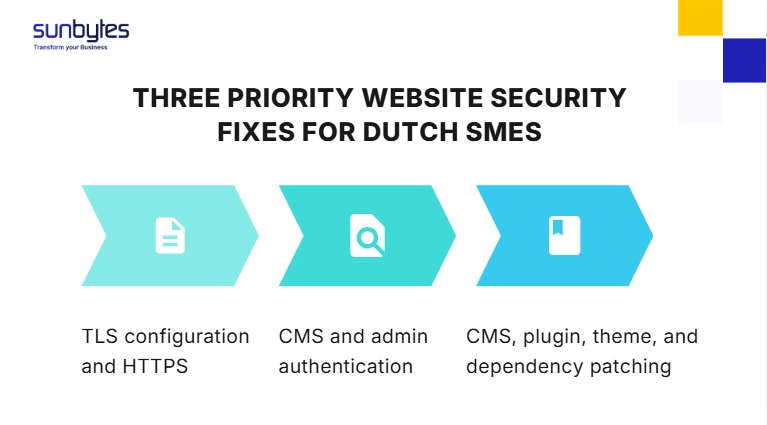
1. TLS configuration and HTTPS
Every page should load over HTTPS, HTTP should redirect to HTTPS, and there should be no mixed-content warnings. TLS 1.0 and TLS 1.1 should be disabled. NCSC NL maintains current TLS guidance and provides the latest TLS guideline version through its TLS page.
Fix first: Check HTTPS redirects, certificate validity, TLS version support, and HSTS.
Typical effort: Less than a day for a standard website when hosting access is available.
2. CMS and admin authentication
A CMS admin panel with only a password is too weak for a business website. MFA should be enabled for all CMS admin users, server access, hosting control panels, and deployment tools.
Fix first: Enable MFA, remove default admin usernames, restrict admin access, and add brute-force protection.
Typical effort: Same day for most WordPress or CMS-based websites.
3. CMS, plugin, theme, and dependency patching
Unpatched software is one of the easiest website risks to reduce. For WordPress, the issue is often not WordPress core itself. The higher-risk layer is plugins, themes, abandoned extensions, and old dependencies that nobody owns.
Fix first: Update CMS core, plugins, themes, npm/composer dependencies, and remove inactive plugins.
Typical effort: One day for standard sites; longer when updates affect custom code or integrations.
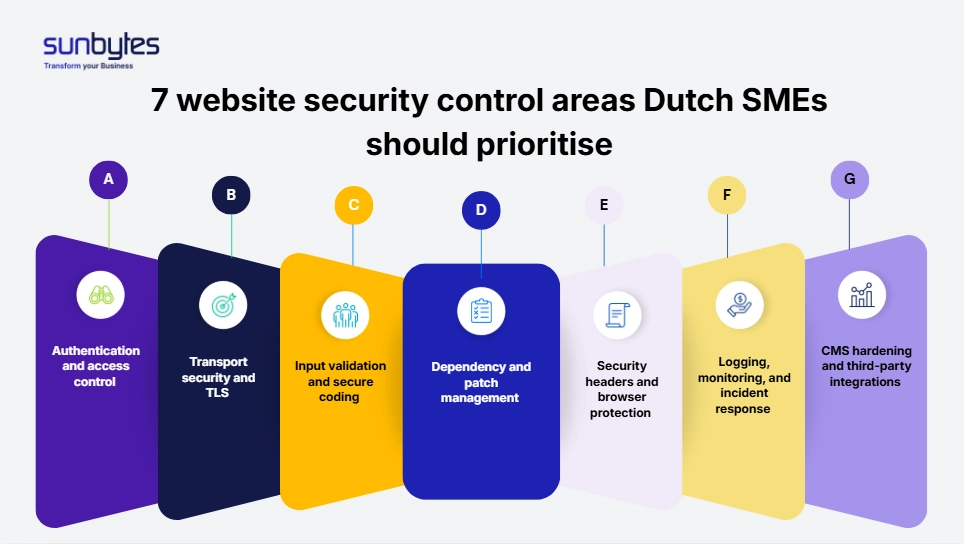
The website security checklist: 28 checks across 7 sections
Use the checklist as a baseline review. Mark each item as GREEN, AMBER, or RED.
GREEN means the control is implemented and evidenced. AMBER means partly implemented or not documented. RED means missing, outdated, or actively risky. A RED item in authentication, TLS, or patching should be fixed before non-security website work continues.
| Section | Area | Quantity of checklist items | Priority |
|---|---|---|---|
| A | Authentication and access control | 4 | Highest |
| B | Transport security and TLS | 4 | Highest |
| C | Input validation and secure coding | 4 | High |
| D | Dependency and patch management | 4 | Highest |
| E | Security headers and browser protection | 3 | Medium |
| F | Logging, monitoring, and incident response | 4 | High |
| G | CMS hardening and third-party integrations | 4 | High |
Website security checklist: all 7 sections
A. Authentication and access control
| # | Security check | Evidence to collect | Who fixes it |
|---|---|---|---|
| A1 | MFA is enabled for all CMS admin accounts, server access, and hosting control panels. | Screenshot of MFA policy or admin user settings | CMS owner / DevOps / hosting administrator |
| A2 | Default CMS admin usernames such as “admin” have been changed. | User list showing non-default admin accounts | CMS owner / developer |
| A3 | CMS admin login is not exposed only through a predictable default path, or it is protected by MFA, IP allowlisting, or equivalent control. | Admin access rule or CMS security configuration | Developer / DevOps / hosting administrator |
| A4 | Brute-force protection is enabled on login endpoints through rate limiting, lockout, CAPTCHA, or equivalent controls. | Security plugin, WAF, or server rule configuration | Developer / DevOps / CMS owner |
B. Transport security and TLS
| # | Security check | Evidence to collect | Who fixes it |
|---|---|---|---|
| B1 | The whole website is served over HTTPS, with HTTP redirecting to HTTPS and no mixed-content warnings. | Browser test and crawl report | Hosting provider / DevOps / developer |
| B2 | TLS 1.2 is the minimum accepted version, TLS 1.0 and 1.1 are disabled, and TLS 1.3 is preferred where supported. | TLS scan result | Hosting provider / DevOps |
| B3 | SSL/TLS certificates are valid, issued by a trusted CA, cover the required subdomains, and renew automatically. | Certificate report | Hosting provider / DevOps |
| B4 | HSTS is enabled with an appropriate max-age value. HSTS preload can be considered for higher-security sites. | Response header report | DevOps / hosting administrator |
C. Input validation and secure coding
| # | Security check | Evidence to collect | Who fixes it |
|---|---|---|---|
| C1 | Forms, URL parameters, search fields, and other user inputs are validated and sanitised before processing. | Secure coding review or test result | Backend developer / QA |
| C2 | File uploads restrict file types, scan uploaded files, and prevent executable files from being uploaded or served. | Upload configuration and test result | Backend developer / DevOps / QA |
| C3 | API endpoints are authenticated and rate-limited. Unauthenticated endpoints do not expose personal data or allow write actions. | API access control review | Backend developer / DevOps |
| C4 | Content Security Policy is configured to reduce cross-site scripting and malicious script injection risk. | CSP header output | Developer / DevOps |
D. Dependency and patch management
| # | Security check | Evidence to collect | Who fixes it |
|---|---|---|---|
| D1 | CMS core software is running the latest stable version, with security updates applied quickly. | CMS version report | CMS owner / developer |
| D2 | Plugins, themes, and extensions are updated; inactive plugins are removed. | Plugin inventory | CMS owner / developer |
| D3 | JavaScript libraries, npm/composer packages, and other dependencies are tracked and updated. | Dependency inventory | Frontend developer / backend developer |
| D4 | Vulnerability scanning runs at least quarterly and after significant website changes. Critical and high findings have remediation SLAs. | Scan reports and remediation tracker | DevOps / security owner / product owner |
E. Security headers and browser-level protection
| # | Security check | Evidence to collect | Who fixes it |
|---|---|---|---|
| E1 | HTTP security headers are configured, including CSP, X-Content-Type-Options, Referrer-Policy, and frame controls. | Header scan | Developer / DevOps |
| E2 | Clickjacking protection is enabled through X-Frame-Options or the CSP frame-ancestors directive. | Header scan | |
| E3 | Sensitive pages do not cache authenticated user data or form submissions in the browser. | Cache-Control review |
F. Logging, monitoring, and incident response
| # | Security check | Evidence to collect | Who fixes it |
|---|---|---|---|
| F1 | Logs capture failed login attempts, admin actions, file changes, and error events. Logs are protected and retained for at least 90 days. | Log retention policy | DevOps / hosting administrator / security owner |
| F2 | Alerts exist for repeated failed logins, new admin users, plugin installation, and unexpected file changes. | Alert configuration | DevOps / security owner |
| F3 | A documented incident process explains who is notified, how the website is contained, and when the Autoriteit Persoonsgegevens must be notified if personal data is involved. | Incident response document | Product owner / IT manager / security owner |
| F4 | Website and database backups run at least daily, are stored off-server, and restoration has been tested in the past 12 months. | Backup and restore test evidence | Hosting provider / DevOps / IT manager |
GDPR Article 33 requires notification to the supervisory authority without undue delay and, where feasible, within 72 hours after becoming aware of a personal data breach, unless the breach is unlikely to create a risk to people’s rights and freedoms.
G. CMS hardening and third-party integrations
| # | Security check | Evidence to collect | Who fixes it |
|---|---|---|---|
| G1 | CMS configuration is hardened: directory listing is disabled, error messages do not expose versions, and PHP execution is disabled in upload directories where relevant. | CMS/server configuration | Developer / DevOps / CMS owner |
| G2 | Third-party scripts such as analytics, chat tools, and marketing pixels are controlled through consent and tag management. | Tag and consent review | Marketing owner / developer / privacy owner |
| G3 | Subresource Integrity is used where suitable for third-party scripts loaded from CDNs. | Script tag review | Frontend developer |
| G4 | Hosting uses least privilege: each application has a dedicated user and the web server does not run as root. | Hosting permission review | DevOps / hosting administrator |
Need to de-risk the website build before launch?
Sunbytes can review your CMS setup, admin access, TLS configuration, patch ownership, logging, backups, and third-party scripts before sprint one or pre-launch handover.
Review your website development plan with Sunbytes →
What this checklist maps to: NCSC NL and ISO 27001:2022
The NCSC NL guidelines give the Dutch web application security reference. ISO 27001:2022 helps teams turn security controls into evidence for procurement, certification, supplier reviews, and internal audits.
For a website development project, this mapping matters because it turns security from a vague requirement into acceptance criteria. Instead of asking whether the website is “secure,” the team can ask whether MFA, TLS, logging, patching, backup testing, and third-party script controls are implemented and evidenced.
| Checklist section | NCSC NL area | ISO 27001:2022 control examples |
|---|---|---|
| A. Authentication and access control | Authentication, access management | A.8.5 secure authentication, A.8.2 privileged access rights |
| B. Transport security and TLS | TLS and cryptography | A.8.24 use of cryptography |
| C. Input validation and secure coding | Secure coding, input validation | A.8.26 application security requirements, A.8.28 secure coding |
| D. Dependency and patch management | Vulnerability and patch management | A.8.8 management of technical vulnerabilities, A.8.19 software on operational systems |
| E. Security headers | Browser-level protection | A.8.27 secure system architecture and engineering principles |
| F. Logging and incident response | Logging, monitoring, continuity | A.8.15 logging, A.8.16 monitoring activities, A.5.26 incident response, A.8.13 backup |
| G. CMS hardening and third parties | Configuration and third-party components | A.8.9 configuration management, A.8.30 outsourced development |
When to go beyond the checklist: NIS2 and the next security level
This checklist is a technical baseline for Dutch SME websites. It is not a full NIS2 compliance programme.
If your organisation is in scope for NIS2 as an essential or important entity, website security becomes part of a wider risk management system. That may include stronger supplier governance, incident reporting, business continuity, vulnerability handling, access management, and documented security measures.
For SMEs outside NIS2 scope, the checklist still creates a defensible baseline. It gives your team a practical way to show what is controlled, what is missing, and what should be fixed first.
How Sunbytes delivers the website security baseline for Dutch SMEs
A secure website is not created by adding controls at the end. It comes from build decisions made early: CMS ownership, plugin selection, hosting setup, access control, form handling, logging, backup testing, and release responsibility.
Sunbytes uses this checklist as part of Digital Transformation Solutions to help Dutch and European companies turn website security requirements into sprint-ready development tasks before launch. Cybersecurity Solutions supports the control layer when NCSC NL alignment, ISO 27001 evidence, access control, or remediation planning is needed. Accelerate Workforce Solutions supports the people layer when vetted development, QA, or security capacity is needed to implement fixes.
With 15+ years of experience, 300+ projects delivered, ISO-certified delivery, and DORA-tracked outcomes, Sunbytes helps teams move from a checklist of risks to a website development plan they can ship and maintain.
Review your website development plan with Sunbytes →
FAQs
Security teams identify and prioritise findings. Development, DevOps, hosting, or CMS owners usually fix them. TLS, headers, dependency updates, file upload restrictions, logging, and CMS hardening should be assigned to sprint work with an owner, deadline, and retest evidence.
WordPress can be secure enough when it is configured, patched, and monitored properly. The higher risk is usually not WordPress core, but weak admin access, outdated plugins, abandoned themes, poor hosting configuration, and missing backups. A managed WordPress setup should include MFA, automatic security updates, plugin inventory, vulnerability scanning, and hardened admin access.
NCSC NL publishes ICT-beveiligingsrichtlijnen voor webapplicaties, a practical guide for securely developing, managing, and offering web applications and supporting infrastructure. The guidance can be used by both customers and suppliers when setting web application security requirements.
A penetration test is useful when your website handles sensitive data, financial transactions, user accounts, or complex custom functionality. For lower-risk SME websites, a vulnerability scan and configuration review may be the first step. This is where the difference between security assessment vs vulnerability scanning matters: a scan finds technical findings, while an assessment helps prioritise risk, ownership, and remediation. If you are in scope for NIS2 or preparing for enterprise procurement, a penetration test may become part of the expected evidence.
Run a baseline review at least quarterly for internet-facing websites, after major changes, and before launching new functionality that handles user data. Also run a review after plugin changes, hosting migration, CMS upgrades, payment integration, or new third-party scripts. The practical rule: check after any change that affects authentication, data flow, code, hosting, or tracking.
This checklist is a self-assessment tool. CyberCheck is a facilitated security baseline assessment by Sunbytes. It reviews the same control areas, adds specialist interpretation, prioritises findings, and turns the result into a remediation plan with effort estimates.
Let’s start with Sunbytes
Let us know your requirements for the team and we will contact you right away.