
In a classic web app, a server sits between the browser and the database and decides who sees what. When a Supabase app queries the database from the browser through the Supabase Data API, that server is not in the middle, so the database itself has to decide. Supabase RLS (Row Level Security) is that decision. When RLS is missing or loosely written, other customers’ rows can become readable with the public key, while the app keeps working normally.
This guide, part of our series on shipping AI-built products safely, covers five RLS gaps that can expose customer data, a check that needs no SQL, a safe fix order and what a gap means under GDPR.
TL;DR
Supabase RLS is the set of rules inside a Supabase database that decides which rows each user can read or change. When the browser queries the database directly, a table without RLS can be read and changed by anyone holding the public key, and a loose RLS policy can show rows to users who should not see them. The public key is visible to every visitor.
- Five RLS gaps covered in this guide can expose customer data in an AI-built Supabase app: RLS switched off, any signed-in user reading every row, loose policies for changing data, a customer ID taken from the browser, and back doors through service_role, views or functions.
- A founder-level RLS check needs no SQL: three checks and six questions for your developer. An RLS gap does not show up as an error: an owner account that tests its own data sees a working app.
- A safe RLS fix goes one table at a time in a staging copy and ends when a second test account sees nothing it should not.
- An RLS gap on personal data is a question of appropriate security under GDPR Article 32; if the gap leads to a personal data breach, Article 33 can require the controller to notify the Autoriteit Persoonsgegevens without undue delay and, where feasible, within 72 hours of becoming aware of the breach, unless it is unlikely to result in a risk to the people affected.
What Supabase RLS does, in plain terms
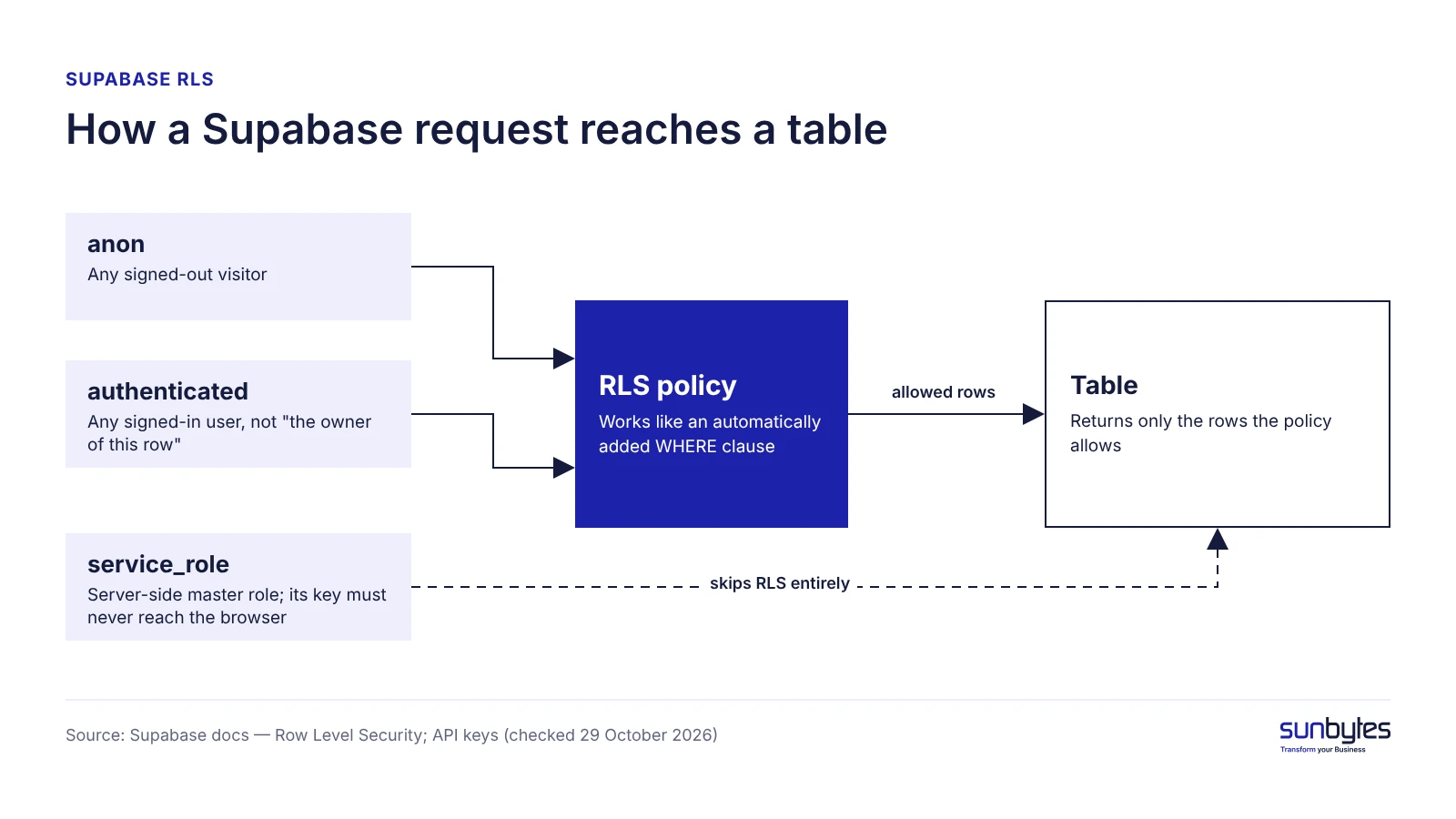
Supabase RLS (Row Level Security) is a PostgreSQL feature that attaches rules to a table and filters every query against it before any row leaves the database. Each rule is an RLS policy. The Supabase Row Level Security guide describes a policy as an automatically added WHERE clause: whatever the browser asks for, the database returns only the rows the policy allows.
Every Data API request runs as one of three database roles:
- anon is any signed-out visitor.
- authenticated is any signed-in user. It does not mean “the owner of this row”, only “someone with an account”.
- service_role is a server-side master role that skips RLS entirely, so its key must never reach the browser.
The public key in your frontend code (the anon key, or publishable key in newer projects) is meant to be public. The Supabase API keys documentation calls the publishable key “safe to expose online” and names RLS as what protects the data behind it, so the key is only as safe as your policies. Real secrets are a separate risk: see leaked API keys in AI products.
Why AI-built apps on Supabase can end up with RLS gaps
Three mechanisms can leave RLS gaps in an AI-built Supabase app, and none of them shows up as a bug on screen.
The first is how a table gets created. Supabase switches RLS on for tables created in its dashboard, according to the Supabase security retro for 2025, but a table created by a SQL migration, including one written by an AI coding tool, only gets RLS if the migration says so. The feature still works, so a missing policy does not show up in normal use.
The second is RLS done halfway. Once RLS is enabled, no data reaches the browser until policies exist, so screens go empty; two shortcuts make them work again, switching RLS off or adding an allow-everything policy, and both reopen the table. Under a change that applies to all projects from 30 October 2026, the Supabase changelog says new tables in the public schema need an explicit grant before the Data API can reach them; a grant added without RLS reopens the table.
The third is the test itself. A test with one owner account only shows that account’s own rows, so a missing ownership check does not appear in it. Why a passing test can miss this is covered in our guide to testing AI applications.
If an AI tool created tables in your project after launch, treat each one as unchecked until someone confirms its policies.
Five RLS gaps that can expose customer data
This guide groups RLS exposure in AI-built Supabase apps into five gaps. Four of them are rated launch blockers when the table holds personal or customer data; that rating is this guide’s recommendation, not a Supabase or GDPR category.
| Gap | What another user could do | Business consequence | Launch blocker? |
|---|---|---|---|
| 1. RLS switched off on a table | Read and change every row without signing in, where the anon role has table grants | Full table exposure; access to personal data can be a personal data breach under GDPR | Yes, with personal or customer data |
| 2. Any signed-in user reads every row | Sign up and read all customers’ rows | Exposure to anyone who can create an account, when sign-up is open | Yes, with personal or customer data |
| 3. Tight policy for reading, loose policy for changing | Change or create rows that belong to someone else | Records changed or created by the wrong user | Fix before launch if users edit shared records |
| 4. Customer or team ID taken from the browser | Swap the ID and open another customer’s workspace | One B2B customer can see another’s data | Yes, with personal or customer data |
| 5. Back doors: service_role, views, functions | Reach rows through a path that skips RLS | Exposure the table’s own policies do not show | Yes, with personal or customer data |
RLS switched off on a table
A table with RLS switched off is open to anyone with your public key, as long as the Data API can reach it. The Supabase project linter rates this as an ERROR-level finding, “RLS Disabled in Public” and calls it “a critically unsafe configuration”. If the table holds names, emails or invoices, unauthorised access to those rows can count as a personal data breach under GDPR.
Policies that let any signed-in user read every row
A policy that only checks for a signed-in user gives every account holder every row. Policies such as allow all, allow any authenticated user or allow any non-empty user ID make a feature work for every account, so they pass a functional test; with public sign-up they cover anyone willing to create an account. This line should never be the only check on a customer table:
using ( auth.uid() is not null )What to look for: a policy that checks that a user exists, not that the row belongs to that user.
A tight policy for reading, a loose one for changing
Supabase RLS policies are written per operation: select (read), insert (add), update (change) and delete. PostgreSQL refuses an operation that has no policy, so a missing delete policy breaks a button rather than exposing data. The exposure comes from an ownership check on reading paired with a write policy that allows everything or accepts someone else’s user ID. Fix this before launch if users edit shared records such as orders or invoices.
Customer or team ID taken from the browser
In a multi-tenant SaaS product, a policy that trusts a company or team ID sent by the browser can expose one customer’s data to another. If the policy accepts whatever ID the request carries, a user who changes that ID can reach another customer’s rows. A safe policy looks up membership in a server-side table linked to auth.uid(), the signed-in user’s ID. Tenant leaks belong to the wider flaw class covered in broken access control.
Back doors around RLS: service_role, views and database functions
Three paths skip RLS even when every table policy is correct. The service_role key bypasses all policies and belongs only on a server. Views created by the postgres role bypass RLS by default, according to the Supabase RLS guide, which recommends the security_invoker option on PostgreSQL 15 or later. Functions marked security definer run with their creator’s rights, and the Supabase guide to securing your API notes that RLS does not apply to functions. Storage buckets carry their own access policies, and Firebase apps use a different mechanism that needs the same review: Firebase security rules.
Supabase Auth and RLS: where login ends and data access begins
Supabase Auth answers “who is this user?”; RLS answers “which rows may this user touch?”. A working login therefore proves nothing about data access: Auth issues the token the browser sends with its requests, and RLS reads that token to decide what the request may see.
The bridge is auth.uid(), a helper that returns the signed-in user’s ID inside a policy, so a good policy compares the row’s owner column with auth.uid() or checks a membership table. Roles such as admin or viewer can come from custom claims read through auth.jwt(), provided the server sets them.
Three Supabase Auth settings change what “authenticated” is worth:
- Open public sign-up makes anyone who signs up an authenticated user.
- Confirm Email switched off lets users sign in without verifying their email address.
- Anonymous sign-ins give visitors the authenticated role without an account (see the Supabase anonymous sign-ins guide).
If sign-up is open to the public, read “authenticated” as “anyone” when you judge a policy.
How to check your Supabase RLS without reading SQL
You can check Supabase RLS without SQL through three checks and six questions for your developer: the checks show where RLS is missing, the questions whether existing policies check ownership.
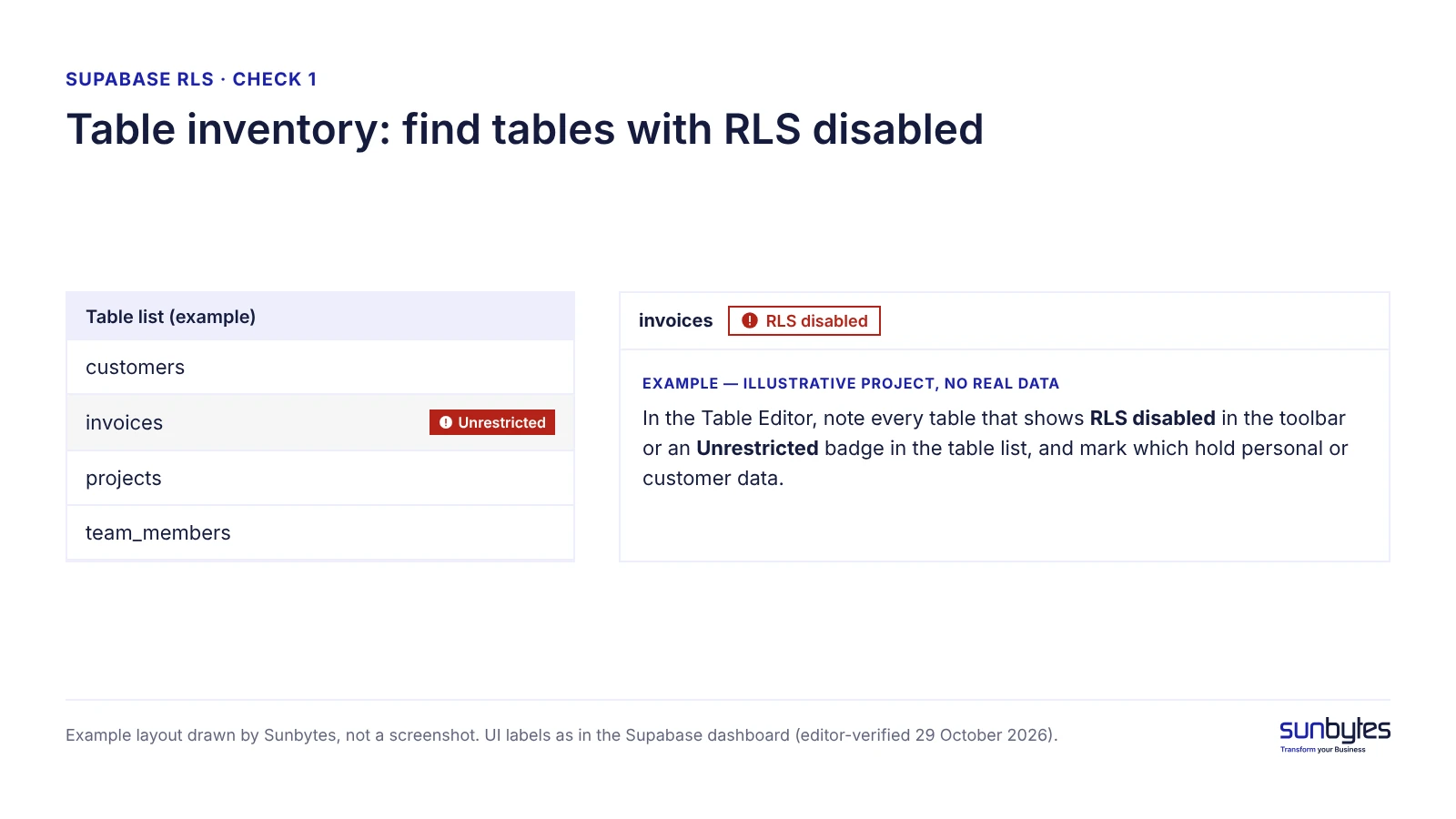
- Table inventory. In the Table Editor, note every table that shows RLS disabled in the toolbar or an Unrestricted badge in the table list, and mark which hold personal or customer data.
- Security Advisor findings. Open Advisors → Security Advisor (
/dashboard/project/<ref>/advisors/security) and read every error and warning; Supabase also sends organisation owners a weekly email with these findings, according to its 2025 security retro. - Policy list. Ask your developer for every RLS policy per table, with one sentence each on who can read and who can change the rows.
Six questions to forward to your developer:
- Which tables hold personal or customer data?
- Is RLS enabled on each of those tables?
- Does each policy check ownership or team membership, or only that the user is signed in?
- Does the customer or team ID in a policy come from a server-side membership table or from the browser?
- Is the service_role key or a secret key used anywhere outside server code?
- Which views or database functions can read these tables, and do they respect RLS?
A two-account check tests the answers in practice: sign in as two test users and try to see, change or delete each other’s data. Full test steps are in our guide to testing AI applications.
If any table with personal data fails check 1, or a policy on it only checks “signed in” while sign-up is open, pause new sign-ups and customer onboarding until it is fixed.
If the answers are “any signed-in user” or “we will check”, treat the policies as unreviewed. An independent reviewer can read your Supabase policies together with the code that calls them and help establish, in plain English, which tables are exposed.
Fixing RLS without breaking the app
Fixing Supabase RLS safely means working table by table in a staging copy, because switching RLS on before policies exist empties screens in production. This order starts with tables that are open without sign-in and then tightens the policies:
- Enable RLS on every table the Data API can reach, personal and customer data first.
- Add one policy per operation, tied to auth.uid() or a membership table.
- Move tenant checks server-side, so no policy trusts an ID from the browser.
- Remove the service_role key from client code and rotate it (see leaked API keys in AI products).
- Secure views and functions: security_invoker on views, a review of every security definer function.
- Index the columns your policies filter on, such as user_id or tenant_id.
Run the two-account check after each table, so a broken screen stays a single-table problem. A sound policy for a table owned by one user is short:
using ( (select auth.uid()) = user_id )What to look for: the row’s owner column compared with the signed-in user’s ID.
Patch policies in place when every row already stores its owner in a user_id or tenant_id column. When rows carry no owner, the fix is a data-model change, best planned before more customer data arrives. Supabase publishes AI prompt templates for RLS policies, but a prompt does not verify its own output, so a person still runs the two-account check.
The fix is done when every table the Data API can reach has RLS on, every policy names its owner or membership check, and a second account sees nothing it should not.
What an RLS gap means for your business
An RLS gap on a table with personal data has legal as well as technical consequences. GDPR Article 32 requires controllers and processors to put in place technical and organisational measures appropriate to the risk. A personal data breach under GDPR is not limited to data that was read: it covers a security breach leading to the accidental or unlawful destruction, loss, alteration or unauthorised disclosure of, or access to, personal data. Where such a breach is notifiable and your company is the controller, Article 33 requires notification to the supervisory authority, in the Netherlands the Autoriteit Persoonsgegevens, without undue delay and, where feasible, within 72 hours after the controller becomes aware of the breach, unless the breach is unlikely to result in a risk to the people affected. A processor must notify the controller without undue delay after becoming aware of a breach. Whether your company acts as controller or processor depends on how it processes the data.
What follows a leak in practice is covered in what happens when a vibe-coded app leaks personal data. A second consequence can come through sales: an enterprise security questionnaire can ask how tenant data is isolated, and “we use Supabase” is not a complete answer, because Supabase provides RLS but the policies are yours.
A self-check can be a reasonable first step when each user only sees their own data and you have no B2B customers yet. Consider an independent review when the product is multi-tenant, stores personal data of EU residents or faces a B2B security review; an AI-built SaaS review puts RLS next to other checks a buyer may ask about.
How Sunbytes reviews Supabase-backed products
RLS gaps are not limited to table policies: a view, a database function or a server route that uses the master key can expose the same rows. That is why we check Supabase policies as part of a wider review.
Each RLS policy is read next to the edge functions, server routes and views that touch the same table, so a function that reads the same rows with the service_role key is checked alongside the policy. You get findings with evidence, a prioritised action plan and a technical handoff your developer or AI coding tool can act on, in plain English rather than a scanner export.
Sunbytes brings 15+ years and 300+ delivered software projects to that review. Scope depends on your stack and data, so ask for an AI-built product review or talk to us for case-by-case advice.