

The main vibe coding security risks are not whether AI wrote the code, but whether the resulting controls have been specified, implemented and verified. A working demo cannot establish that permissions, credentials, database policies and recovery procedures work under production conditions.
The difference shows once real users arrive, because they change three things at once: they must be kept apart, their personal data falls under the GDPR, and automated scanners probe the app from its first public day.
Seven vibe-coding security risks below help you determine whether a vibe-coded app is ready for real customers. Each one below comes with a warning-sign check you can run yourself, and any of them can block launch once an engineer confirms it. The wider route from prototype to launch is covered in ai-generated code in production.
TL;DR
Vibe coding can be appropriate for prototypes tested with synthetic data and protected credentials. It is not ready for real customers’ personal data until an engineer has verified access control, secrets, database permissions, input handling and dependencies in the real deployment. In GitHub projects, Fu et al. found security weaknesses in 29.5% of AI-generated Python snippets and 24.2% of JavaScript snippets (arXiv 2310.02059).
- Block launch on any confirmed finding that exposes sensitive data, privileged credentials or an exploitable attack path; rank the rest by exploitability, exposure, data sensitivity and business impact.
- The self-checks below flag warning signs without reading code; an engineer confirms them before any release decision.
- One confirmed launch-blocker is enough to stop release.
Is vibe coding safe?
A vibe-coded prototype may be appropriate for controlled testing by you and a few testers, with synthetic data and protected credentials. Before customer use, someone other than the tool that wrote the code should evaluate the real deployment, access controls, third-party services and data handling.
The condition matters more than the tool, because code that works is not automatically code that is secure. When Fu et al. examined 733 AI-generated code snippets found in GitHub projects, they identified security weaknesses in 29.5% of Python snippets and 24.2% of JavaScript snippets, spread across 43 weakness categories in the Common Weakness Enumeration (arXiv 2310.02059). The Common Weakness Enumeration (CWE) is MITRE’s standard catalogue of software weakness types, and every one of those snippets had already made it into a published project.
The study concerns code snippets, not the security or breach rate of complete vibe-coded applications. What it does show is that “it works” and “it is secure” are separate tests, and a vibe-coded app that has only been demoed has passed only the first.
Human-written code fails security tests too, so the gap is not the author. It is the review step: AI-generated code can be reviewed and tested like any other code, but in many vibe-coding workflows nobody reads it line by line, and the flaws a reviewer would catch go live. Risk therefore depends on verified controls rather than authorship alone.
In practice, the release threshold is whether your product will handle real customer data, payments, or sensitive workflows. GDPR obligations can arise earlier, including during development and testing when real personal data is processed. Use synthetic data for prototypes and verify access controls, data retention, and any international transfers before onboarding customers.
Why vibe-coded apps break when real users arrive
Vibe-coded apps often break at launch because prompts tend to describe features, not restrictions. “Customers can see their orders” is a feature; “and never anyone else’s orders” is a restriction, and unless someone specifies and tests it, nobody can assume the AI built it.
A demo hides that gap, because one user with test data cannot see anyone else’s records when there are none. Production removes that cover: it adds many users who must be kept apart and personal data covered by the GDPR, as well as automated scanners that search public apps and code repositories for exposed keys and open databases.
Rules from your own sector go missing for the same reason. A health, finance or HR product often has to record who opened which record, delete data after a set retention period, or meet GDPR rules before personal data is transferred outside the EU, and an AI tool cannot apply obligations that the prompt never states.
Fixing problems by prompting can widen the gap over time. In a peer-reviewed experiment, Shukla, Joshi and Syed asked an AI model to “improve” 400 code samples round after round, and after five rounds critical vulnerabilities had risen by 37.6% (IEEE-ISTAS 2025, arXiv 2506.11022). The mechanism is the same as at launch: each round fixes what was asked and can quietly remove a check that nobody mentioned. That is why every prompted change to login, payments or user data should be treated as a new release that needs a security check.
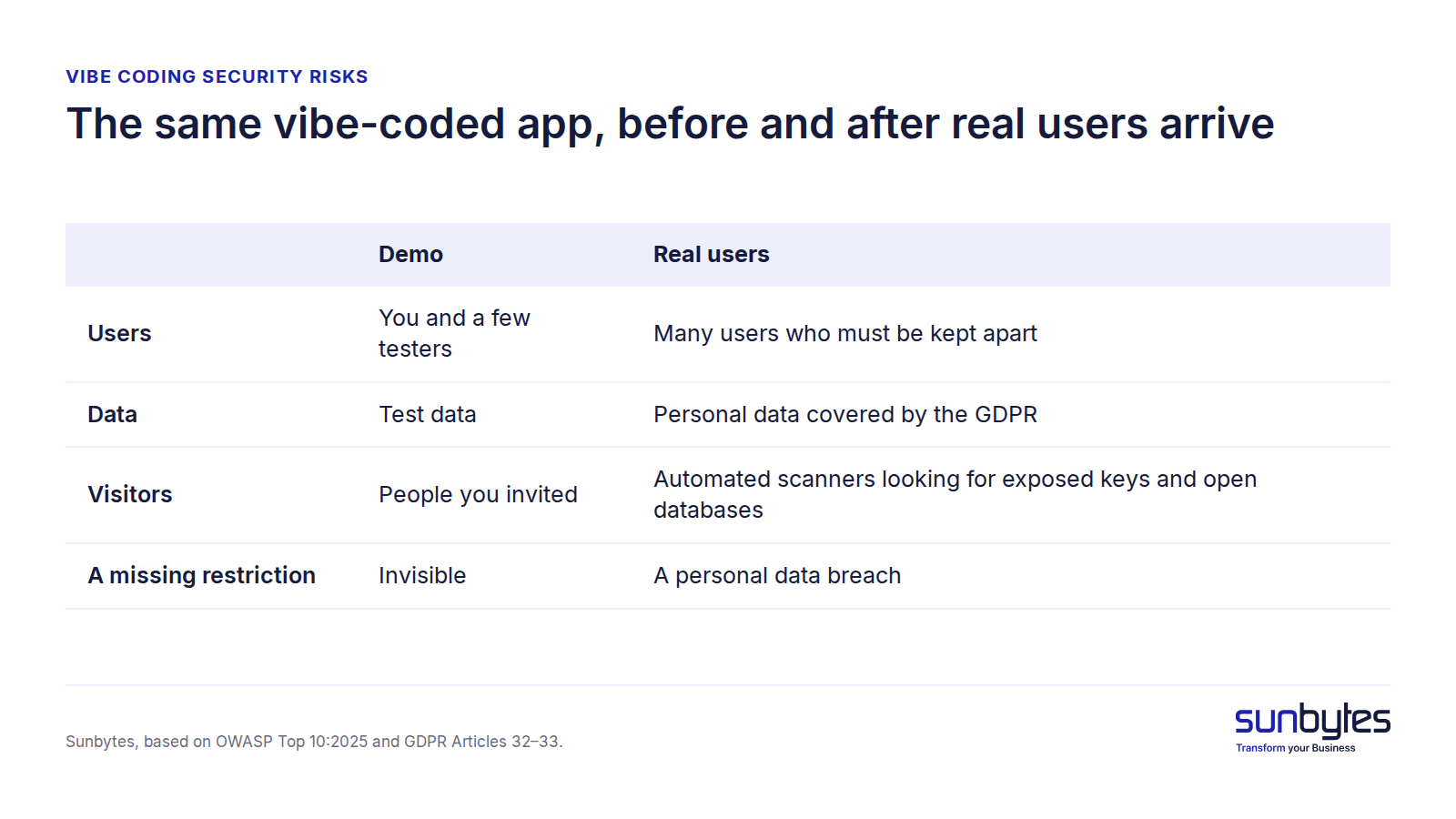
Figure 1. The same vibe-coded app, before and after real users arrive
Seven vibe coding security risks that matter most
The seven vibe coding security risks below cover most of what goes wrong when a vibe-coded app meets real users, and each one maps to an entry in the OWASP Top 10:2025, the most widely used list of web application security risks, or to a named CWE weakness type. Each section explains how the risk appears and ends with a self-check you can run without reading code. These checks identify warning signs, not confirmed vulnerabilities, so run them only with test accounts and synthetic data in systems you own or are authorised to assess. Before any release decision, an engineer verifies the underlying API responses, permissions and database configuration.
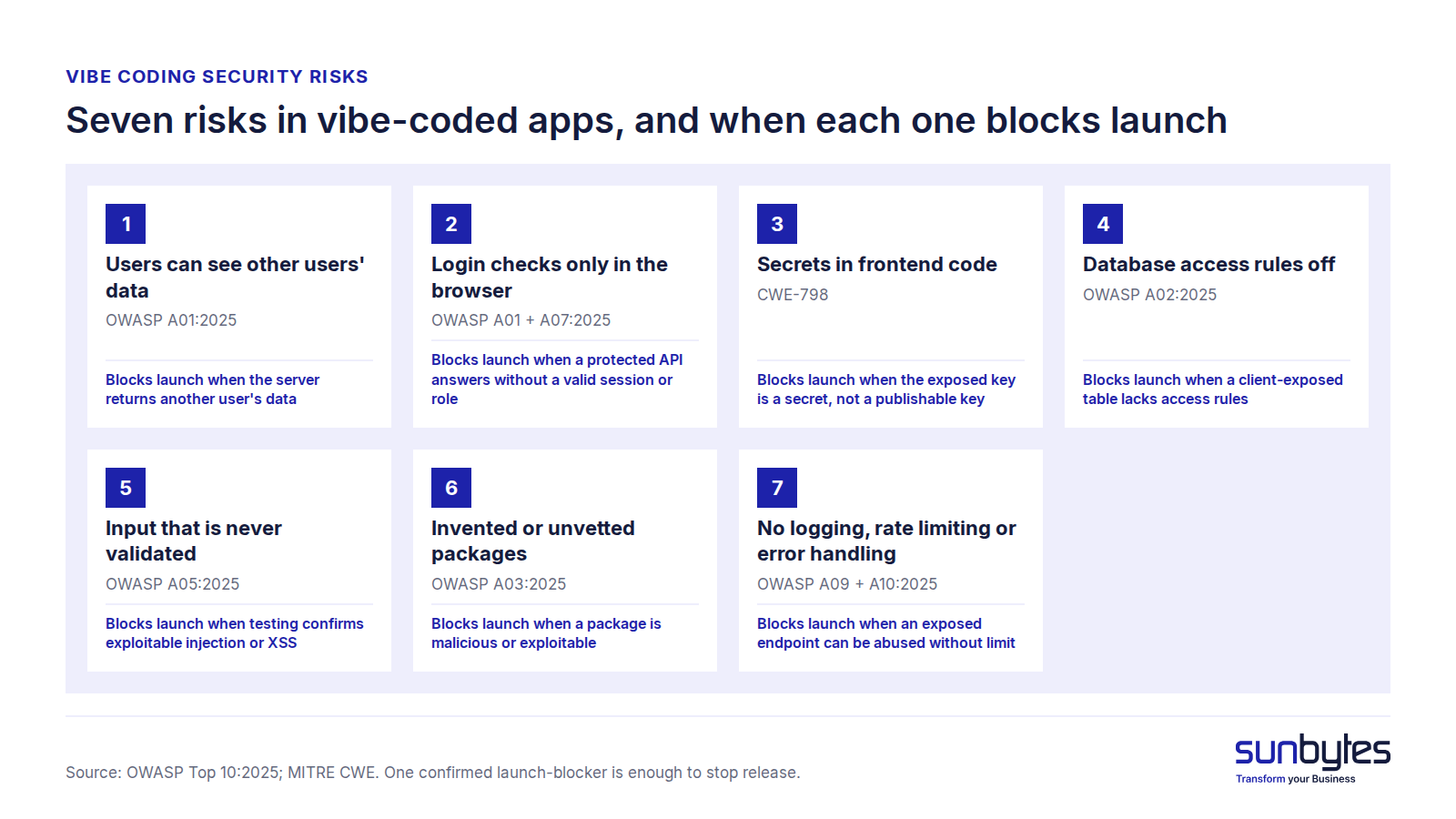
Figure 2. Seven risks in vibe-coded apps, and when each one blocks launch
1. Users can see other users’ data
Broken access control means a user can read or change data that belongs to someone else. OWASP ranks it A01, the top risk in the OWASP Top 10:2025. A common form is an insecure direct object reference (IDOR): the app trusts the record ID in a request and returns whatever record that ID points to.
In vibe-coded apps this is easy to miss, because the interface can hide other customers’ data correctly while the server still returns that data to anyone who asks for it directly. A check therefore has to test the server, not the screen.
Self-check: create two test accounts, log in as user B, and open one of user A’s invoices or profile pages by changing the ID in the browser address bar. If user B sees user A’s data, the server is returning records it should refuse, which means the app has a personal data breach waiting for its first curious customer.
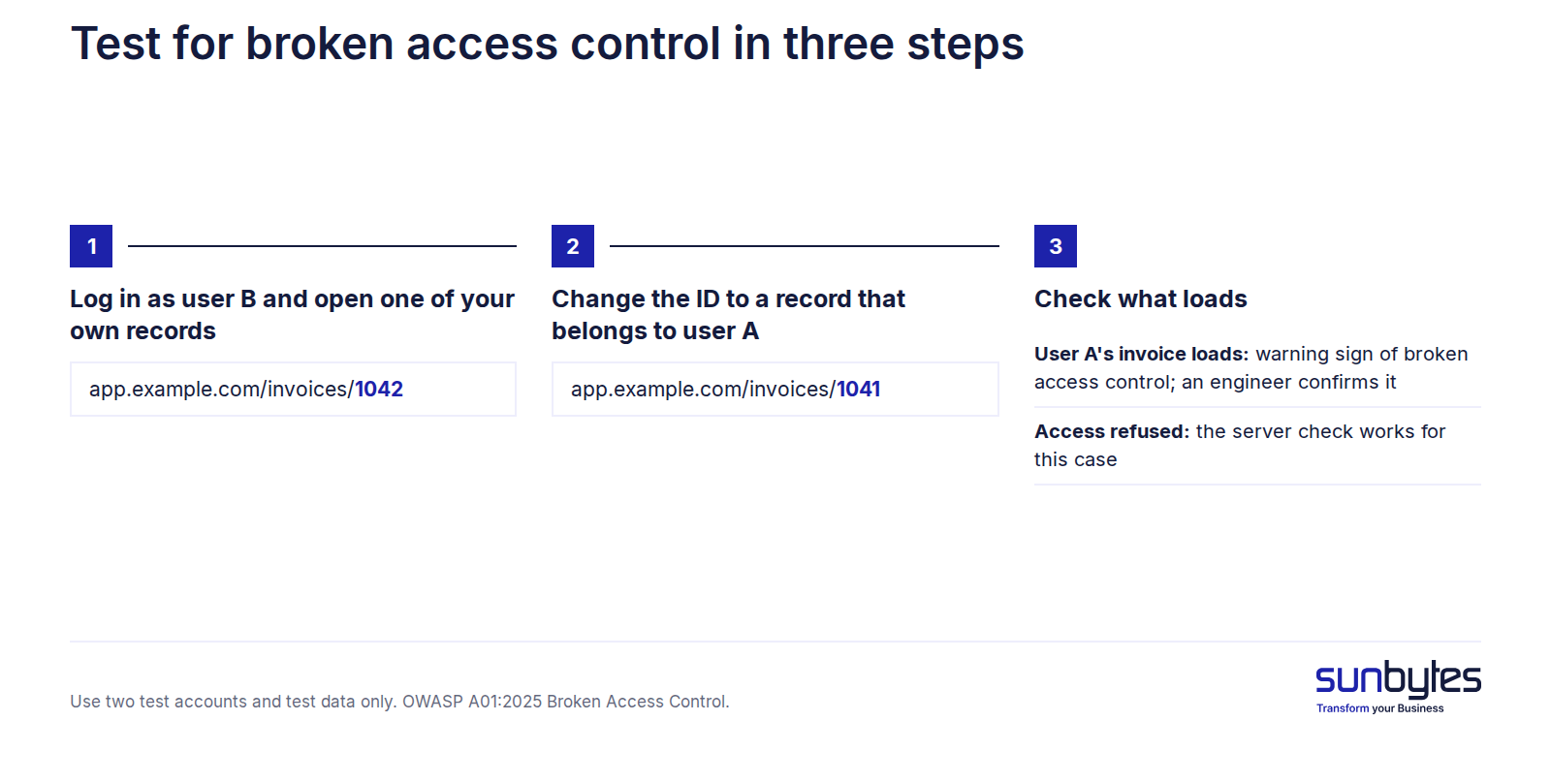
Figure 3. Test for broken access control in three steps
2. Login checks that only run in the browser
Authentication confirms who a user is, while authorisation determines what that user can access. Neither decision should rely solely on browser-side checks, because users can modify what runs in their own browser. The backend must verify the session and permissions before returning protected data or completing an action. Missing server-side authorisation falls under OWASP A01:2025 Broken Access Control, while login and session weaknesses are covered by A07:2025 Authentication Failures.
Self-check: open a page that should require a paid plan or an admin role in a private browser window while logged out. If protected data appears, even briefly before the page hides itself, treat it as a warning sign. The proof sits one layer down, however: an engineer calls the protected API without a valid session, or with a lower role, and checks whether data or actions come back. If they do, paid features are free and admin functions are public.
3. API keys and secrets exposed in frontend code
An API key works like a password for a paid service, unless it is a publishable key that is designed to appear in frontend code and is limited by rules on the provider’s side. The risk lies with secret keys: when a vibe-coded app calls an outside service straight from the browser, the key travels with the page, and every visitor can read it because the browser downloads that code. MITRE calls this CWE-798, use of hard-coded credentials. How keys leak and how to replace them is covered in leaked api keys.
Self-check: open your app, right-click and choose “View page source”, then search for “key”, “secret” and “token”. A long, random-looking value is a warning sign, but only an engineer can tell whether it is a publishable key or a secret, such as a payment secret key or a database service-role key. The distinction matters because an exposed secret lets anyone run up your bill or read the data behind it.
4. A database with access rules switched off
Many vibe-coded apps use a hosted database that the browser talks to directly. That design depends on row-level access rules, which decide inside the database which rows each user may read or write, working together with the database permissions each role holds. A missing policy or an excessively broad role permission can expose records through the connection details that every visitor’s browser receives, depending on the actual privileges and data routes. OWASP files this under A02:2025 Security Misconfiguration.
Self-check: ask your builder, in writing, which tables are exposed to the client and whether row-level access rules are enabled on each. Because rules and permissions work together, also ask which database permissions the public and logged-in roles hold, and whether both were tested with two accounts. Then have an engineer verify the allowed and denied operations with separate test accounts, because what a missing policy exposes depends on the grants behind it.
5. Input that is never validated
Input validation means the server checks every value a user sends before using it. Without it, a form field can carry commands that the database, or another user’s browser, will run. OWASP calls this A05:2025 Injection, which includes SQL injection and cross-site scripting (XSS), and cross-site scripting was one of the three most frequent weaknesses in the GitHub study by Fu et al.
Self-check: type <b>test</b> into a name or comment field and save it. If the word appears in bold elsewhere in the app, the app may be rendering user input as code: a warning sign, not proof of an exploitable flaw. An engineer confirms whether script execution or injection is possible; if it is, an attacker can act inside other users’ sessions or reach data they should never see.
6. Packages the AI invented or never vetted
A package, also called a dependency, is outside code that your app downloads to run. AI tools add packages freely, and some suggestions name packages that do not exist, which gives attackers an opening: they register those invented names and fill them with malicious code, a technique called slopsquatting. OWASP lists the wider risk as A03:2025 Software Supply Chain Failures.
Self-check: ask your builder for the list of packages the app uses and who chose each one. A package nobody can explain, or one with very few downloads, needs a second look, because once installed it runs with full access to your app and its data even though nobody on your side wrote it.
7. No logging, rate limiting or error handling
Logging records what happened in your app, rate limiting caps how many requests one user or bot can send, and error handling decides what a user sees when something fails. None of these controls is visible in a demo, so nobody asks the AI for them. OWASP covers the gaps as A09:2025 Security Logging and Alerting Failures and A10:2025 Mishandling of Exceptional Conditions.
Self-check: If nobody can answer from a log, and the login page accepts hundreds of wrong passwords without slowing down, both controls are missing. As a result, you cannot see an attack while it runs, and after an incident you cannot tell which data was affected.
| Recognised one or more of these in your own product? A self-check shows a warning sign, not a confirmed vulnerability or how deep it goes. An AI-built product review checks access control, secrets and data handling in your actual codebase and tells you, in plain English, which findings block launch and which can wait. → Book an AI-built product review |
Which risks block launch and which can wait
Not every finding carries the same release impact. Block launch when testing confirms unauthorised access to sensitive data, exposed privileged credentials, exploitable injection, compromised dependencies, or another weakness with unacceptable security or privacy impact. Prioritise the remaining findings by exploitability, exposure, data sensitivity and business impact. Timing matters because fixing access-control weaknesses after launch may also require changes to live permissions, existing customer records, and database migrations. Addressing these dependencies before customers rely on the product reduces the scope of remediation and the risk of disrupting live operations.
| Risk | When it blocks launch | Why | Typical fix |
|---|---|---|---|
| Users can see other users’ data | When the server returns another user’s data | Any user can read other users’ personal data | A server-side permission check on every record request |
| Login checks only in the browser | When a protected API returns data or actions without a valid session or role | Paid features and admin screens are open to anyone | Move authentication and role checks to the server |
| Secrets in frontend code | When the exposed key is a secret or privileged key, not a publishable one | Anyone can use your paid services or read their data | Move outside calls to the server; replace every exposed key |
| Database access rules switched off | When a client-exposed table lacks access rules or has broad permissions | Records in exposed tables can be read or changed, depending on grants | Enable row-level rules and test them with two accounts |
| Input that is never validated | When testing confirms exploitable injection or XSS | Can give an attacker control of other users’ sessions or data | Server-side validation and output encoding |
| Invented or unvetted packages | When a package is confirmed malicious or has an exploitable known vulnerability | The exposure grows with every package added | Remove unexplained packages; add dependency scanning |
| No logging, rate limiting or error handling | When an exposed endpoint, such as login, can be abused without limit | Limits what you can see, and prove, after an incident | Central logs, alerts and rate limits on login and APIs |
The threshold is simple: one confirmed launch-blocker is enough to stop release. In practice, warning signs from the self-checks should lead to an independent review before you onboard paying customers, because a review is what confirms or clears each warning sign. What such a review covers is explained in production readiness review.
What happens when a vibe-coded app leaks personal data
When a vibe-coded app leaks personal data, the GDPR treats it like any other personal data breach, because how the code was written changes nothing. Under GDPR Article 33 you notify the Autoriteit Persoonsgegevens (AP), the Dutch data protection authority, without undue delay. Where feasible, that means within 72 hours of becoming aware of the breach, unless the breach is unlikely to put people at risk. Under Article 34 you also inform the people affected when the risk to them is high.
This is where missing logging, risk 7 above, turns into a legal problem. The notification has to describe the breach, including the categories and approximate number of people and records concerned (Article 33(3)), and Article 33(5) requires you to document every breach, including those you do not report. Without logs, nobody can say which records were read, so the report either overstates the breach or guesses.
Reporting late carries its own fine, and the Dutch regulator has used it. In a decision dated 10 December 2020 and published on 31 March 2021, the AP fined Booking.com €475,000 for reporting a personal data breach 22 days late.
Enterprise customers ask the same questions before anything goes wrong, because organisations covered by NIS2 must manage security in their supply chain under Article 21(2)(d). In practice, a Dutch enterprise prospect sends its suppliers a security questionnaire, and a vibe-coded product has to answer the same questions as any other software. If you cannot yet show logs, access rules and an incident procedure, fix that before the first questionnaire arrives.
How to reduce vibe coding security risks before launch
Start with these five checks to address common security weaknesses before launch. They provide a practical sequence, but they do not replace the risk-based assessment above. A confirmed injection vulnerability, compromised dependency, or unprotected login endpoint may also block release, depending on its exploitability and impact. The independent review determines which findings must be resolved before customer onboarding.
- Move every secret server-side, and replace any key that has ever appeared in frontend code. Moving a key does not help while the old one still works.
- Switch on database access rules and test them with two accounts, user A and user B, before any real customer signs up.
- Enforce login and permission checks on the server, for every page and every API call that returns user data.
- Remove packages nobody can explain, and ask your builder to add automated dependency scanning.
- Get an independent review before real users arrive, from someone who did not write the code.
Security-focused prompts can reduce some weaknesses in generated code, including during revision. In Bruni et al.’s tested configurations with GPT-4o and GPT-4o-mini, a security-focused prefix reduced vulnerabilities by up to 56% (arXiv 2502.06039). Prompting cannot establish that your particular app has correct permissions or secure deployment settings, so test and independently review those controls before release.
The full pre-launch list, including data handling and error handling, sits in the production readiness checklist.
How Sunbytes checks vibe-coded apps before launch
A vibe-coded app may already have access controls, protected API keys and database permissions in place. However, having these controls does not necessarily mean they work as intended. Before launch, the question is whether they have been tested against real user roles, data flows and potential security failures, rather than simply assumed to be working because the app runs as expected.
Sunbytes’ AI-built product review helps answer that question. Software engineers and security specialists assess the same codebase, examining access control, secrets, database permissions, dependencies, logging and deployment. The review identifies weaknesses, verifies how existing controls are implemented and prioritises findings by their impact on launch readiness. Each finding comes with supporting evidence and a plain-English explanation of what needs fixing before launch and what can be addressed later.
Reviews are conducted within Sunbytes’ information security management system, certified to ISO/IEC 27001:2022. Our team draws on 15+ years of software delivery experience and 300+ completed projects.