
Deleting a leaked API key from your code does not stop the key from working. A leaked key keeps working until you revoke it at the provider, and anyone who copied it can use it until then. Leaked API keys in AI products need that order of work: contain first, then find out how the key got out.
This article covers which leaked keys matter, the first-hour response, the six ways AI products leak keys, and the controls that stop repeat leaks.
TL;DR
A leaked API key is a secret credential that people outside your team can now read, in browser code, a repository, a log or a chat. Revoke the key at the provider first: removing it from the code does not disable a copy.
- Three key types need immediate replacement after a leak: secret server keys, AI model-provider keys and database or cloud admin credentials; publishable keys are public by design.
- A six-step response contains a leaked key: revoke it, preserve the evidence, replace it, limit further cost, assess personal-data impact, and remove copies with a recorded follow-up list.
- AI products leak API keys in six places: browser-side model calls, prompts, coding-agent context, repository history, logs and shared channels.
- Three controls stop repeat leaks: keys kept on your own backend, secret scanning that blocks merges with credentials, and secrets rotation with one named owner per key.
Leaked AI credentials are a growing share of the problem. GitGuardian’s State of Secrets Sprawl 2026 counted 1,275,105 leaked secrets tied to AI services in 2025, 81% more than in 2024. For the wider picture of shipping an AI-built product safely, read our guide to ai-generated code in production.
Which leaked API keys matter: publishable, secret and model keys
Not every visible API key is a leak. An API key is a password a program uses to call a paid service or data store. Publishable keys are designed to sit in browser code; secret keys, AI model-provider keys and admin credentials must never leave your server.
OpenAI’s API key guidance tells customers not to deploy keys in browsers or mobile apps, because anyone can extract them there and make requests on the account owner’s behalf.
| Key type | Example | Designed to be public? | What a holder of the key can do | Replace after exposure? |
|---|---|---|---|---|
| Publishable key | Payment form key; map key restricted to your domain | Yes | Only what the provider allows public keys to do | Only if domain or usage restrictions are missing |
| Secret server key | Payment secret key; email-sending key | No | Act as your account: charge, refund, send email | Yes, immediately |
| AI model-provider key | API key for a large language model | No | Spend your metered budget; on some accounts, read stored files | Yes, immediately |
| Database admin key | Service-role or admin key for a hosted database | No | Read and change all data, bypassing access rules | Yes, immediately |
| Cloud credential | Access key for hosting or file storage | No | Create, change or delete infrastructure and stored files | Yes, immediately |
When you cannot tell which type a key is, treat it as secret and replace it. To find keys in your own product, use the page-source check in our article on vibe coding security risks.
Leaked API key? What to do in the first hour
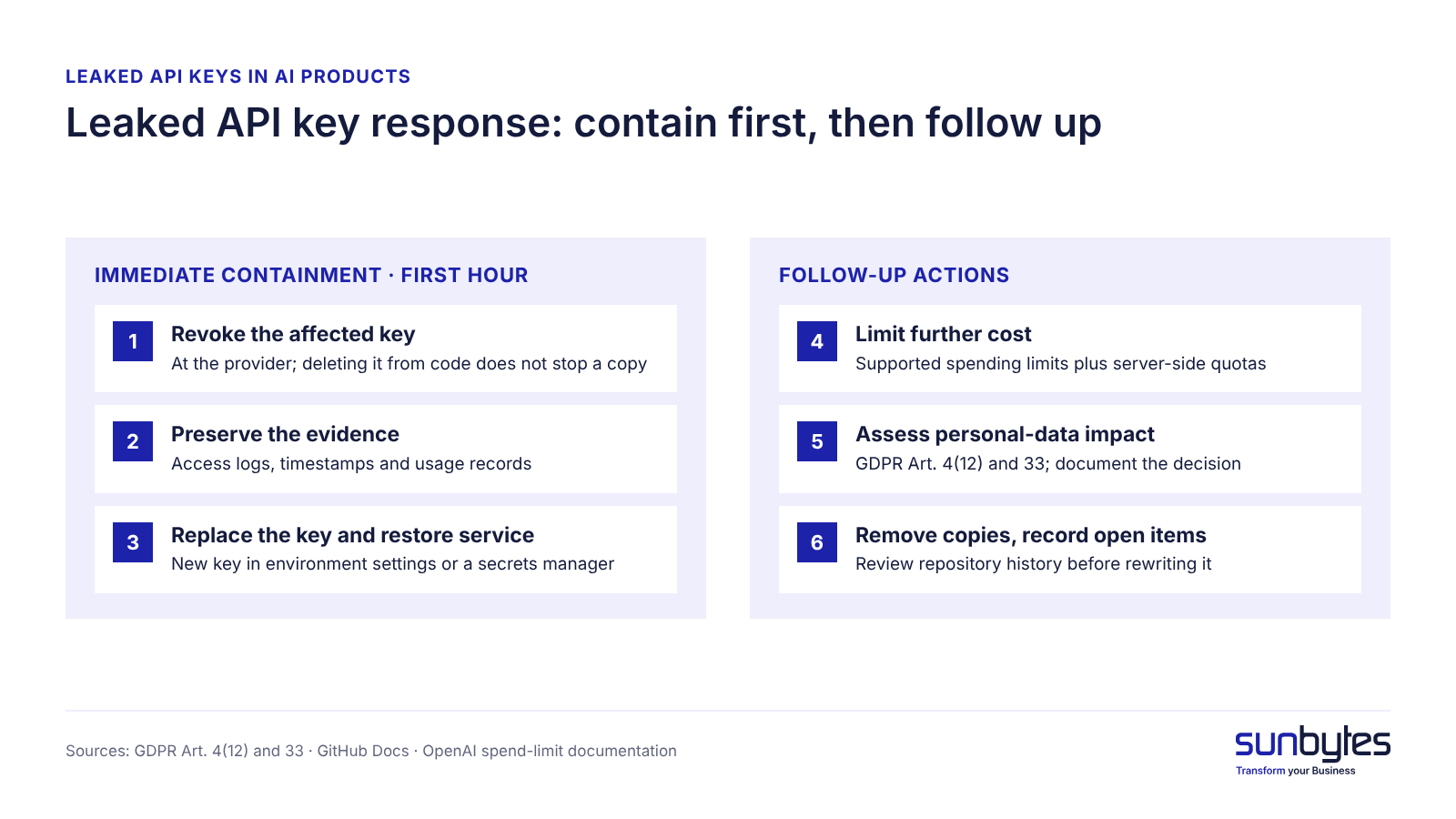
If an API key has leaked, revoke the affected key at the provider before doing anything else. Public code is scanned automatically, so assume the key has already been copied. The six steps are immediate containment priorities followed by follow-up actions: steps 1 to 3 belong in the first hour, while steps 4 to 6 start in that hour and may take longer to complete. Each step ends with a check that tells you it is done.
Immediate containment (first hour)
- Revoke or disable the affected key at the provider. Deleting the line from your code or removing the commit does not stop a copied key. Done when the provider dashboard shows the key as revoked or deleted.
- Preserve the evidence. Before removing anything, save the access logs, timestamps and usage records you need to investigate the incident: when and where the key was exposed and which calls it made. Done when copies of the relevant records are stored where the investigation can use them.
- Replace the key and restore service. Create a new key and store it in your hosting environment’s settings or a secrets manager, never in code. Done when the feature works again with the new key.
Follow-up actions (start now, finish when the evidence is in)
- Limit further cost. Check whether your model provider supports enforceable spending limits at the organisation, project or key level, and configure the limits that exist. OpenAI’s spend-limit documentation offers hard limits per organisation and per project, and states that enforcement is not instantaneous and that recorded spend can slightly exceed the configured amount. Do not rely on billing alerts alone; add server-side request quotas, rate limits and per-user controls where needed. Spending controls limit further financial impact, but they do not replace revoking the key. Done when the available limits are active and you know the usage since exposure.
- Assess whether personal data was affected. A leaked API key is not automatically a personal data breach. Under GDPR Article 4(12), assess whether the exposure led to a breach of security affecting personal data, based on the key’s permissions, the available logs and any evidence of unauthorised access or disclosure. If you identify a personal data breach, Article 33 generally requires notifying the Autoriteit Persoonsgegevens within 72 hours of becoming aware of the breach, which is not necessarily the moment the exposed key was first spotted, unless the breach is unlikely to result in a risk to people’s rights and freedoms. Done when the assessment and the reasons for the notification decision are documented, also when no notification is needed.
- Remove copies and record what still needs follow-up. After revoking the key, remove unnecessary copies from source code, configuration files, tickets and shared documents. Review repository history with a developer before rewriting it: GitHub’s documentation warns that forks, other users’ clones and cached commits can still contain the old credential. Check the retention and deletion options of any third-party service where the key was shared. The incident record states what was exposed, where copies were found, what was revoked and which locations still need follow-up; it is the replacement evidence that our production readiness checklist asks for, and it supports ISO/IEC 27001:2022 Annex A 5.17 on authentication information. Done when a second person can read the record and see every open item.
If you cannot determine what the exposed key could access, escalate the investigation and treat its permissions as a potential risk until verified. Revoke the affected key promptly, review related credentials and account activity, and expand the rotation scope only when the evidence indicates broader exposure. Avoid disabling unrelated production keys without assessing the operational impact.
Six ways AI products leak API keys
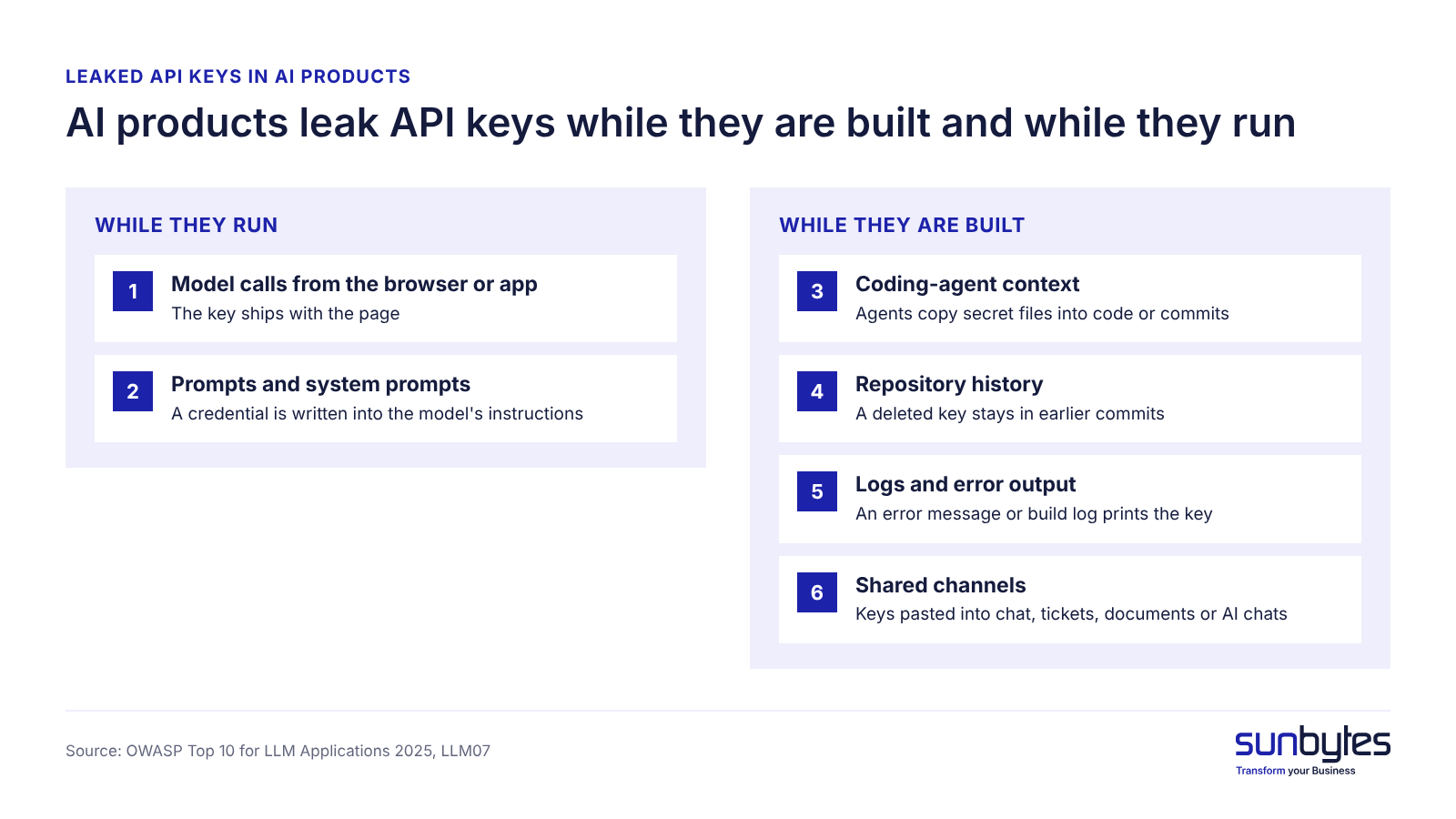
AI products leak API keys in two directions: while they are built and while they run. AI coding tools and agents read, write and commit secrets; AI features ship model-provider keys to browsers and put credentials into prompts.
| Leak path | How it happens in an AI product | How a founder can check (no code) |
|---|---|---|
| 1. Model calls from the browser or app | The AI feature calls the model provider from the browser or app, so the key ships with the page | Ask: does every model request go through our own server? |
| 2. Prompts and system prompts | A credential is written into the model’s instructions | Read the system prompt for anything that looks like a password |
| 3. Coding-agent context | A coding agent reads local secret files or tool settings and copies secrets into code or commits | Ask which files AI coding tools may read |
| 4. Repository history | A deleted key stays in earlier commits | Ask when a secret scan last ran on the full history |
| 5. Logs and error output | An error message or build log prints the key | Ask whether logs are checked for secrets |
| 6. Shared channels | A key is pasted into chat, a ticket, a document or an AI chat | Ask how keys are handed to new people |
Moving code to a private repository does not remove the risk. GitGuardian’s 2026 report found at least one hardcoded secret in 32.2% of internal repositories, against 5.6% of public ones.
Model calls made from the browser or app
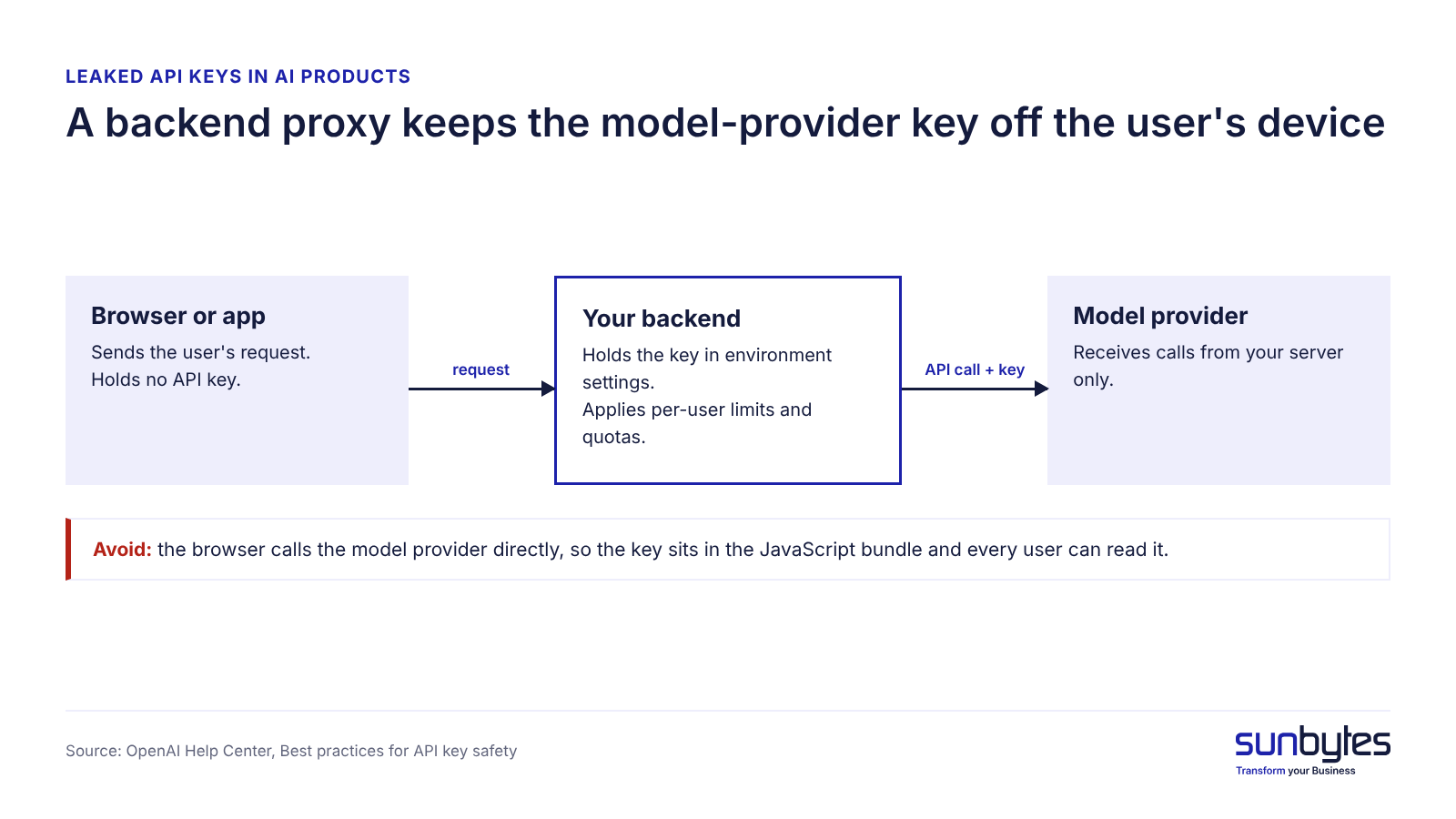
A model-provider key in browser or mobile code is readable by every user of the product. The fix is a backend proxy: the browser calls your server, and only your server holds the key and calls the model provider. OpenAI’s API key guidance gives the same instruction: route requests through your own backend server.
We’d recommend the proxy even for the first version of an AI feature: it also enforces limits per user, and adding it later means changing every model call.
Keys in prompts, agent context and tool settings
A system prompt is not a safe place for a secret. The OWASP Top 10 for LLM Applications 2025 entry LLM07, System Prompt Leakage, states that “sensitive data such as credentials, connection strings, etc. should not be contained within the system prompt language.”
AI coding agents create a second path: an agent that can read the project folder can read the .env file, the local file that holds keys, and copy it into code or its own context. GitGuardian found 24,008 unique secrets in public configuration files for MCP, the Model Context Protocol that connects AI agents to tools, of which 2,117 were valid. Exclude secret files from what coding tools may read, and keep tool settings out of the repository.
Not sure where your product keeps its keys?
Most of the six leak paths sit where a founder cannot see: build configuration, repository history, the way the AI feature calls the model. An AI-built product review checks engineering and security together and explains findings in plain English: which keys are exposed, which to replace first and what to change so it does not recur.
Why a leaked AI model key costs more than other keys
A leaked AI model-provider key is a direct bill and an outage risk, not only a data risk. Model APIs charge per request or per token, so whoever holds the key spends your budget. The OWASP Top 10 for LLM Applications 2025 lists this as LLM10, Unbounded Consumption: attackers “exploit the cost-per-use model of cloud-based AI services”.
The second cost is availability. When a leaked key pushes the account to its spend cap or rate limit, your own AI feature stops for every customer until the cap resets or someone raises it.
The third cost depends on the account: some model-provider accounts also store files or conversation history that a key may reach. Check the key’s permissions in the provider dashboard.
An illustrative scenario: a B2B customer portal adds an AI meeting-summary feature. To ship faster, the browser calls the model provider directly, so the key sits in the JavaScript bundle. Usage spikes over a weekend, and on Monday the feature is down because the account hit its cap. Three changes fix it: a backend proxy, a separate key per feature, and the spending limits the provider supports, backed by server-side quotas per user.
Check today which spending limits your model provider supports at organisation, project or key level, and configure them; billing alerts alone do not stop misuse. If a key is already exposed, revoke or disable that key first: spending controls limit further financial impact, but they do not replace revocation.
Secret scanning: catch keys before they ship
Secret scanning is an automated check that looks for credentials in code, configuration and repository history. Secret scanning works best at three checkpoints, each catching what the previous one missed. GitGuardian counted about 29 million new hardcoded secrets in public GitHub commits in 2025, 34% more than in 2024.
- On the developer’s machine, before a commit. A pre-commit hook stops a key from entering the repository at all.
- On every pull request. The CI pipeline (the automated build and test run) blocks the merge when a credential appears.
- Across the full history and at the hosting platform. A one-time history scan finds old leaks, and push protection on the code-hosting platform rejects new ones.
Open-source scanners such as Gitleaks and TruffleHog cover the first two checkpoints. How secret scanning fits a full delivery pipeline is covered in our DevSecOps pipeline article.
Secret scanning has limits: it cannot see a key the build injects into the browser bundle, a key stored inside a prompt, or a key pasted into chat. Scanning reduces new leaks; it does not fix a key that is already public.
Secrets rotation: replace keys without breaking production
Secrets rotation means replacing a key with a new one and disabling the old one, on a schedule and after every suspected leak. Teams skip secrets rotation because they fear an outage. GitGuardian reports that 64% of the valid secrets it detected in 2022 were still active and exploitable four years later.
The right order depends on whether the key is exposed. A deploy-first order keeps production running, but during the switch-over an exposed old key stays usable for whoever copied it.
| Scenario | Correct approach |
|---|---|
| Routine rotation (no known exposure) | Create new key → deploy → verify → revoke old key |
| Suspected or confirmed compromise | Revoke or disable the affected key promptly → replace → restore service → investigate |
For routine rotation, this order replaces a key without downtime:
- Create the new key at the provider, scoped to one service and one environment.
- Store the new key in your secrets manager or hosting environment settings.
- Deploy, and verify that the feature works with the new key.
- Revoke the old key.
- Watch error logs for 24 hours: any failed call shows a place that still used the old key.
Rotate API keys at four moments: immediately after a suspected leak (compromise order: revoke first), when someone with access leaves, when a freelancer or supplier finishes, and on a fixed schedule. OpenAI’s API key guidance supports keys with an expiration date and regular rotation. Give each service, environment and person its own key, so one rotation does not break everything.
Name one person who owns the key inventory: which keys exist, who holds them and when each was last rotated.
How to keep API keys out of an AI product
Six rules keep API keys out of an AI product; most cost a decision rather than a budget.
| Rule | What it prevents |
|---|---|
| Keys only on the server, behind your backend | Model keys shipped to browsers and apps |
| Secrets in a secrets manager or environment settings, never in code, prompts or documents | Keys in repositories, prompts and chats |
| Scoped keys with IP or domain restrictions where supported | A leaked key that can do more than its job |
| Spending limits at the levels the provider supports, plus server-side quotas and rate limits | Bill run-up and quota outages (not a substitute for revoking an exposed key) |
| Secret files excluded from AI coding tools; no keys in prompts | Keys copied into agent context, code and logs |
| A key inventory with an owner and last-rotated date per key | Old keys nobody replaces |
OWASP’s LLM07 prevention advice is the same: keep sensitive information in systems the model does not directly access. In ISO/IEC 27001:2022 terms the rules sit under Annex A 5.17 and A 8.4; our article on ai generated code security covers those standards in more depth.
An AI product is in good shape when no secret appears in the browser bundle, secret scanning blocks merges that contain credentials, and every key has an owner and a last-rotated date.
When a leaked key calls for an independent review
One leaked key often signals a pattern, not a one-off mistake. An independent review is worth it when one of four signals is present:
- a secret key has been found in frontend code once, because the same build pattern usually repeats elsewhere;
- nobody can list which keys exist and who holds them;
- an AI feature went live without a backend proxy or a spend limit;
- a previous leak was fixed by deleting the line, and the key was never revoked.
GitGuardian’s State of Secrets Sprawl 2026 found that Claude Code co-authored commits leaked secrets at roughly twice the baseline rate across public GitHub commits in its analysis. This does not establish the same rate for every AI coding tool or project. It does support checking how AI coding assistants access credentials, write configuration files and contribute changes before an AI-built product goes live. An outside reviewer also reads the code without the assumptions that let the key out.
How Sunbytes checks AI products for exposed keys
Revoking one leaked key closes the incident; it does not close the route the key took. In AI products that route usually runs through a build setting, a model call made from the browser or a coding agent with too much access, and the same route tends to carry more than one key.
Sunbytes starts from that route, not from the key. In an AI-built product review, software engineers and security specialists look at the same product: the code and its full repository history, the build and hosting configuration, and every place the product calls a model provider. Each exposed key is traced back to the pattern that put it there, and the findings explain in plain English what to revoke now, what to move behind your backend and which controls (secret scanning, spend limits, a rotation owner) close the gap. The review is separate from any fix work, so the advice does not depend on who builds the solution.
Two other teams step in only when the findings call for them. When a leaked key could reach customer data, Cybersecurity Solutions adds the control and evidence side: access rules, secret handling and the record you need for a GDPR breach assessment or a customer’s security questionnaire. When moving keys server-side and setting up scanning is more work than your team can absorb, a dedicated software development team carries out the changes.
Code access during the review runs under Sunbytes’ ISO/IEC 27001-certified information security management, with Dutch-led governance from the Utrecht headquarters, which matters as soon as your product holds data on European customers. The work draws on 300+ delivered software projects.
If one key has leaked from your AI product, request an AI-built product review to find out which other keys took the same route.