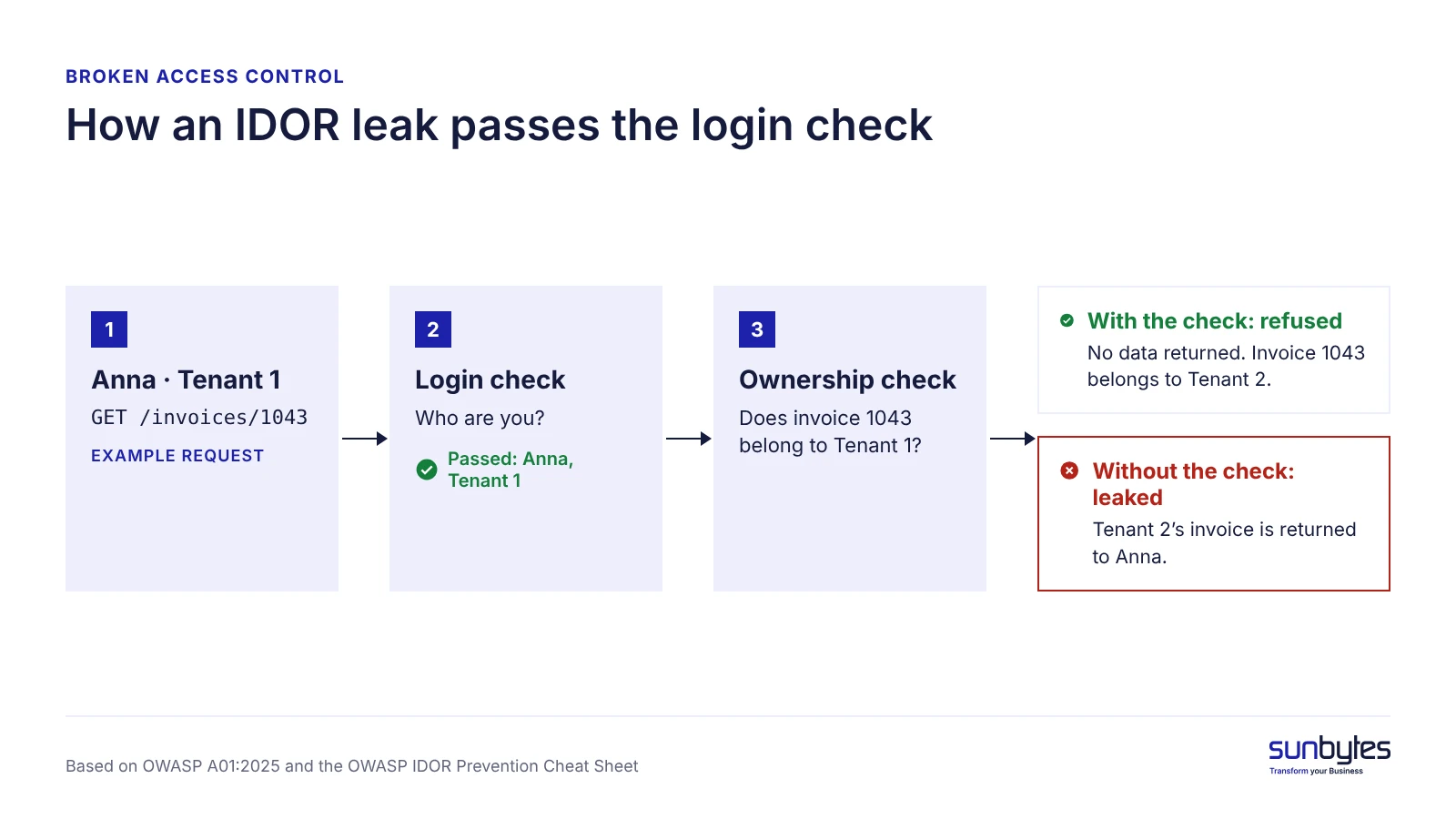
Logging in proves who a user is. It does not prove what that user may see. Broken access control is the gap between the two: the app knows Anna works for Company A, and still returns Company B’s invoice when she asks for invoice 1043 instead of 1042. An AI-built app can handle login correctly and still leave the second check out, because that check is a business rule someone has to specify, and a working demo does not show it is missing.
This article covers the three forms the flaw takes, how multi-tenant data isolation keeps customers apart, what the fix looks like and five questions to ask before you sign off. It is part of our founder’s guide to shipping AI-built products safely.
TL;DR
Broken access control means an application checks who a user is but not what that user may see or do. It is ranked first in the OWASP Top 10:2025. In an AI-built app it can appear as an endpoint that returns any record by its ID without checking who owns that record.
- Three forms to recognise: IDOR (changing an ID returns someone else’s record), admin functions without a server-side role check, and roles or flags a user can change.
- Multi-tenant data isolation: take the tenant from the signed-in user’s membership, never from the request, and enforce it in both the app and the database.
- The fix: deny by default, check ownership on the server for every object and operation, and keep that check in one central access-control layer.
- Sign-off threshold: if your developer cannot show where record access is decided and where each query’s tenant ID comes from, the product is not ready for multi-customer use.
What broken access control is
Broken access control is a flaw where an application lets a signed-in user read, change or delete data, or run functions, beyond what that user is permitted to do. OWASP ranks it first in the OWASP Top 10:2025, the position it also held in 2021, and reports that every application in its 2025 test data showed some form of the flaw. For a founder, that makes access control the first area to check in any product that holds other people’s data.
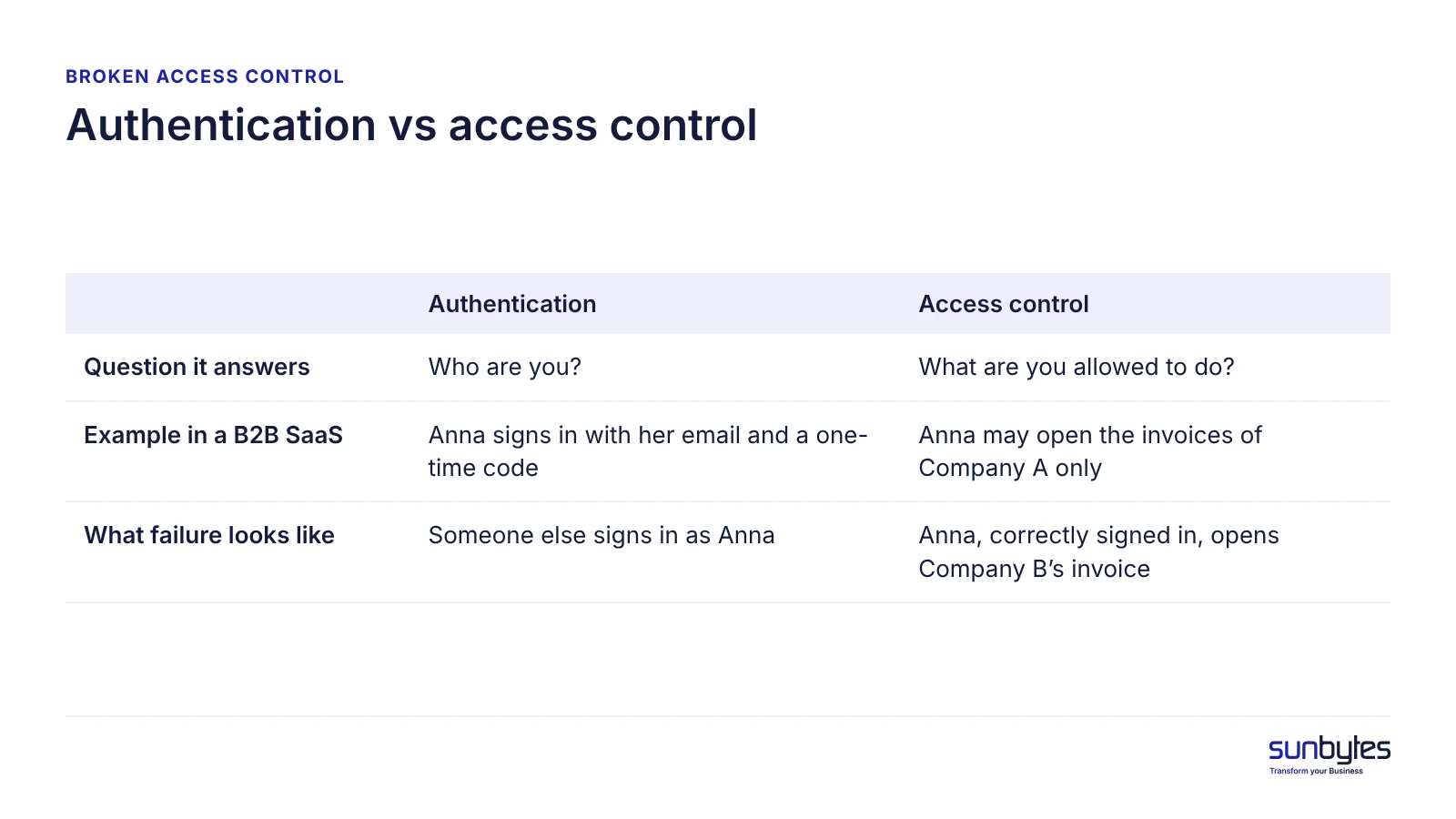
Access control is easy to confuse with authentication, and the difference decides where you look. Authentication establishes identity. Access control, also called authorization, decides what that identity may do with each record and function.
| Question it answers | Example in a B2B SaaS | What failure looks like | |
|---|---|---|---|
| Authentication | Who are you? | Anna signs in with her email and a one-time code | Someone else signs in as Anna |
| Access control | What are you allowed to do? | Anna may open the invoices of Company A only | Anna, correctly signed in, opens Company B’s invoice |
Failures run in two directions. Horizontal escalation reaches the data of another user at the same level, such as another customer’s invoice. Vertical escalation reaches the functions of a higher role, such as an admin panel. If any screen or API call takes an ID, a role or a customer ID from the user, access control for that call is a design decision, not something to assume is in place.
How broken access control can enter an AI-built app
AI coding tools can implement a requested feature without the authorization rules the product requires. This can happen when the prompt, existing code or project requirements do not define who may access a particular record or function. The risk is not unique to AI-generated code, but teams using AI-assisted development still need to verify how permissions are enforced. Four paths can let the gap in or keep it hidden:
- The prompt. For example, asked to “add an endpoint that returns an invoice”, an AI coding tool can fetch the invoice by ID and return it. If neither the prompt nor the existing code says only members of the invoice’s company may read it, the tool has no ownership rule to enforce.
- Checks in the browser only. Buttons are hidden from regular users while the API accepts any signed-in request. The OWASP Authorization Cheat Sheet is explicit: “Developers must never rely on client-side access control checks.” Our article on role checks enforced only in the browser covers this risk.
- Testing with the wrong account. A builder testing as owner or admin sees every request succeed, which is also what an over-permissive app shows.
- Automated tools have limited coverage. Automated security tools, such as static application security testing (SAST), can identify some access-control weaknesses, but their coverage depends on the tool, configuration, application context and testing approach. Missing or incorrect business-level authorization rules may require manual review and targeted authorization tests to detect, which is why AI code needs human review.
The exposure grows with the access model. A single-user tool has few records to separate; a B2B SaaS with companies, teams and roles needs an ownership rule for every object type and operation, and each rule is one more place a check can be missing.
Three forms broken access control takes in an AI-built app
Broken access control in an AI-built app shows up in three recognisable forms: IDOR, admin functions without a server-side role check, and roles or flags a user can change. OWASP lists all three among the common weaknesses in A01:2025.
IDOR: changing an ID shows someone else’s record
An IDOR vulnerability (insecure direct object reference) is a flaw where the app uses an ID from the request to fetch a record without checking that the requester may see it. A customer opens /invoices/1042, changes it to 1043 and sees another company’s invoice, with contact names, addresses and amounts. When the record holds personal data, that is a disclosure to someone with no right to see it, which makes it a GDPR question before a technical one. The OWASP IDOR Prevention Cheat Sheet names the cause as a missing object-level access check. The same flaw applies to file downloads, exports and the API calls behind a mobile app.
Admin functions without a server-side role check
Missing function-level access control means an admin page or endpoint is hidden from the menu but still answers anyone who calls it; reaching it by typing or guessing its address is called forced browsing. For example, an AI coding tool that builds an admin screen and its API in one step can protect the screen in the interface and leave the API open. A regular user can then export accounts or delete data through the open API. The fix: every admin endpoint checks the caller’s role on the server, whatever the interface shows.
Roles and flags the user can change
Vertical escalation through user-controlled fields happens when the app accepts a role, plan or is_admin value from the user. Two routes lead there: a profile-update endpoint that saves every field it receives, including “role: admin”, and a token claim the server trusts without verifying it. A JWT (JSON Web Token) is a signed token that carries claims such as user ID and role, and OWASP A01:2025 lists tampering with JWTs, cookies and hidden fields as a common weakness. The fix: the server decides roles and plans from its own records and never accepts them from the client.
| Form | Example | Who is harmed | Launch blocker? |
|---|---|---|---|
| IDOR | Changing invoice 1042 to 1043 shows another customer’s invoice | The customer whose record is exposed | Yes, when personal or customer data is involved |
| Admin function without a server-side role check | A regular user calls the admin export endpoint directly | Every user in the export | Yes, when personal or customer data is involved |
| Role or flag the user can change | A profile update that accepts “role: admin” | Every tenant the new admin can reach | Yes, when personal or customer data is involved |
Multi-tenant data isolation: keeping one customer out of another’s data
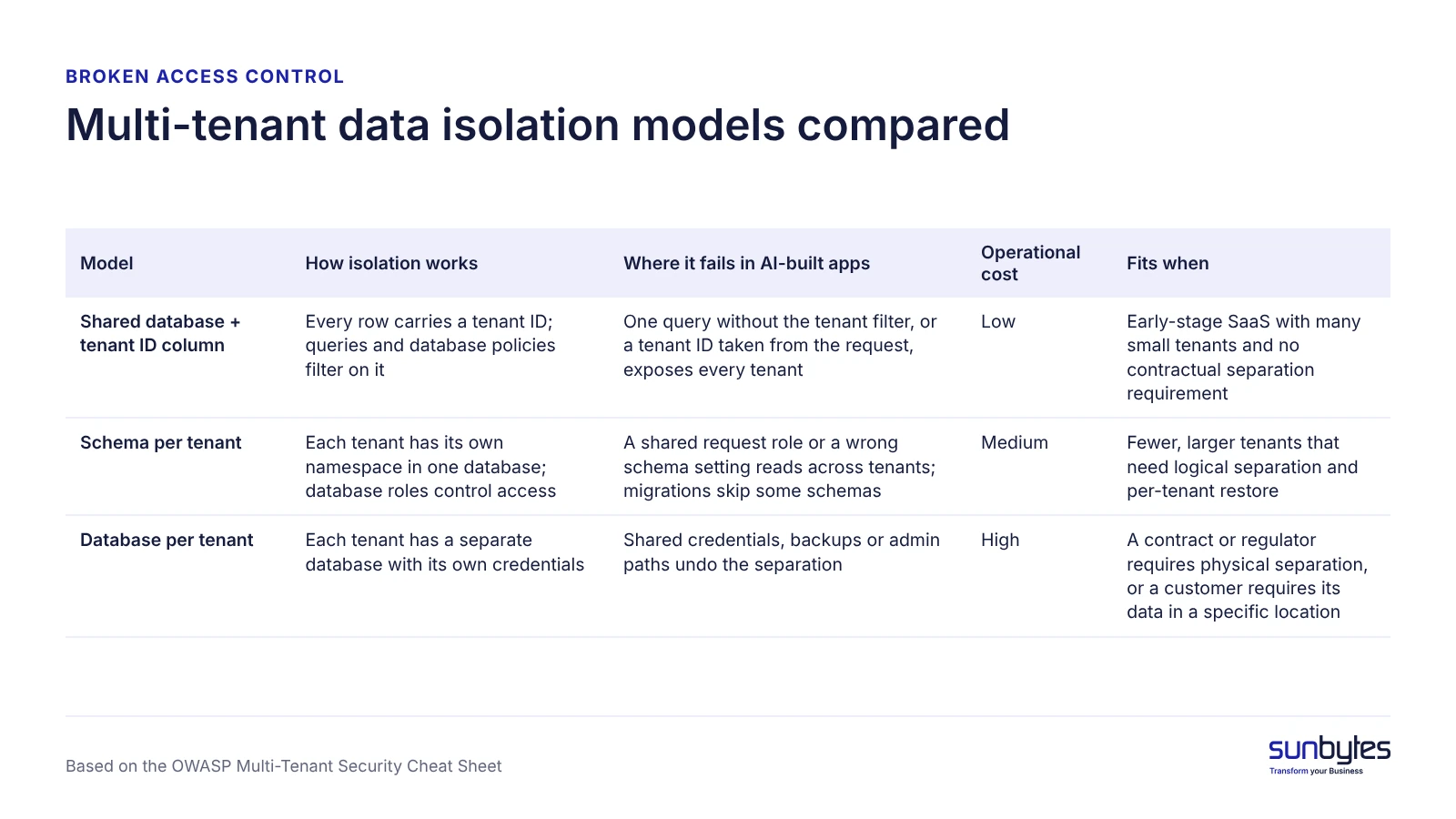
Multi-tenant data isolation is the set of controls that keeps each tenant, meaning one customer organisation in your SaaS, from reading or changing another tenant’s data. A tenant leak happens when the app reads the tenant ID from the request body, the URL or browser storage instead of from the signed-in user’s membership. The OWASP Multi-Tenant Security Cheat Sheet says client-supplied tenant identifiers should be treated as selectors only and verified against the authenticated user. How strictly tenants are separated then depends on the isolation model.
| Model | How isolation works | Where it fails in AI-built apps | Operational cost | Fits when |
|---|---|---|---|---|
| Shared database + tenant ID column | Every row carries a tenant ID; queries and database policies filter on it | One query without the tenant filter, or a tenant ID taken from the request, exposes every tenant | Low | Early-stage SaaS with many small tenants and no contractual separation requirement |
| Schema per tenant | Each tenant has its own namespace in one database; database roles control access | A shared request role or a wrong schema setting reads across tenants; migrations skip some schemas | Medium | Fewer, larger tenants that need logical separation and per-tenant restore |
| Database per tenant | Each tenant has a separate database with its own credentials | Shared credentials, backups or admin paths undo the separation | High | A contract or regulator requires physical separation, or a customer requires its data in a specific location |
For an early-stage SaaS, we recommend a shared database with a tenant ID enforced in two places, the application’s access-control layer and a database policy such as row-level security (RLS), because a missing filter in one layer is caught by the other. Move to schema- or database-per-tenant when a contract or regulator requires physical separation, or when a customer requires its data in a specific location; the stronger boundary brings more migrations, backups and credentials to manage. On Supabase, our guide to Supabase RLS shows the database layer in detail, and Firebase security rules play the same role on Firebase. Whatever the model, every query that touches customer data should name its tenant filter in one place your developer can point to.
NEXT STEP
Check the access rules, not only the scan results.
Automated scans may not detect a missing or incorrect business-level access rule. An independent review reads your code for who should see what, and shows with evidence which endpoints and tables let one customer reach another’s data.
How to fix broken access control
Fixing broken access control means the server decides, on every request, whether this user may perform this operation on this object, and refuses when no rule allows it. The six fix patterns below follow the prevention guidance in OWASP A01:2025 and the OWASP Authorization Cheat Sheet, and a founder can hold a developer to each one:
- Deny by default: new endpoints, functions and tables start closed, with public resources as the listed exception.
- Check ownership or membership on the server for every object and every operation: read, update, delete, export and download.
- Derive the user and the tenant from the session, never from request parameters, form fields or browser storage.
- Keep one central access-control layer, such as middleware or a policy module, instead of checks written separately in each endpoint.
- Enforce the rule again in the database where the stack supports it, through row-level security or security rules.
- Log access-control failures and alert on bursts, such as repeated failures from one account.
Three responses look like fixes and are not. Hiding buttons changes what the interface shows, not what the API accepts. Random or UUID identifiers make guessing harder, but IDs still travel through shared links, logs and API responses; the OWASP IDOR Prevention Cheat Sheet treats them as defence in depth and states: “If attackers obtain URLs for unauthorized objects, the application should still block their access attempts.” And “the AI tool will add it if I ask” is a plan, not a fix, until someone checks the result. When you prompt an AI coding tool, write the rule in business terms (“only members of the invoice’s company may read it; only that company’s admins may delete it”) and review the output for that rule, not only for whether it runs.
Patch endpoint by endpoint when only a few lack ownership checks. When checks are missing across most endpoints, build the central layer first and move endpoints onto it, because patching dozens one by one leaves the next new endpoint open again.
Proving the fix holds
Negative authorization tests provide evidence that the access-control rules work for the users, resources, operations and conditions covered by those tests. Include cross-user, cross-tenant and role-based denial scenarios in regression testing, and review whether additional access paths remain outside the tested coverage. OWASP A01:2025 lists functional access-control checks in unit and integration tests as a prevention measure. The test steps are in our guide to testing AI-built applications.
Five questions to ask before you sign off on access control
Five design questions show whether access control was designed or left to chance, and a developer should answer each by pointing to code:
- Where in the code is the single place that decides who may see a record?
- Where does the tenant ID in each query come from: the signed-in user’s membership, or the request?
- Which endpoints or functions run with admin or service rights, and why?
- Can a user change any field that affects their own role, plan or tenant?
- What happens when an access check fails, and who is alerted?
Questions 1 and 2 carry the most weight: if the developer cannot point to an answer for both, treat the product as not ready for multi-customer use, whatever the test results say. An independent reviewer asks the same questions of the code itself.
What broken access control costs a European SaaS
For a European SaaS, broken access control that exposes personal data is a security failure under the GDPR (AVG in Dutch), and depending on your role and the risk, it can start a 72-hour notification clock. The GDPR defines a personal data breach in Article 4(12) to include unauthorised disclosure of or access to personal data, which is what an IDOR or tenant leak does. Article 5(1)(f) requires appropriate security against unauthorised processing, and Article 32(1)(b) names the confidentiality of processing systems among the measures to ensure; Article 25 adds data protection by design.
The notification duty depends on your role, which your contracts should confirm. Where your SaaS decides why and how the data is processed (controller), Article 33(1) requires notification to the supervisory authority without undue delay and, where feasible, within 72 hours of becoming aware, unless the breach is unlikely to result in a risk to people’s rights and freedoms. For a controller established in the Netherlands, that is the Autoriteit Persoonsgegevens. Where you process data on your B2B customers’ instructions (processor), Article 33(2) requires you to notify each affected customer without undue delay.
The commercial cost can arrive first. Customers in scope of NIS2 (Directive (EU) 2022/2555) must address supply-chain security, including their direct suppliers’ cybersecurity practices and secure development procedures (Article 21(2)(d) and 21(3)), so their questionnaires can ask how tenant data is separated. A multi-tenant product that holds personal data and sells to B2B buyers should therefore have its access control reviewed independently before the next enterprise deal; a single-user tool can rely on the five sign-off questions.
How Sunbytes reviews access control in AI-built products
Access control is one of the security areas covered by Sunbytes’ AI-built product review. As part of the agreed scope, our software engineers and security specialists examine relevant permissions, cross-user access, database rules and sensitive data flows alongside the product’s code, architecture, critical workflows and deployment setup.
The review considers how access permissions are implemented and whether the relevant product behaviour raises security concerns. Findings are documented with supporting evidence and prioritised by what needs attention now and what can wait. Your team receives practical technical guidance to help plan the next steps. For a B2B product, our guide to the AI-built SaaS review shows what else such a review covers; teams that want a security-only assessment can choose secure code review instead.
You can address the findings with your own developers or discuss separately scoped remediation and re-checking with Sunbytes. Sunbytes brings experience from 300+ software delivery projects and an ISO/IEC 27001:2022-certified information security management system. The specific permissions, user roles, data flows and components included in a review are confirmed during scoping, so talk to us about what yours should cover.
Want to understand the security and technical risks in your AI-built product? Explore Sunbytes’ AI-built product review.