

Your AI-built app may work well in testing and still become slower as customers add more data. The cause is not always your hosting plan: some parts of the app may ask the database to do far more work than necessary. Database performance optimization starts by finding that unnecessary work. This guide explains three problems to check, what to ask your development team, and how to decide whether to fix the code or pay for more capacity.
TL;DR
Database performance optimization means making the database do less unnecessary work for each page or action, so the app stays fast as customer data grows. Before you pay for a bigger hosting plan, ask your team for measured evidence of where the database spends its time.
- N+1 queries make one page send a separate database request for every item it shows, so a list of 50 orders can cost 51 requests.
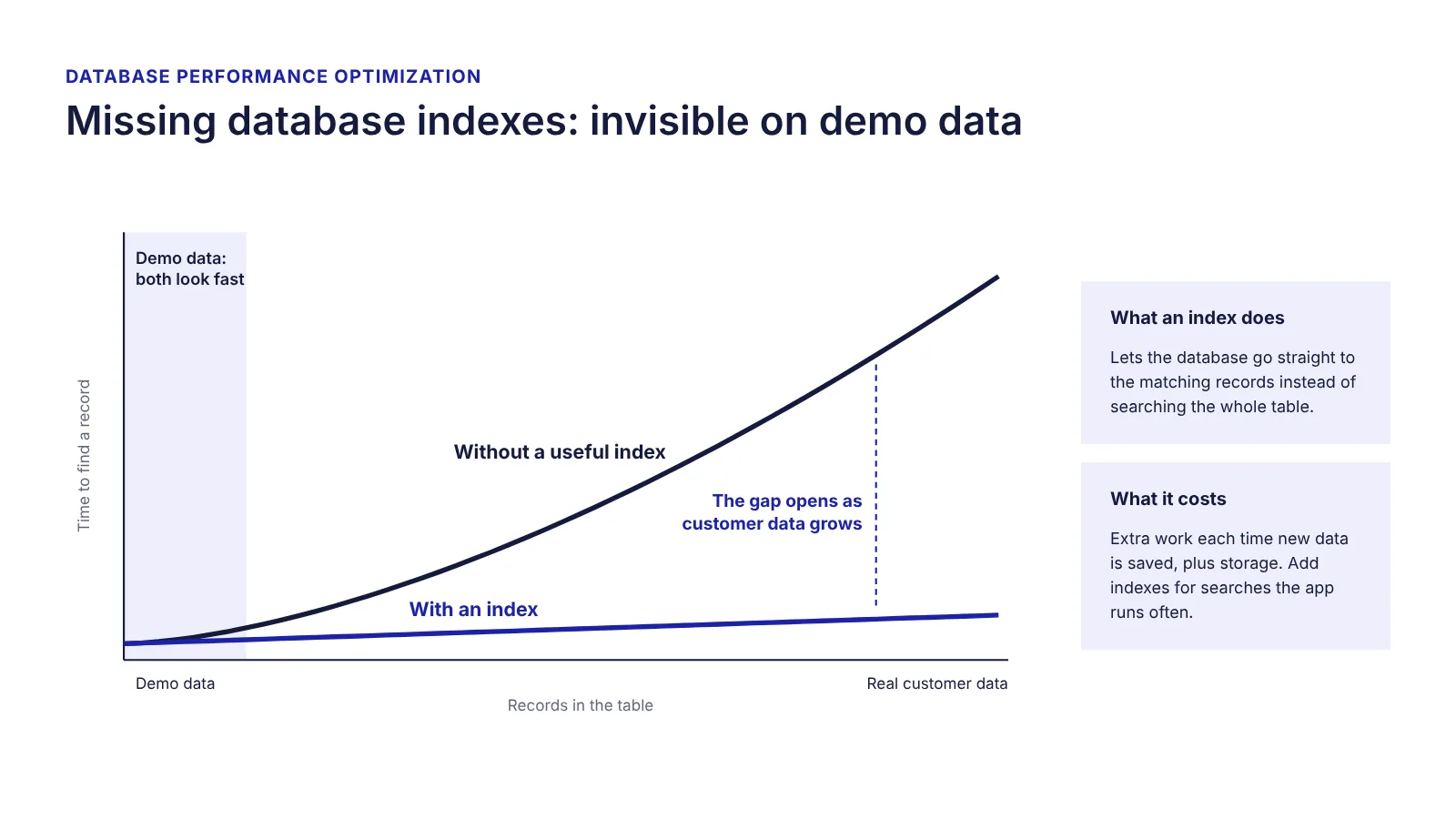
- Missing database indexes make the database search a whole table to find a few records, which stays invisible with demo data and slows down as real data grows.
- Unbounded queries load every record or every field when the page shows only a few, so the page gets slower as the table grows.
- A fix is ready for release only when comparable before-and-after tests show a faster page, the same results and unchanged customer access.
Why your AI-built app slows down as data grows
An AI-built app slows down as data grows when its database requests were written for a small demo, not for real customers. AI coding tools see the prompt and the project files, not how many orders, users or records the app will hold. With a few dozen test records, almost any request returns instantly, whether it is efficient or not.
The difference shows up later. For example, a page that loads in under a second at launch can take several seconds once customers have added a year of data, while the number of visitors stays the same. That pattern, slower every month with flat traffic, points to the database before the server, one of the launch risks covered in our guide to shipping AI-built products safely.
Three database problems that can slow down your AI-built app
The three problems below are hard to spot with a small demo database and become more noticeable as customers add orders, records or reports.
N+1 queries: when one page makes too many database requests
N+1 queries happen when a page asks the database for a list and then sends one extra request for every item on that list. The name comes from the count: one request for the list, plus one for each of the N items.
An example: an orders page shows 50 orders. The app first requests the list of orders, then requests the customer details for each order one by one. The page sends 51 database requests where one or two would return the same information. With 5 test orders, nobody notices. With 5,000 orders in an export, the same page sends 5,001 requests (example numbers).

What to ask your team: does the number of database requests on this page grow with the number of items shown? A useful answer is a measured request count for a busy page, before and after the fix.
Missing database indexes: when finding a record takes too long
Missing database indexes mean the database has no quick way to look up the records a page needs, so it searches the whole table. An index works like the index at the back of a book: instead of reading every page, the database looks up the value and goes straight to the matching records.
Without the right index, a search that was instant with demo data takes longer with every record customers add. Indexes are not free, though: each one adds work when new data is saved and uses storage, which is why the PostgreSQL documentation advises using them “sensibly”. An index helps the searches the app runs often, not every column in the database.
What to ask your team: which slow operation does this new index speed up, and what did the measurement show before and after? An index added without that answer is a guess.
Unbounded queries: when the app loads too much data
Unbounded queries load more data than the page uses: every record in a table when the page shows 20, or every field when the page shows three. The page works, but it gets slower as the table grows.
The fix is to load only the records and fields the page needs, one page of results at a time. Loading fewer fields also means less personal data passes through the app and its logs, which fits the data minimisation principle in GDPR Article 5(1)(c).
What to ask your team: are we asking the database for more data than this page shows? Start with the busiest pages and the lists that grow with every customer action.
How to check whether the database is causing the slowdown
You do not need to read SQL to ask whether the database is causing the slowdown. Ask your developer for a database performance report showing which operations use the most time, how often they run, and which customer-facing pages they affect. PostgreSQL-based platforms can record this data for every type of operation, so the report should come from measurements, not opinions.
No one on your team can produce this report yet? Start with an independent look at the evidence. An AI-built product review checks code and architecture, reliability and critical flows, and shows what was found, why it matters and the evidence behind it. Talk to us about a review →
Compare the report with the slow pages your team or customers have noticed. A useful report identifies likely causes and what the team plans to test next, not simply a larger hosting plan. The questions in Table 1 help you judge the answers.
| Ask your team | A useful answer | Warning sign |
|---|---|---|
| What is making the app slow? | Measured evidence linking slow operations to affected user journeys | The diagnosis is based only on guesses |
| Are we asking the database for more data than a page needs? | An example of excess requests or unnecessary records being loaded | No one has checked |
| Can we improve speed before upgrading hosting? | Options compared by expected effect, effort and risk | An upgrade is proposed without investigation |
| How will we know a fix worked? | Before-and-after results from comparable tests | “The code looks better”, without measurements |
| Will the fix change results or access? | Key functions and customer data permissions verified | Only speed was tested |
Should you fix the code or upgrade the database?
Fix the code first when the performance report shows that a few operations take most of the database time; upgrade when the operations are already efficient and real customer load is still too high. An upgrade is a valid decision, as long as it rests on evidence rather than on a slow page alone.
| Option | Choose it when the evidence shows | What to ask for before approving |
|---|---|---|
| Fix the code | A few operations take most of the database time | The operations to fix, expected effect and a before-and-after test plan |
| Upgrade capacity | Operations are already efficient and real load is high | Measured load, the expected gain, the added monthly cost and who monitors it |
| Redesign the data model | Every new feature needs another workaround in the same tables | Scope, risk to existing features and a decision on refactoring or rewriting |
When the cause is in the code, an upgrade buys time, not a solution: the slowdown returns as data grows. A redesign touches the whole product; our guide on whether to refactor or rewrite an AI-built app covers that decision.
How to know whether the fix actually worked
A database fix worked when comparable tests show the page is faster and nothing else changed. Before approving a fix, ask for results from comparable tests: the same key user journey, a similar amount of data and realistic numbers of concurrent users. The team should show whether the page became faster, whether the improvement holds under load testing, and whether the results and customer access permissions remain correct. If any of these checks fail, the fix is not ready for release.
The access check matters most for fixes an AI tool suggests: a speed fix that stores answers for reuse can, if set up carelessly, show one customer’s data to another. Our article on Supabase access rules explains database-level access control. Run tests on a separate copy of the app with synthetic or anonymised data, not on live customer records.
How Sunbytes helps assess performance risks
When your AI-built app slows down, the first decision is what needs attention before you commit more budget to development or hosting. Our Sunbytes AI-built product review examines code and architecture, reliability, critical user flows, and security and data risks, so a speed problem is assessed together with its effect on customer data.
You receive evidence-backed findings, a prioritised action plan and a technical handoff your development team can use. The review helps clarify what to investigate or fix first; any implementation work is scoped separately. It runs under Sunbytes’ ISO 27001-certified information security management system, backed by 300+ projects delivered.