
App maintenance for an AI-built product is less a budget question than an ownership question: who can change this code safely next month? The app may run well today. When a security patch, a store policy change or an outage arrives, someone has to understand the code well enough to act. With AI-built code, the reasons behind each choice may not be written down anywhere.
This guide is for business leaders whose AI-built app is live and has its first paying users. It covers what maintenance includes, six tasks that fail without an owner, who should own the app, how to hand it over and what drives the cost. It is part of our guide to shipping AI-built products safely.
TL;DR
App maintenance is the ongoing work of fixing, adapting, improving and protecting an app after launch. For an AI-built app, the risk is not the work itself but the lack of an owner: the reasons behind AI-written code may exist only in a prompt history, so every change needs someone who can read and test the code.
- App maintenance covers four types of work named in the ISO/IEC/IEEE 14764 maintenance standard: corrective, adaptive, perfective and preventive.
- Ownership belongs with one accountable person or team that can read and test code, once the app takes payments or stores personal data.
- Handover takes five steps: company-held accounts, a written runbook, monitoring with a named responder, a written maintenance scope and an independent baseline of the codebase.
- App maintenance cost depends on five drivers: code clarity and tests, integrations, platforms, data sensitivity and the pace of product change.
What does app maintenance cover for an AI-built app?
App maintenance covers every change made to a live app after launch, from bug fixes to the updates that prevent the next failure. ISO/IEC/IEEE 14764, the international standard for software maintenance, defines the types of maintenance work. Four of them map directly onto an AI-built app:
- Corrective: fixing faults that users or monitoring find, such as a checkout that fails for one payment method.
- Adaptive: keeping the app working when its environment changes, such as a new mobile operating system or a retired API version.
- Perfective: improving the app and adding features, such as the next prompt-built screen.
- Preventive: reducing future failures before they happen, such as updating outdated packages or testing a backup.
Launch is where the build budget ends. The four types of maintenance continue for as long as the app has users.
Why an AI-built app needs a named owner after launch
An AI-built app needs a named owner because the code carries no explanation of itself. When a developer writes an app, that developer remembers why a query is written a certain way or which edge case a check prevents. When an AI coding tool writes the app, those reasons may exist only in a chat or prompt history that nobody reads again.
The code still works, but nobody can say what a change will break. The founder asks the tool for a fix, the tool rewrites part of the code, and nobody checks what else changed.
The useful question is therefore not “how many hours of maintenance does the app need?” but “who can change this code safely next month?” The answer should be a named person or team, with the access, documentation and tests to act. Until then, maintenance waits for whoever notices a problem first.
6 maintenance tasks that become production incidents without an owner
Each task below is routine when someone owns the app and becomes a production incident when nobody does. Check each one against your own product.
Security patches and dependency updates go stale
An AI-built app depends on open-source packages, called dependencies, that other people write and maintain. When a security flaw is found in a package, its maintainers release a fix. Your app stays exposed until someone updates the package and tests that the app still works.
AI coding tools add packages to make a feature work, but they do not track them after the session ends. Tools such as GitHub Dependabot raise alerts for vulnerable dependencies; the alerts only help if someone reads and acts on them. Ask your developer: “When were our dependencies last updated, and how many security alerts are open?”
Platform and third-party API changes break features
Platforms and providers change their rules on their own schedule, and an app that is not adapted stops working or cannot ship updates. Google Play requires new apps and app updates to target Android 16 (API level 36) from 31 August 2026. Existing apps below Android 15 become unavailable to new users on newer Android devices.
Apple has required apps uploaded to App Store Connect to be built with Xcode 26 since 28 April 2026. Payment, login and database providers retire API versions in the same way. The warning arrives as a provider email, so ask: “Who reads our provider and app store notices, and when did we last act on one?”
Outages have no one to respond
Without monitoring and a named responder, the first person to notice an outage is a customer. Monitoring means automatic checks that the app is up and alerts when errors increase. A named responder, sometimes called on-call, is the person who receives those alerts and is expected to act.
An AI-built app can go live without error tracking, uptime checks or alerts, because none of them is visible in a demo. If you learn about downtime from support tickets or social media posts, this task has no owner yet. Ask: “If the app goes down at 02:00 on a Sunday, who gets the alert?”
Backups exist but restores are never tested
Hosting and database platforms offer backups, but a backup that has never been restored is an assumption. The settings depend on your plan. On Supabase, for example, daily backups run on the Pro, Team and Enterprise plans, point-in-time recovery is an add-on, and database backups do not include files stored through Supabase Storage.
If the app holds personal data, GDPR Article 32(1)(c) asks for “the ability to restore the availability and access to personal data in a timely manner in the event of a physical or technical incident”. Ask: “When did we last restore a backup into a test environment, and how long did it take?”
New features break old ones
Each new AI-generated change can alter behaviour elsewhere in the app when no automated tests check the rest of it. Developers call this a regression: something that used to work stops working after an unrelated change. AI coding tools focus on the feature described in the prompt, not on everything that feature touches.
Two signals show the problem: fixes create new bugs, and every release needs a manual click-through of the whole app. To measure how far the code has drifted, see our code quality metrics and our guide to AI technical debt. Ask: “Which of our critical flows have automated tests?”
Accounts and access sit with one person
If the accounts that run your app belong to a freelancer or one co-founder, the company does not control its own product. Accounts opened in a personal name during a fast build stay there until someone moves them. The test is simple: can you log in to production yourself?
Check at least these eight accounts:
- domain registrar and DNS
- hosting or cloud platform
- database
- code repository
- App Store Connect
- Google Play Console
- payment provider
- the AI coding tool account that holds the project
Know what you are taking ownership of
Before anyone signs up to maintain your app, find out what is in it. An AI-built product review checks security, code, reliability and deployment together, and explains the findings in plain English, so the next owner starts from facts.
Who should own your app after launch?
For a live product with paying users, one accountable owner who can read and test code, plus company-held access to every account, works better than any arrangement where the founder and an AI tool share the job. The owner can be a freelancer, an agency, an employee or a dedicated team. What matters is that one party answers for all four types of maintenance.
| Owner | Works when | Breaks when | What the company must hold itself |
|---|---|---|---|
| Founder with the AI tool | The app has no paying users and no personal data | A fix needs someone to read the code, or a change breaks a flow nobody tested | Everything: accounts, code, backups |
| Freelancer | The app is small, stable and one person can understand all of it | The freelancer is unavailable, leaves or holds the accounts | All accounts, the code repository and a written runbook |
| The agency that built it | The agency knows the code and you agree a written maintenance scope | Problems trace back to the original build and nobody can check the agency’s own work | Accounts, repository and an independent baseline of the code |
| First in-house engineer | The product is core to the business and changes every month | One person carries all the knowledge and is also building new features | Accounts, documentation and a second person who can deploy |
| Dedicated team or product engineering partner | The app has paying users, personal data or several platforms | Scope and ownership of decisions are not written down | Accounts, repository and the right to take the code elsewhere |
The condition that changes the answer is risk, not size. The founder-plus-AI-tool model holds only while the app has no paying users and no personal data. Once you take payments or store customer data, you need an owner who can read the code the tool writes and test it before release.
We would not hand maintenance back to the agency that built the app without an independent baseline first, because the agency would be judging its own work. The new owner may also inherit code they would not keep, which turns the ownership decision into a refactor or rewrite decision.
How to hand over app ownership after launch
App ownership changes hands safely in five steps, in this order: the first four give the new owner control and context, and the fifth shows what they inherit.
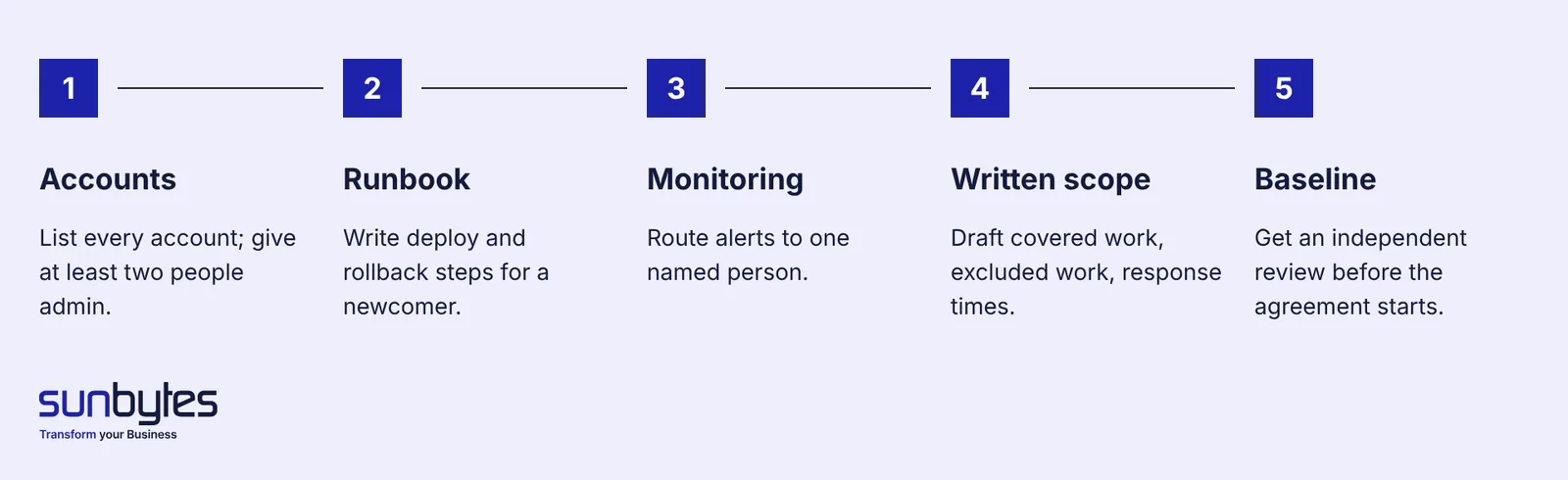
Five steps to move app ownership without losing access or context.
Move every account into the company’s name
Before any code changes, transfer every production account to a company-owned email address and give at least two people admin rights. Use the eight-account list above as the checklist. Store the credentials in a company password manager, a shared vault where access can be granted and removed, rather than in one person’s browser or notes. Once the transfer is done, removing a freelancer’s access is a setting, not a negotiation.
Write down how the app runs and deploys
A short runbook lets a new owner work from the first week instead of reverse-engineering the app. Two pages are enough to start: how to deploy a change, where the logs are, how to roll back, and which environment variables exist. Environment variables are the settings and keys the app reads when it starts. Rollback means returning to the previous working version when a release goes wrong.
Set up monitoring and name an incident owner
Uptime checks, error tracking and alerts sent to a named person turn outages from customer complaints into tickets. You need three things: a check that the app responds, a record of errors users hit, and an alert route to a person who has agreed to act. Write down who that person is outside office hours.
Put the maintenance scope in writing
A maintenance agreement should state what is covered, what is not and how quickly each type of issue gets a response. Covered work can include security patches, platform updates, incident response, backup checks and small fixes. New features are a separate decision with their own budget. Response expectations should depend on impact: a payment outage is not the same as a typo on a settings page.
Get an independent baseline of the codebase
An independent review tells the new owner, and you, what they are inheriting: security gaps, fragile areas, missing tests and what to fix first. Without that baseline, every later problem turns into a debate about who caused it. An AI-built product review gives both sides the same findings before the maintenance agreement starts.
What drives app maintenance cost?
App maintenance cost depends less on how big the app looks than on five drivers, each of which changes how much work and risk a single fix or update carries. We do not publish prices, because the same drivers produce very different scopes from one product to the next.
How readable and tested the code is
Readable, tested code makes each change smaller and safer, and that is the biggest cost driver for an AI-built app. When code has no tests and no clear structure, a one-line fix needs hours of checking what else it touches. Measure this before you agree a maintenance scope.
How many integrations the app depends on
Every external service the app connects to adds maintenance, because each one changes on its provider’s schedule. Payments, login, email, maps, analytics and AI model APIs each have their own versions, limits and notices.
How many platforms you ship to
Each platform you ship to adds its own release process and its own rules. A web app, an iOS app and an Android app mean three release pipelines, and the two mobile apps each follow store requirements such as the Google Play and Apple SDK rules above.
How sensitive the data is
Personal or payment data adds security work that never ends. GDPR Article 32(1)(d) asks for “a process for regularly testing, assessing and evaluating the effectiveness of technical and organisational measures for ensuring the security of the processing”. In practice that means regular patching, access reviews and restore tests, on top of normal fixes.
How fast the product still changes
A product that is still finding its market needs perfective work every sprint, so maintenance and new development blur together. A stable internal tool mostly needs preventive and adaptive work: patches, platform updates and backup checks.
When maintenance is not enough: stabilise, refactor or rebuild
Maintenance has turned into rescue work when fixes create more problems than they remove, or when nobody can change the app without breaking something. Three signals show the shift: the same incident returns after each fix, every release breaks a flow that was not touched, and no developer will take on a change without first rewriting that part of the app.
At that point, the first job is to stop the damage. Our guide to project rescue explains how to stabilise a failing AI-built product before deciding anything else. Once it is stable, the choice between improving the existing code and starting again is covered in refactor or rewrite.
How Sunbytes supports AI-built apps after launch
The handover step that prevents later disputes is the independent baseline. Once the founder and the new owner see the same findings, maintenance becomes a plan rather than an argument about who broke what.
The AI-built product review looks at security and data, code and architecture, reliability of critical flows, deployment and operations, and maintainability and code ownership. You receive clear findings, a prioritised action plan and a technical handoff that the next owner can work from. Delivery is Netherlands-led and ISO 27001-certified, backed by 15+ years in software delivery and 300+ projects delivered.
When the findings show that the app needs a long-term owner, our product engineering team can take over the Run phase (monitoring, backups, deployment support and agreed service levels) and the Evolve phase for new development. Scope is advised case by case. Talk to us about a review before you sign a maintenance agreement.