
Legacy systems rarely fail overnight, but they quietly slow everything down: releases take longer, integration becomes fragile, and security risks start to accumulate. What begins as “it still works” quickly turns into rising maintenance costs, limited scalability, and missed opportunities to adopt AI or cloud-native capabilities. Organizations estimate that 30–35% of cloud spend is wasted due to inefficiencies and poor planning.
Many teams jump straight into modernization without a clear assessment, leading to scope creep, unexpected risks, and wasted investment. The real problem isn’t modernization itself, but the lack of a structured, audit-ready way to evaluate what should be changed, when, and why.
This article will guide how to assess your applications systematically, what to evaluate across business and technical layers, and how to build a clear, risk-controlled modernization roadmap.
TL;DR
An Application Modernization Assessment is a structured evaluation of your system’s architecture, code, data, infrastructure, and security to determine what to modernize, when, and how before committing to costly transformation decisions.
- Start an assessment when:
- release cycles are slowing down
- scaling becomes inefficient or costly
- preparing for cloud migration, microservices, or compliance audits
- What it covers:
- business alignment and ROI impact
- architecture and technical debt
- data complexity and migration risk
- infrastructure, DevOps maturity, and security readiness
- What you get:
- a prioritized, evidence-based roadmap
- clear modernization paths (rehost, refactor, re-architect, or replace)
- visibility into risks, cost, and system readiness
- Avoid this mistake: starting modernization without assessment → leads to scope creep, hidden risks, and wasted investment
- Best fit when: your system shows early signs of scaling, delivery, or compliance friction
- Not needed when: your product is still validating core business logic with low complexity
If you’re unsure where your system stands, start a structured assessment with Sunbytes to identify risks and define your next step with clarity.
What is an Application Modernization Assessment?
An Application Modernization Assessment is a structured, audit-ready evaluation of your existing applications to determine how well they support current business goals, and what needs to change to move forward.
It goes beyond a surface-level technical review. A proper assessment connects business priorities (ROI, scalability, time-to-market) with technical realities (architecture, code quality, infrastructure, and security posture) to give a full picture of where your system stands.
In practice, it answers three critical questions:
- What should we modernize? (portfolio and business alignment)
- How should we modernize it? (rehost, refactor, re-architect, or replace)
- What are the risks and costs? (technical debt, data complexity, compliance impact)
The outcome is a prioritized, evidence-based roadmap that helps you transform legacy systems in a controlled, low-risk way while preparing for cloud, AI integration, and future scale.
Before diving into the technical audit, it is essential to understand the broader landscape of App Modernization Explained, which covers the various methodologies, from refactoring to rehosting, that drive enterprise agility.
When Should You Start an Application Modernization Assessment?
Many organizations delay modernization assessments until problems become visible, slow releases, rising costs, or failed integrations. In reality, the right time to start is before these issues compound. Below are 5 trigger points that signal it’s time to assess your system.
1. Before Scaling Your Product or Infrastructure
If you’re preparing for growth, more users, more features, or new markets, your current system may not scale as expected.
Typical signals:
- Increasing performance bottlenecks
- Difficulty scaling specific features independently
- Rising infrastructure costs without clear efficiency gains
Starting an assessment at this stage helps you prevent scaling inefficiencies instead of reacting to them later.
2. Before Migrating to Cloud or Adopting Microservices
Many teams move to cloud or microservices assuming it will solve existing limitations.
Typical signals:
- “Cloud-first” or “microservices-first” decisions without full system visibility
- Unclear architecture boundaries
- No baseline for current performance, cost, or risk
Without an assessment, migration often leads to higher cost and complexity, not better outcomes.
3. When Release Cycles Start Slowing Down
A common early warning sign is when delivery speed begins to decline.
Typical signals:
- Small changes require full redeployment
- Teams are blocked by shared dependencies
- Increasing coordination overhead across teams
This usually indicates underlying architectural or process constraints, not just engineering inefficiency.
4. When Technical Debt Starts Impacting Business Outcomes
Technical debt becomes critical when it affects more than just developer productivity.
Typical signals:
- Frequent production issues or regressions
- Increasing time spent on maintenance over new features
- Delays in launching new products or integrations
At this stage, an assessment helps identify whether the problem is code-level, architectural, or operational.
5. Before Security Audits or Compliance Requirements
Security and compliance are often the last things teams evaluate, but they shouldn’t be.
Typical signals:
- Preparing for ISO 27001, GDPR, or client due diligence
- Lack of audit trails or access control visibility
- Difficulty proving security posture to partners or customers
Starting early allows you to close gaps before audits become blockers to growth or deals.
What is The Comprehensive Application Modernization Assessment Checklist?
A comprehensive Application Modernization Assessment Checklist is a structured framework to evaluate every layer of your system, business, technical, and operational before making modernization decisions. Here are the 8 key areas you should assess:
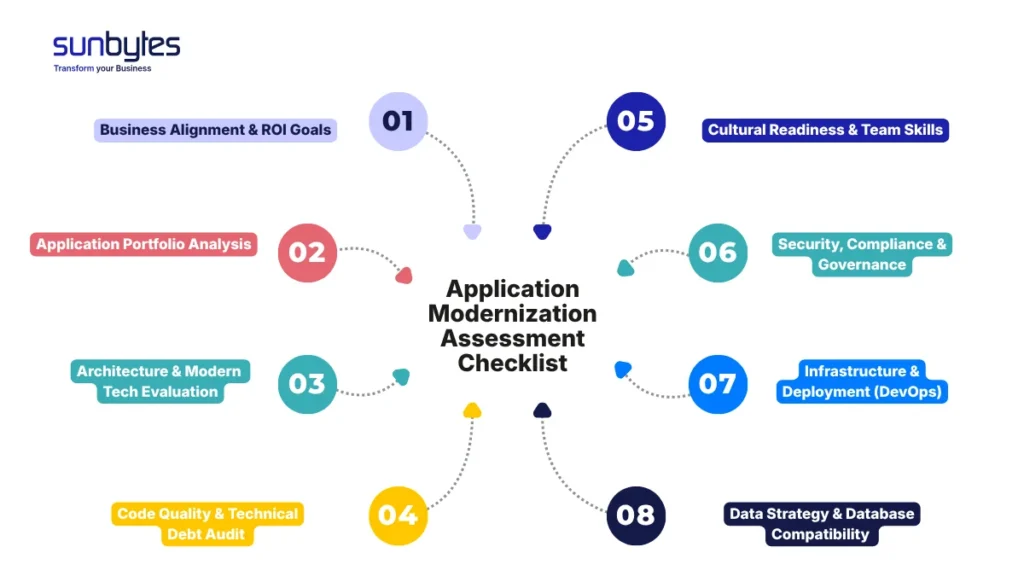
Business Alignment & ROI Goals
Does the application still support your current business model and KPIs? Assess whether modernization will drive revenue, reduce cost, or unlock new capabilities, not just improve technology.
Application Portfolio Analysis
Map all applications, dependencies, and their criticality. Identify which systems are core, redundant, or high-risk, so you can prioritize what to modernize first.
Architecture & Modern Tech Evaluation
Evaluate whether your current architecture can scale. Determine readiness for cloud-native patterns, microservices, or modular redesign, or if a simpler evolution is more appropriate.
This is typically the point where architectural limitations become visible, especially when evaluating trade-offs in Microservices vs. Monolith: Which Architecture Should You Choose?
Code Quality & Technical Debt Audit
In many organizations, developers spend over 30% of their time managing technical debt, turning it into a direct productivity drain rather than a hidden issue. Therefore, analyze codebase health using automated tools and manual review. Look for dead code, complexity, outdated frameworks, and maintainability risks that could slow down future development.
In many cases, the real bottleneck isn’t the architecture but accumulated inefficiencies outlined in Technical Debt: A Comprehensive Guide to Identifying and Managing It.
Data Strategy & Database Compatibility
Assess how data is structured, stored, and accessed. Identify risks around data migration, schema flexibility, and integration with modern data platforms.
Infrastructure & Deployment (DevOps)
Review your infrastructure maturity and deployment practices.Check readiness for containerization, CI/CD pipelines, and scalable cloud environments.
Security, Compliance & Governance
Evaluate your current security posture. Ensure systems are audit-ready, compliant (e.g., ISO 27001, GDPR), and aligned with structured Cybersecurity solutions.
Cultural Readiness & Team Skills
Assess whether your team can support the new architecture. Identify skill gaps, change readiness, and operational capacity to sustain modernization long-term.
A Practical Scoring Framework for Your Application Modernization Assessment
After preparing a comprehensive checklist, a scoring framework will tell you what to do next.
To move from observation to decision, each assessment area should be evaluated based on risk level, business impact, and modernization urgency. This helps you prioritize actions instead of treating all issues equally.
How to Use This Framework
For each area, assign:
- Score (1–5)
- 1–2 → High risk / Immediate action required
- 3 → Moderate risk / Needs planning
- 4–5 → Low risk / Monitor or optimize
- Impact Level
- High → Direct impact on revenue, scalability, or security
- Medium → Affects efficiency or maintainability
- Low → Minor or long-term improvement
| Area | What to Evaluate | Score (1–5) | Risk Level | Recommended Action |
|---|---|---|---|---|
| Business Alignment | Does the system support current KPIs, revenue model, and growth strategy? | High / Med / Low | Re-prioritize or replace if misaligned | |
| Application Portfolio | Redundancy, dependencies, and system criticality | High / Med / Low | Consolidate or retire low-value systems | |
| Architecture | Scalability, modularity, readiness for cloud-native or microservices | High / Med / Low | Refactor or re-architect if tightly coupled | |
| Code Quality & Technical Debt | Maintainability, outdated frameworks, code complexity | High / Med / Low | Refactor high-risk components first | |
| Data Strategy | Data structure, migration complexity, integration readiness | High / Med / Low | Plan phased data migration & governance | |
| Infrastructure & DevOps | CI/CD maturity, deployment speed, cloud readiness | High / Med / Low | Modernize pipelines and automate deployments | |
| Security & Compliance | Audit readiness (ISO 27001, GDPR), vulnerability exposure | High / Med / Low | Enforce controls, close compliance gaps | |
| Team & Operational Readiness | Skill gaps, ability to support new architecture | High / Med / Low | Upskill team or bring external expertise |
How to Interpret Your Results
Once scored, patterns will quickly emerge:
- Multiple scores ≤2 in critical areas (Architecture, Data, Security)
→ High modernization urgency. A phased transformation roadmap is required. - Mixed scores (2–4 across areas)
→ Targeted modernization. Focus on bottlenecks instead of full transformation. - Mostly 4–5 scores
→ System is stable. Optimize incrementally rather than overhauling architecture.
Priority Mapping: What to Fix First
Not all problems are equal. Use this priority logic:
- High Impact + Low Score (≤2)
→ Immediate action (e.g., security gaps, scaling bottlenecks) - High Impact + Medium Score (3)
→ Plan short-term improvements - Low Impact + Low Score
→ Defer unless it blocks other initiatives
In practice, most organizations discover that data and architecture, not code, are the real bottlenecks during modernization. Organizations with scores 2 or below in Architecture and Security typically require a phased transformation roadmap before any migration begins.
What is The Step-by-Step Application Modernization Assessment Process?
A structured Application Modernization Assessment follows a four-phase process designed to move from visibility to a clear, execution-ready roadmap. Each phase builds on the previous one, ensuring decisions are grounded in evidence.
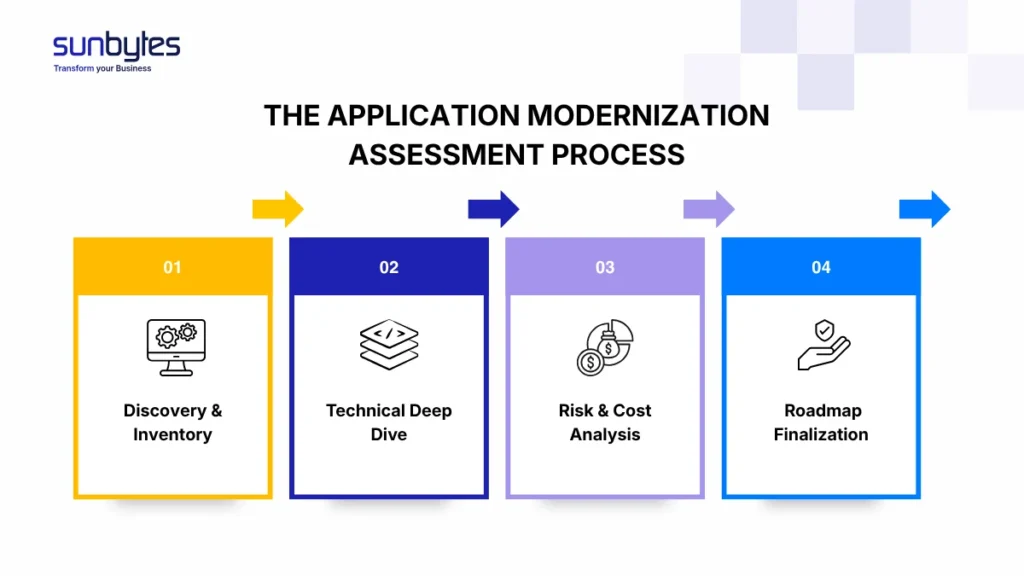
Phase 1: Discovery & Inventory
This phase focuses on creating complete visibility across your entire application landscape, something many organizations lack at the start.
It involves identifying all applications (including shadow IT), mapping system interdependencies, understanding business criticality, and capturing current performance baselines. Beyond just listing systems, this phase clarifies how applications interact, which ones are mission-critical, and where potential bottlenecks or redundancies exist.
Key activities include:
- Application portfolio inventory
- Dependency mapping (systems, APIs, data flows)
- Business capability mapping
- Performance and usage baseline analysis
Output:
- Centralized application inventory repository
- Dependency and architecture overview diagrams
- Business criticality classification (e.g., high / medium / low impact systems)
- Initial performance baseline report
Estimated timeline: 2–4 weeks (Depending on system complexity, documentation availability, and stakeholder access)
Phase 2: Technical Deep Dive
Once visibility is established, the next step is to assess the internal health and structure of each application at a technical level.
This phase goes beyond surface-level analysis to evaluate architecture patterns, code quality, maintainability, data structures, infrastructure setup, and security posture. The goal is to uncover hidden technical debt, scalability limitations, and constraints that could impact modernization decisions.
Key activities include:
- Codebase analysis and maintainability scoring
- Architecture and design pattern evaluation
- Infrastructure and deployment model assessment (on-prem, cloud, hybrid)
- Security and compliance review
- Data structure and integration analysis
Output:
- Technical health scorecard for each application
- Identified technical debt and refactoring needs
- Risk and constraint register (e.g., legacy dependencies, outdated frameworks)
- Modernization readiness assessment (e.g., rehost, refactor, rearchitect suitability)
Estimated timeline: 3–6 weeks (Heavily influenced by application size, codebase accessibility, and system diversity)
Phase 3: Risk & Cost Analysis
At this stage, technical insights are translated into business and financial implications, a critical step to avoid overestimating capacity or underestimating risk.
This phase evaluates modernization effort, projected costs, and potential risks for each application or transformation approach. It also helps identify quick wins (low effort, high impact) versus complex, high-risk initiatives, enabling better prioritization.
Key activities include:
- Effort estimation (engineering time, resource requirements)
- Cost modeling (infrastructure, development, migration, maintenance)
- Risk assessment (technical, operational, business continuity risks)
- Scenario comparison (e.g., rehost vs refactor vs rebuild)
Output:
- Cost-benefit analysis per application or modernization option
- Risk matrix with mitigation recommendations
- Prioritization framework (quick wins vs long-term investments)
- High-level business case for modernization initiatives
Estimated timeline: 2–3 weeks
Phase 4: Roadmap Finalization
The final phase consolidates all insights into a clear, actionable modernization roadmap that aligns with business goals and execution capacity.
Rather than a generic plan, this roadmap defines exactly what to modernize, in what sequence, and using which approach while balancing risk, cost, and organizational readiness. It also ensures alignment across technical teams, leadership, and stakeholders.
Key activities include:
- Prioritization of applications and initiatives
- Definition of modernization approach per system
- Timeline and milestone planning
- Resource and capability alignment
Output:
- Phased modernization roadmap (typically 6–24 months)
- Prioritized backlog of initiatives
- Recommended modernization strategies per application
- Execution plan with milestones, dependencies, and success metrics (KPIs)
Estimated timeline: 1–2 weeks
If you’re unsure whether your system is ready for modernization, the first step is not to rebuild, but to assess. Sunbytes helps you establish an audit-ready baseline across architecture, data, security, and operations, so you can identify real risks before committing to transformation. Get a clear view of your system’s readiness and define what to modernize first.
What are Common Pitfalls in Modernization Assessments (and how to avoid them)
Even with the right intent, many modernization assessments fail, not because of technical limitations, but because of misjudgments in scope, readiness, and prioritization.
Based on real-world assessments, these are the 6 common pitfalls, and how to avoid them.
1. Underestimating Data Complexity
Data is often treated as a secondary concern until migration begins. Teams focus on architecture or code, assuming data will follow.
What we see in practice: Data dependencies, inconsistent schemas, and integration constraints are usually more complex than expected, often increasing migration effort by 2–3x.
How to avoid it:
- Map data flows and dependencies early
- Treat data as a first-class component in the assessment
- Plan for validation, rollback, and governance from the start
2. Jumping to Architecture Decisions Too Early
Teams decide on solutions (“move to microservices”, “go cloud-first”) before fully understanding current system constraints.
What we see in practice: Architecture is rarely the first bottleneck, but becomes critical at scale. Early decisions often lead to unnecessary complexity or rework.
How to avoid it:
- Separate diagnosis from solution design
- Let evidence (not trends) drive decisions
- Define domain boundaries before choosing architecture
3. Treating Technical Debt as the Root Problem
Modernization efforts focus heavily on rewriting or refactoring code.
What we see in practice: Technical debt is often a symptom, not the root cause. The real issues are:
- unclear domain boundaries
- inefficient workflows
- lack of system ownership
How to avoid it:
- Identify root constraints before refactoring
- Prioritize architecture and process improvements
- Avoid rewriting without a clear outcome
4. Overestimating Organizational Readiness
Teams assume they are ready for microservices or cloud-native transformation.
What we see in practice: Without mature DevOps, CI/CD, and observability, modern architectures increase complexity instead of reducing it.
How to avoid it:
- Assess team capabilities alongside technology
- Validate operational maturity (CI/CD, monitoring, automation)
- Align architecture choices with team capacity
5. Ignoring Security and Compliance Until Late Stages
Security is treated as a final checkpoint instead of part of the assessment.
What we see in practice: Security gaps often surface during audits or client due diligence, when remediation becomes urgent and costly.
How to avoid it:
- Embed security and compliance early (e.g., ISO 27001, GDPR)
- Ensure audit trails and access control are in place
- Treat security as part of architecture. not an add-on
6. Scope Creep Without Clear Prioritization
Teams try to assess everything at once, expanding scope beyond control.
What we see in practice: This leads to delayed decisions, higher costs, and unclear outcomes without improving actual modernization readiness.
How to avoid it:
- Prioritize high-impact systems first
- Define clear evaluation criteria
- Focus on decision-making, not exhaustive analysis
Choosing a Partner: Modernize Your Apps with Sunbytes
Modernization doesn’t fail because of technology, it fails because of unclear decisions. At Sunbytes, we help you turn assessment into an execution-ready roadmap, aligned with your business goals, compliance requirements, and team capacity.
Whether you’re preparing for cloud migration, scaling your product, or facing audit pressure, we ensure your next step is controlled, evidence-based, and low-risk.
Why Subytes?
Sunbytes is a Dutch technology partner, with headquarters in the Netherlands and a delivery hub in Vietnam, bringing over 15 years of experience in guiding organizations through structured application modernization. We help businesses assess, transform, and scale their systems with a clear roadmap through three main service pillars:
- Transform Business Solutions: Access to senior engineers and full-stack agile teams ensures your roadmap doesn’t stall after the assessment. We match the right expertise to your context, so execution remains consistent from planning to delivery.
- Cybersecurity solutions: Security is embedded from the start—not added later. We enforce standards, map compliance requirements, and produce audit-ready evidence throughout the assessment and implementation, reducing risk while maintaining delivery speed.
- Accelerated Workforce Solutions: We help you move faster by combining structured processes, pre-qualified talent, and proven delivery frameworks, so you can scale modernization efforts without increasing operational complexity.
Talk to our architects to assess your current system and define a modernization path that fits your business.