

Using specialist providers for login and payments keeps passwords and card numbers off your servers. It does not change who owns the code that checks sign-in status, plan selection or payment failure handling. In an AI-built SaaS, the AI coding tool wrote that code. Security for payment and login integrations is a review of the code that connects your product to its providers.
This guide gives business leaders of AI-built SaaS a review plan for both integrations. It covers five authentication checks to confirm server-side login, six payment checks to protect revenue and subscription state, the EU rules that apply (PSD2, PCI DSS, GDPR), and the order to review before taking live payments. Most checks end with a question for your developer. This is part of our guide to shipping AI-built products safely.
TL;DR
Payment integration security means protecting the connection between your SaaS and its payment provider, including the decisions that grant paid access.
- Authentication needs five checks: server-side session validation, recovery links, session expiry and sign-out, MFA for privileged accounts, and ownership of the login system.
- Payments need six checks: checkout design, webhook verification, idempotency, server-side prices, subscription state, and failure handling.
- Review both integrations before accepting live payments. Pause the affected release if a forged identity, payment message or price can grant access. Unknown results need investigation; a successful checkout alone does not establish readiness.
Why auth and payments come first
Auth and payments come first because a flaw in either one has the widest blast radius in a SaaS product. When authentication fails, an attacker can take over an account, and every control that depends on knowing who the user is fails with it. When the payment integration fails, the damage is financial: free use of paid plans, duplicate charges and refunds that never remove access. Both flows also process personal data, so one bug can become a security incident and a GDPR question at once.
Providers take on some of this risk, not all. Hosted auth services like Auth0, Clerk, Firebase Auth or Supabase Auth store passwords. Stripe, Mollie or Adyen hold card data. Your repository holds the code that reads the provider’s answer and decides what happens next.
Two neighbouring topics have their own guides: keeping provider API keys and secrets on the server, and broken access control, which decides what a signed-in user may see or change.
If your product takes payments or stores customer data behind a login, review these two integrations first. This comes before performance or code style. B2B teams planning single sign-on should review login first, since SSO adds a second sign-in route to the same session handling.
Authentication: five checks for an AI-built SaaS

Authentication identifies users. In an AI-built SaaS, you can check authentication best practices without reading code. Use five checks, each with a question for your developer. Define two terms: a session tracks signed-in users, and a token is the digital pass the browser sends with each request.
Sign-in checked on the server, not in the browser
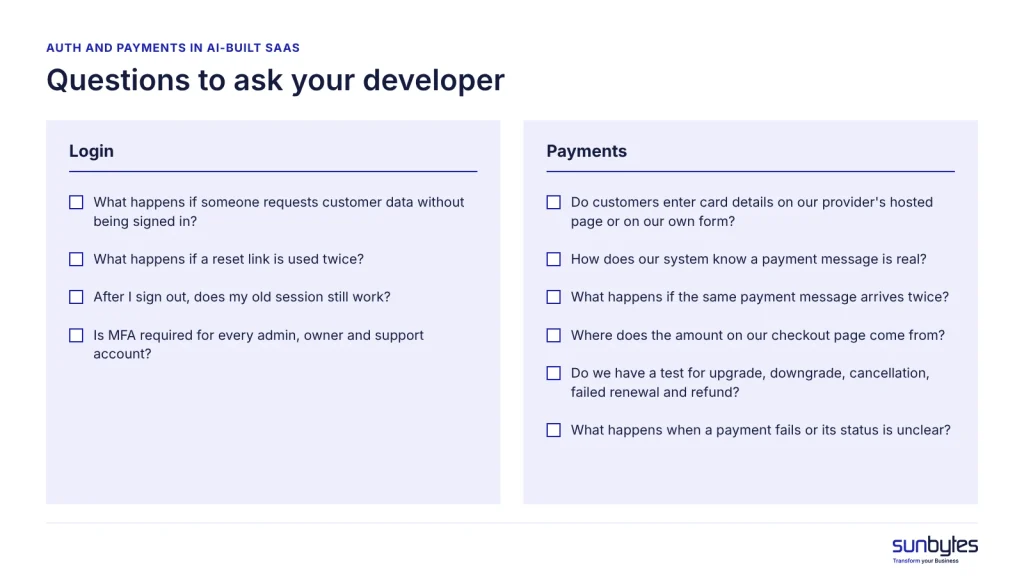
Your system must verify the digital pass on its own server every time someone requests data. Hiding a page or button in the browser only changes what people see; anyone with basic tools can send requests straight to your system and skip the screen. Login checks that only run in the browser are one of seven vibe coding security risks. Ask: “What happens if someone requests customer data without being signed in?” The answer you want is “it is refused, and here is the test that shows it.”
Password reset and magic links
The “forgot password” link is a second way into every account. If it is weak, someone can take over an account without knowing the password. A safe reset link works once, expires after a short time and goes only to the email address already on the account. The page should also show the same message whether or not an email is registered, so outsiders cannot test who your customers are. These points follow OWASP’s guidance on password resets (OWASP is an open community that publishes web security guidance). The same rules apply to magic links, the sign-in links sent by email. Ask: “What happens if a reset link is used twice?”
Session expiry and sign-out
Clicking “sign out” should end the session on your server, not just in the browser. Otherwise anyone who copied the digital pass, for example on a shared computer, can keep using the account. Where the pass is stored matters too: OWASP advises against keeping it where any script on the page can read it, because one injected script (an attack called cross-site scripting, or XSS) could then copy it. Ask: “After I sign out, does my old session still work?”
MFA for admin and owner accounts
Multi-factor authentication (MFA) means a second proof after the password, such as a code from an app on your phone. Require it for everyone who can see all customers or change billing: founders, admins and support staff. Without it, one stolen admin password exposes every customer at once. OWASP recommends that teams require MFA for administrative or other high-privileged users. For end users, MFA can remain optional until your B2B customers request it. Ask: “Is MFA required for every admin, owner and support account?”
Build your own login or use a provider
Use an established login provider. If you build your own login, your team owns password storage, brute force protection, account recovery and MFA for the lifetime of the product. A provider handles password storage, but your product still needs to enforce and review the other controls.
If you are unsure about any of these five questions, mark the login as unreviewed and schedule a review.
Payment integration security: six checks
Payment integration security requires trustworthy payment evidence and a correct link from that evidence to paid access. Ask the reviewer to examine the actual integration code, then test requests that should fail as well as successful purchases.
| Check | What can go wrong | What it costs you | Fix before launch? |
|---|---|---|---|
| Hosted checkout or your own card form | Card details pass through your own servers | More compliance work and risk for your business | Decide before launch |
| Verified payment messages | Accepts a fake “payment received” message | Paid plans unlocked for free | Yes |
| One payment, one effect | Handles a repeated message twice | Double credits or wrong account status | Yes |
| Prices set on the server | Takes the price from the customer’s browser | Top plan bought at the lowest price | Yes |
| Subscriptions in sync with the provider | Tracks only successful payments | Cancelled customers keep access; paying customers get locked out | Yes |
| Failures default to “not paid” | Counts an error or unknown status as paid | Free access and records that do not match | Yes |
Hosted checkout or your own card form
A hosted checkout is a payment page run by your payment provider: the customer types card details there, not on your site. Use one unless full control over the look of the payment step is worth extra compliance work. Keeping card details off your servers reduces your obligations under PCI DSS, the card industry’s security standard. A card form your team builds itself moves more of that work to your business. Some providers also offer payment fields that sit inside your own page; ask your provider how that option is classified. Ask your developer: “Do customers enter card details on our provider’s hosted page or on our own form?”
Verified payment messages
When a customer pays, your payment provider sends your system a short automatic message saying “payment received”. This message is called a webhook. If your system does not check that the message really came from the provider, anyone who finds its address can send a fake one and unlock a paid plan for free. Providers make this check possible, for example by signing each message with a secret key that your system checks, or by sending only a payment reference that your system looks up with the provider. Your system should also reject duplicate messages. Ask: “How does our system know a payment message is real?”
One payment, one effect
Payment providers will resend a message if your system does not confirm receipt, so the same payment notification can arrive more than once. If your system processes it each time, a customer may receive double credits, duplicate invoices or an incorrect account status. The solution is to record each handled message, ignore repeats and confirm receipt promptly so the provider stops resending. This is called idempotency. Check your process by asking: What happens if the same payment message arrives twice?
Prices and plans decided on the server
Your server must decide the amount a customer pays, not the browser. If your checkout relies on price, plan or discount data from the browser, anyone with basic technical skills can change it and buy your highest plan at the lowest price. The browser should only send the selected option, such as Pro yearly. Your server looks up the price and generates the checkout. Check your process by asking: Where does the amount on our checkout page come from?
Subscriptions that match the provider
Who gets paid features should match your payment provider’s reporting, including cancellations, failed renewals, refunds and chargebacks. If your system only listens for successful payments, customers who cancel keep access, and one missed message can lock out a paying customer. Messages can arrive out of order. Your system should check the subscription’s current status with the provider, not just rely on the last message. Ask for a test of each case: upgrade, downgrade, cancellation, failed renewal and refund.
Failures that default to “not paid”
Treat every unclear payment as not paid. Timeouts, declined cards, errors or unknown statuses must not unlock paid features. AI-generated code may treat any unrecognised status as success or default to active. This exposes features without confirmation. Only grant access after the provider confirms payment. Log every ambiguous case for follow-up. Otherwise, features are given away and finance records will not match the provider. Ask: “What happens when a payment fails or its status is unclear?”
Your payment dashboard shows successful payments. It does not show a system that accepts fake payment messages or takes the price from the browser.
An independent AI-built product review reads the integration code around your providers and tells you in plain English what to fix before you take live payments.
EU rules that shape both integrations
EU payment authentication, card-security standards and personal-data protection address different responsibilities. Review each against your actual payment methods, data paths and contracts.
- PSD2, Directive (EU) 2015/2366, Article 97, sets strong customer authentication (SCA) requirements for payment service providers in applicable payment flows. SCA uses at least two independent factors; 3D Secure supports this for card payments. Your integration must handle required authentication, cancellation and failure. Exemptions and transaction scope matter; a visible challenge is not required on every payment.
- PCI DSS is a card-industry security standard, with compliance programmes managed by payment brands and acquirers. Outsourcing card collection leaves merchant responsibilities. Confirm the applicable obligations with your provider or acquirer for your checkout design.
- GDPR Article 32 requires controllers and processors to apply technical and organisational security measures appropriate to risk. Account emails, identifiable login records and customer billing details need protection. Exclude full authentication tokens and sensitive card data from logs; agree who can access the records you retain.
These checks cover two integration boundaries. Use the wider AI-built SaaS review checklist to examine the rest of the product before expanding customer access.
In what order should you review auth and payments?
Review the checks in order of who could exploit a flaw: anyone on the internet first, any signed-up user second, edge cases third.
- Sign-in checked on the server: without it, anyone can skip every other control.
- Verified payment messages: anyone who finds the message address can exploit a missing check, without an account.
- Prices and plans set on the server: any signed-up user can edit a checkout request.
- Failure defaults and subscription state: these decide who keeps access after a decline, cancellation or refund.
- One payment, one effect: repeated messages cause wrong credits and invoices.
- Reset links, sign-out and admin MFA: these close account-takeover paths.
- Checkout type and EU confirmations: settle hosted or embedded, and PCI DSS and SCA coverage, before launch.
Auth and payments are one part of a launch review. The full set of SaaS checks, including tenant isolation, is in the AI-built SaaS review checklist.
How Sunbytes reviews auth and payment flows
When a provider works correctly but your app grants the wrong access, the review needs to examine the application code connecting those decisions. Bring your auth setup, payment methods and unresolved checks to a scoping conversation with Sunbytes.
Sunbytes’ AI-built product review brings engineering and security review together across agreed areas. Our AI-built product review covers security and data, and the reliability of critical flows, which is where session checks, webhook handlers and plan logic sit. You receive clear findings with the evidence behind them, a prioritised action plan that separates what to fix now from what can wait, and a technical handoff your team or AI coding tool can act on. The work runs under an ISO 27001-certified ISMS with Netherlands-led delivery, backed by 15+ years and 300+ projects delivered.
What a review should cover depends on your stack and providers, so scope is advised case by case. Talk to our team about your auth and payment flows before you take live payments.