

Software teams today are under constant pressure to ship faster, yet many still rely on manual releases, fragmented testing, and inconsistent deployment processes. The result? Delays stack up, bugs slip into production, and every release becomes a high-risk event rather than a predictable operation. As systems scale, these inefficiencies increase operational cost, expose security gaps, and create friction between engineering and business goals. A CI/CD pipeline addresses this by turning software delivery into a structured, automated system, where every change is tested, secured, and deployed with control and consistency.
This article will talk about what a CI/CD pipeline is, how it works, its business benefits, and how to implement it effectively to accelerate software delivery while reducing risk.
TL;DR
- A CI/CD pipeline is an automated software delivery workflow that moves code from commit to release through a repeatable path of build, testing, security checks, deployment, and monitoring.
- CI/CD reduces manual release work by standardizing how every change is validated before production.
- The strongest pipelines do more than automate builds. They also improve rollback readiness, environment consistency, and release traceability.
- Most growing teams should first aim for continuous delivery, then move toward continuous deployment only when testing, monitoring, and recovery controls are mature.
- Best fit when: your team ships often, manages multiple environments, or wants to reduce release risk without adding more manual approvals.
- Watch out for: treating CI/CD as a tool setup only. The real value comes from designing the full release process, including testing, security, deployment strategy, and feedback loops.
Need a clearer release path before you automate further? Explore how Sunbytes helps teams design CI/CD pipelines that improve speed without losing control.

What is a CI/CD Pipeline?
A CI/CD pipeline is a structured, automated workflow that moves code from development to production in a controlled, repeatable way. Instead of relying on manual steps, it orchestrates how code is integrated, tested, secured, and deployed, ensuring every change follows the same standard before reaching users.
At its core, a CI/CD pipeline connects two key practices: Continuous Integration (CI) and Continuous Delivery/Deployment (CD).
What is CI?
Continuous Integration (CI) is the practice of frequently merging code changes into a shared repository, where each update is automatically built and tested. This ensures that issues are detected early, before they accumulate into costly bugs or integration conflicts.
By enforcing small, frequent updates and immediate validation, CI creates a fast feedback loop, helping teams maintain code quality while reducing the risk of breaking the system.
What is CD?
Continuous Delivery and Continuous Deployment (CD) extend CI by automating what happens after code is validated.
- Continuous Delivery ensures that every change is ready for release, but deployment to production still requires a manual approval.
- Continuous Deployment goes one step further by automatically releasing every validated change to production without human intervention.
Together, CD transforms releases into a predictable, low-risk process, where updates can be delivered quickly, consistently, and with full control over quality and compliance.
What Are the Main Benefits of Implementing a CI/CD Pipeline?
According to the Google Cloud DORA report, elite teams using CI/CD deploy up to 200 times more frequently and recover from failures significantly faster, highlighting the direct impact of automation on delivery performance. Here are three business benefits that matter most:
- Enhanced Code Quality: Every code change is automatically validated through testing and quality checks before it moves forward. This early detection prevents defects from reaching production, reducing costly rework and ensuring a more stable, reliable product over time. Fixing a bug in production can cost up to 100x more than fixing it during development
- Improved Developer Productivity: Manual processes and last-minute fixes create unnecessary friction for engineering teams. CI/CD removes this “operational noise” by automating workflows, allowing developers to focus on building features and solving problems, not managing deployments.
- Stronger Security and Compliance: Modern pipelines integrate security checks directly into the development lifecycle (DevSecOps). This means vulnerabilities are identified and addressed early, and every release is traceable, auditable, and aligned with compliance standards without slowing down delivery.
In practice, these benefits compound: faster releases improve feedback loops, better quality reduces risk, and stronger governance builds trust across stakeholders. The result is a delivery process where releases move through the same validated path every time, with clearer rollback options, better traceability, and less manual coordination.
What is the Difference Between Continuous Integration, Delivery, and Deployment?
While these terms are often used together, they represent different levels of automation and control in the software delivery process. Understanding the distinction helps you decide how far your organization should go in automating releases without compromising governance or quality.
| Aspect | Continuous Integration (CI) | Continuous Delivery (CD) | Continuous Deployment (CD) |
|---|---|---|---|
| Primary Goal | Ensure code integrates correctly | Ensure code is always ready for release | Automatically release code to production |
| Focus Area | Build & test | Release readiness | Production deployment |
| Automation Level | Automated build & testing | Automated build, test, and staging | Fully automated end-to-end |
| Human Involvement | Required for deployment | Manual approval before production | No manual intervention |
| Risk Control | Early bug detection | Controlled release process | Continuous, low-risk releases |
| Release Frequency | Frequent integrations | On-demand releases | Continuous releases |
| Best For | Teams improving code quality | Teams needing control over releases | Mature teams with strong testing & monitoring |
When Is a Team Ready for Continuous Deployment?
Not every team that has CI is ready for continuous deployment. Releasing every validated change to production only works when your delivery process is already stable, observable, and recoverable. For most growing teams, continuous delivery is the more realistic and lower-risk milestone before moving to full deployment automation.
A team is usually ready for continuous deployment when the following conditions are already in place:
- Reliable automated testing: unit, integration, and regression tests catch issues consistently without creating excessive false positives
- Fast rollback or recovery paths: teams can reverse failed releases quickly without long manual intervention
- Production monitoring in place: errors, latency, failed deployments, and service health are visible in real time
- Stable environment parity: staging behaves close enough to production that release outcomes stay predictable
- Clear release ownership: developers, QA, security, and operations all understand who responds when a deployment fails
If these conditions are still inconsistent, continuous deployment often adds speed before it adds control. In that case, the better next step is to strengthen continuous delivery first: automate more validation, reduce release friction, and improve observability before removing manual approvals.
What Are the 6 Core Stages of a Robust CI/CD Pipeline?
A well-designed CI/CD pipeline is a controlled system of stages that ensures every code change is validated, secured, and deployed with consistency. These 6 stages play a specific role in reducing risk while maintaining delivery speed:
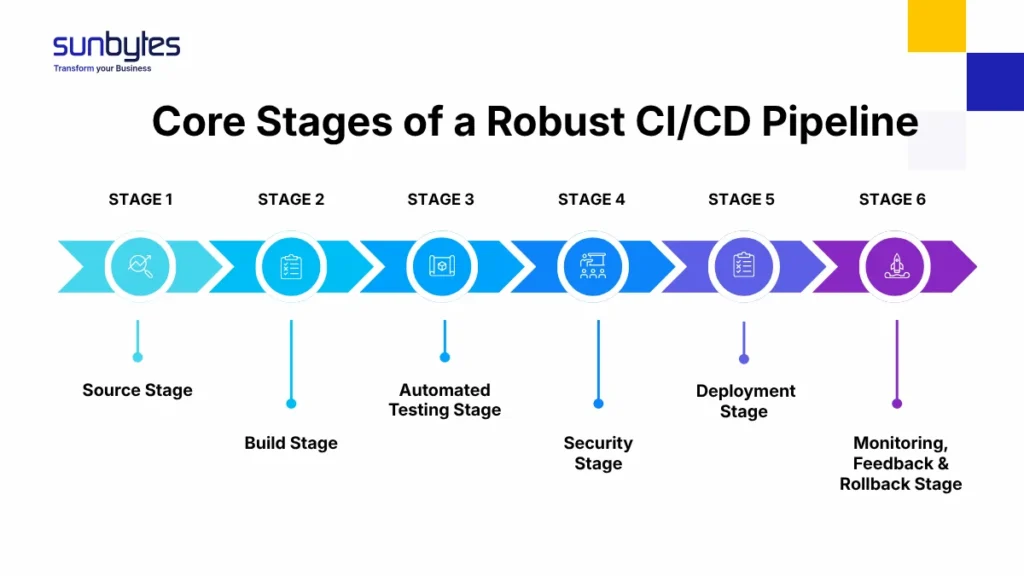
Stage 1. Source Stage
This stage is the single source of truth for all code, configurations, and infrastructure definitions. Every change, whether feature updates, bug fixes, or infrastructure adjustments, is committed, versioned, and traceable.
A mature setup enforces:
- Branching strategies (e.g., GitFlow, trunk-based development) to control how code is merged
- Pull request reviews to maintain code standards and shared ownership
- Commit triggers that automatically initiate the pipeline
This ensures full auditability and governance, where every change can be tracked, reviewed, and rolled back if needed, critical for both collaboration and compliance.
Stage 2. Build Stage
The build stage transforms raw code into a reproducible, deployable artifact. This is where consistency is enforced, ensuring the same code produces the same output across all environments.
Key practices include:
- Dependency management to avoid version conflicts
- Containerization (e.g., Docker) to standardize runtime environments
- Artifact versioning for traceable releases
A reliable build system eliminates environment-related failures and creates a predictable foundation for downstream stages.
Stage 3. Automated Testing Stage
This stage acts as the quality gate of the pipeline. Instead of relying on manual QA cycles, automated tests validate functionality continuously and at scale.
A testing layer includes:
- Unit tests to validate individual components
- Integration tests to ensure systems work together
- Regression tests to prevent reintroducing old issues
- Performance tests (in advanced pipelines) to validate scalability
The goal is not just to detect bugs, but to create fast, actionable feedback loops that allow teams to fix issues immediately, before they propagate.
Read our software testing explained guide to explore the specific levels and types of tests your pipeline should include.
Stage 4. Security Stage (DevSecOps)
Security is embedded directly into the pipeline, not treated as a final checkpoint. This stage ensures that every build is continuously assessed for vulnerabilities and compliance risks.
Typical controls include:
- Static Application Security Testing (SAST) for code-level vulnerabilities
- Dynamic Application Security Testing (DAST) for runtime risks
- Dependency scanning to detect known vulnerabilities in third-party libraries
- Compliance checks aligned with security standards. For many Dutch and EU organizations, CI/CD is not only a speed question. It is also a governance question. Release traceability, approval control, rollback readiness, and evidence of security checks often matter just as much as automation itself, especially in environments shaped by standards such as ISO 27001, GDPR, or NIS2.
By integrating these controls early, teams reduce remediation costs and ensure every release is audit-ready and secure by design.
Stage 5. Deployment Stage
This stage moves validated code into staging or production environments using controlled, low-risk deployment strategies. Best-in-class pipelines implement:
- Blue-green deployments to switch traffic between environments with zero downtime and immediate rollback if issues arise.
- Canary releases to test changes with a small subset of users
- Automated rollback mechanisms in case of failure
- Environment parity to ensure staging mirrors production
The focus here is not just speed, but safe, predictable releases where risk is minimized and recovery is immediate if issues arise.
Stage 6. Monitoring, Feedback & Rollback Stage
Once code is live, the pipeline does not stop, it transitions into continuous observation. This stage ensures that performance, stability, and user impact are measured in real time. Key elements include:
- Application monitoring (errors, latency, uptime)
- Log aggregation and analysis for root cause investigation
- User behavior tracking to validate business impact
- Alerting systems for rapid incident response
Crucially, this stage enables closed feedback loops, where insights from production inform future development cycles. Combined with rollback capabilities, it ensures that issues are contained quickly, protecting both user experience and business continuity.
Individually, each stage adds a layer of validation. Together, these stages ensure that every release passes the same build, test, security, deployment, and monitoring path before it reaches users. This is what separates ad-hoc automation from a truly disciplined CI/CD pipeline: every change is controlled, every release is predictable, and every outcome is measurable.
Explore our guide on Software Development Life Cycle to understand how CI/CD fits into the broader development process.
If you’re looking to transition from manual releases to a fully automated delivery cycle, Sunbytes provides the technical expertise to design and implement a custom CI/CD roadmap that scales with your business goals.
What Are the Key Components Needed to Run a CI/CD Pipeline?
Beyond the stages, these 6 components define how reliably, securely, and efficiently your pipeline operates at scale:
- Jobs and Steps
At the core of every pipeline are jobs and steps, the individual instructions that define what happens at each stage (e.g., “run tests”, “build artifact”, “deploy to staging”). A well-structured pipeline:
- Breaks processes into modular, reusable steps
- Defines clear dependencies between jobs
- Enables parallel execution to speed up delivery
This modular approach improves maintainability and scalability, allowing teams to evolve the pipeline without disrupting the entire system.
- Execution Environments (Runners)
Pipelines need environments to run in, these are typically virtual machines, containers, or cloud-based runners that execute jobs. Key considerations include:
- Isolation: Each job runs in a clean environment to avoid conflicts
- Scalability: Ability to spin up multiple runners to handle workloads
- Consistency: Standardized environments to eliminate “works on my machine” issues
Modern pipelines often use containerized runners to ensure portability and predictable execution across different stages.
- Pipeline Orchestration (CI/CD Platform)
The orchestration layer coordinates how jobs are triggered, executed, and monitored. Tools like GitHub Actions, GitLab CI, or Jenkins act as the control center of the pipeline. They handle:
- Workflow definitions (usually as code)
- Trigger conditions (e.g., code commits, pull requests)
- Job scheduling and execution
- Status tracking and reporting
A strong orchestration layer ensures visibility, control, and governance across the entire delivery process.
- Artifact Management
Once code is built, the output (artifacts) needs to be stored, versioned, and retrieved reliably. This includes:
- Artifact repositories (e.g., Docker registries, package managers)
- Version control for builds
- Secure access and distribution
Proper artifact management ensures that what gets deployed is exactly what was tested, maintaining integrity across environments.
- Infrastructure as Code (IaC)
Modern pipelines treat infrastructure the same way as application code, defined, versioned, and automated. With IaC tools (e.g., Terraform, CloudFormation), teams can:
- Provision environments consistently
- Track infrastructure changes over time
- Recreate environments on demand
This eliminates manual configuration errors and ensures environment parity, a critical factor in reducing deployment risks.
- Monitoring and Feedback Systems
A pipeline doesn’t end at deployment, it requires continuous visibility into performance and reliability. Core elements include:
- Logging systems for debugging and traceability
- Monitoring tools for uptime and performance metrics
- Alerting mechanisms for incident response
These systems provide the feedback loop needed to maintain pipeline health and continuously improve delivery outcomes.
Which CI/CD Pipeline Tools Should You Choose in 2026?
Choosing CI/CD tools is less about finding the single best platform and more about selecting the right operating model for your team. The right choice depends on where your code lives, how complex your architecture is, how much control you need, and how much pipeline maintenance your team can realistically handle.
- GitHub Actions & GitLab CI (Integrated Platforms)
For most modern teams, integrated CI/CD platforms are the default starting point. Built directly into version control systems, they simplify setup and reduce the need for external orchestration.
Best for:
- Teams already using GitHub or GitLab
- Fast-moving product teams that need quick setup
- Organizations prioritizing developer experience and speed
Why they work:
- Native integration with repositories and pull requests
- Pipeline-as-code with version control
- Strong ecosystem of pre-built actions and templates
These tools strike a balance between speed, simplicity, and scalability, which makes them ideal for most use cases.
- Jenkins (High Customization & Legacy Flexibility)
Jenkins remains a powerful option for organizations that require deep customization and full control over their pipeline logic.
Best for:
- Complex, legacy systems
- Highly customized workflows
- On-premise or hybrid infrastructure environments
Trade-offs:
- Requires manual setup and maintenance
- Plugin management can introduce complexity
- Higher operational overhead compared to modern tools
Jenkins is less about convenience and more about control and flexibility, best suited for teams with strong DevOps maturity.
- Cloud-Native Tools (AWS, Azure, GCP)
Cloud providers offer fully managed CI/CD services that integrate tightly with their ecosystems. Examples include:
- AWS CodePipeline
- Azure DevOps
- Google Cloud Build
Best for:
- Organizations already operating within a specific cloud ecosystem
- Teams prioritizing scalability, security, and compliance
- Enterprises needing tight integration with cloud services
Why they matter:
- Native security and IAM integration
- Scalable infrastructure without managing runners
- Built-in compliance and monitoring capabilities
These tools provide enterprise-grade governance with minimal infrastructure management.
How to Choose the Right Tool
Instead of asking “which tool is best,” ask:
- Where does your code live? → Start with native integrations (GitHub/GitLab)
- How complex is your architecture? → Consider Jenkins for advanced control
- Are you cloud-first? → Leverage cloud-native pipelines
- What level of governance is required? → Prioritize tools with strong audit and compliance features
The right tool is the one that fits your architecture, release cadence, governance needs, and the level of pipeline complexity your team can realistically maintain.

What Are the Best Practices for Maintaining a Healthy CI/CD Pipeline?
A healthy pipeline should do more than automate delivery. It should provide fast feedback, predictable releases, and clear operational control. The following eight practices help teams protect delivery speed without compromising quality, security, or operational control.
Best practice #1: Keep Feedback Fast
The real value of a pipeline comes from how quickly it tells teams whether a change is safe to move forward. When builds and tests take too long, developers wait longer for answers, context gets lost, and productivity drops.
To maintain fast feedback:
- Prioritize the most critical tests early in the pipeline
- Run jobs in parallel where possible
- Separate fast validation checks from heavier end-to-end or performance tests
- Regularly review pipeline steps to remove unnecessary delays
The goal is simple: developers should know quickly whether a change is valid or needs attention. Fast feedback keeps momentum high and prevents small issues from growing into release blockers.
Best practice #2: Fix Broken Builds Immediately
A broken pipeline should never become normal. Once teams start ignoring failed builds, the pipeline stops being a source of trust and becomes just another noisy system. That is when quality slips and deployment risk increases. Strong teams follow a “stop the line” mindset:
- Treat failed builds as urgent operational issues
- Assign clear ownership for fixing them
- Avoid stacking new changes on top of unstable code
- Restore pipeline health before continuing normal delivery
This practice protects the integrity of the whole system. A CI/CD pipeline only works when teams trust that green means safe and red demands action.
Best practice #3: Maintain Environment Parity
Many deployment failures happen not because the code is broken, but because environments are inconsistent. If development, testing, staging, and production behave differently, the pipeline loses predictability. To reduce this risk:
- Keep environments as similar as possible in configuration and dependencies
- Use containers and Infrastructure as Code to standardize setup
- Avoid manual environment changes that are not tracked in version control
- Validate deployment behavior in staging under production-like conditions
Environment parity turns delivery into a controlled process instead of a guess. What is tested should closely reflect what will actually run in production.
Best practice #4: Commit Small Changes Frequently
Large, infrequent updates are harder to test, review, and troubleshoot. Smaller commits, pushed regularly, make it easier to identify the source of issues and reduce the chance of major integration conflicts. This practice improves pipeline health by:
- Reducing merge complexity
- Making failures easier to isolate
- Allowing faster validation and recovery
- Supporting a more continuous release rhythm
A healthy pipeline depends on a healthy development habit. The more frequently code is integrated, the more manageable the delivery process becomes.
Best practice #5: Automate Security Without Slowing Delivery
Security checks should be built into the pipeline, not added as a last-minute gate. But they also need to be designed carefully. If security scanning becomes too heavy or disruptive, teams may treat it as an obstacle instead of a safeguard. A better approach is to:
- Embed automated security checks at the right stages
- Prioritize the most critical risks first
- Separate blocking issues from non-blocking observations
- Continuously tune scanning rules to reduce false positives
This keeps the pipeline both secure and usable. Good governance is about applying the right controls with clarity and evidence.
Best practice #6: Monitor Pipeline Performance, Not Just Application Performance
Many teams monitor production systems closely but overlook the health of the pipeline itself. That creates blind spots. If build times increase, runners fail, or test instability grows, delivery performance degrades long before production incidents appear. Teams should track pipeline health metrics such as:
- Build duration
- Test pass/fail trends
- Deployment frequency
- Failed deployment rates
- Mean time to recovery after incidents
These signals help teams improve delivery as an operational capability, not just a technical workflow.
Best practice #7: Review and Refactor the Pipeline Regularly
As products, teams, and architectures evolve, the pipeline must evolve too. Steps that once made sense can become outdated, redundant, or too slow. Regular review helps teams:
- Remove obsolete jobs and scripts
- Reorganize stages for better efficiency
- Update dependencies and runner configurations
- Align the pipeline with new security, compliance, or release requirements
In other words, pipelines need maintenance just like applications do. Without periodic refinement, automation becomes cluttered and fragile.
Best practice #8: Build a Culture of Shared Ownership
The healthiest pipelines are supported by a culture where developers, QA, security, and operations all understand their role in maintaining delivery quality. Shared ownership means:
- Developers write code with pipeline success in mind
- QA helps define meaningful automated checks
- Security teams embed practical controls early
- Operations teams ensure deployment reliability and recovery readiness
When ownership is shared across development, QA, security, and operations, the pipeline becomes more reliable because release quality is maintained before issues reach production.
How Can Sunbytes Help You Build and Scale Your CI/CD Pipeline?
Sunbytes combines expert DevOps engineering with a structured delivery approach to design CI/CD pipelines aligned with your business goals. We focus on building predictable, audit-ready systems so you can accelerate releases without increasing operational risk.
Beyond implementation, we act as a technology consultancy partner for growth,helping you assess your current setup, select the right tools, and design a CI/CD roadmap that improves delivery speed, stability, and long-term scalability.
Why Sunbytes? (Transform – Cybersecurity – Accelerate)
Sunbytes helps businesses improve software delivery with the balance that modern CI/CD demands: faster releases, stronger control, and less operational friction. As a Dutch-led technology partner with a delivery hub in Vietnam, we bring together engineering execution, governance awareness, and scalable delivery support to help teams modernize how software moves from code to production.
What makes this valuable in practice is the ability to design a delivery system that fits your architecture, your release rhythm, and your risk profile. That is where Sunbytes combines transformation, security, and workforce scalability into one practical delivery model.
- Digital Transformation Solutions: We design and modernize digital products with senior engineering teams, covering custom development, QA/testing, and long-term maintenance, ensuring your CI/CD pipeline supports scalable, high-quality delivery
- CyberSecurity Solutions: We embed security into every stage of your pipeline, helping you reduce risk and meet compliance requirements without slowing down development so every release is secure by design and audit-ready.
- Accelerate Workforce Solutions: We help you scale your capabilities with the right talent and operational support so your teams can move faster, stay compliant, and deliver consistently as your business grows.
Contact us to assess your current delivery process and build a CI/CD roadmap that fits your architecture, release goals, and control requirements.
FAQs
- Managed services are ideal for most teams, they reduce setup time and operational overhead.
- Custom-built pipelines are better suited for organizations with highly specific workflows or compliance needs.