

A GDPR-compliant website is not created by adding a cookie banner at the end of a build. The important decisions happen earlier: which scripts load before consent, what data each form collects, where submissions are stored, how third-party tools receive data, and whether users can exercise their rights.
This GDPR website compliance checklist Europe guide is written for Dutch and EU companies reviewing a new website, preparing a redesign, or running a practical GDPR audit on an existing site before privacy issues become expensive to fix.
The key idea is simple: GDPR compliance should be built into the website architecture, content model, form logic, consent setup, and security controls from the start. For teams planning website development, this checklist helps turn GDPR from a late legal review into practical build requirements.
TL;DR
A GDPR-compliant website needs more than a visible cookie banner. At minimum, it should handle consent correctly, explain data use at the point of collection, protect submitted data, document third-party tools, and give users a clear way to exercise their rights.
- Cookies and tracking scripts should not load before valid consent where consent is required.
- Forms should collect only necessary data and explain the purpose before submission.
- Privacy notices should name the controller, legal basis, retention period, recipients, and user rights.
- Third-party tools need proper contracts and transfer safeguards where personal data leaves the EU/EEA.
- Security controls should cover HTTPS, access control, secure storage, patching, and breach response.
What GDPR actually requires from websites
GDPR website compliance means configuring the website so it collects, explains, protects, and transfers personal data according to GDPR rules before users interact with forms, cookies, tracking tools, or accounts.
GDPR is often treated as a legal document. For website teams, it should also be treated as a build specification.
A website processes personal data when it collects contact form submissions, newsletter sign-ups, account details, analytics identifiers, chat data, tracking cookies, payment data, support requests, or job applications. Even a simple B2B website can fall within GDPR if it collects or tracks identifiable users.
The main website obligations sit around four GDPR areas.
| GDPR area | Website implication |
| Article 6 and 7 | The website needs a lawful basis for processing. Consent must be valid where consent is used, especially for non-essential cookies, marketing tracking, and newsletter opt-ins. |
| Article 13 | The website must tell users who processes their data, why, on what legal basis, for how long, who receives it, and what rights they have. |
| Article 32 | The website must protect personal data with appropriate technical and organisational measures. |
| Article 25 | Privacy must be built into the website by design and by default. |
GDPR website compliance checklist Europe
A GDPR website compliance checklist should verify consent, privacy notices, forms, third-party tools, security controls, privacy by design, user-rights workflow, and Dutch AVG requirements
Use this checklist as a practical review tool. Mark each section as:
| Status | Meaning | Action |
| Red | Not in place | Fix before launch or as soon as possible |
| Amber | Partly in place, undocumented, or unclear | Clarify ownership and evidence |
| Green | Implemented and documented | Re-check during major website updates |
Any red item in cookie consent, privacy notices, forms, or third-party tools should be treated as a priority because these areas are visible to users and regulators.
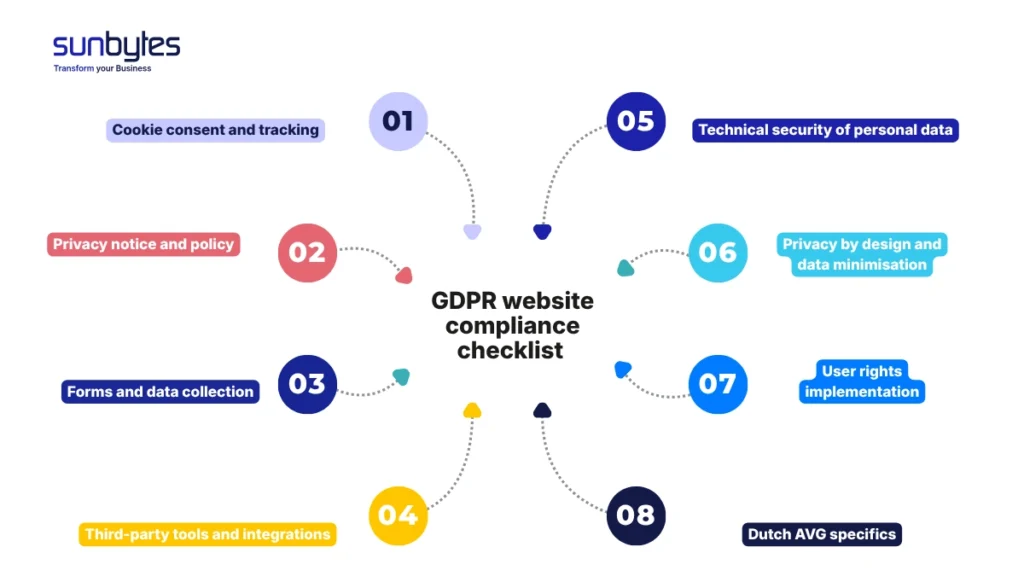
Section A — Cookie consent and tracking
| # | Check | GDPR relevance |
|---|---|---|
| A1 | Non-essential cookies and tracking scripts do not load before valid consent. | Article 6 / 7 |
| A2 | The consent banner offers clear category choices, such as necessary, analytics, and marketing. | Article 7 |
| A3 | “Accept” and “reject” choices are equally easy to use. | Article 7 |
| A4 | No pre-ticked boxes are used for non-essential cookies. | Article 7 |
| A5 | Consent records include timestamp, consent version, and selected categories. | Article 7 |
| A6 | Users can change or withdraw consent from every page. | Article 7 |
Section B — Privacy notice and policy
| # | Check | GDPR relevance |
|---|---|---|
| B1 | A privacy policy is accessible from every page. | Article 13 |
| B2 | The controller is clearly identified. | Article 13 |
| B3 | Each processing purpose has a legal basis. | Article 13 |
| B4 | Recipients or categories of recipients are listed. | Article 13 |
| B5 | Retention periods or retention criteria are explained. | Article 13 |
| B6 | User rights are explained in plain language. | Article 13 |
| B7 | The relevant supervisory authority is named for complaints. | Article 13 |
A privacy policy should not be a generic legal page copied across websites. It needs to match the actual website setup. If the website uses HubSpot, Google Analytics, embedded maps, newsletter tools, chat software, or recruitment forms, the privacy policy should reflect those tools and the data flow behind them.
Section C — Forms and data collection
| # | Check | GDPR relevance |
|---|---|---|
| C1 | Forms only collect data needed for the stated purpose. | Article 5 |
| C2 | A form-level notice or privacy link explains how the data will be used. | Article 13 |
| C3 | Newsletter consent is separated from service enquiry submission. | Article 6 / 7 |
| C4 | Marketing consent is stored separately from transactional communication. | Article 6 / 7 |
The build decision matters here. If a website emails every form submission to several people, access control and retention become harder to evidence. A controlled CRM or ticketing flow is usually easier to manage because permissions, logs, deletion, and ownership are clearer.
Section D — Third-party tools and integrations
| # | Check | GDPR relevance |
|---|---|---|
| D1 | Every third-party tool that processes website personal data is documented. | Article 28 |
| D2 | A data processing agreement is in place where a processor handles personal data. | Article 28 |
| D3 | Embedded third-party content does not load before consent where consent is required. | Article 7 |
| D4 | International transfers are identified and supported by appropriate safeguards. | Articles 44–46 |
Do not treat the tag manager as a black box. For GDPR review, the development team should know which tags fire before consent, which tags fire after consent, which tools receive personal data, and which processor agreements cover them.
Section E — Technical security of personal data
| # | Check | GDPR relevance |
|---|---|---|
| E1 | The full website runs over HTTPS with no mixed-content issues. | Article 32 |
| E2 | Form submissions are stored in a controlled system with restricted access. | Article 32 |
| E3 | CMS, plugins, frameworks, and server software are patched. | Article 32 |
| E4 | A breach response process exists, including internal escalation and 72-hour notification assessment. | Articles 33 / 34 |
| E5 | If the website has user accounts, passwords are hashed and login abuse is rate-limited. | Article 32 |
Article 32 does not require every website to have the same security stack, but it does require appropriate protection for the personal data the website collects. For most company websites, that means checking HTTPS, CMS access, form storage, patching, backups, and breach response. If this section reveals deeper technical gaps, a separate website security checklist can help your team review CMS hardening, access management, monitoring, vulnerability handling, and recovery planning in more detail.
Building or redesigning a website? Sunbytes turns GDPR requirements into build-ready backlog items: consent loading, form routing, CMS access, third-party tools, and release checks before they become launch blockers.
Section F — Privacy by design and data minimisation
| # | Check | GDPR relevance |
|---|---|---|
| F1 | The default website state is privacy-protective. | Article 25 |
| F2 | Non-essential scripts are off until valid consent. | Article 25 |
| F3 | A DPIA is considered if the website involves high-risk processing. | Article 35 |
| F4 | Logs, session data, and form records have defined retention rules. | Article 5 |
Privacy by design is where website teams can prevent expensive rework. If consent loading, form minimisation, data routing, access control, and third-party scripts are defined during discovery, the build stays cleaner. If those decisions wait until legal review, developers often need to undo tracking logic, rebuild forms, rewrite privacy notices, and reconfigure integrations close to launch.
Section G — User rights implementation
| # | Check | GDPR relevance |
|---|---|---|
| G1 | A process exists for responding to access requests. | Article 15 |
| G2 | Users can request deletion, correction, restriction, objection, or portability. | Articles 16–21 |
| G3 | Data can be located across forms, CRM, email tools, analytics, and processors. | Articles 12–22 |
| G4 | Automated decision-making or profiling is disclosed where relevant. | Article 22 |
A website does not need a full user portal for every right in every case. But the organisation needs a process. Someone should know where form submissions, CRM records, email marketing profiles, analytics identifiers, backups, and third-party records live.
Section H — Dutch AVG specifics
| # | Check | GDPR relevance |
|---|---|---|
| H1 | The correct supervisory authority is named in the privacy policy. | Article 13 |
| H2 | Cookie consent follows current AP guidance. | Article 7 |
| H3 | Records of processing are maintained where required. | Article 30 |
| H4 | Cross-border processing by website tools is documented. | Article 44 – 46 |
AVG is the Dutch name for GDPR. The law is European, but Dutch websites should still reflect Dutch expectations in the privacy policy, consent experience, and complaint route. For Dutch companies, naming the AP clearly helps users understand where they can lodge a complaint.
Privacy by design: building GDPR compliance into the website from the start
The strongest website GDPR work happens before development is finished. Once tracking tools, forms, CRM fields, and CMS permissions are already live, every privacy change touches multiple teams: development, marketing, analytics, legal, and operations.
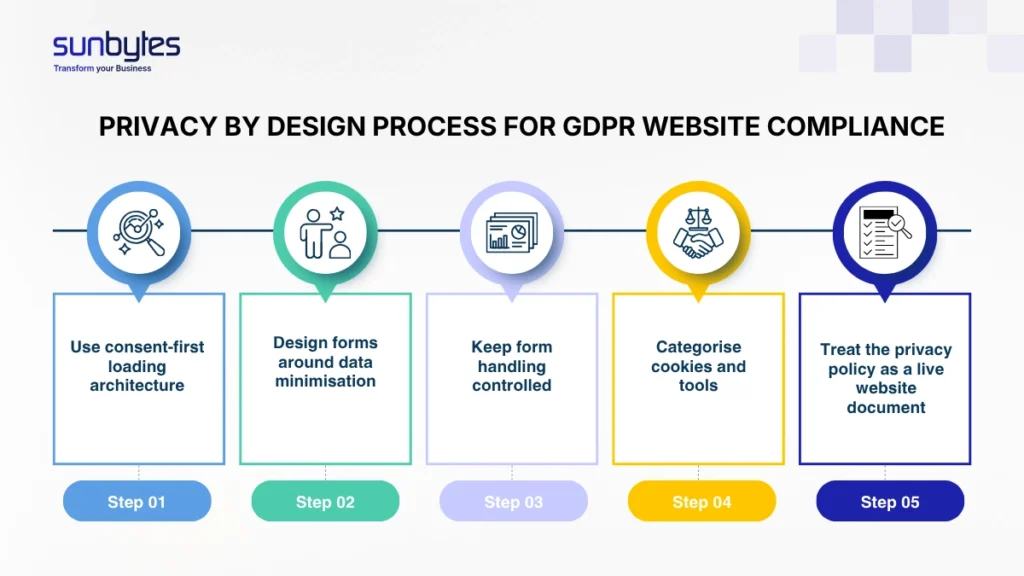
Privacy by design turns GDPR into build requirements. In practice, that means five checks should be part of the website backlog before Sprint 1 starts:
- Use consent-first loading architecture. Analytics, marketing pixels, chat widgets, embedded video, and other non-essential scripts should not fire on page load if consent is required. The consent management setup should control script loading, not only display a banner.
- Design forms around data minimisation. If a field does not directly support the purpose of the form, remove it or make it optional. A contact form, newsletter form, demo request, and job application form should not all collect the same data by default.
- Keep form handling controlled. Personal data should not be scattered through personal inboxes, spreadsheets, or unmanaged notifications. Store submissions in a system with restricted access, clear retention, and a deletion process.
- Categorise cookies and tools from day one. Every tag, script, plugin, embed, and marketing integration should have an owner, category, purpose, and consent rule.
- Treat the privacy policy as a live website document. When the website stack changes, the policy should be checked as part of release readiness. A new analytics tool, CRM integration, chat widget, or ad pixel can change the privacy notice, consent rules, and processor list.
GDPR decisions also affect the website development timeline. If cookie consent, analytics loading, form notices, processor checks, and access control are reviewed too late, developers may need to revisit tag manager rules, CMS permissions, privacy copy, and form storage after the main build is already complete. The better route is to include privacy checks in the website backlog before Sprint 1 starts.
If consent logic is reviewed after launch, teams often need to rebuild tag manager rules, form routing, privacy copy, and analytics events. Treating these checks as Sprint 1 backlog items reduces rework and keeps release readiness measurable.
Dutch AVG: what this means for websites operated by Dutch companies
For Dutch companies, GDPR is commonly discussed as AVG. The legal foundation is the same EU regulation, but the supervisory context matters because Dutch organisations should understand the role of the Autoriteit Persoonsgegevens.
For websites, the Dutch context is most visible in three areas.
The first is cookie consent. AP guidance states that tracking cookies can follow internet behaviour across websites and that cookie walls are usually not allowed when users do not have a reasonable alternative. For a Dutch company website, this means the cookie banner, reject option, consent categories, and script loading behaviour need to be reviewed together.
The second is privacy information. The AP fined Netflix €4.75 million in 2024 because customers were not sufficiently informed about what the company did with their personal data. The lesson for websites is direct: a privacy policy must explain actual processing clearly enough for users to understand it. It should not be a vague legal page that does not match the website’s real tools and data flows.
The third is clarity for the intended audience. The AP imposed a €750,000 fine on TikTok in 2021 for infringing young children’s privacy, with the EDPB annual report noting that the Dutch supervisory authority imposed the fine in April 2021. For websites aimed at young people, consumers, patients, applicants, or other specific groups, privacy information needs to be written for the audience that actually uses the website.
These examples should not turn the article into an enforcement checklist. They show why website teams should treat privacy wording, consent behaviour, and user-facing explanations as part of the build scope.
How Sunbytes supports GDPR-compliant website development
When a website handles consent, forms, analytics, and third-party tools, GDPR readiness depends on evidence: what loads before consent, where submissions are stored, who can access them, and which processors receive data.
Sunbytes approaches this as part of Digital Transformation Solutions: website requirements, backlog planning, CMS setup, integrations, and release workflows are reviewed so GDPR decisions become part of delivery. Cybersecurity Solutions provides the control layer for cookie behaviour, access control, DPA requirements, secure form handling, and audit-ready evidence. Accelerate Workforce Solutions supports the people-risk layer where access ownership, least-privilege permissions, and compliant handover matter during delivery.
With ISO 27001 certified delivery, DPA support where relevant, 15+ years of experience, and 300+ projects delivered across industries and regions, Sunbytes helps teams move from GDPR audit findings to controlled remediation actions.
Planning a website build or redesign? Explore Digital Transformation Solutions to see how Sunbytes turns website requirements, GDPR controls, and delivery planning into a build process your team can manage with confidence.