
Most website timelines are decided before development starts. The better question is how long does it take to build a website when scope, content, approvals, and integrations are already clear before the first sprint begins. A landing page with approved copy can move in a few weeks. A CMS website or custom platform takes longer when decisions are still open.
For Dutch and EU companies, the timeline also depends on compliance, accessibility, integrations, and internal decision speed. When these requirements appear late, they often add more delay than the development work itself.
TL;DR
A website can take 2 weeks to 18+ months, depending on project type. A small landing page may take 2–4 weeks, a business website with CMS often takes 5–8 weeks, e-commerce projects usually need 8–16 weeks, and custom web applications can take 3–6 months or more.
- The biggest timeline risk is usually not coding. It is unclear scope, late content, slow approval, or integration surprises.
- Content, design decisions, and technical requirements should be confirmed before the main development sprint begins.
- For Dutch and EU companies, accessibility, GDPR, cookie consent, hosting, and integration requirements should be planned early.
Website development timeline by project type
A website development timeline is the planned sequence from scope definition and design to development, QA, launch, and post-launch fixes. The timeline below gives a practical starting point. It assumes the main business requirements, page list, brand assets, and content responsibilities are already clear before development begins.
| Website type | Typical timeline | First useful milestone | Biggest timeline risk | Planning note |
|---|---|---|---|---|
| Landing page or campaign page | 2–4 weeks | First full-page review | Copy and visuals not ready | Works fastest when scope is limited to 1–5 pages |
| Business website with CMS | 5–8 weeks | Design or CMS preview | Stakeholder approval delays | Best planned around sitemap, templates, and content batches |
| E-commerce website | 8–16 weeks | Product catalogue or checkout flow | Payment, tax, shipping, and product data | Each integration should have acceptance criteria |
| Custom web application | 12–26 weeks | Working MVP | Scope changes during development | Needs backlog control and phased releases |
| Platform or SaaS product | 6–18+ months | Core MVP | No defined end state | Usually managed as ongoing product development |
The ranges are broad because “website” can mean very different things. A five-page B2B site and a multi-role customer portal are both websites, but they do not need the same discovery, architecture, testing, launch process, or cost structure.
A better planning question is: what must be proven before launch? If the answer is “the page is live and converts,” the timeline is short. If the answer is “users can log in, manage data, integrate with ERP, and meet compliance expectations,” the project is closer to custom software development. Treating that kind of project like a simple website often creates technical debt early, because roles, data flows, integrations, and future feature changes are not planned into the architecture.
Timeline and budget should be planned together. A short build can still become expensive if content, integrations, QA, accessibility checks, or post-launch ownership are not included in the first estimate. For a clearer planning baseline, compare your timeline assumptions with the typical website development cost in Europe before locking the delivery scope.
What affects website build time?
Most timeline delays happen where business ownership meets technical execution: approvals, content, integrations, and compliance decisions.
| Factor | Shortens the timeline | Extends the timeline |
|---|---|---|
| Scope definition | Sitemap, templates, core features, and acceptance criteria are clear | Discovery happens during development |
| Content readiness | Page copy, imagery, legal text, and product data are prepared | Developers wait for content or rebuild layouts later |
| Platform choice | CMS or framework is selected early based on project type, content needs, integrations, and internal maintenance capacity | Platform is chosen late or changed mid-project. |
| Stakeholder decision speed | One owner approves designs and sprint reviews | Every decision needs several internal rounds |
| Third-party integrations | APIs are documented and test credentials are available | CRM, ERP, payment, or analytics setup is unclear |
| Compliance and accessibility | GDPR, cookie consent, WCAG, hosting, and data flows are reviewed early | Legal or Web Accessibility Directive checks happen after build |
| Feedback loop speed | Questions are answered in hours | Async delays turn small issues into multi-day blockers |
For Dutch and EU companies, accessibility should not be treated as a final QA task. W3C’s WCAG 2.2 is the current accessibility recommendation for web content, and Dutch public-sector digital accessibility policy points to accessibility as a requirement for public services. Even for private-sector websites, accessibility affects usability, procurement expectations, and technical quality.
The practical takeaway: the fastest website projects move faster because the limits are clear before development starts. Scope is defined, content is available, approvals are assigned, and technical risks are surfaced before the team starts building.
Why website projects run late
Late website projects usually have a visible pattern. The project starts with an estimated timeline, then small decisions arrive late: one missing copy batch, one extra page type, one new integration, one stakeholder who did not review the design earlier. Each issue looks manageable alone. Together, they reset the schedule.
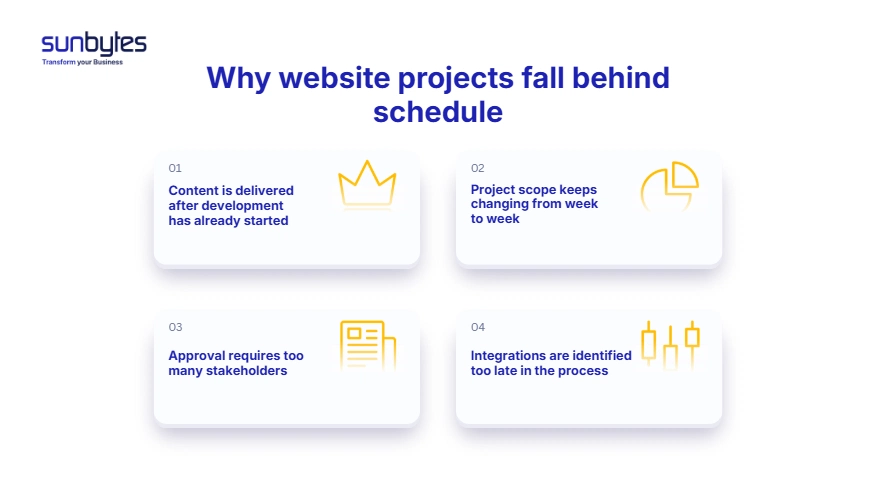
Content arrives during development
Content is often treated as something that can run in parallel with development. That only works when the design system is flexible and the page structure is already known.
In practice, final copy affects layout, components, SEO structure, translations, calls to action, and CMS fields. If content arrives after templates are built, the team may need to adjust page sections, rewrite components, or reopen design decisions.
How to prevent it: create a content gate before development. Confirm the sitemap, priority pages, copy owner, image source, translation needs, and legal text before the main build begins.
Scope changes from week to week
A website timeline becomes unstable when new features enter the active sprint without trade-offs. “Can we also add a blog?” may sound small, but it can add template work, CMS fields, routing, SEO metadata, archive pages, author pages, and design review.
When scope changes are uncontrolled, rework can account for 30–50% of all project effort, especially when requirements change after work has already started, according to ScopeMaster. This is why sprint planning, backlog ownership, and documented architecture decisions matter: they keep change visible before it becomes a hidden delay.
How to prevent it: use a backlog. New ideas are captured, estimated, and prioritised, but they should not interrupt committed sprint work unless the business accepts the timeline change.
Approval becomes a committee
Design approval can take one day or three weeks. The difference is usually not design quality. It is decision ownership.
When every mockup must go through brand, marketing, legal, product, management, and local market teams, the project timeline becomes an approval timeline. This is common in Dutch and EU organisations with several business units or regional stakeholders.
How to prevent it: name one decision owner before design review starts. Other stakeholders can give input, but the project needs one person who can approve, reject, or escalate within a defined timeframe.
Integrations are discovered too late
CRM forms, payment providers, ERP systems, product catalogues, analytics platforms, consent tools, and customer portals can all change the build. A standard HubSpot or Stripe integration is different from a custom ERP with limited API documentation.
How to prevent it: list every third-party system during discovery. For each integration, confirm owner, documentation, credentials, data fields, test environment, privacy impact, and acceptance criteria.
This is especially important when you opt for software development outsourcing, where the delivery team depends on clear access, documentation, and decision ownership from your side. If integration details are incomplete, the outsourced team may move fast on the visible build but lose time waiting for API access, test credentials, or clarification from internal system owners.
Before integrations reset your website timeline, map the dependencies first. Sunbytes helps Dutch and EU teams clarify scope, access, sprint risks, and launch readiness before development starts. Explore Digital transformation solutions
A practical website project timeline
A realistic timeline is easier to manage when the work is split into phases. The exact duration changes by project type, but the sequence should stay clear.
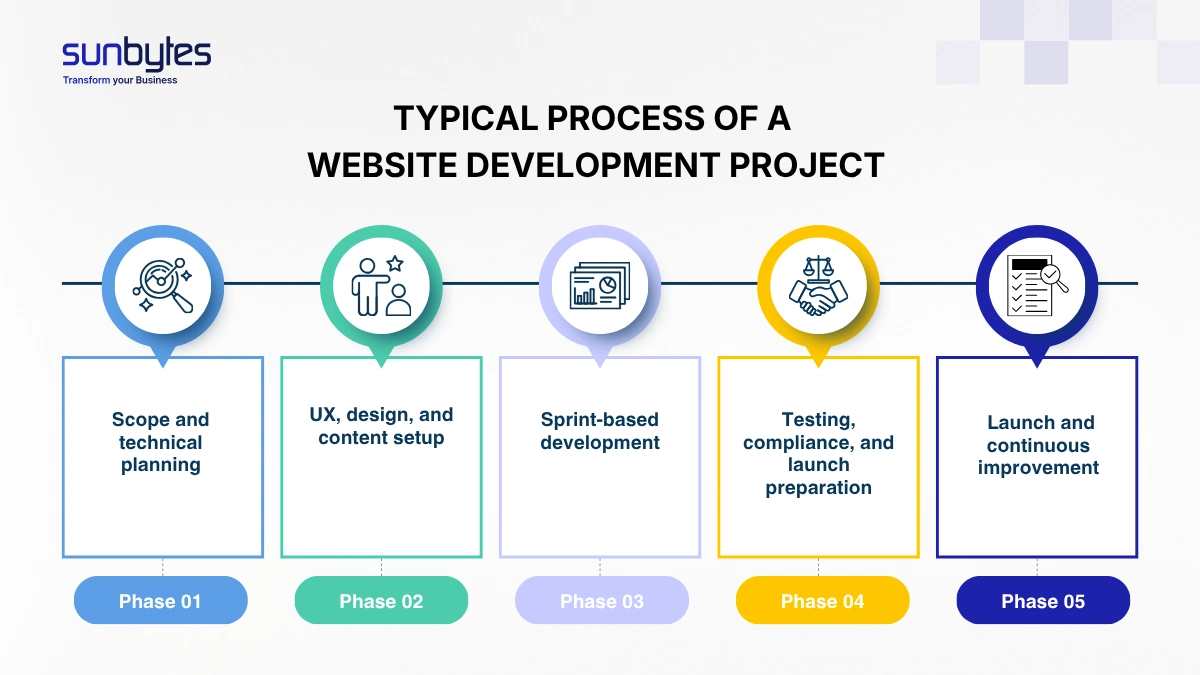
Phase 1: Planning and technical discovery
This phase defines what will be built, what will be reused, and what needs technical validation.
For a small website, this may take a few days. For a custom web application, it may take several weeks. The work should cover sitemap, content responsibilities, design inputs, CMS needs, hosting, integrations, privacy requirements, analytics, and launch constraints.
For EU-facing websites, this is also where data processing questions should be raised. If the site collects personal data through forms, accounts, checkout flows, newsletter signups, or tracking tools, GDPR considerations should be planned before implementation.
Phase 2: UX, design, and content preparation
This phase turns requirements into UI/UX screens, templates, and page structure.
For business websites, the fastest route is usually template-based: homepage, service page, case study, blog article, contact page, landing page, and legal pages. Each template should follow responsive web design principles so the site works properly across desktop, tablet, and mobile. For web applications, this phase may include user flows, dashboard states, permissions, and data entry screens.
Content should not be treated as decoration. It shapes the layout and CMS model. A short service page and a long technical page may need different components. A multilingual Dutch/EU website may need different navigation, URL structure, hreflang planning, and translation workflow.
Phase 3: Development sprints
Development turns the approved structure into working pages, CMS components, integrations, and deployable code.
A sprint model helps because it creates fixed review points. Instead of waiting until the end to see the whole site, the team reviews working sections at planned intervals. This reduces surprise and makes feedback easier to control.
For custom builds, sprint planning also protects the timeline. New features can still be discussed, but they enter the backlog instead of interrupting active work. For larger builds, hiring dedicated development team capacity can help maintain sprint momentum without pulling the internal CTO or Head of Digital into day-to-day delivery work.
Phase 4: QA, accessibility, compliance, and launch preparation
QA should cover more than broken links.
For Dutch and EU websites, launch readiness may include browser testing, mobile testing, performance checks, cookie consent, privacy notices, form validation, CMS permissions, redirects, analytics, search indexing, accessibility checks, and security basics.
WCAG 2.2 includes recommendations for making web content more accessible, and the Digital Services Act may matter for online platforms, marketplaces, or services with user-generated content and platform obligations in the EU.
Phase 5: Launch and post-launch iteration
Launch is not the end of the project. It is the point where real usage starts.
The first 2–4 weeks after launch should focus on monitoring, fixing, and improving. Check analytics, conversion paths, form submissions, CMS editor issues, crawl errors, page speed, and user feedback. For custom applications, this period may include backlog reprioritisation based on user behaviour.
The timeline should leave room for this. A project that spends every available day on pre-launch development has no buffer for the issues that only appear when real users arrive.
Website build time: what Dutch and EU teams should prepare first
The most useful timeline preparation is not a long requirements document. It is a short set of decisions that prevents rework.
Before requesting a timeline estimate, prepare:
| Preparation item | Why it matters | Owner |
|---|---|---|
| Website goal | Defines what must be prioritised | CTO / Head of Digital / Marketing lead |
| Sitemap | Sets page count and template needs | Marketing / Product |
| Content status | Shows whether design can start | Content owner |
| Technical stack preference | Affects CMS, hosting, integrations | CTO / IT |
| Integration list | Reveals hidden timeline risk | IT / Operations |
| Approval owner | Prevents decision delays | Project sponsor |
| GDPR and cookie requirements | Reduces late legal rework | Legal / Compliance |
| Accessibility expectations | Supports usability and procurement readiness | Product / Compliance |
For a Dutch CTO or Head of Digital, this checklist is often more useful than asking for a fixed delivery date too early. A fixed date without these inputs is only a guess. A timeline based on these inputs can be managed. Once these inputs are clear, the next question is whether the delivery partner can control them in practice. Before signing, use a structured framework to choose a web development partner in Europe based on scope control, sprint governance, GDPR readiness, timezone overlap, and post-launch accountability.
How Sunbytes structures website projects
Website timelines slip when scope, delivery capacity, and technical risk are treated as separate conversations.
Sunbytes uses the early planning phase to clarify page scope, integration dependencies, sprint priorities, approval points, and launch-readiness risks before development moves too far.
For larger builds, Accelerate Workforce Solutions supports the people layer when extra dedicated team capacity is needed, while Cybersecurity Solutions supports the control layer for personal data, access control, compliance evidence, and secure-by-design requirements. With 15+ years of experience, 300+ projects delivered, ISO-guided delivery, and DORA-tracked outcomes, Sunbytes helps Dutch and EU companies turn timeline uncertainty into a Digital Transformation Solutions delivery plan. Ready to clarify your website timeline before development starts? Contact our experts today.