
Headless CMS is often sold as the modern answer to website performance, content reuse, and frontend flexibility. That is only partly true. In website development, headless CMS is not a better CMS by default. It is a different architecture that pays off when your website, app, or digital platform needs content to move through more than one frontend.
Already comparing CMS options? Our WordPress vs custom website guide covers the traditional build decision. This article focuses on headless CMS as the third option.
TL;DR
A headless CMS separates content management from content delivery. The CMS stores and organises content; a separate frontend renders it through an API. The main pros are frontend freedom, performance, security separation, and omnichannel content. The main cons are higher build cost, more developer dependency, and a less familiar editing experience.
- Headless CMS works best when content needs to serve a website, app, portal, or multiple markets from one source.
- Traditional CMS is usually better for simple business websites, brochureware, and marketing teams that depend on visual editing.
- For Dutch/EU teams, the decision should include GDPR handling, hosting model, access control, and long-term maintenance.
- Sunbytes planning ranges from delivery experience show headless builds can add 30–60% more build time than a comparable WordPress setup when the frontend must be built from scratch.
What is a headless CMS and how does it differ from a traditional CMS?
A traditional CMS controls both the content and the presentation. WordPress, Drupal, and Typo3 can manage content, render templates, handle themes, and publish web pages from one system.
A headless CMS separates that flow. The CMS manages content, but the frontend is built separately and pulls content through an API. This gives the development team more control over the website tech stack: the frontend framework, hosting model, performance setup, API layer, and deployment workflow can all be chosen independently from the CMS.
For CTOs and Heads of Digital, the practical question is not “Is headless more modern?” The better question is: “Does separating the content layer from the frontend solve a real operational problem?” If the answer is no, headless is likely an extra cost. If the answer is yes, headless can reduce future rework by keeping content, design, and frontend delivery independent.
Traditional vs headless CMS comparison table
| Dimension | Traditional CMS | Headless CMS |
|---|---|---|
| Architecture | CMS controls content management and page rendering. | CMS manages content only. A separate frontend renders content through an API. |
| Frontend technology | Usually tied to the CMS template system. | Frontend can use React, Next.js, Vue, Nuxt, Svelte, or another framework. |
| Content editing | Familiar admin panel, visual editing, themes, plugins, and page builders. | Structured content editor. Live preview and visual editing may require extra setup. |
| Performance | Can perform well with caching and CDN setup, but pages often depend on dynamic rendering. | Static generation and CDN delivery can produce faster pages when implemented well. Core Web Vitals focus on LCP, INP, and CLS as user experience metrics. |
| Security | Public-facing CMS, plugins, themes, admin area, and database all need careful maintenance. | Public frontend can be separated from the CMS admin, reducing exposure, but API security becomes critical. |
| Omnichannel delivery | Website-first. Other channels usually need custom setup. | One content model can serve a website, mobile app, portal, digital signage, or product interface. |
| Initial build cost | Lower for most standard websites because themes and plugins reduce build time. | Higher because the frontend, CMS model, deployment workflow, and preview flow need custom implementation. |
| Scalability | Good for many content-led websites, but scale often requires tuning. | Frontend and CMS can scale separately, especially when pages are CDN-delivered. |
A CMS choice also changes the wider planning model. A traditional CMS can shorten the website development timeline when the project mainly needs standard pages, content editing, and familiar publishing workflows. A headless CMS can increase the website development cost at the start because the frontend, CMS integration, preview setup, hosting, and deployment workflow are separate workstreams. The trade-off is easier to justify when the same content must support several channels, markets, or product interfaces.
That is why traditional CMS usually wins on editor experience and initial cost, while headless CMS wins on frontend freedom, performance control, omnichannel delivery, and long-term flexibility.
Headless CMS pros & cons
| Headless CMS pros | Headless CMS cons |
|---|---|
| Frontend freedom: the development team can build the frontend in the framework that fits the product. | Higher initial build cost: no theme shortcut. The frontend, API integration, and deployment workflow are custom. |
| Better performance potential: static generation and CDN delivery can improve page speed when the frontend is well built. | More developer dependency: content model changes, preview logic, and frontend changes often require developer support. |
| Smaller public attack surface: the CMS admin can be separated from the public website. | API security becomes a design responsibility. OWASP lists broken object-level authorization as a major API security risk. |
| Omnichannel content: the same content can serve websites, apps, portals, and other interfaces. | Less familiar editor experience: structured content editing can feel less visual than WordPress for marketing teams. |
| Independent scaling: the frontend and content layer can scale separately. | More infrastructure to manage: CMS, frontend hosting, CDN, API access, preview, permissions, and monitoring. |
| Better fit for custom design systems: frontend teams can build the interface without CMS theme constraints. | Not cost-effective for simple websites: Sunbytes planning ranges from delivery experience show a simple headless site can add €10k–€20k compared with WordPress for similar end-user functionality. |
Headless CMS is strongest when the frontend is a strategic layer. It is weaker when the website is mainly a content publishing tool for a small marketing team.
In Sunbytes delivery reviews, CMS architecture decisions are documented early through ISO-guided delivery so teams can see which decisions affect frontend build time, editor workflow, access control, and future rework. When that step is skipped, rework can add 30–40% to the original estimate because the team has to rebuild content models, preview logic, or frontend components after content has already been entered.
Need to choose before the build starts?
Sunbytes can review your content model, frontend ownership, preview workflow, API exposure, and build-time impact before sprint one.
Review your CMS architecture with Sunbytes →
When does headless CMS make sense for Dutch B2B companies?
Headless CMS makes sense when content has to support more than one frontend, more than one market, or more than one product experience. For Dutch and EU companies, it can also support cleaner access control, EU hosting decisions, and structured content governance.
| Dutch/EU B2B use case | Why headless fits | Possible CMS direction |
|---|---|---|
| Scale-up with website and mobile app sharing content | One content model can serve both channels through an API. No duplicate content entry. | Hosted headless CMS or custom open-source setup, depending on data ownership requirements. |
| High-traffic marketing site where speed affects conversion | Static generation and CDN delivery can reduce frontend bottlenecks when the site is built correctly. | Headless CMS with a modern frontend framework. |
| B2B company with multilingual content across EU markets | Structured content makes translation workflows, localisation fields, and reusable content blocks easier to govern. | Headless CMS with a clear content model and role-based permissions. |
| E-commerce or customer portal beyond standard WooCommerce flows | Product content, pricing logic, account areas, and checkout UX can be separated more cleanly. | Headless CMS for content, with separate commerce or portal logic. |
| Enterprise using Typo3 or Drupal but needing modern frontend delivery | The existing CMS can sometimes remain the content source while the frontend is modernised gradually. | Decoupled or hybrid migration path. |
| Organisation with separate content and development teams | Editors manage structured content while developers maintain the frontend and design system. | Headless CMS with defined content ownership and preview workflow. |
A headless CMS decision is often a team decision as much as a technology decision. If your organisation already has frontend capability, headless can become a controlled architecture choice. If every change depends on an external developer, the same architecture can become a bottleneck. For companies already considering hiring dedicated development team capacity, headless CMS is easier to maintain because the frontend, content model, and release process have clear ownership.
When headless CMS is not the right choice
Headless CMS is the wrong investment when the architecture does not solve a real constraint. These are the common cases where a traditional CMS is usually better.
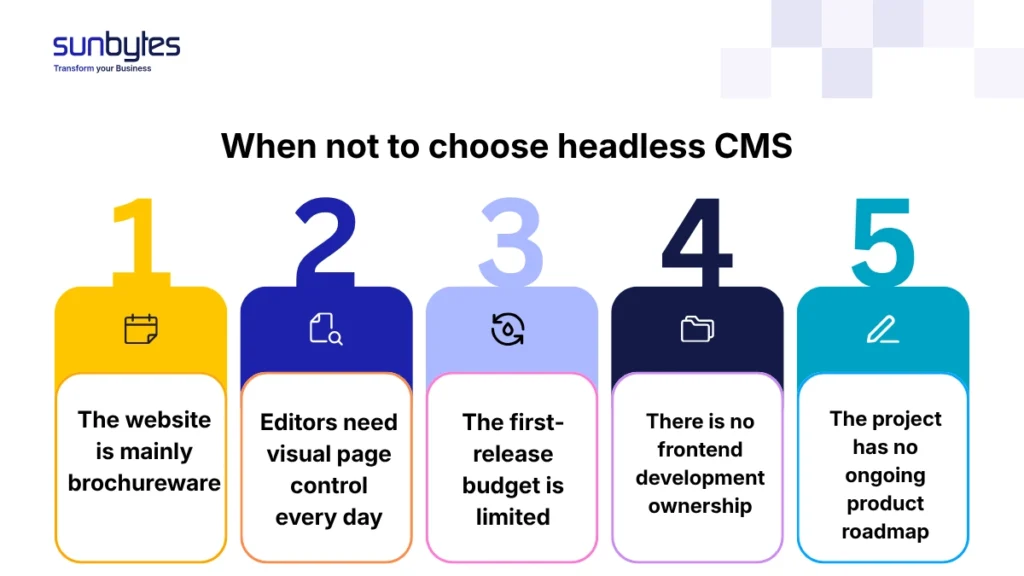
A simple brochure website
For a 5-page or 10-page company website, headless usually adds cost without improving the customer experience. WordPress or another traditional CMS can deliver the same visible result faster.
Sunbytes planning ranges from delivery experience: for simple brochureware, headless can add €10k–€20k compared with a traditional CMS because the frontend and CMS integration still need to be built.
A marketing team that needs visual editing every day
If your marketing team works mainly through page builders, visual previews, and fast landing page edits, a traditional CMS is often more practical. Headless CMS can support preview workflows, but they usually require extra setup and training.
The trade-off is operational. Better architecture for developers can become a worse workflow for editors if the content model is too rigid.
A limited first-release budget
If the initial website budget is under about €15,000, headless is rarely the cleanest first move. The frontend build alone can consume much of that budget before content migration, design QA, analytics, cookie consent, accessibility checks, and launch support are included.
For Dutch/EU projects, GDPR, consent tooling, hosting choices, and accessibility expectations still need a budget regardless of CMS model. GDPR Article 25 requires data protection by design and by default, so architecture cannot be treated as a purely technical preference.
No frontend development capability
Headless CMS needs front-end developers who understand API integration, state handling, deployment, preview environments, and performance. A team that is strongest in WordPress themes and PHP templates may maintain a traditional CMS better than a headless stack.
This is where the 2–4 week planning window matters. Before Sprint 1 starts, the team should know who owns content modelling, frontend components, preview, deployment, and access control. Without that, headless turns into more moving parts rather than more control.
A one-off website with no ongoing roadmap
Headless CMS benefits compound over time. They make more sense when your company expects new markets, new content types, app integrations, portal features, or custom frontend improvements.
For a website that will be built once and barely changed for three years, headless may be over-architecture. A traditional CMS is often easier to hand over and cheaper to maintain.
How Sunbytes approaches headless CMS architecture
CMS architecture is not only a tooling decision. It decides who owns frontend changes, how editors preview content, how API permissions are governed, and how launch risk is controlled.
Through Digital Transformation Solutions, Sunbytes designs that build model before sprint one: content model, frontend architecture, editor workflow, and security controls documented in the delivery plan. Accelerate Workforce Solutions puts the senior frontend, CMS, and QA capacity in place when the project needs it. Cybersecurity Solutions embeds API access control, GDPR-aware handling, and review trails into the build instead of treating them as launch tasks.
With 15+ years of experience, 300+ projects delivered, senior teams operational in 2–4 weeks, ISO-guided delivery, and DORA-tracked outcomes where relevant, Sunbytes helps teams choose a CMS architecture they can launch and maintain.
Review your CMS architecture with Sunbytes →