

Building a SaaS product with AI coding tools involves more than getting the features to work. Before accepting paying customers, you need to check how the application separates customer data, enforces permissions, handles payments and protects critical operations.
This SaaS security checklist covers seven areas to review, the issues that may block a launch, the evidence business customers may request, and when an independent technical review can help. It focuses on the risks of operating an AI-built SaaS product rather than evaluating SaaS vendors as a buyer.
TL;DR
An AI-built SaaS security review checks whether a product built largely with AI coding tools separates customer data, enforces permissions on the server, handles payments safely and protects critical operations before paying customers arrive.
- The seven-area SaaS security checklist covers login and recovery, tenant isolation, secrets and environments, payments and inputs, AI features (if the product has them), logging and recovery, and abuse limits. Not every control applies to every product.
- A finding blocks launch when it creates an unacceptable risk to customer data, account security, payment integrity or critical operations, such as one tenant reaching another tenant’s data or a server-side credential exposed in browser code.
- EU business customers may request evidence such as a data processing agreement where you act as their processor (GDPR Article 28), a sub-processor list, where data is stored and how incidents are handled.
- An independent review helps before the first business contract that involves personal data, because tenant isolation, role permissions and payment entitlements depend on business rules that automated tools may not understand.
What changes when you build SaaS with AI and customers start paying
When you build SaaS with AI, the product can work in the demo long before it is ready for many customers at once. An AI-built SaaS product is one built largely with AI coding tools; it does not necessarily contain AI features such as chat, summaries or agents. Area 5 of the checklist applies only when it does.
Three things change when the first customer pays. Many customers now use one system: in a multi-tenant product, customer organisations (tenants) share the same application, and in the common shared-database model also the same tables, so one missing filter can expose other tenants’ records. Money moves through the product, so plans, credits and billing events become targets. And contracts arrive that ask for evidence.
Features generated by AI coding tools still need checking for whether authorisation rules, rate limits and tests were implemented around them. A new route can work for the person who prompted it without ever having been tried by a second customer. That gap corresponds to the first risk in the OWASP API Security Top 10 (2023): broken object level authorization (API1).
If one paying customer would leave after seeing another customer’s data, tenant isolation is the first thing to verify.
Before you charge your first customer? An AI-built product review checks permissions, cross-user access, exposed secrets and database rules together with the code around them, and explains in plain English what to fix first.
Before the checklist: list what would hurt most
A SaaS security review starts with what you must protect, not with a tool. Five asset groups are a useful starting point:
- Customer data: records, files, exports, messages and support attachments.
- Identity: passwords, sessions, reset links, API keys and single sign-on settings.
- Money: plans, credits, invoices, refunds, coupons and entitlements.
- Operations: production database, cloud console, CI/CD pipeline, DNS, email provider and backups.
- AI-specific assets (if the product has AI features): model-provider keys, prompts containing customer data, uploaded documents, retrieval indexes, agent tool permissions and generation quotas.
Checks belong at the trust boundaries, where something from outside enters the system: browser input, an ID in a URL, a webhook, a third-party API response or a support tool that can act as a user.
For each high-value workflow, write four lines: actor, asset, abuse and control. For an “export all contacts” feature: the actor is a member or a hijacked account; the asset is customer data; the abuse is exporting owner-only data or draining compute with repeated exports; the controls are an organisation-level permission, re-authentication, an export limit, an expiring download link and an audit log.
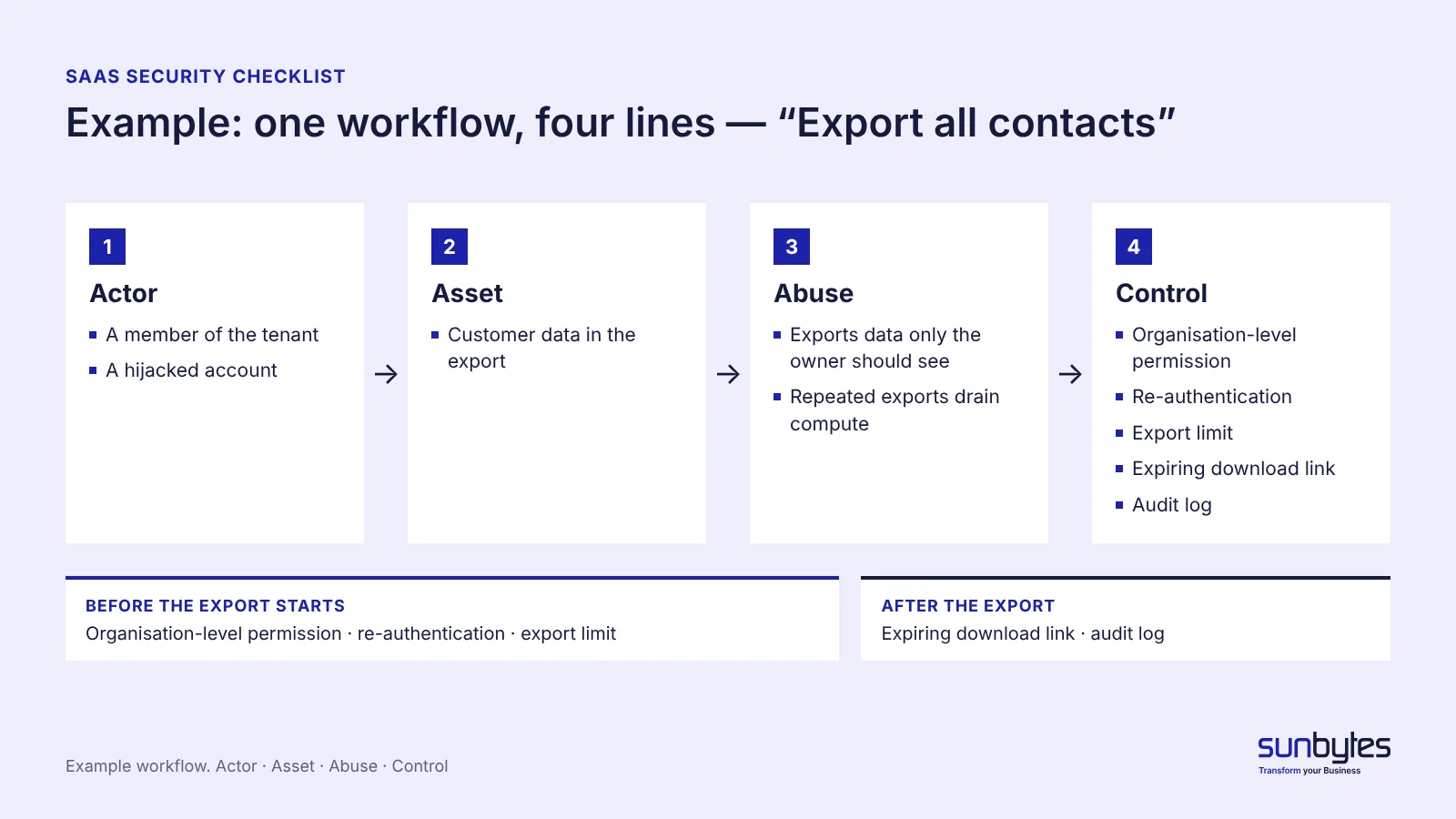
Run this for your top three workflows. The risks it surfaces decide which checklist items matter most for your product.
The SaaS security checklist for AI-built products
This checklist covers seven areas relevant to operating an AI-built SaaS product. Not every control applies to every architecture or business model. For each item, first determine whether the product has the relevant feature, data flow or exposure.
Treat a finding as a launch blocker when it creates an unacceptable risk to customer data, account security, payment integrity or critical operations. Other controls should be completed before the related feature goes live or prioritised according to the product’s risk assessment. Each item carries one of three labels:
| Label | Meaning |
|---|---|
| Block launch if applicable | A confirmed weakness here can lead to unacceptable risk on a critical workflow |
| Required before the feature goes live | The control must be in place before the related feature is switched on |
| Prioritise by risk | Priority depends on the data involved, exposure and business impact |
Use the checklist to record what was checked, the evidence available, the remaining risk and who owns the next action.
Login and account recovery
Login and recovery flows decide whether someone can take over an account without touching your database. A mature identity provider or authentication library handles reset tokens, sessions and multi-factor authentication (MFA), so these are not left to custom code written by prompt.
| Check | What to verify | Applies when | Label |
|---|---|---|---|
| Reset links | Expire, work once, and do not reveal whether an email address has an account | You run your own password reset | Block launch if applicable |
| Admin MFA | MFA required for admin and staff accounts, available to users | Admin accounts can reach customer data or settings | Prioritise by risk (high where admins reach all tenants) |
| Session revocation | Logging out, removing a member or deleting a user ends access within the time your session or token design allows (for example short-lived tokens or a revocation list) | Users can be removed or roles changed | Prioritise by risk |
| Sensitive changes | Changing email, password, billing or API keys asks the user to sign in again | These settings exist in the product | Prioritise by risk |
| Invites and callbacks | Expired invites stop working; OAuth callbacks accept only your own redirect addresses | You use invitations or OAuth sign-in | Required before the feature goes live |
The US Cybersecurity and Infrastructure Security Agency names multi-factor authentication among the default protections in its Secure by Design guidance: with MFA enforced, a stolen admin password alone no longer opens the account.
Multi-tenant isolation and authorisation
Multi-tenant isolation carries the largest consequence in this checklist when the product serves several customer organisations, because a failure can expose one customer’s data to another. Isolation means every read, change, export and share is limited to what the signed-in user’s tenant and role allow. In a product for individual users, the same checks apply between user accounts.
| Check | What to verify | Applies when | Label |
|---|---|---|---|
| Cross-tenant authorisation tests | Using at least two test tenants and several roles, try to access, change, export or share another tenant’s resources through the application and API. Every unauthorised operation is denied, and no protected data is returned or changed | Several organisations or accounts share the product | Block launch if applicable |
| Server-side checks | Each endpoint enforces the session, tenant membership and role on the server; tenant identity comes from the authenticated session, not from a value the browser sends | Always for endpoints that return or change customer data | Block launch if applicable |
| Three levels | A user cannot reach another record by changing an ID, cannot set protected fields such as role, tenant, price or status, and cannot call an admin-only action | Objects, protected fields or admin functions are exposed through an API | Block launch if applicable |
| Role and plan matrix | Admin routes and paid features tested as a signed-out visitor, a member, an admin and an expired-subscription user | The product has roles or paid plans | Required before the feature goes live |
| Hidden shared spaces | File storage paths, background jobs, exports, caches and search indexes keep tenant context | These components hold customer data | Prioritise by risk |
Depending on the API design, an unauthorized request may return 403, 404, an empty filtered result or another intentionally defined response. What the test must show is that the user cannot read, change or infer data they are not allowed to access. Repeat the checks for the relevant object types, operations and access paths: passing the selected tests provides evidence for the tested scenarios, not proof of complete authorisation coverage.
The three levels follow the OWASP API Security Top 10 (2023): object level (API1), object property level (API3) and function level (API5). OWASP describes the first as attackers manipulating the ID of an object that is sent within the request. Combine functional tests like these with a review of the code that enforces the rules.
Our guide to broken access control in AI-built apps explains the fixes. Testing AI applications explains why a test suite’s ability to catch a real flaw matters more than the number of passing tests.
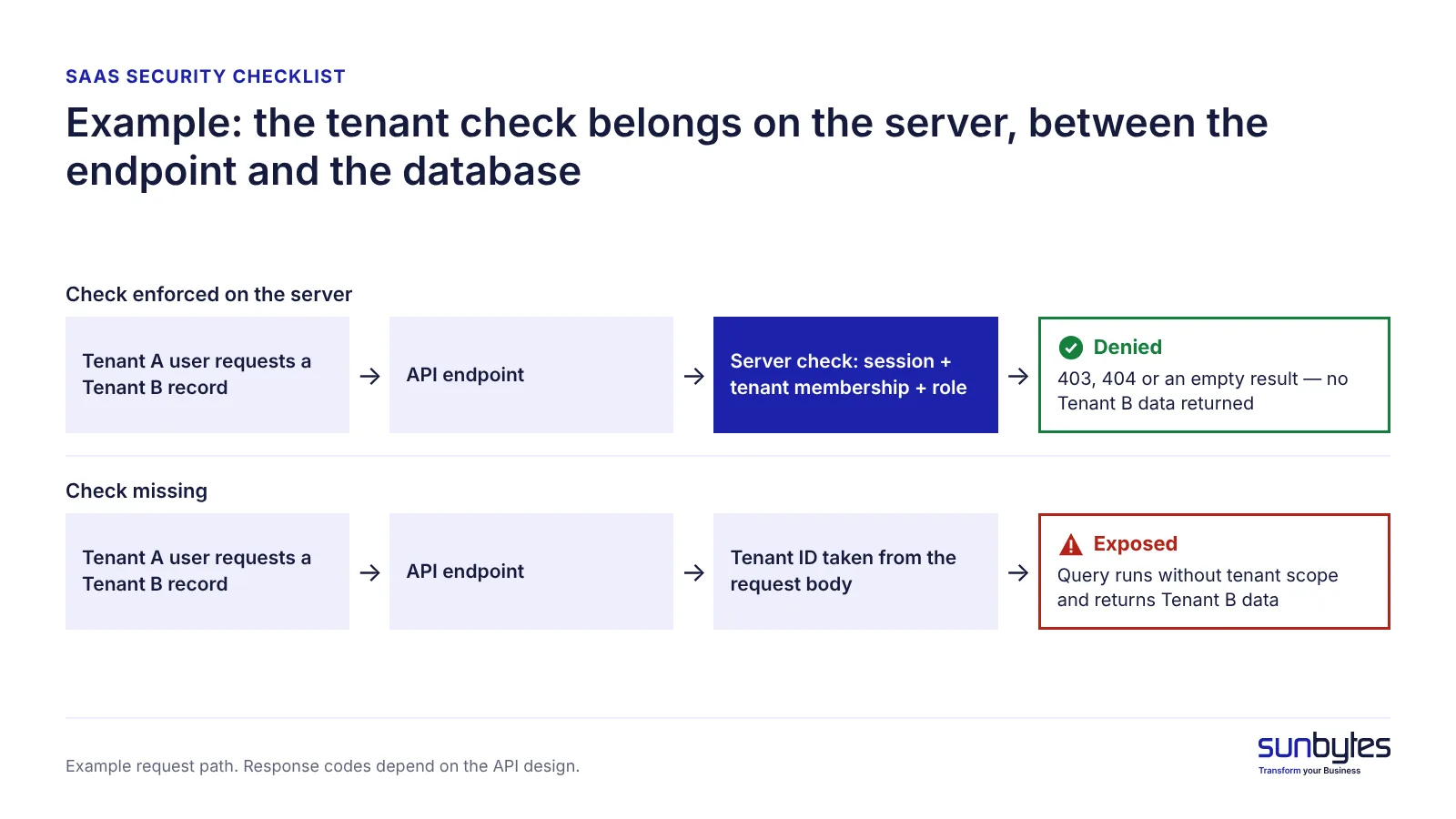
A one-off test does not survive the next prompt. Ask your developer to turn the cross-tenant checks into automated API tests that run before every deploy, starting with five:
1. Tenant A cannot read a Tenant B record.
2. Tenant A cannot change, delete, export or share a Tenant B record.
3. A member cannot call an admin action.
4. A request cannot change role, tenant or price.
5. A removed member loses access within the time your session design allows.
Name each test after its risk, for example member_cannot_export_another_workspace_invoices, so a failure explains itself.
An access-control vulnerability that allows one tenant to reach another tenant’s personal data creates a potential GDPR risk. If unauthorised access or disclosure actually occurs, the incident may qualify as a personal data breach under GDPR Article 4(12). Notification obligations then depend on the organisation’s role and the circumstances of the breach. Under Article 33, a controller must notify the competent supervisory authority without undue delay and, where feasible, within 72 hours of becoming aware of a personal data breach, unless the breach is unlikely to result in a risk to individuals’ rights and freedoms. A processor must notify its controller without undue delay after becoming aware of a personal data breach. In the Netherlands, the supervisory authority is the Autoriteit Persoonsgegevens.
Not sure your tenant isolation holds? Cross-user access, permissions and database rules are part of the security and data area of an AI-built product review. You get findings with the evidence behind them and a prioritised plan for what to fix first.
Secrets, configuration and environments
A server-side credential in browser code or git history can give whoever finds it access within the scope of that key’s permissions. AI-assisted building adds one specific route: credentials pasted into prompts, chats and test files during development.
| Check | What to verify | Applies when | Label |
|---|---|---|---|
| No server credentials in the browser | Built JavaScript and network calls contain no private API keys, database URLs or secret tokens | Always | Block launch if applicable |
| Review and rotate exposed credentials | Identify credentials used during development and check whether they were committed, included in prompts or chat logs, exposed in client-side code or shared through unapproved channels. Revoke and replace those known or reasonably suspected to be exposed | Credentials were used during AI-assisted development | Block launch if applicable (for exposed credentials) |
| Scoped production credentials | Production uses separate, appropriately scoped credentials; obsolete development access is removed | Before launch | Required before the feature goes live |
| Scan the history | A secret scanner (for example git-secrets or TruffleHog) runs over the git history and CI logs, not only the current code | The repository holds or held credentials | Prioritise by risk |
| Close build leftovers | Debug endpoints, verbose errors, open CORS rules, public storage buckets, preview deployments and old subdomains are closed; public source maps are reviewed so they do not reveal secrets or sensitive implementation details | These exist in the deployment | Prioritise by risk |
| Separate environments | Development, staging and production use different credentials; staging holds no unmasked production data | You run a staging environment | Prioritise by risk |
A key deleted from the code can still be exposed in an earlier commit, which is why the history scan matters even when the current code looks clean. Our guide to leaked API keys in AI products covers rotation and scanning.
Payments, webhooks, inputs and API surface
Payment and webhook weaknesses can let a user get a paid plan, a refund or credits without paying. The rule across this area: trust nothing from outside until it is verified.
| Check | What to verify | Applies when | Label |
|---|---|---|---|
| Hosted payment fields | Card details go to the payment provider’s hosted checkout or tokenised fields, not through your servers | You take card payments | Required before the feature goes live |
| Verified webhooks | Signatures are verified; events are checked for replay and identified by event ID; where the integration allows it, entitlements are confirmed on the server with the payment provider before a plan, credit or refund changes | Webhooks change plans, credits or refunds | Required before the feature goes live |
| Duplicate-safe handling | Event handling is idempotent: a repeated event does not grant a plan or refund twice | You receive payment events | Required before the feature goes live |
| Lean API responses | Responses return only the fields the screen needs: no password hashes, credentials or other tenants’ data | Always | Block launch if applicable (if they expose credentials or other tenants’ data) |
| Input validation | The server checks type, length, format, page size and upload type and size; queries are parameterised | Always | Prioritise by risk |
| Untrusted integrations | URL imports, file converters and third-party API responses cannot reach internal addresses | You import URLs or process uploaded files | Required before the feature goes live |
Stripe’s integration security guide states that sending payment details directly to Stripe, without passing through your servers, reduces your PCI DSS obligations (the card industry’s security standard). Its webhook documentation says to verify events before acting on them and warns that an endpoint might receive the same event more than once. The last row covers server-side request forgery (SSRF), where your server is tricked into calling an internal address (OWASP API7:2023). Our article on auth and payments in AI-built SaaS goes deeper.
AI feature controls
AI feature controls apply only if the SaaS product includes AI features such as chat, summaries or agents; a product built with AI coding tools may have none. These controls limit what the model can see and do on behalf of a user.
| Check | What to verify | Applies when | Label |
|---|---|---|---|
| Data scope | The AI feature reads only data the current user may see; it never runs with admin database credentials or system logins | The feature reads customer data | Required before the feature goes live |
| Provider role and terms | The model provider’s role is assessed (for example processor or sub-processor) and its retention and training terms are confirmed in writing; where it processes personal data on your behalf, it is listed as a sub-processor | Personal data reaches a model provider | Required before the feature goes live |
| Data minimisation | Only the personal data the use case needs is sent to the model, under a lawful basis and contractual safeguards | Prompts can contain personal data | Required before the feature goes live |
| Safeguards for high-impact actions | Confirmation, limits or human approval for actions such as mass emails, refunds or deletions, based on their risk | An AI feature can trigger these actions | Prioritise by risk |
| Prompt injection tests | Basic tests with hidden or adversarial instructions in user content | The model reads user-supplied content | Prioritise by risk |
| Generation quotas | Limits per user or plan, so one account cannot run up the model bill | Generation is paid per use | Prioritise by risk |
Prompt injection is covered in the OWASP Top 10 for LLM applications section of our security standards guide. Agents that act on their own need stricter limits, covered in AI agent security for teams shipping their first agent.
Dependencies, logging, backups and recovery
Logging and recovery decide how fast you notice a problem and whether you can undo it.
| Check | What to verify | Applies when | Label |
|---|---|---|---|
| MFA on infrastructure | Code repository, cloud console, database platform and email provider accounts use MFA | These accounts can change production | Prioritise by risk (high for production access) |
| Clean logs | Logs contain no passwords, full tokens, raw request bodies or unneeded personal data; log access is restricted | Always | Prioritise by risk |
| Tested restore | One backup has been restored into a separate environment; backups are protected like production | You rely on backups for recovery | Prioritise by risk |
| Audit events | Sign-ins and failures, MFA and role changes, password resets, API key creation, exports, billing changes and deletions are logged with who, which tenant and what changed | These actions exist in the product | Prioritise by risk |
| Dependencies and CI | Vulnerable packages updated, starting with code the product uses; deploy keys and CI workflows hold only the permissions they need | Always | Prioritise by risk |
| Data lifecycle | A documented process deletes or anonymises a customer’s data on request or at contract end, with exceptions for records you must keep, such as billing records under legal retention obligations | You store customer personal data | Required before the feature goes live |
For what to monitor after go-live, use our AI deployment checklist.
Abuse limits and expensive actions
A paying user with valid permissions can still cost you money: mass emails, bulk exports, AI generation and refunds are expensive even when every permission check passes. Abuse limits decide how much one account can do.
| Action tier | Examples | Possible controls |
|---|---|---|
| Low | Browse, search, draft | Normal limits |
| Moderate | Invite a teammate, publish, limited API calls | Rate limits per account |
| High | Export data, change login settings, rotate API keys, change billing, add an integration, send a campaign | Re-authentication, confirmation screen, audit log |
| Hard to undo | Delete, refund, pay out, mass-send, change ownership, grant admin | Confirmation, limits, duplicate-safe processing and, where the risk warrants it, human or second-person approval (also when an AI agent triggers the action) |
Set limits before expensive work is queued: per account, tenant, plan and API key rather than only per IP address, with plan quotas for AI generation, exports and email, lower limits for new accounts and alerts on bursts and model-spend spikes. OWASP lists this risk as unrestricted resource consumption (API4:2023). Your developer builds the limiter; the founder decides, per plan, what normal use and acceptable loss look like. Whether the product survives a busy day is a separate question, covered in load testing for founders.
What your first business customer will ask you to prove
Your first business customer may ask for evidence rather than assurances. Once you sell SaaS to other businesses, you are the vendor whose security they assess. Requests can include:
- A completed security questionnaire.
- A data processing agreement where you process personal data on your customer’s behalf. GDPR Article 28 sets the contract terms for that processor relationship; whether it applies depends on the actual roles in the processing.
- A sub-processor list: for example hosting, database platform, email provider and, where it processes personal data on your behalf, the AI model provider.
- Where customer data is stored, and whether it leaves the EU.
- Encryption in transit and at rest.
- How you detect, handle and report incidents.
- How customer data is deleted or returned when the contract ends.
Customers in scope of the NIS2 Directive must address supply-chain security in their own cybersecurity risk management (Article 21), so they may ask software suppliers for security information as part of their due diligence. That request does not by itself make your company subject to NIS2 Article 21; whether NIS2 applies to you directly depends on your sector and size.
You do not need a certification to answer a first questionnaire, but you do need written answers backed by evidence. If a customer requires ISO/IEC 27001 or SOC 2, plan it as a separate project, and prepare the questionnaire answers before the sales call.
How this fits with the readiness and deployment checklists
This checklist covers what only a SaaS adds: tenants, plans, billing and business customers. For checks that apply to any AI-built product, including personal data under GDPR Article 25, use the production readiness checklist; for release day and rollback, use the AI deployment checklist.
Self-check, automated tools or independent review
A self-check, automated security tools and an independent review cover different ground, and a clean scan is not evidence on its own that the product is secure.
Automated security tools can identify vulnerable dependencies, exposed secrets, configuration problems and some authorisation weaknesses. Their coverage depends on the tools, authentication setup, test cases and application context.
Tenant isolation, role permissions and payment entitlements also depend on business rules that an automated tool may not understand. Combine appropriate automated checks with targeted authorisation tests and human review of critical workflows rather than treating a clean scan as evidence that the product is secure.
| Option | What it covers | Where its coverage depends on context | Use it when |
|---|---|---|---|
| Self-check with this list | Missing basics: exposed credentials, unverified webhooks, no cross-tenant tests | Limited to what the team knows to look for | Always, as the first step |
| Automated tools (dependency, secret, static and dynamic scanners) | Vulnerable dependencies, exposed secrets, configuration problems and some authorisation weaknesses | Business rules, roles and entitlements the tool has no test case or account set-up for | In your CI pipeline and before releases |
| Independent review | Code, data access and deployment reviewed against the product’s business rules, with evidence and a fix order | Changes made after the review | Before the first business contract with personal data, before an enterprise security questionnaire, after a large prompt-driven rework |
Our guide to the AI code audit explains what an independent review covers and how it runs.
Using AI security agents without trusting them blindly
AI security agents help list routes, draft tests and suggest where to look, but a person still reproduces each finding and judges its business impact. Brief the agent narrowly: a test environment with synthetic data and no production credentials, two tenants and several roles, the route list, what it may not do, the permission rules you expect and the evidence you want per finding. Then ask specific questions instead of “is this secure?”:
1. For every endpoint that takes an object ID, can a user from a second tenant read or change it?
2. Which endpoints change billing, roles, API keys, exports, integrations or retention settings?
3. Can request fields override role, tenant, price, status or approval state?
4. Can a webhook, URL import or document parser reach internal addresses?
5. Which endpoints that trigger expensive work have no rate limit?
6. Which actions have no audit event or duplicate protection?
What “covered” looks like before your first paying customer
No certification or audit guarantees that a product has no vulnerabilities. “Reasonably covered” means you can show six things for the workflows that matter to your product:
1. You know your highest-value data and workflows.
2. Permissions and tenant isolation are tested through the real API for those workflows.
3. High-impact actions have limits, approvals where needed, logs and a recovery path.
4. Secrets, dependencies and environments each have an owner and a recurring check.
5. Every fixed finding left a test or a guardrail behind, not only a patch.
6. Unusual behaviour triggers an alert, and someone has practised the response.
To keep this true after launch, write a short abuse note before building exports, sharing, billing, admin tools, uploads or AI features, and keep the tenant tests in CI. As the product grows, OWASP ASVS 5.0 lists security requirements to grow into, and NIST SP 800-218 (the Secure Software Development Framework) describes how to build these practices into delivery.
If points 1 to 3 cannot be shown for the workflows that handle customer data, payments or admin access, record that as an open risk: fix it, or accept it explicitly with an owner and a date, before taking payment from a business customer.
How Sunbytes reviews AI-built SaaS products
Tenant isolation shows why a SaaS review needs engineering and security in the same pass: the flaw sits in business logic, but its consequence can be a data breach. Sunbytes’ AI-built product review covers five areas: security and data, code and architecture, reliability and critical flows, deployment and operations, and maintainability and code ownership. The security and data area includes authentication, permissions, cross-user access, exposed secrets and database rules, which correspond to areas 1 to 3 of this checklist.
You get findings with the evidence behind them, a prioritised action plan for what to fix now and what can wait, and a technical handoff your team or AI coding tool can act on. Access and information handling run under Sunbytes’ ISO 27001-certified information security management system, with Netherlands-led client governance and engineering delivery in Vietnam. Behind it sit 15+ years in software delivery and 300+ projects delivered.
If you are about to sign your first business customer, talk to us about reviewing your SaaS product. Scope depends on your stack, data and integrations, so we advise case by case.