

Before an AI-built website goes live, a website launch checklist should cover what a design preview cannot show. Every claim must be true, and the legal pages must match the data the site collects. Search engines must be able to index the site, and nothing private may be exposed in the code. Forms must reach your inbox or CRM, and your company must control the accounts. A miss on any of these can cost leads, search visibility or control of the site. Building the pages with an AI tool or website builder does not confirm these points. The checklist below, written for marketing sites, gives each check a clear pass state. You can see what is ready, what still needs fixing and when a second review is worth arranging.
TL;DR
A website launch checklist for an AI-built site confirms that the site is ready before visitors arrive. It covers six things: true content, the right legal pages, search readability, nothing private exposed, working on every device and company-owned accounts. The AI tool builds the pages, but it cannot confirm that what the pages say and do is correct.
- The 30 pre-launch checks fall into six stages: The stages are (1) content and AI hallucination cleanup, (2) legal and privacy pages, (3) SEO and AI search readiness, (4) technical and security basics, (5) forms, accessibility and mobile UX, and (6) ownership and access.
- The European Accessibility Act has applied since 28 June 2025 to covered private services such as e-commerce. A site that sells to consumers online should check whether it is in scope before launch.
- A 30-day post-launch audit at day 1, day 7 and day 30 checks indexing, redirects, form delivery against the CRM, consent behaviour, chatbot answers and admin access.
- An independent review is worth arranging when two or more risk signals apply. The signals are personal data beyond a contact form, a CRM, booking or payment connection, or custom code. An AI chatbot, possible European Accessibility Act scope or a builder who is leaving also count.
What an AI-built website gets wrong before launch
The launch risks on an AI-built website sit in the parts a design preview does not show. These include what the copy claims, where form entries go, what search engines are told, what the code exposes and who controls the accounts. The preview can pass while the site underneath does not.
Five failure modes carry a direct business cost, and each starts with something the tool generated or a default nobody changed:
- Invented proof: testimonials, logos, statistics or awards generated to fill a layout, which become your company’s claims once published.
- Placeholder business details: a sample address or dummy phone number that sends real enquiries nowhere.
- Missing or template legal pages: a privacy statement that names tools you do not use, or none at all.
- Forms that only look like they work: the thank-you message appears, but the entry never reaches the inbox or CRM.
- Accounts in someone else’s name: domain, builder workspace or analytics in a freelancer’s personal account.
The same risks apply to every AI-built product, and the wider picture is in our guide to shipping AI-built products safely. This checklist covers marketing websites. A web app with logins and stored customer data also needs release and rollback checks, which are in the app deployment checklist. A founder can check three of the five failure modes without technical help: invented proof, placeholder details and form delivery. Reading every page and submitting every form is enough.
The website launch checklist: 30 pre-launch checks and a 30-day audit

The website launch checklist below groups 30 checks into six stages of five. Stages 1 to 5 follow the order in which visitors and search engines meet the site. Stage 6, ownership, decides whether you can fix any of it later. A short audit at day 1, day 7 and day 30 then confirms the live site behaves as the checks assumed. Mark each check pass, fix or not applicable. Start with stage 1, because every later check assumes the content is true.
1. Content and AI hallucination cleanup
An AI hallucination on a website is text the tool invented that reads like fact. Examples are a testimonial from a client who does not exist, a statistic with no source, or an award nobody gave you. Every published claim is a statement your company makes to customers, so each one needs a source you can show if asked.
| Check | What ‘done’ looks like |
|---|---|
| Placeholder text and unlicensed images removed | No lorem ipsum, ‘Acme’, example.com addresses or dummy phone numbers left, and every image is your own, licensed, or generated under terms you have checked |
| Invented proof removed | Every testimonial, client logo, case result and award is real, and you have permission to publish it |
| Numbers and claims verified | Every statistic, price, service area and date traces back to a source you can show, and anything without one is deleted |
| Business details consistent | Legal name, KvK number, address, phone, email and opening hours match across every page, the footer and your Google Business Profile |
| Value proposition clear | The home-page H1 says what you offer, for whom and why it matters, and each page has one call to action that sales can deliver |
2. Legal and privacy pages
Launch-ready legal pages describe what the site actually does, not what a template assumes. A privacy statement that lists tools you never installed, or misses the chatbot you added last week, does not tell visitors where their data goes.
| Check | What ‘done’ looks like |
|---|---|
| Privacy statement | Lists the data each form, analytics tool, chatbot and newsletter collects, why, how long it is kept and who receives it |
| Cookie banner and cookie policy | Non-essential cookies and tags stay off until the visitor makes a choice, and the policy lists each cookie in use |
| Terms and conditions | Published when you sell or take bookings online, and linked from the checkout or booking step |
| Withdrawal and refund policy | Published when you sell to consumers online and explains the 14-day withdrawal right and its exceptions |
| Marketing consent on forms | An unticked opt-in box with plain wording, separate from the contact request itself |
The withdrawal check follows an EU-wide rule. Consumers who buy online can generally cancel within 14 days without giving a reason. Exceptions include personalised or perishable goods (Your Europe, returns and right of withdrawal). A site with a consumer checkout needs the policy, whereas a site that only collects business enquiries does not.
On an AI-built site, two data flows deserve a second look. The first is builder templates that load analytics or embeds before the visitor has chosen. The second is chatbots or forms that send entries to a third-party AI provider. Write down where each form entry and chat transcript goes, and check whether the provider may use that data to train its models. Lawful bases, visitor rights and Dutch AVG specifics are in our GDPR website checklist.
3. SEO and AI search readiness
Search readiness at launch means search engines can crawl the live site, understand each page and pick one address for it. Google states that no additional requirements or special optimisations are needed to appear in AI Overviews or AI Mode. There is also no special schema.org structured data to add (Google Search Central, AI features and your website). The same SEO basics therefore cover both classic results and AI search.
| Check | What ‘done’ looks like |
|---|---|
| Staging block removed | Live pages carry no noindex tag, and robots.txt does not disallow pages you want found |
| Titles and descriptions | A unique title tag and meta description on every important page, plus one H1 per page |
| XML sitemap | Generated, listing only live pages, and submitted in Google Search Console |
| One address per page | http redirects to https, www and non-www resolve to one address, canonical tags point to that address and old URLs 301-redirect to the new ones |
| Basic structured data | Organization and WebSite markup on the home page. FAQ or Product markup only where that content is visible. All markup tested in Google’s Rich Results Test |
The staging block can hide the whole site. Google drops a page from Search results once Googlebot reads its noindex rule (Google Search Central, block indexing with noindex). A noindex setting carried over from staging keeps every page it touches out of search.
Two popular launch tips need correcting. Canonical tags are not a shield against a ‘duplicate content penalty’. Google’s canonicalization documentation describes them as a way to consolidate signals for duplicate pages and indicate which URL to show. Structured data helps Google classify a page and can make it eligible for rich results. But Google’s introduction to structured data promises no rich result, and markup is no shortcut into AI answers. Platform settings for Framer and Webflow sites are covered in SEO for AI-built websites.
4. Technical and security basics
The technical baseline for launch has three parts. The site runs only over HTTPS, exposes nothing private in its code and lets only your own people into the admin. On a website builder, the platform handles much of the hosting, certificates and patching, but admin access, custom code embeds and third-party scripts remain your responsibility.
| Check | What ‘done’ looks like |
|---|---|
| HTTPS everywhere | Every page loads over https, http redirects to it and the browser shows no mixed-content warnings |
| No secrets in the page source | A search of the page source and custom code embeds for ‘key’, ‘secret’ and ‘token’ finds no API key, admin URL or database credential |
| Admin access controlled | Multi-factor authentication (MFA) on the builder or CMS admin, and unused editor accounts removed |
| Third-party scripts justified | Every script and embed has an owner and a purpose, and the rest are removed |
| 404 page and favicon | A custom 404 page links back to the main pages, and a favicon shows in the browser tab |
A key found in the page source has to be treated as exposed, because anyone who opens the page can copy it. What to do in the first hour, and how to keep keys out of the build, is covered in leaked API keys in AI products.
For the full security baseline, use the website security checklist for Dutch SMEs. It sets 28 checks across seven sections. Three priority fixes come first: HTTPS/TLS configuration, MFA on admin access and patching of the CMS, plugins and dependencies.
Want a second view on data flows and exposed code?
You can run these 30 checks yourself. The ones that are hard to judge alone are in stages 2 and 4: where personal data goes and what the code exposes. If your site collects personal data or connects to a CRM, an AI-built product review gives you an independent view of those parts before visitors find them.
5. Forms, accessibility and mobile UX
A thank-you message on screen is not proof that an enquiry arrived. This stage tests the routes visitors use to reach you, including visitors who use a keyboard, a screen reader or a small phone screen.
| Check | What ‘done’ looks like |
|---|---|
| End-to-end form test | Each form submitted with valid, blank and malformed input, and every valid entry appears in the real inbox or CRM, with the right notification and autoresponder |
| Chatbot limits | The chatbot cannot promise prices, discounts or delivery dates, edge cases are tested, and a human contact route is visible outside the chat |
| Labels and error messages | Every field has a visible label, not only placeholder text, and error messages say what to fix and keep what the visitor typed |
| Alt text, contrast and keyboard | Informative images have alt text that describes them, text passes a contrast check against WCAG 2.1 AA, and every link and button works with a keyboard |
| Mobile layout and touch targets | Tested on at least two real phone widths: no horizontal scrolling, menus close, tap targets at least 24 by 24 CSS pixels |
The form test needs a check at the receiving end. A builder can confirm a submission on screen while the notification goes to an old address, a spam folder or a disconnected integration.
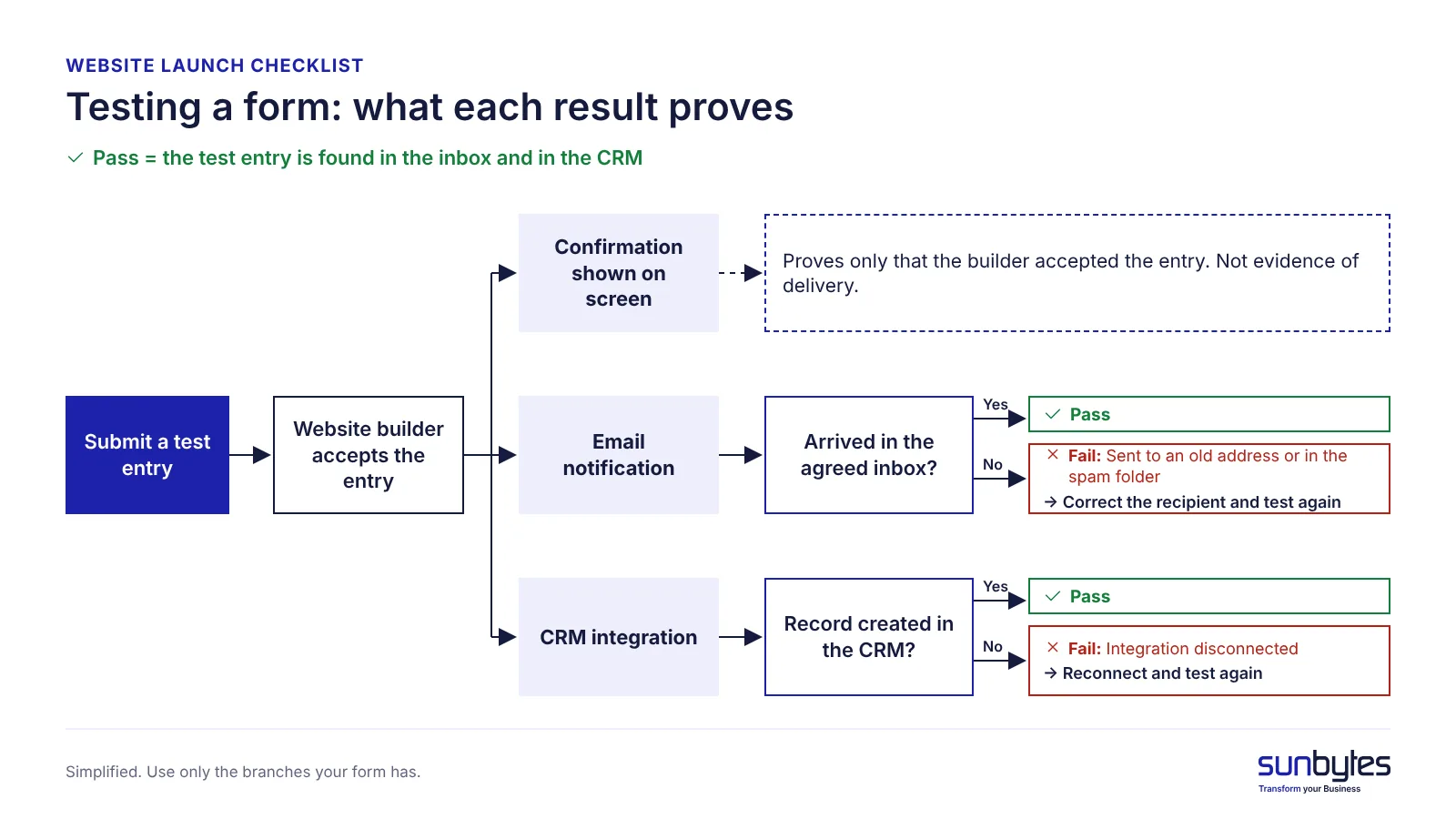
The touch-target value comes from WCAG 2.2 success criterion 2.5.8 (level AA). It sets 24 by 24 CSS pixels as the minimum size for pointer targets, with listed exceptions. Page speed belongs here only as a final check on the slowest page. What slows AI-built sites and what to fix first is covered in website performance for AI-built sites.
6. Ownership and access
Ownership decides whether you can fix your own website during an incident. If the domain, builder workspace or analytics sit in a freelancer’s personal account, you depend on someone outside the company. That applies to changing a DNS record, restoring a page or removing a leaver.
| Check | What ‘done’ looks like |
|---|---|
| Domain and DNS | The domain is registered to the company, and DNS access sits in a company account |
| Builder or hosting workspace | Owned by a company account with at least two admins |
| Analytics and Search Console | Google Analytics, Search Console and the tag manager are owned by a company account |
| Backup and version history | An export or version history is confirmed on the builder, and someone knows how to restore it |
| Written handover | One document lists where everything lives, who has access and how to remove a leaver |
A site passes this stage when the company could replace the person who built it without losing access to anything.
After launch: website audit checklist for the first 30 days
A website audit checklist for the first 30 days confirms that the live site behaves the way the 30 pre-launch checks assumed. Run it at three points, day 1, day 7 and day 30, because indexing, form volume and content edits take time to show problems.
| When | Check | Where to look |
|---|---|---|
| Day 1 | Home page and key pages can be indexed, with no noindex left | Google Search Console, URL Inspection |
| Day 1 | Redirected old URLs return 301, not 302 or 404 | A redirect checker or the browser’s developer tools |
| Day 1 | Analytics and marketing tags do not fire before consent | A clean browser window with developer tools open |
| Day 7 | No new errors in page indexing | Google Search Console, Page indexing report |
| Day 7 | Every form entry matches a CRM record, one to one | Form log against CRM records |
| Day 7 | Structured data shows no errors | Google Search Console, enhancement reports |
| Day 30 | No broken links after content edits | A link checker |
| Day 30 | Chatbot answers contain no wrong promises | A sample of chatbot transcripts |
| Day 30 | Admin users are current and leavers are removed | Builder or CMS user list |
The site is stable when three signals hold at day 30. There are no new indexing errors, form entries match the CRM one to one, and the consent test still passes. Speed monitoring after launch is a separate routine with its own metrics.
Does the European Accessibility Act apply to your website?
The European Accessibility Act applies to a private company’s website when the site delivers a service the Act covers, such as e-commerce to consumers. The Act has applied since 28 June 2025. Some existing services have a transition period up to 28 June 2030. Public-sector sites fall under the Web Accessibility Directive instead. Both use WCAG 2.1 level AA as the reference standard.
If your site sells to consumers online, check whether it is in scope before launch, not after a complaint. If it only presents your company and collects enquiries, the e-commerce obligations are less likely to apply, but confirm that rather than assume an exemption. Scope, dates and conformance are explained in our WCAG accessibility guide.
When a self-check is enough and when to get a review
A self-check is enough for a simple brochure site, whereas an independent review is worth arranging when the site handles data, money or customer promises. The person who built the site tests the routes they expect to work. A second pair of eyes finds the gaps a builder is least likely to look for.
| Situation | Self-check enough? | Why |
|---|---|---|
| Brochure site, one contact form to one inbox, consented analytics only | Yes | Few data flows and no custom code to inspect |
| Personal data collected beyond a contact form | Review | Privacy statement, consent and data flows must match |
| Connected to a CRM, booking system or payment flow | Review | Integrations can fail or leak data without visible errors |
| Custom code or an exported React/Next.js build | Review | Code can expose keys or admin routes that a builder would hide |
| An AI chatbot answers customers | Review | Answers become promises your company has to keep |
| The site may fall under the European Accessibility Act | Review | Scope and conformance need checking before launch |
| The person who built the site is leaving | Review | Ownership and access must transfer before the knowledge does |
If two or more of these situations apply, have someone other than the builder check the site before launch. If none applies, the 30-check list and the 30-day audit are a proportionate level of control.
How Sunbytes reviews AI-built websites before launch
Completing a website launch checklist helps you catch visible issues, but some technical risks need a closer look. A form may work during testing while its integration fails under certain conditions, or custom code may expose sensitive information without an obvious warning. These are the kinds of issues a technical review can help uncover.
Sunbytes’ AI-Built Product Review examines the agreed technical scope across security and data, code and architecture, critical workflows, deployment and maintainability. Software engineers and security specialists review the product together, connecting technical findings with their potential impact on users and business operations.
You receive evidence-backed findings, a prioritised action plan showing what needs attention before launch and what can wait, and guidance your development team can act on. The review stands on its own: your team can address the findings, or Sunbytes can scope the necessary fixes separately.
Sunbytes brings 15+ years of software delivery experience across 300+ projects, with Netherlands-led delivery and an ISO 27001-certified information security management system.
Not sure whether your AI-built website is technically ready for launch? Talk to Sunbytes about the risks worth reviewing before real users depend on it.