
WCAG compliance for EU websites has moved into website planning. Public sector teams already have accessibility duties, and private companies in scope of the European Accessibility Act now need to treat accessibility as part of the build model.
This guide explains what WCAG compliance EU websites need in the Dutch and EU context: which law applies, what WCAG 2.1 AA requires, where the EAA fits, and what CTOs should check before a rebuild, redesign, or new development sprint.
The practical point is simple: accessibility is easier to build into the website architecture than to patch after launch. If your checkout, contact forms, account flows, consent banner, or navigation are not accessible, the issue affects user experience, QA, compliance, and delivery planning. For CTOs, WCAG should sit next to the website development timeline and website development cost discussion before a rebuild starts.
TL;DR
WCAG compliance for EU websites means your site must be usable by people with accessibility needs. Public sector websites follow the EU Web Accessibility Directive. Many private sector websites, especially e-commerce services, may fall under the EAA, which has been in force since 28 June 2025.
- WCAG 2.1 AA is the practical standard when you audit website accessibility.
- Public sector sites need accessibility statements to show compliance status and known gaps.
- In-scope private services must treat accessibility as a live compliance requirement after 28 June 2025.
- Existing services may have a transition time until 28 June 2030, depending on scope.
- Common website fixes include alt text, colour contrast, keyboard navigation, form labels, and screen reader support.
Two frameworks, one standard: WCAG compliance EU websites need to understand
Dutch companies often hear “WCAG compliance” and assume it means one rule. In practice, two EU frameworks matter.
The EU Web Accessibility Directive applies to public sector bodies. In the Netherlands, this includes government websites, public service portals, municipalities, public education bodies, and similar organisations. These organisations need accessible websites and apps, and they must publish accessibility statements.
The European Accessibility Act, or EAA, applies to covered private sector products and services. For Dutch SMEs, the most relevant website category is usually e-commerce. If a company sells products or services online to consumers and is not exempt, accessibility becomes part of compliance planning.
Both frameworks point website teams toward the same build direction: WCAG 2.1 AA through EN 301 549. The difference is scope, enforcement, documentation, and transition timing. For formal EU compliance, check the version referenced by the applicable standard or national guidance. EN 301 549 still draws heavily from WCAG 2.1, while WCAG 2.2 is the newer W3C recommendation and a useful forward-looking target for new builds.
That distinction matters before development starts. A Dutch SME does not need a generic accessibility project. It needs to know whether the website is in EAA scope, which user flows create the highest risk, and which accessibility gaps should be fixed before design and frontend decisions are locked. This is also why accessibility should sit inside a broader website development guide: it affects scope, UX, frontend components, QA, content governance, and post-launch ownership.
Directive vs EAA: side-by-side comparison
The fastest way to plan WCAG compliance is to separate public sector duties from private sector duties.
| Area | EU Web Accessibility Directive | European Accessibility Act |
|---|---|---|
| Who it applies to | Public sector bodies, including government websites, public portals, and public service apps | Private sector companies offering covered products or services, including e-commerce and electronic communications |
| Main website standard | WCAG 2.1 AA through EN 301 549 | Accessibility requirements for covered services, with WCAG 2.1 AA often used as the practical website benchmark |
| Covered digital content | Websites, mobile apps, online documents, intranets, extranets, and cloud applications used by public bodies | E-commerce websites, digital service flows, electronic communications, banking/payment services, transport services, e-books, and other covered services |
| In force | Dutch public sector website rules have applied in phases, with all public sector websites in scope since September 2020 | New in-scope services must comply from 28 June 2025 |
| Transition nuance | Public sector rules already apply | Some existing service facilities that were lawfully in use before 28 June 2025 may receive a further five-year transition, until 28 June 2030 |
| Dutch enforcement context | DigiToegankelijk.nl supports accessibility statements and monitoring for government accessibility | ACM has published guidance and enforcement information for e-commerce and electronic communications services |
| Accessibility statement | Required for Dutch public sector websites and apps | EAA documentation duties differ from the public sector statement model |
For Dutch SMEs, the main planning question is not “Do we need accessibility?” The better question is: “Which user flows are legally and commercially important enough to fix first?” Checkout, account creation, contact forms, consent banners, product filters, payment steps, and customer support pages usually belong at the top of the review.
What WCAG 2.1 AA actually requires: the 4 principles
WCAG 2.1 is organised around four principles: perceivable, operable, understandable, and robust. This is often called the POUR model.
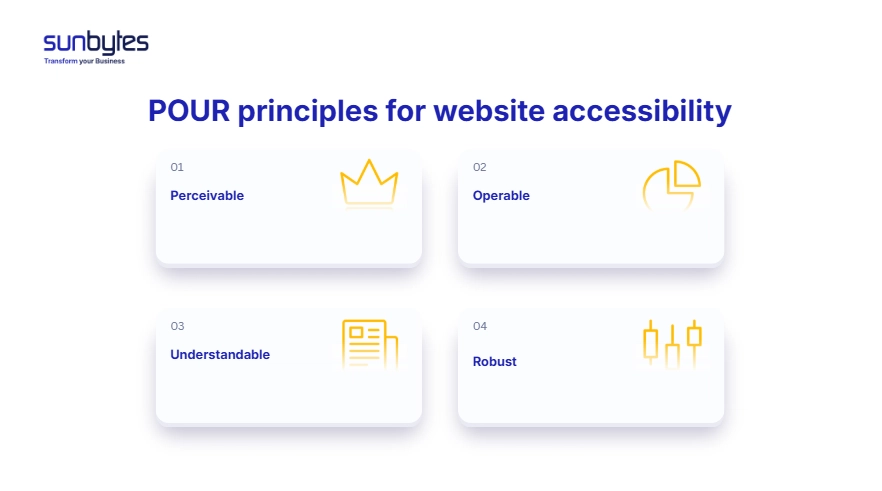
For a CTO, the value of the model is practical. It turns accessibility from a vague design request into testable website behaviour.
| WCAG principle | What it means for websites | Common website fail |
|---|---|---|
| Perceivable | Users can access content through sight, sound, screen readers, captions, text alternatives, and sufficient contrast | Images without alt text, low-contrast CTA buttons, video without captions |
| Operable | Users can navigate and complete tasks without relying on a mouse | Dropdown menus that do not work with a keyboard, missing focus states, no skip-to-content link |
| Understandable | Users can understand navigation, forms, errors, and page language | Placeholder-only form labels, vague error messages, missing page language attribute |
| Robust | Assistive technologies can read and interpret the website reliably | Invalid HTML, duplicate IDs, custom components without accessible names or states |
A simple example: a checkout form may look fine to a sighted mouse user, but still fail accessibility. If the payment field has no programmatic label, the error message only says “Invalid,” and the submit button cannot be reached by keyboard, the flow blocks some users from buying.
That is why WCAG compliance belongs in the development workflow. Designers need contrast and focus states. Frontend developers need semantic HTML and ARIA only where needed. QA needs keyboard and screen reader checks. Product owners need acceptance criteria that include accessibility before the sprint is marked done.
How CTOs can test WCAG readiness before a rebuild
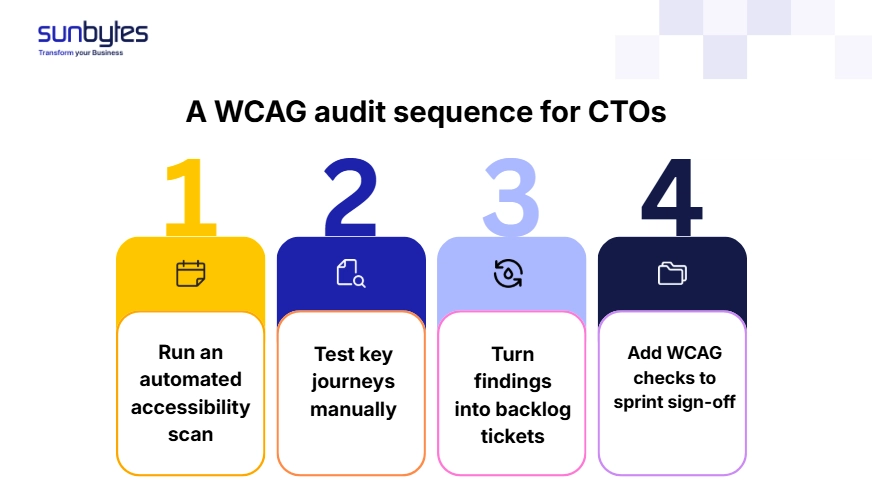
Start with an automated scan to catch missing labels, contrast issues, heading errors, and ARIA mistakes. Then run manual keyboard testing on checkout, account creation, contact forms, consent settings, and support flows. Use a screen reader sample test for the highest-value journeys, convert findings into backlog tickets, and add WCAG acceptance criteria before sprint work is marked done.
Dutch public sector: DigiToegankelijk and accessibility statements
Dutch public sector organisations have a specific accessibility process. Government websites and apps must be accessible and must publish an accessibility statement. DigiToegankelijk.nl provides guidance, status models, and statement support for public sector bodies.
For public sector websites, WCAG work is not only a code review. The organisation must show what has been checked, which status applies, which problems remain, and how those problems will be improved. A valid accessibility investigation is part of the evidence.
This section matters for SMEs too, even if they are not public sector bodies. Public sector expectations often shape procurement. If your company sells to government, education, healthcare, or regulated buyers, an accessibility baseline can become part of supplier review.
Need to check accessibility before the rebuild starts?
Sunbytes can review your WCAG gaps, keyboard navigation, colour contrast, form labels, and accessibility statement requirements before development continues.
Review your website accessibility plan with Sunbytes →
Who is exempt from the EAA and the EU Web Accessibility Directive?
The EU Web Accessibility Directive is a public sector framework. It does not work like the EAA exemption model for micro-enterprises. If a Dutch public sector body is in scope, its websites and apps are expected to follow the required accessibility process.
The EAA is different. It applies to covered private sector products and services, with exemptions for micro-enterprises that provide services. In practice, Dutch SMEs should check three things before assuming they are exempt:
- Does the website provide a covered service, such as e-commerce or electronic communications?
- Does the business meet the micro-enterprise threshold?
- Is the website new, being rebuilt, or an existing service with a transition rule?
Micro-enterprise exemption does not make accessibility irrelevant. It only changes the legal starting point. A small company can still lose users when menus cannot be used by keyboard, forms are unclear, or product pages depend on images without useful text.
Accessibility and SEO: why WCAG work supports better website development
Accessibility and SEO share the same foundation: clear structure, usable content, and predictable navigation. Accessible websites are better built because they use clearer structure, stronger content semantics, and fewer interaction traps. Those same choices often help search engines and users understand the page.
Alt text is a good example. Screen readers use it to communicate image meaning. Search systems can also use it to understand images. Descriptive link text is another example. “Click here” is weak for screen reader navigation and weak for search context. “Review the GDPR compliance checklist” tells both users and crawlers what the linked page is about.
The overlap is practical:
| WCAG practice | Website development benefit | SEO or content benefit |
|---|---|---|
| Alt text for meaningful images | Non-visual users understand image content | Search systems get more context for image content |
| Correct heading hierarchy | Pages are easier to scan and maintain | Content structure is clearer |
| Descriptive link text | Screen reader users can navigate links with context | Internal links send clearer relevance signals |
| Language declaration | Assistive technology can use the right pronunciation rules | Regional and language context is clearer |
| Responsive reflow | Users can read content on small screens without horizontal scrolling | Mobile usability improves |
The measurable next step: add WCAG acceptance criteria to sprint one before components are approved. For a rebuild, test at least five high-risk flows before launch: navigation, search or filtering, contact forms, checkout or conversion forms, and consent settings. If two or more reusable components fail, fix the component library before reviewing individual pages.
How Sunbytes builds WCAG-compliant websites
Accessibility work fails when it is reviewed after components, forms, and CMS workflows are already approved. Sunbytes helps Dutch and European teams treat WCAG as part of the website build plan through Digital Transformation Solutions: content structure, component behaviour, keyboard access, colour contrast, form flows, and QA acceptance criteria are reviewed before sprint decisions become expensive to change.
Accelerate Workforce Solutions supports the people layer when senior frontend, QA, or CMS capacity is needed for delivery. Cybersecurity Solutions adds the control layer when accessibility overlaps with GDPR, consent flows, audit evidence, or secure user journeys.
With 15+ years of experience, 300+ projects delivered, senior teams operational in 2–4 weeks, ISO-guided delivery, and DORA-tracked outcomes where relevant, Sunbytes helps teams move from accessibility uncertainty to a build plan they can ship and maintain.
Ready to check your website before the next rebuild or sprint? Contact us now to review your WCAG-compliant website development plan.