

Building an AI-built app and releasing it are two different jobs. AI tools shorten the first job. The second still needs a goal, an owner, a tested way back and someone watching the first hours. This AI deployment checklist covers that second job, for founders and COOs releasing a product built with AI tools.
The checklist has 25 checks in five stages: goals and go/no-go, environments and access, testing on staging, rollout and monitoring, and rollback and recovery. It assumes the product already passed a readiness check. Use it with whoever builds your product, a few weeks before launch day. For the full route from prototype to paying users, start with our founder’s guide to ai-generated code in production.
TL;DR
An AI deployment checklist is the list of checks a team runs before, during and after releasing an AI-built app. It makes sure the release has a goal and an owner, is tested on staging, reaches users in stages, is watched from the first hour and can be reversed within minutes.
- Goals, owner and go/no-go: one measurable release goal, a named release owner, written go/no-go criteria and a stop rule, such as an error rate above 2% for 10 minutes.
- Environments, keys and access: production has its own environment, database and keys, no API key sits in the frontend build, and every AI provider key has a usage limit and a spend alert.
- Testing on staging: user acceptance testing is signed off, critical flows are re-tested after the last change, and the AI feature is tested with normal, empty and hostile input.
- Rollout and monitoring: the first release goes to a pilot group, alerts reach a named person’s phone, and the app is watched closely for 72 hours and daily for 14 days.
- Rollback and recovery: the previous version can be restored in under 15 minutes, tested once before launch, with the AI model version pinned and a kill switch for AI features.
What an AI deployment checklist covers
An AI deployment checklist covers the release of an application: the step from a version that works for the builder to a version real users rely on. For an AI-built app, the checklist in this article has 25 checks in five stages, from the release goal to the rollback.
Two terms are often mixed up. Deployment puts a new version of the app on the production servers. Release makes that version available to users. With a feature flag, a switch that turns a feature on or off without a new deployment, a team can deploy on Tuesday and release to users on Thursday. The AI deployment checklist covers both steps.
The AI deployment checklist starts where the production readiness checklist ends. The readiness checklist asks whether the product is ready: access rules, personal data, error handling and ownership. The deployment checklist asks how to release a ready product without losing control on the way out.
One boundary applies. Deploying a machine learning model your team trained, with training data pipelines, model quantisation, Kubernetes clusters and drift or bias testing, needs a separate MLOps checklist. The checklist here is for products built with AI tools that call an AI model through a provider’s API, which is how most founder-led AI products reach users.
The AI deployment checklist: 25 checks in five stages
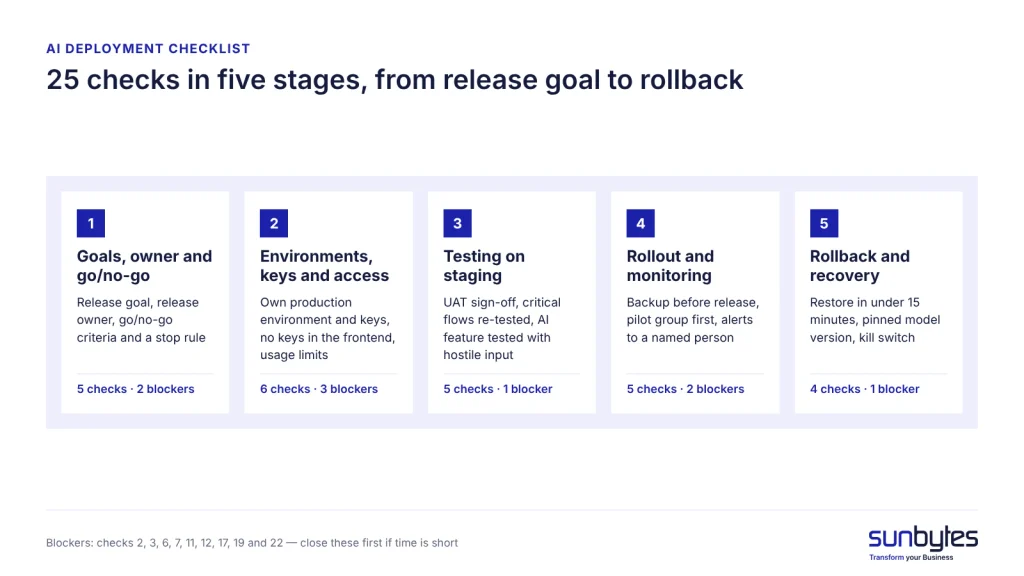
The AI deployment checklist below has 25 checks in five stages. Checks marked B are launch blockers: a “no” on a B check means the release waits until it is fixed. Each check names who answers it, so a founder can run the list with the builder in one meeting.
Stage 1: goals, owner and go/no-go
Stage 1 turns “we launch next week” into a decision with written criteria. Without criteria, a release goes out because the date was announced, not because the app is ready for it. Five checks, two of them launch blockers.
| # | Check | Who | Blocker |
|---|---|---|---|
| 1 | One measurable release goal is written down, for example 50 pilot users complete signup with an error rate below 1% | Founder | — |
| 2 | A named release owner and a go/no-go time are set | Founder | B |
| 3 | Go/no-go criteria are written: all B checks answered yes, UAT signed off, rollback tested | Founder + builder | B |
| 4 | A stop rule is written, for example an error rate above 2% for 10 minutes, one failed payment or AI spend above twice the expected day | Founder + builder | — |
| 5 | No new features go in during the last working days before the release, for example the last 3 | Founder | — |
Stage 2: environments, keys and access
Stage 2 makes sure the release lands in a production environment that is separate, locked down and protected against runaway AI costs. The OWASP Top 10 for LLM Applications 2025 lists unbounded consumption (LLM10) as a risk: uncontrolled requests to a model can drain the budget or block the service for real users. Rate limits and usage limits in checks 10 and 11 answer that risk.
| # | Check | Who | Blocker |
|---|---|---|---|
| 6 | Production has its own environment, database and API keys; development and staging cannot reach production data | Builder | B |
| 7 | No API key sits in the frontend build or the code repository, and any key that was ever exposed has been replaced | Builder | B |
| 8 | Every page and API endpoint uses HTTPS, and the hosting provider encrypts stored data | Builder | — |
| 9 | Production access is limited to named people with multi-factor authentication, and a list shows who can deploy | Founder + builder | — |
| 10 | Rate limits per user and IP address protect login, signup and every endpoint that calls an AI model | Builder | — |
| 11 | Every AI provider key has a monthly usage limit and a spend alert | Founder + builder | B |
How API keys leak from code and how to replace them is covered in leaked api keys.
Stage 3: testing on staging
Stage 3 tests the release on staging, a copy of production that runs on test keys and test data. AI features need two tests beyond the normal user flows: how the feature answers unusual input, and what users see when the model provider is slow or down.
| # | Check | Who | Blocker |
|---|---|---|---|
| 12 | User acceptance testing (UAT) is signed off on staging | Founder | B |
| 13 | Signup, login, payment and data export are re-tested after the last code change | Builder | — |
| 14 | The AI feature is tested with normal, empty, very long and hostile input, and its answers are compared with agreed example answers | Founder + builder | — |
| 15 | When the model provider is slow or down, users see a clear message after a set timeout instead of an endless loading screen | Builder | — |
| 16 | Expected peak load was tested once, for example twice the pilot group using the app at the same time | Builder | — |
Stage 4: rollout and monitoring
Stage 4 limits who sees the release first and makes problems visible within minutes. Teams that release automatically through a CI/CD pipeline still set these rules themselves: the pipeline carries out the release, it does not decide who gets it first.
| # | Check | Who | Blocker |
|---|---|---|---|
| 17 | The database is backed up right before the release, and database changes can be reversed or still work with the previous version | Builder | B |
| 18 | The first release goes to a pilot group, not to all users | Founder + builder | — |
| 19 | Uptime and error alerts reach a named person’s phone, not a shared inbox | Builder | B |
| 20 | AI usage and cost are checked daily for the first 14 days, with an alert at twice the expected daily spend | Founder + builder | — |
| 21 | Users have one place to report problems, and reports reach the on-call person | Founder | — |
Stage 5: rollback and recovery
Stage 5 is the way back, and AI-built apps need one extra item in it: the AI model version. Model providers retire versions on published dates, and OpenAI’s API deprecations page lists shutdown dates for older models. An app that calls “the latest model” can change behaviour without any release on your side.
| # | Check | Who | Blocker |
|---|---|---|---|
| 22 | The previous version can be restored in under 15 minutes, and the restore was tested once before launch | Builder | B |
| 23 | Each release records the AI model version and prompts it uses, and the model version is pinned, not set to “latest” | Builder | — |
| 24 | AI features have a kill switch or feature flag that turns them off without a new deployment | Builder | — |
| 25 | An incident contact list names who decides on a rollback, who replaces exposed keys and who decides on a GDPR Article 33 notification within 72 hours | Founder | — |
If time before launch is short, close the nine B checks first: 2, 3, 6, 7, 11, 12, 17, 19 and 22. The other 16 checks reduce the cost of a bad release; the nine blockers decide whether a bad release is recoverable at all.
More than two blockers still open?
That is common for a product built quickly with AI tools. An AI-built product review checks deployment and operations together with security and data: environments and access, alerts, rollback and the AI features themselves. Findings come in plain English, launch blockers first.
Big bang, staged, canary or shadow: which release strategy fits
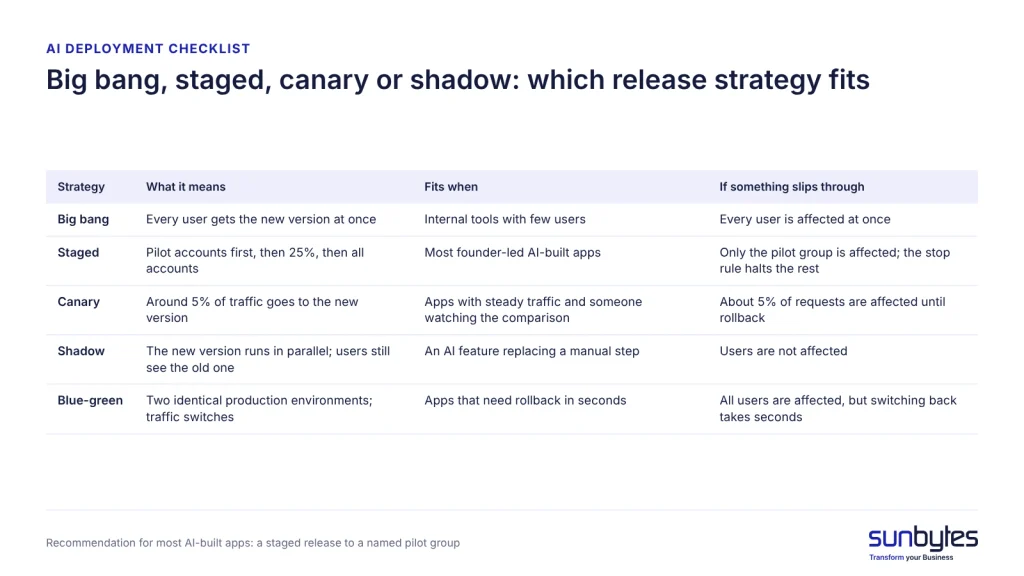
For most AI-built apps with fewer than a few thousand active users, a staged release to a named pilot group is the safest release strategy. A staged release limits how many users see a faulty version, without the traffic-splitting set-up that a canary release needs.
| Strategy | What it means | What it needs | Fits when | If something slips through |
|---|---|---|---|---|
| Big bang | Every user gets the new version at once | Nothing extra | Internal tools with few users | Every user is affected at once |
| Staged | Pilot accounts first, then 25%, then all accounts | Feature flags or account-level switches | Most founder-led AI-built apps | Only the pilot group is affected; the stop rule halts the rest |
| Canary | Around 5% of traffic goes to the new version and is compared with the current one | Hosting that splits traffic by percentage, plus automated metrics | Apps with steady traffic and someone watching the comparison | About 5% of requests are affected until rollback |
| Shadow | The new version runs in parallel on real input; users still see the old one | Duplicate processing and extra model cost | An AI feature replacing a manual step | Users are not affected |
| Blue-green | Two identical production environments; traffic switches between them | Double hosting during the release | Apps that need rollback in seconds | All users are affected, but switching back takes seconds |
We’d recommend a canary release only when your hosting platform splits traffic for you and someone checks the comparison during the release window. Shadow mode earns its extra model cost when an AI feature replaces a manual process and you need evidence that its answers are good enough before customers see them.
Every release strategy depends on Stage 5. A staged or canary release only limits damage when the team can stop the rollout and restore the previous version within minutes.
UAT checklist: what to test on staging before go-live
A UAT checklist lists what the people who will use an app confirm on staging before go-live. User acceptance testing (UAT) is the last test before a release. A pilot customer or a colleague from operations runs their own tasks on a staging copy and signs off that the app does the job. For an AI-built app, eight checks cover most of what matters:
- Signup, login and password reset work for a new account.
- The three most important user tasks complete from start to finish.
- Payment and refund work in the payment provider’s test mode.
- The AI feature gives a usable answer to normal input, to empty input and to one hostile input that tries to override its instructions (a prompt-injection attempt).
- Emails and notifications arrive with the right sender, and their links point to production, not to staging.
- Two test accounts with different roles cannot see each other’s data.
- The main screens work in a mobile browser.
- A named business user signs off, with the date.
Staging runs on test keys and test data. Copying real customer records into staging puts personal data in an environment with weaker controls, which works against data protection by design and by default under GDPR Article 25. Plan the UAT round before the release date is fixed, so a failed check moves the date instead of being skipped.
Who does what on release day
Release day needs five named roles, even in a team of three. One person can hold several roles, but each role needs a name before the go/no-go time.
| Role | Who in a small team | Owns on release day |
|---|---|---|
| Go/no-go decision | Founder or COO | Approves the release at the agreed time against the written criteria, or stops it |
| Deploy and rollback | Builder or developer | Runs the release and, when the stop rule triggers, the rollback |
| On-call | A named person, often the builder | Watches alerts for the first 72 hours and answers them |
| Users and support | Founder or customer success lead | Tells pilot users what changed and routes problem reports |
| Account owner | Whoever administers hosting and AI provider accounts | Changes usage limits, replaces keys, checks usage and billing |
Support escalation follows one path. A user report reaches the support role first. The support role passes anything that looks like a fault to the on-call person within the hour. The on-call person then decides on a rollback together with the release owner.
The go/no-go criteria cover release day. Whether the product itself is ready is a separate question, answered with evidence by a production readiness review before the release date is set.
What to monitor in the first 14 days after go-live
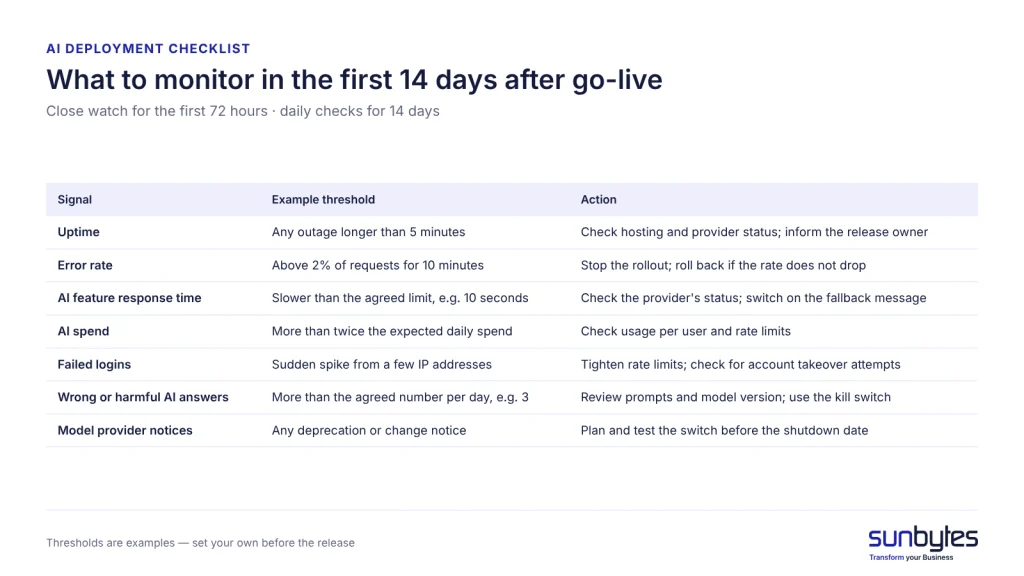
Watch an AI-built app closely for the first 72 hours after go-live and check it daily for 14 days, against thresholds the team agreed before the release. Thresholds turn monitoring into a decision: below the line, carry on; above it, act.
| Signal | Example threshold | Action |
|---|---|---|
| Uptime | Any outage longer than 5 minutes | On-call checks hosting and provider status; release owner is informed |
| Error rate | Above 2% of requests for 10 minutes | Stop the rollout; roll back if the rate does not drop |
| AI feature response time | Typical answer slower than the agreed limit, for example 10 seconds | Check the model provider’s status; switch on the fallback message |
| AI spend | More than twice the expected daily spend | Check usage per user and rate limits; lower the limit if the feature is abused |
| Failed logins | Sudden spike from a few IP addresses | Tighten rate limits; check for account takeover attempts |
| Wrong or harmful AI answers reported | More than the agreed number per day, for example 3 | Review prompts and model version; use the kill switch if needed |
| Model provider notices | Any deprecation or change notice for your model | Plan and test the switch before the shutdown date |
The thresholds in Table 8 are examples. Set your own numbers before the release, based on what the pilot group will tolerate, and write them next to the stop rule from check 4.
From the first release, record two delivery metrics defined by DORA. Change fail rate is “the ratio of deployments that require immediate intervention following a deployment”. Failed deployment recovery time is “the time it takes to recover from a deployment that fails and requires immediate intervention”. Two numbers per release show whether releases get safer over the first months.
When to roll back instead of fixing forward
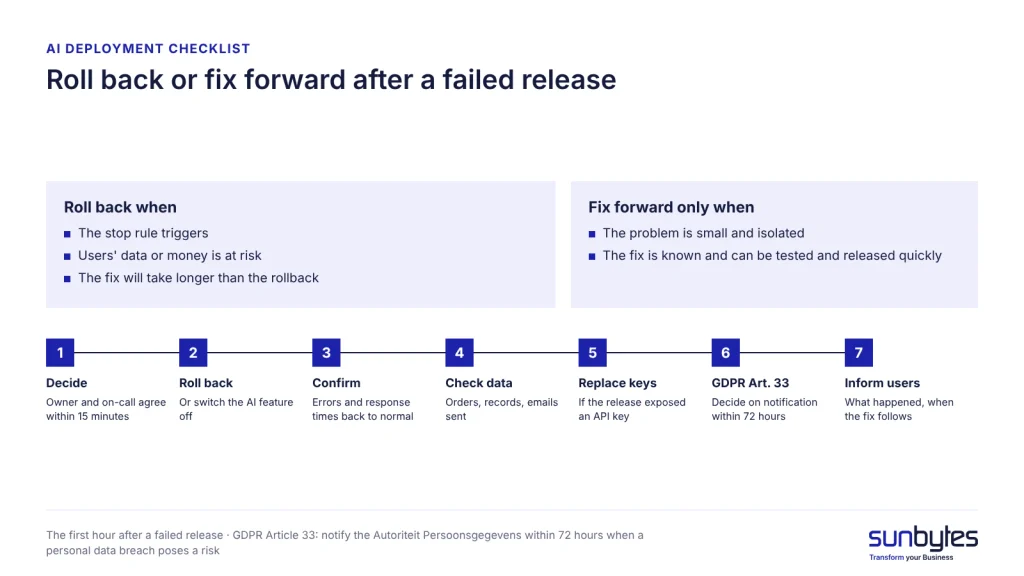
Roll back when the stop rule triggers, when users’ data or money is at risk, or when the fix will take longer than the rollback. Fix forward, meaning ship a correction instead of returning to the previous version, only for a small and isolated problem with a known fix that can be tested and released quickly.
A tested rollback of under 15 minutes (check 22) makes the choice easier, because rolling back then costs little. The first hour after a failed release follows a fixed order:
- Decide: the release owner and the on-call person agree within 15 minutes of the alert whether to roll back.
- Roll back, or switch the AI feature off with its kill switch if only that feature fails.
- Confirm that the error rate and response times return to normal.
- Check the data the faulty version wrote: duplicated orders, broken records, emails already sent.
- If the release exposed an API key, replace the key at the provider. A rollback restores code; it does not revoke a key (see leaked api keys).
- If personal data could have been accessed, decide on notification. GDPR Article 33 requires notifying the Autoriteit Persoonsgegevens within 72 hours of becoming aware of a personal data breach, unless the breach is unlikely to result in a risk to people.
- Tell pilot users what happened and when the fix follows.
Afterwards, record the incident in the release notes and count it in the change fail rate, so the next release starts from what went wrong.
How Sunbytes checks your release before launch
The release checks that fail most often are the ones a builder finds hardest to judge in their own work: a rollback that exists but was never run, alerts that go to an inbox nobody reads at night, an AI model set to “latest”. None of these gaps shows up in a demo. All of them show up in the first week of real use.
Sunbytes looks for those gaps in its AI-built product review, part of Digital Transformation Solutions. The review covers deployment and operations together with security and data, code and architecture, reliability and maintainability, so a rollback gap is assessed alongside the code the rollback has to restore. The reviewers are independent of whoever fixes the findings, and every finding is explained in plain English and ranked, launch blockers first. That ranking maps onto the B checks in this list: your team sees what has to be closed before the go/no-go time and what can follow after the release.
Two other parts of Sunbytes join only when the findings call for them. When a finding concerns access to production, key handling or the evidence behind a GDPR Article 33 decision, Cybersecurity Solutions puts the controls in place. When the fixes need more hands than your builder has before launch, a dedicated software development team adds senior engineers, typically operational within 2–4 weeks.
Access to your code and environments during the review falls under Sunbytes’ ISO/IEC 27001-certified information security management system, with the engagement led from the Netherlands. For an app that holds personal data of EU customers, that keeps the review itself inside the controls the release checklist asks for.
If your launch date is close, book an AI-built product review before you set the go/no-go time, so the blockers in this checklist are answered with evidence instead of assumptions.