
An AI-built mobile app review checks your app before you submit it to the App Store and Google Play: the code, the backend rules and the way the app handles user data. Run it before the first submission, or before a release that adds payments or personal data.
This guide gives who built their app with AI coding tools six checks to run before submission, three steps to prepare the store forms, and the conditions for booking an independent review. Apple and Google will still review the app for policy and stability; these checks cover what their review is not designed to inspect, such as database rules, keys inside the app package and access to other users’ data. Most checks end with a question for your developer.
TL;DR
Before you submit an AI-built app, check what store review is not designed to test: keys inside the app package, database rules, access to other users’ data and whether privacy labels match the code. Apple and Google review policy, store listings and basic stability, so those four checks stay with you and your developer.
- Six checks before you submit: secrets inside the app, backend rules that trust the app, cross-user data access, privacy labels versus the code, store policy gaps and crashes on real devices.
- Submission preparation: test the release build on real devices, fill in the App Privacy and Data safety forms from the code, and give reviewers a working demo account.
- Three different checks: store review checks policy, an AI-built mobile app review checks how the product is built, and a mobile security test attacks the running app.
- When to book: before the first submission if the app stores personal data, takes payments, or nobody on the team can read the backend rules.
What is an AI-built mobile app review?
An AI-built mobile app review is an independent check of a mobile app built mostly with AI coding tools. It covers the code, the backend configuration and the handling of personal data before public release. The client is the app on the phone; the backend is the server, database and services it talks to.
AI coding tools produce working screens quickly. To get a feature working, a tool may keep permissive defaults: open database rules, keys in configuration files or an extra analytics package. Those settings stay until someone changes them, while the app looks finished on screen.
A practical reference list is the OWASP Mobile Top 10. Its 2024 edition names risks such as improper credential usage (M1), insecure authentication and authorisation (M3) and inadequate privacy controls (M6). The review is one step in shipping AI-built products safely.
6 checks before you submit an AI-built app

The six checks below are grouped by what goes wrong, not by tool or platform. Checks 1 to 4 sit in the code and backend, which store review is not designed to inspect. Checks 5 and 6 cover what App Store and Google Play reviewers do see: store policy and stability.
1. Secrets shipped inside the app
Anything inside the app package can be extracted. API keys for paid services, admin tokens or payment secrets in the app code are readable by anyone who downloads the app. The fix is to keep those secrets on the backend and let the app reach the service through your own server.
Not every key is a secret. Firebase states that its API keys are OK to include in code, because access is controlled by Security Rules and App Check rather than by hiding the key. A secret key for a payment provider, an AI model API or an admin account is different: whoever copies it can run up costs or reach your data.
Ask your developer: “Which keys in our app package would cost us money or data if someone copied them?”
2. Backend rules that trust the app
Your mobile app is not the only client of your backend. Anyone with the project details can call Firebase or Supabase directly, so the database rules, not the app screens, decide who reads and writes data. Rules left over from the prototype that allow open access, or that check only whether a user is signed in, fail this check.
Firebase warns that open rules let anyone who finds the project read, change or delete data. In Supabase, the equivalent control is Row Level Security: a table in an exposed schema without RLS is readable and writable by any role with a grant on it. The warning sign on both platforms is a rule that checks login but not ownership. Our guide to Firebase security rules covers the setup.
Ask your developer: “If someone skips our app and calls the database directly, what can they read or change?”
3. Users who can see other users’ data
Cross-user data exposure happens when changing an ID in a request returns another user’s profile, order or chat. Security teams call this IDOR or broken object level authorisation. The app may hide that data on screen, but if the server does not check ownership, the API still returns it.
OWASP describes the attack as “manipulating the ID of an object that is sent within the request“. To test it, create two test accounts and ask your developer to request the second account’s data while signed in as the first.
If the second account’s orders open, stop the submission and fix the server check first. Our article on access control in AI-built apps shows how to find these gaps.
Ask your developer: “Did we request another account’s data in a test, and did the server refuse it?”
4. Privacy labels that do not match the code
Apple’s App Privacy details and Google Play’s Data safety form are declarations you make as the developer. If the code sends data to an analytics service or an AI API that the form does not list, the label is wrong. For an app with EU users, that is both a store-policy problem and a GDPR problem.
Google Play states that developers alone are responsible for complete and accurate declarations, including data collected through third-party libraries and SDKs.
Apple requires a privacy manifest for commonly used third-party SDKs in new apps and in updates that add one, a rule enforced since 1 May 2024. Guideline 5.1.2(i) also requires apps to disclose personal data shared with third parties, including third-party AI, and to ask permission first.
An AI coding tool may add an analytics, crash-reporting or AI SDK while building a feature. Under GDPR Article 13, a controller that collects personal data from users must tell them, among other things, the recipients or categories of recipients of that data. Labels that miss an SDK fail both the store declaration and that duty. Our guide to GDPR for mobile apps covers the EU obligations in more depth.
Ask your developer: “Which SDKs and APIs receive user data, and does each one appear in our privacy labels?”
5. Store policy gaps that block approval
Three store rules are worth checking first when an app has sign-up, paid features or little content of its own. If users can create an account, Apple’s Guideline 5.1.1(v) requires account deletion inside the app, and Google Play also requires a web link where users can request deletion. Features or digital content unlocked in the app must use in-app purchase under Guideline 3.1.1.
Guideline 4.2 asks for “features, content, and UI that elevate it beyond a repackaged website”. Check the current App Review Guidelines before you submit, because Apple updates them; the references here were checked on 10 November 2026. Other causes of rejection are covered in our article on App Store rejection.
Ask your developer: “Can a user delete their account inside the app, and is every paid feature sold through in-app purchase?”
6. Crashes and slow screens on real devices
Simulators hide what real devices show: crashes on older OS versions, slow first screens on mid-range Android phones and broken flows when the network drops. Both stores also keep measuring stability after release.
Google Play’s Android vitals (checked November 2026) set bad-behaviour thresholds over the last 28 days of data: a user-perceived crash rate of 1.09% and a user-perceived ANR (app not responding) rate of 0.47%. An app above either threshold may become less visible on Google Play. Before launch, read the TestFlight crash reports and the Play Console pre-launch report for the release build.
Ask your developer: “Which real devices and OS versions did we test the release build on?”
Checks 1 to 4 do not show up in App Store or Google Play review. An AI-built product review looks at your code, database rules, exposed secrets and cross-user access before real users do, and explains every finding in plain English.
How to prepare your App Store and Google Play submission
Store review is the last gate before launch, not the first check. Three steps reduce back-and-forth with reviewers, whether you follow an iOS App Store submission checklist or submit an Android app for review.
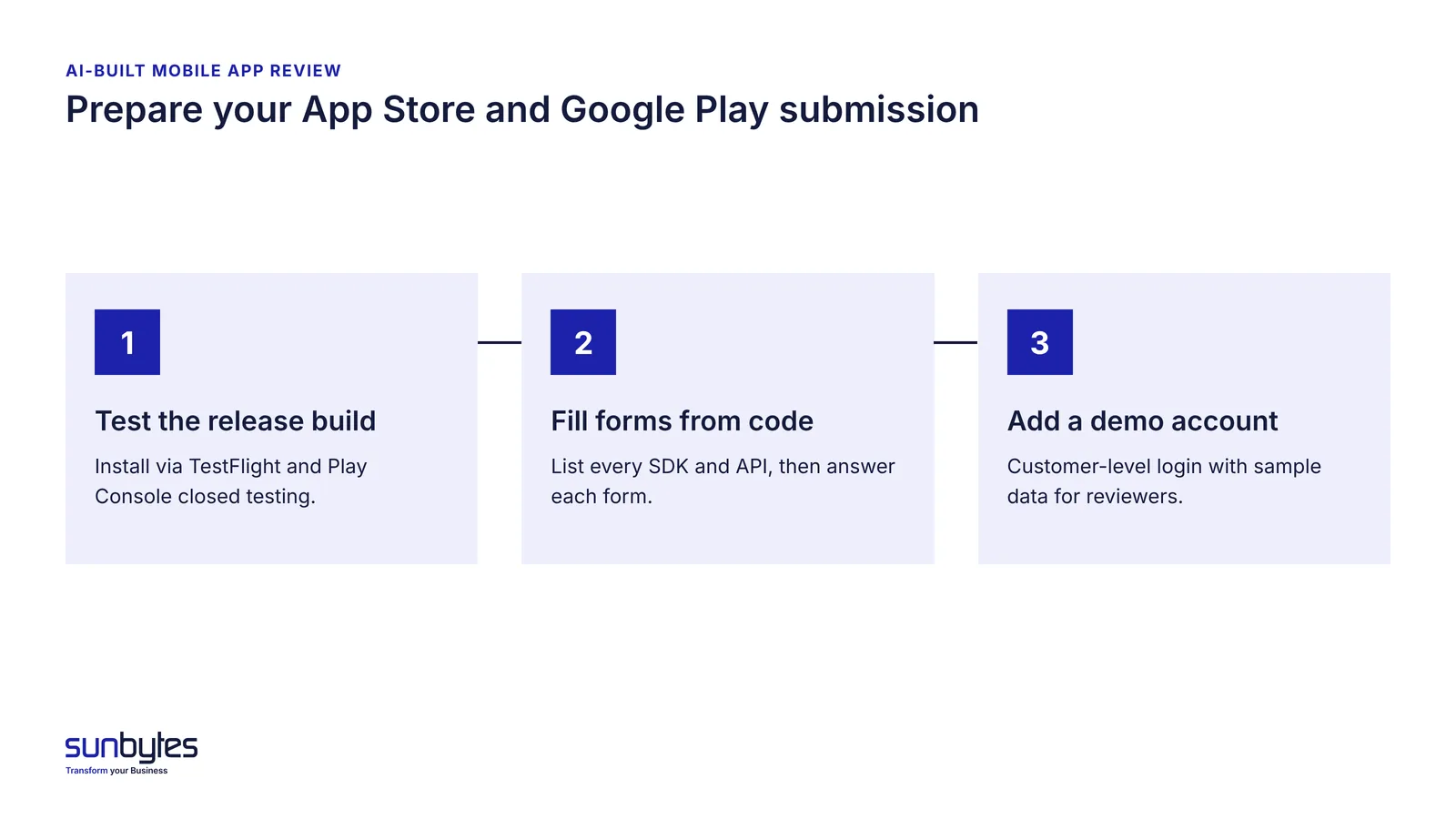
Test the release build on real devices
Test the release build, not the debug build, because reviewers and users install the release build. Use TestFlight for iOS and internal or closed testing in Play Console for Android. A debug build can include logging and settings that hide problems the release build would show.
New personal developer accounts on Google Play have an extra step. Accounts created after 13 November 2023 must run a closed test with at least 12 testers opted in for 14 consecutive days before they can apply for production access, and Google says that review usually takes seven days or less. Build the closed test into the launch plan rather than discovering it in the final week.
Fill in the store forms from the code, not from memory
Fill in Apple’s App Privacy details and Google Play’s Data safety form from a list of what the code actually does. Ask your developer, or the AI coding tool, for every SDK and API the app calls and the user data each one receives. Then answer each form question against that list, not against the features you remember building.
Keep that dependency list and update it whenever a release adds an SDK. It is your evidence when an investor or a user asks where personal data goes.
Give the reviewer a working demo account
Apps behind a login need demo credentials for the reviewer. Apple’s Guideline 2.1 asks developers to “include demo account info (and turn on your back-end service!)”. Google Play asks for valid, working login credentials in the app access section of Play Console. Seed the account with sample data so every feature is visible.
Give the demo account the same permissions as an ordinary customer, never admin rights or access to real customer data.
Store review vs AI-built app review vs mobile security test
Store review checks policy. An AI-built mobile app review checks how the product is built. A mobile security test, or pentest, attacks the running app to find weaknesses an attacker could exploit. Each answers a different question, so passing one does not answer the other two.
| Store review | AI-built mobile app review | Mobile security test | |
|---|---|---|---|
| Who does it | Apple App Review and the Google Play review team | An independent engineering and security reviewer | A security tester |
| What it checks | Guideline compliance, store listing, privacy declarations as submitted, basic stability | Code, backend rules, secrets, cross-user access, data flows compared with privacy labels | Weaknesses an attacker can exploit in the running app and its APIs |
| What it does not check | Database rules, keys inside the app package, who can reach other users’ data | Live attack paths tested under attacker conditions | Store policy compliance and how maintainable the code is |
| When | Every submission and update | Before the first submission, and before releases that add payments, personal data or new SDKs | When a client, investor or regulator asks for test evidence, or after major changes |
| What you get | Approval, or a rejection that names the guideline | Findings with evidence, a prioritised fix plan and a technical handoff | A test report of exploitable findings |
Before a first launch with personal data or payments, do the AI-built mobile app review first. Add a pentest when a client, investor or regulator asks for test evidence. A pentest on an app with open database rules spends test time on a gap a review would have found earlier. For what a security test covers on mobile, see our mobile app security testing checklist.
When should you book an independent review before launch?
Book an independent review before the first store submission when a mistake in the backend would expose real user data or money. Five conditions point to booking one:
- The app stores personal data, especially health data, which GDPR Article 9 treats as a special category.
- The app takes payments or sells subscriptions.
- Nobody on the team can read and explain the backend rules.
- An investor or enterprise client asks for technical evidence.
- The app was rejected, and the same AI coding tool made the fix without anyone checking what else changed.
A review can wait when the app is an internal prototype with test data only. Book it before you invite real users, because that is when real personal data enters the database.
A review is also not an app review submission service. Sunbytes reviews the product; you or your developer submit it to Apple and Google.
What a pre-launch review looks at and what you receive
A pre-launch review looks at five areas: security and data, code and architecture, critical flows, deployment and operations, and maintainability. In a mobile app, those areas can include the app package, the backend rules, the APIs the app calls and the data each SDK receives.
You receive findings with the evidence behind them, a prioritised plan of what to fix now and what can wait, and a technical handoff your team or AI coding tool can act on. Findings are explained in plain English, so a founder can decide which risks to fix before launch and which to accept. Scope is agreed case by case.
For launch topics beyond the code, such as monitoring, rollback and support, use our production readiness checklist.
How Sunbytes reviews AI-built mobile apps
An app can pass store review with its database open to anyone who has the project details. Closing that gap before launch is the job of an independent review.
Sunbytes scopes the review separately from any fix work, so the findings do not depend on who later builds the fixes. Engineering and security are covered in one review, so a database rule and the app code that depends on it are assessed together.
Reviews run under an ISO 27001-certified ISMS with Netherlands-led governance, backed by 15+ years in software delivery and 300+ projects delivered. Because scope depends on your app’s backend and data, we advise on it case by case.
Planning your first store submission? Talk to us about a review → You can also read how the AI-built product review works.